
Mcp Painter
What is Mcp Painter
MCP-painter is a demonstration project based on the MCP protocol, designed as a drawing tool that supports brush tools and the ability to retrieve drawing results. It serves as a complete MCP-server application example for testing and learning the usage of the MCP protocol.
Use cases
Use cases for MCP-painter include online collaborative drawing sessions, educational tools for teaching drawing concepts, and as a backend service for applications that require drawing functionalities.
How to use
To use MCP-painter, navigate to the project directory and run the application using npm commands. After installation, access the drawing board via localhost:3000. For API testing, run the draw_start.py script to see the drawing results.
Key features
Key features of MCP-painter include a brush tool with adjustable width and color, the ability to retrieve the current canvas image in PNG format, real-time visualization of drawing operations through WebSocket communication, and a set of API interfaces for interaction.
Where to use
MCP-painter can be utilized in educational environments for learning about the MCP protocol, in software development for creating drawing applications, and in collaborative projects that require real-time drawing capabilities.
Clients Supporting MCP
The following are the main client software that supports the Model Context Protocol. Click the link to visit the official website for more information.





Overview
What is Mcp Painter
MCP-painter is a demonstration project based on the MCP protocol, designed as a drawing tool that supports brush tools and the ability to retrieve drawing results. It serves as a complete MCP-server application example for testing and learning the usage of the MCP protocol.
Use cases
Use cases for MCP-painter include online collaborative drawing sessions, educational tools for teaching drawing concepts, and as a backend service for applications that require drawing functionalities.
How to use
To use MCP-painter, navigate to the project directory and run the application using npm commands. After installation, access the drawing board via localhost:3000. For API testing, run the draw_start.py script to see the drawing results.
Key features
Key features of MCP-painter include a brush tool with adjustable width and color, the ability to retrieve the current canvas image in PNG format, real-time visualization of drawing operations through WebSocket communication, and a set of API interfaces for interaction.
Where to use
MCP-painter can be utilized in educational environments for learning about the MCP protocol, in software development for creating drawing applications, and in collaborative projects that require real-time drawing capabilities.
Clients Supporting MCP
The following are the main client software that supports the Model Context Protocol. Click the link to visit the official website for more information.
Content
MCP-painter
这是一个基于MCP协议编写的绘图工具示例项目,支持画笔工具和绘图结果获取功能。
提供了一个完整的MCP-server应用示例,可用于测试和学习MCP协议的使用。
画板功能介绍
- 画笔工具:支持设置画笔线宽和颜色
- 绘图结果获取:支持以PNG格式获取当前画布图像
- 可视化:画图程序的服务端和前端之间使用websocket通信,前端可实时查看调用api接口后绘图操作的结果(可视化)。
- mcp-painter使用服务端提供api接口编写工具。
运行方式
应用运行
cd whiteBoard
npm install
npm run dev
查看localhost:3000,即可看到画板页面。
接口测试
运行 draw_start.py
python draw_start.py
可以看到以下结果
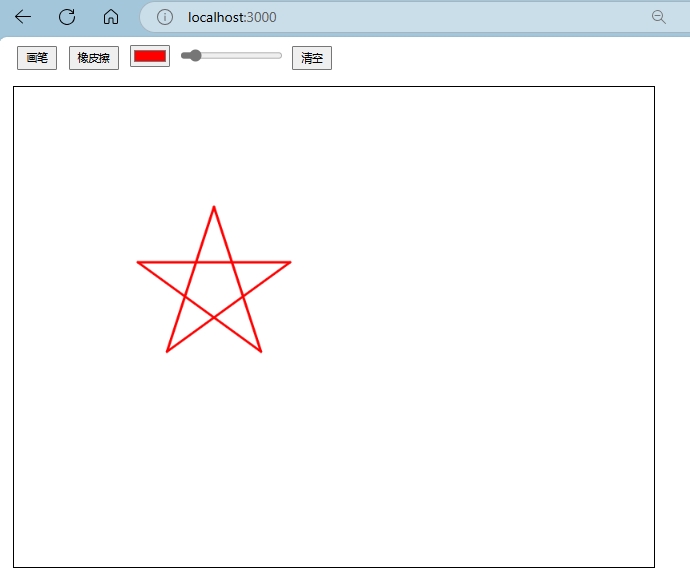
白板程序的mcp-server使用说明
编译mcp-painter(server)
cd mcp-painter
npm install
npm run build
在cline,claude-desktop等支持mcp协议的客户端添加mcp-painter即可。由于环境问题,我直接使用nodejs运行。
"DrawingBoard": {
      "command": "yournodepath/node.exe",
      "args": [
        "yourpathto/mcppainter/build/index.js"
      ],
      "env": {},
      "disabled": false,
      "autoApprove": [
        "set_brush",
        "use_eraser",
        "draw_on_canvas",
        "set_color",
        "get_image",
        "clear_canvas",
        "get_canvas_size",
        "set_canvas_size",
        "get_current_draw_parameters"
      ]
    }
MCP协议编写工具说明
1. 画笔工具封装
- 封装了画笔的线宽和颜色设置功能
- 通过MCP协议暴露以下接口:
- 设置画笔线宽
- 设置画笔颜色
- 获取当前画笔配置
2. 绘图结果获取
- 封装了画布图像获取功能
- 支持以PNG格式返回绘图结果
- 通过MCP协议暴露以下接口:
- 获取当前画布图像
- 获取画布尺寸信息
接口说明
1. 画笔相关接口
-
POST /brush:设置画笔属性- 参数:
width(线宽),color(颜色) - 示例:
{"width": 3, "color": "#ff0000"}
- 参数:
-
POST /eraser:设置橡皮擦属性- 参数:
width(线宽) - 示例:
{"width": 10}
- 参数:
2. 绘图操作接口
POST /draw:执行绘图操作- 参数:
x,y,state - 示例:
{"x": 100, "y": 200, "state": 'start'} - state:
start,move,end
- 参数:
3. 颜色选择器接口
POST /color-picker:设置颜色- 参数:
color(颜色值) - 示例:
{"color": "#00ff00"}
- 参数:
4. 画布操作接口
POST /clear:清空画布POST /set_canvas_size:设置画布尺寸- 参数:
width,height - 示例:
{"width": 800, "height": 600}
- 参数:
GET /get_canvas_size:获取画布尺寸GET /get_current_draw_parameters:获取当前绘图参数
5. 图像获取接口
GET /image:获取当前画布图像- 返回:PNG格式图像base64数据
Dev Tools Supporting MCP
The following are the main code editors that support the Model Context Protocol. Click the link to visit the official website for more information.







