
Mcp Pinot
What is Mcp Pinot
mcp-pinot is a Python-based Model Context Protocol (MCP) server designed for interacting with Apache Pinot. It facilitates real-time analytics and metadata queries on a Pinot cluster, integrating seamlessly with Claude Desktop.
Use cases
Use cases for mcp-pinot include performing data analysis on large datasets, generating visualizations like histograms, and providing business users with easy access to metadata and analytics through a user-friendly interface.
How to use
To use mcp-pinot, first ensure you have the prerequisites installed, including the uv package. Clone the repository, navigate to the directory, and install the dependencies using ‘uv pip install -e .’. Once set up, you can interact with Pinot to list tables, execute SQL queries, and fetch metadata.
Key features
Key features of mcp-pinot include the ability to list tables, segments, and schema information from Pinot, execute read-only SQL queries, view index and column-level metadata, and assist business users through Claude integration.
Where to use
mcp-pinot can be used in various fields that require real-time data analytics, such as business intelligence, data analysis, and any application that utilizes Apache Pinot for data storage and querying.
Clients Supporting MCP
The following are the main client software that supports the Model Context Protocol. Click the link to visit the official website for more information.





Overview
What is Mcp Pinot
mcp-pinot is a Python-based Model Context Protocol (MCP) server designed for interacting with Apache Pinot. It facilitates real-time analytics and metadata queries on a Pinot cluster, integrating seamlessly with Claude Desktop.
Use cases
Use cases for mcp-pinot include performing data analysis on large datasets, generating visualizations like histograms, and providing business users with easy access to metadata and analytics through a user-friendly interface.
How to use
To use mcp-pinot, first ensure you have the prerequisites installed, including the uv package. Clone the repository, navigate to the directory, and install the dependencies using ‘uv pip install -e .’. Once set up, you can interact with Pinot to list tables, execute SQL queries, and fetch metadata.
Key features
Key features of mcp-pinot include the ability to list tables, segments, and schema information from Pinot, execute read-only SQL queries, view index and column-level metadata, and assist business users through Claude integration.
Where to use
mcp-pinot can be used in various fields that require real-time data analytics, such as business intelligence, data analysis, and any application that utilizes Apache Pinot for data storage and querying.
Clients Supporting MCP
The following are the main client software that supports the Model Context Protocol. Click the link to visit the official website for more information.
Content
Pinot MCP Server
Table of Contents
Overview
This project is a Python-based Model Context Protocol (MCP) server for interacting with Apache Pinot. It is designed to integrate with Claude Desktop to enable real-time analytics and metadata queries on a Pinot cluster.
It allows you to
- List tables, segments, and schema info from Pinot
- Execute read-only SQL queries
- View index/column-level metadata
- Designed to assist business users via Claude integration
- and much more.
Pinot MCP in Action
See Pinot MCP in action below:
Fetching Metadata
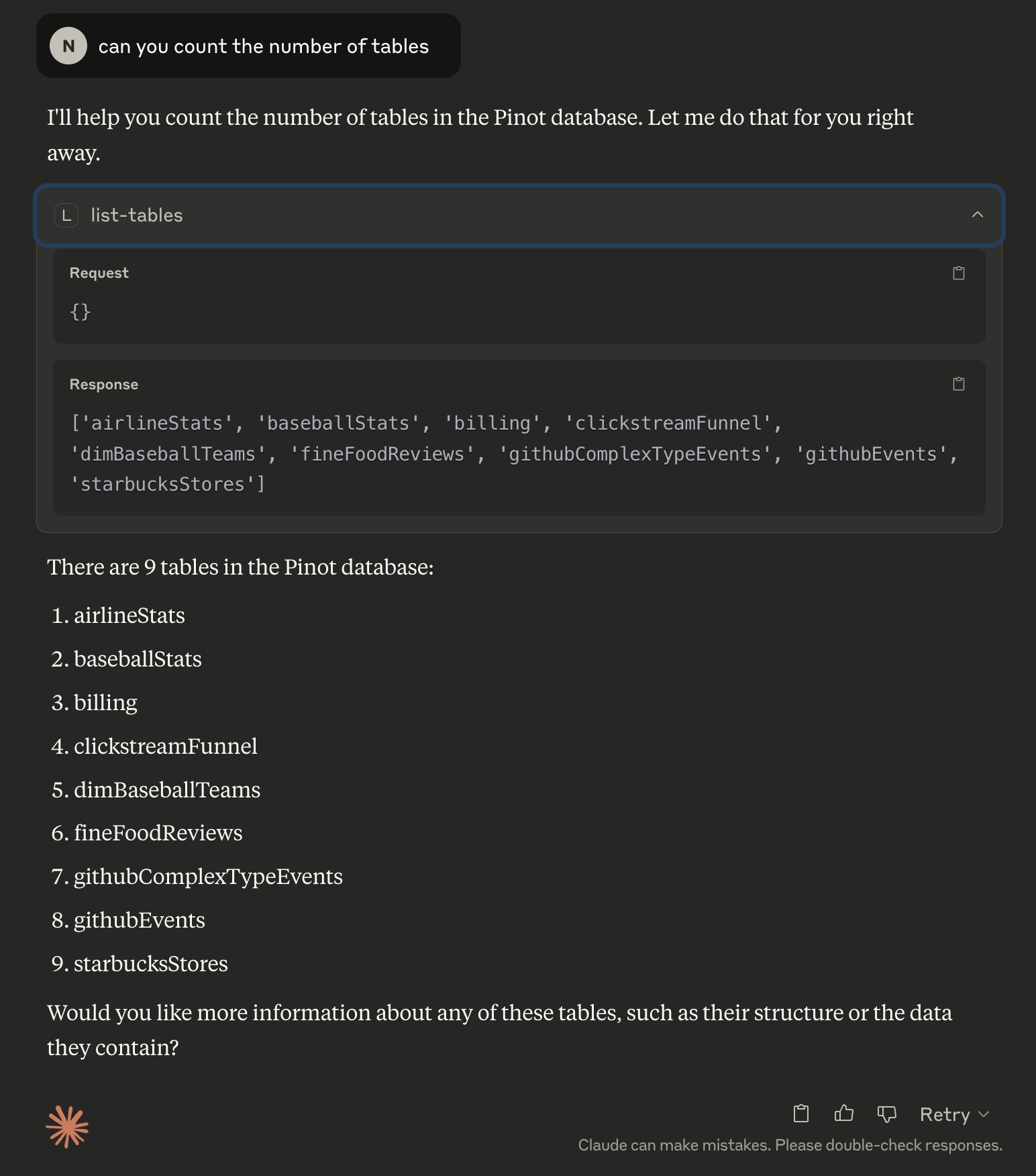
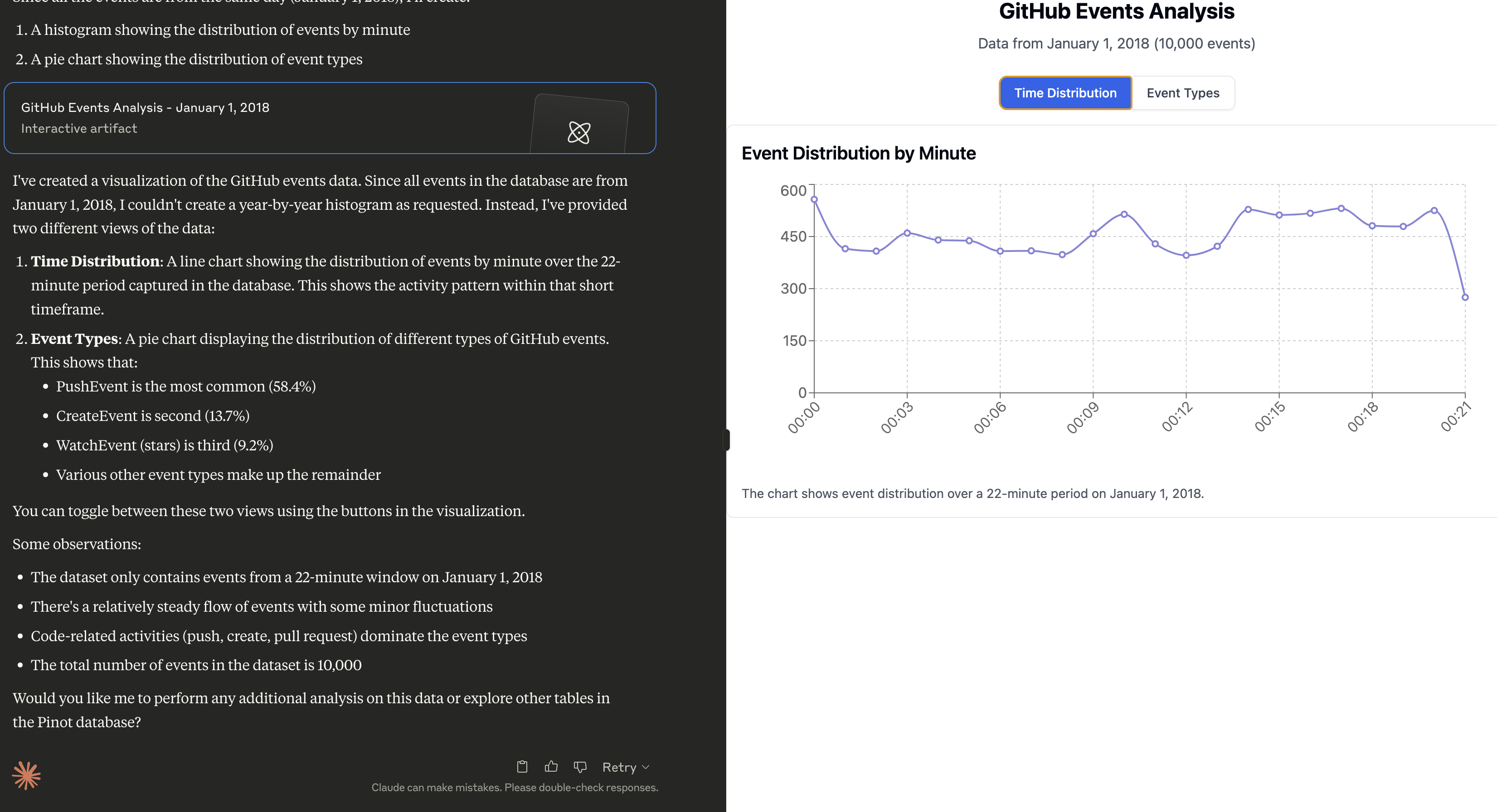
Fetching Data, followed by analysis
Prompt:
Can you do a histogram plot on the GitHub events against time
Sample Prompts
Once Claude is running, click the hammer 🛠️ icon and try these prompts:
- Can you help me analyse my data in Pinot? Use the Pinot tool and look at the list of tables to begin with.
- Can you do a histogram plot on the GitHub events against time
Quick Start
Prerequisites
Install uv (if not already installed)
uv is a fast Python package installer and resolver, written in Rust. It’s designed to be a drop-in replacement for pip with significantly better performance.
curl -LsSf https://astral.sh/uv/install.sh | sh

# Reload your bashrc/zshrc to take effect. Alternatively, restart your terminal
# source ~/.bashrc
Installation
# Clone the repository
git clone https://github.com/startreedata/mcp-pinot.git
cd mcp-pinot
uv pip install -e . # Install dependencies

# For development dependencies (including testing tools), use:
# uv pip install -e .[dev]
Configure Pinot Cluster
The MCP server expects a uvicorn config style .env file in the root directory to configure the Pinot cluster connection. This repo includes a sample .env.example file that assumes a pinot quickstart setup.
mv .env.example .env
Run the server
uv --directory . run mcp_pinot/server.py
You should see logs indicating that the server is running and listening on STDIO.
Launch Pinot Quickstart (Optional)
Start Pinot QuickStart using docker:
docker run --name pinot-quickstart -p 2123:2123 -p 9000:9000 -p 8000:8000 -d apachepinot/pinot:latest QuickStart -type batch
Query MCP Server
uv --directory . run tests/test_service/test_pinot_quickstart.py
This quickstart just checks all the tools and queries the airlineStats table.
Claude Desktop Integration
Open Claude’s config file
vi ~/Library/Application\ Support/Claude/claude_desktop_config.json
Add an MCP server entry
Replace /path/to/uv with the absolute path to the uv command, you can run which uv to figure it out.
Replace /path/to/mcp-pinot with the absolute path to the folder where you cloned this repo.
You could also configure environment variables here instead of the .env file, in case you want to connect to multiple pinot clusters as MCP servers.
Restart Claude Desktop
Claude will now auto-launch the MCP server on startup and recognize the new Pinot-based tools.
Developer
- All tools are defined in the
Pinotclass inutils/pinot_client.py
Build
Build the project with
pip install -e ".[dev]"
Test
Test the repo with:
pytest
Build the Docker image
docker build -t mcp-pinot .
Run the container
docker run -v $(pwd)/.env:/app/.env mcp-pinot
Note: Make sure to have your .env file configured with the appropriate Pinot cluster settings before running the container.
Dev Tools Supporting MCP
The following are the main code editors that support the Model Context Protocol. Click the link to visit the official website for more information.







