
Mcp Profiler Bundle
What is Mcp Profiler Bundle
The mcp-profiler-bundle is a Symfony bundle that mimics the WebProfiler Bundle, designed to connect Profiler data with MCP-enabled AI-powered IDEs.
Use cases
Use cases include debugging Symfony applications, analyzing performance metrics through the Profiler, and leveraging AI-powered IDE features to improve coding efficiency.
How to use
To use the mcp-profiler-bundle, install it via Composer with ‘composer require killerwolf/mcp-profiler-bundle:^0.1’, then add it to your ‘config/bundles.php’ to enable it in the development environment.
Key features
Key features include tools for listing recent profiler entries, retrieving specific profiler entries by token, and accessing all or individual collectors for profiler entries.
Where to use
The mcp-profiler-bundle is primarily used in Symfony applications that require integration with MCP-enabled IDEs for enhanced development and debugging capabilities.
Clients Supporting MCP
The following are the main client software that supports the Model Context Protocol. Click the link to visit the official website for more information.





Overview
What is Mcp Profiler Bundle
The mcp-profiler-bundle is a Symfony bundle that mimics the WebProfiler Bundle, designed to connect Profiler data with MCP-enabled AI-powered IDEs.
Use cases
Use cases include debugging Symfony applications, analyzing performance metrics through the Profiler, and leveraging AI-powered IDE features to improve coding efficiency.
How to use
To use the mcp-profiler-bundle, install it via Composer with ‘composer require killerwolf/mcp-profiler-bundle:^0.1’, then add it to your ‘config/bundles.php’ to enable it in the development environment.
Key features
Key features include tools for listing recent profiler entries, retrieving specific profiler entries by token, and accessing all or individual collectors for profiler entries.
Where to use
The mcp-profiler-bundle is primarily used in Symfony applications that require integration with MCP-enabled IDEs for enhanced development and debugging capabilities.
Clients Supporting MCP
The following are the main client software that supports the Model Context Protocol. Click the link to visit the official website for more information.
Content
MCP Server Bundle for Symfony
The Symfony MCP Profiler Bundle mimics the WebProfiler Bundle. It bridges the gap between Profiler data and your favorite MCP-enabled AI-powered IDE.
Installation
composer require killerwolf/mcp-profiler-bundle:^0.1
Configuration
Add the bundle to your config/bundles.php:
return [
    // ...
    Killerwolf\MCPProfilerBundle\MCPProfilerBundle::class => ['dev' => true],
];
Built-in Tools
The bundle provides several tools for interacting with the Symfony Profiler:
- profiler_list: Lists recent profiler entries
- profiler_get_by_token: Gets a specific profiler entry by token
- profiler_get_all_collector_by_token: Gets all collectors for a specific profiler entry
- profiler_get_one_collector_by_token: Gets a specific collector for a profiler entry
Here are some examples of the MCP Inspector in action with different IDEs:
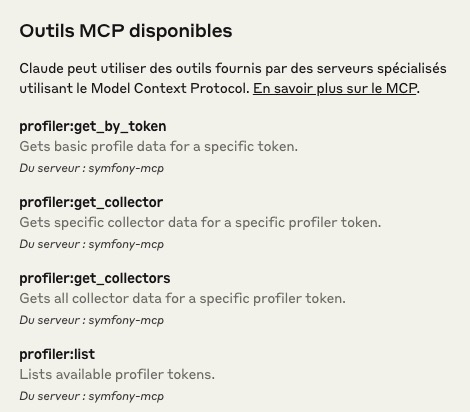
Capture d’écran de l’interface MCP Inspector intégrée avec Claude AI, montrant l’interaction avec le serveur MCP Symfony et l’accès aux données du Profiler.
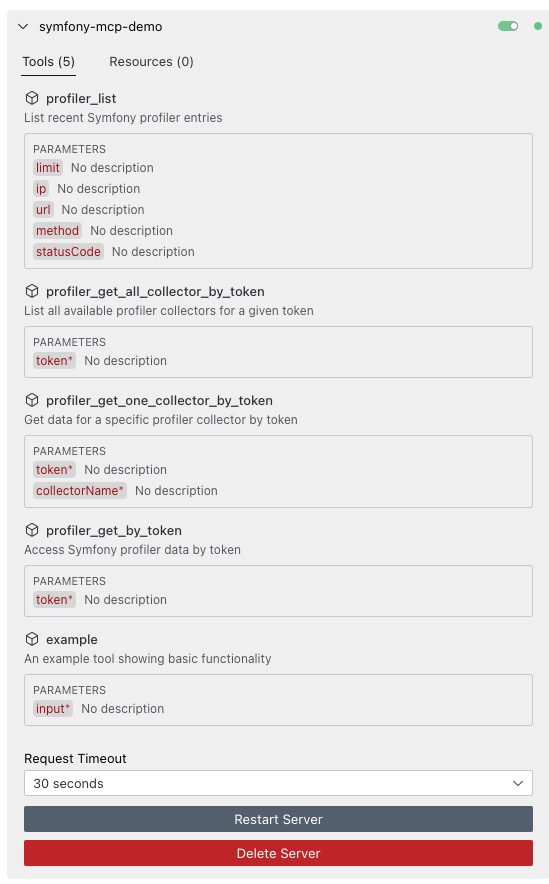
Capture d’écran de Cline IDE avec l’inspecteur MCP, illustrant comment les outils du profiler Symfony sont exposés via le protocole MCP.
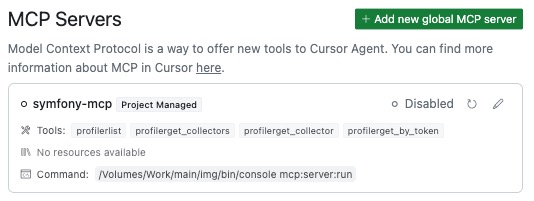
Capture d’écran de Cursor IDE montrant l’inspecteur MCP en action, permettant d’explorer et d’interagir avec les données du Profiler Symfony.
Commands
The bundle provides the following commands:
Configure the MCP Server in your IDE (Cursor, Claude Code, Cline, etc.)
{
  "mcpServers": {
    "symfony-mcp": {
      "command": "/path/to/your/symfony/project/bin/console",
      "args": [
        "mcp:server:run"
      ]
    }
  }
}
Using the MCP Inspector
The MCP Inspector is a tool that allows you to interact with your MCP Server and test your tools and resources. You can use it with the following command:
npx --registry https://registry.npmjs.org @modelcontextprotocol/inspector
Interacting with the Symfony Profiler (for learning/debug purposes)
The bundle also provides a command-line interface for interacting with the Symfony Profiler directly:
# List recent profiler entries
bin/console mcp:profiler list --limit=20

# Show details for a specific profile
bin/console mcp:profiler show <token>
bin/console mcp:profiler show <token> --collector=request
How It Works
The bundle implements the MCP protocol directly, handling JSON-RPC requests and responses according to the specification. It exposes Symfony Profiler data through a set of tools that can be called by MCP clients (like AI assistants in your IDE).
The implementation includes:
- A command that runs the MCP server (
mcp:server:run) - A service that manages the server lifecycle
- Tool classes that implement specific functionality
- Integration with Symfony’s dependency injection system
Dev Tools Supporting MCP
The following are the main code editors that support the Model Context Protocol. Click the link to visit the official website for more information.







