
Mcp Quantum
What is Mcp Quantum
MCP-Quantum is a Check Point Quantum Management MCP Server that provides a structured, machine-readable API for enterprise data, facilitating AI-powered automation and decision-making in security management.
Use cases
Use cases include regulatory compliance checks, risky rule discovery, path analysis for access, rulebase optimization with AI, and visual policy mapping.
How to use
Users can interact with MCP-Quantum by querying and analyzing security policies, rulebases, and network topologies through its API, enabling efficient management without the need for custom SDKs.
Key features
Key features include the ability to query and visualize installed policies, retrieve and analyze access, NAT, and VPN rules, and inspect various objects such as hosts, networks, and services.
Where to use
MCP-Quantum is applicable in fields such as cybersecurity, regulatory compliance, and IT infrastructure management, where understanding complex security environments is crucial.
Clients Supporting MCP
The following are the main client software that supports the Model Context Protocol. Click the link to visit the official website for more information.





Overview
What is Mcp Quantum
MCP-Quantum is a Check Point Quantum Management MCP Server that provides a structured, machine-readable API for enterprise data, facilitating AI-powered automation and decision-making in security management.
Use cases
Use cases include regulatory compliance checks, risky rule discovery, path analysis for access, rulebase optimization with AI, and visual policy mapping.
How to use
Users can interact with MCP-Quantum by querying and analyzing security policies, rulebases, and network topologies through its API, enabling efficient management without the need for custom SDKs.
Key features
Key features include the ability to query and visualize installed policies, retrieve and analyze access, NAT, and VPN rules, and inspect various objects such as hosts, networks, and services.
Where to use
MCP-Quantum is applicable in fields such as cybersecurity, regulatory compliance, and IT infrastructure management, where understanding complex security environments is crucial.
Clients Supporting MCP
The following are the main client software that supports the Model Context Protocol. Click the link to visit the official website for more information.
Content
Check Point Quantum Management MCP Server
What is MCP?
Model Context Protocol (MCP) servers expose a structured, machine-readable API for your enterprise data—designed for AI-powered automation, copilots, and decision engines. By delivering a clear, contextual slice of your security environment, MCP lets you query, analyze, and optimize complex systems without building custom SDKs or parsing raw exports.
Why MCP for Security?
Security Policies often span hundreds of rules and thousands of objects across diverse enforcement points. Understanding, auditing, or optimizing these environments is slow and error-prone.
MCP changes this: exposing security management data in a modular, context-rich format, ready for AI systems to consume. Enabling the AI to use your data with precision. Ask real-world questions, and get structured, actionable answers—instantly.
Features
- Query and visualize installed policies, rulebases, and network topology
- Retrieve and analyze access, NAT and VPN rules
- List and inspect objects such as hosts, networks, services, VPN communities, and more
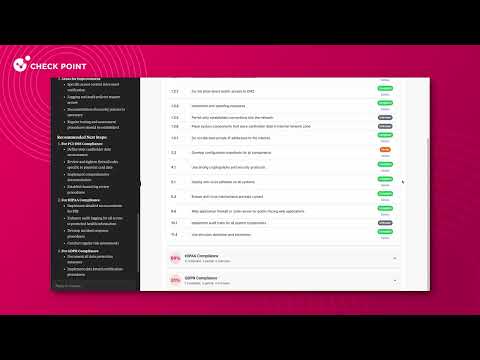
Demo
Example Use Cases
Regulatory Compliance Checks
“Do my current gateways meet PCI-DSS, HIPAA, or GDPR standards?”
→ Returns a detailed gap analysis across your policy layers.
Risky Rule Discovery
“Show all rules that allow any-to-any traffic. Highlight unused or disabled rules.”
→ Surfaces misconfigurations and expands your visibility.
Path Analysis for Access
“Can host 10.1.2.7 access the internet under current policy?”
→ Traces real access flows across Access, NAT, and interfaces.
Rulebase Optimization with AI
“Review internet-facing rules and suggest which should be tightened or removed.”
→ Actionable insights that improve your security posture.
Visual Policy Mapping
“Generate a report showing allowed and blocked services across my environment.”
→ Delivers structured data for dashboards, reports, and audits.
Configuration Options
This server supports two main modes of authentication:
1. Smart-1 Cloud (API Key)
Authenticate to Check Point Smart-1 Cloud using an API key.
- How to generate an API key:
In your Smart-1 Cloud dashboard, go to Settings → API & SmartConsole and generate an API key.
Copy the key and the server login URL (excluding the/loginsuffix) to your client settings.
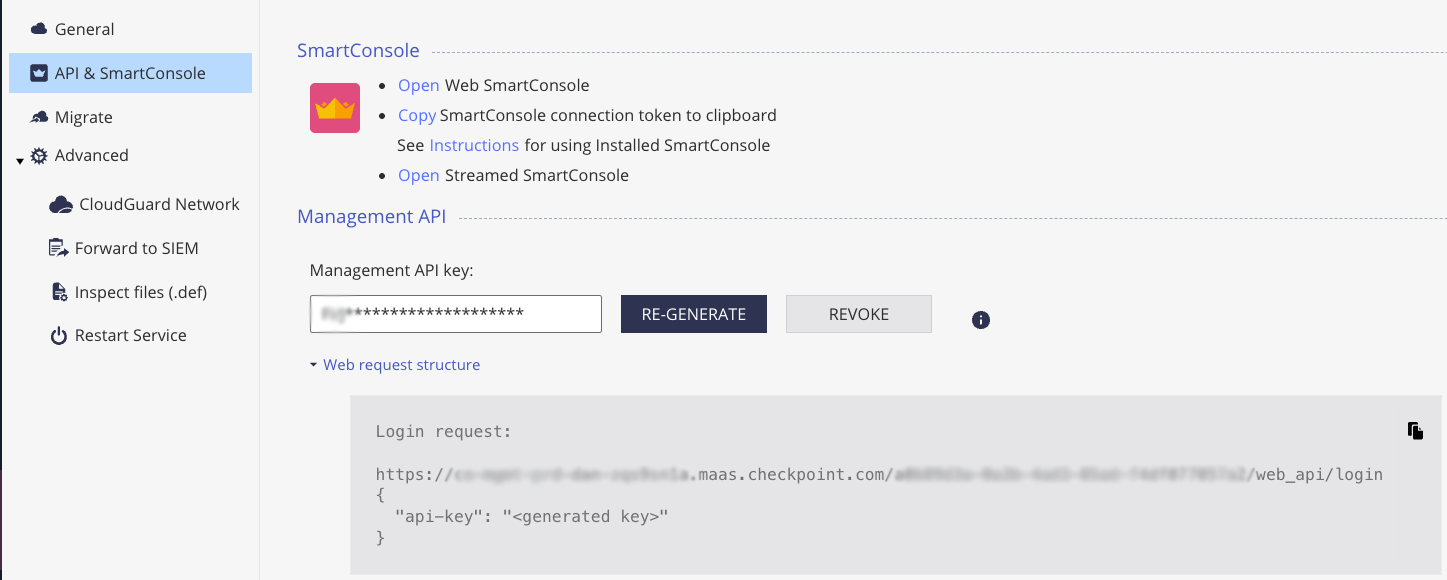
Set the following environment variables:
API_KEY: Your Smart-1 Cloud API keyS1C_URL: Your Smart-1 Cloud tenant “Web-API” URL
2. On-Prem Management (API Key or Username/Password)
-
Configure your management server to allow API access:
To use this server with an on-premises Check Point management server, you must first enable API access.
Follow the official instructions for Managing Security through API. -
Authenticate to the Security Management Server using either an API key or username/password:
- Follow the official instructions: Managing Administrator Accounts (Check Point R81+)
- When creating the administrator, assign appropriate permissions for API access and management operations.
- You can authenticate using an API key (recommended for automation) or username/password credentials.
Set the following environment variables:
MANAGEMENT_HOST: IP address or hostname of your management serverPORT: (Optional) Management server port (default: 443)API_KEY: Your management API key (if using API key authentication)USERNAME: Username for authentication (if using username/password authentication)PASSWORD: Password for authentication (if using username/password authentication)
Client Configuration
Prerequisites
Download and install the latest version of Node.js if you don’t already have it installed.
You can check your installed version by running:
node -v      # Should print "v22" or higher
nvm current  # Should print "v22" or higher
Supported Clients
This server has been tested with Claude Desktop, Cursor, GitHub Copilot, and Windsurf clients.
It is expected to work with any MCP client that supports the Model Context Protocol.
Note: Due to the nature of management API calls and the variety of server tools, using this server may require a paid subscription to the model provider to support token limits and context window sizes.
For smaller models, you can reduce token usage by limiting the number of enabled tools in the client.
Smart-1 Cloud Example
On-Prem Management Example
Set only the environment variables required for your authentication method.
Configuring the Claude Desktop App
For macOS:
# Create the config file if it doesn't exist
touch "$HOME/Library/Application Support/Claude/claude_desktop_config.json"

# Open the config file in TextEdit
open -e "$HOME/Library/Application Support/Claude/claude_desktop_config.json"
For Windows:
code %APPDATA%\Claude\claude_desktop_config.json
Add the server configuration:
VSCode
Enter VSCode settings and type “mcp” in the search bar.
You should see the option to edit the configuration file.
Add this configuration:
Windsurf
Enter Windsurf settings and type “mcp” in the search bar.
You should see the option to edit the configuration file.
Add the configuration as Claude Desktop App.
Cursor
Enter Cursor settings and click on “MCP Servers” in the left menu.
You should see the option to add a new MCP Server.
Add the configuration as Claude Desktop App.
Development
Prerequisites
- Node.js 22+
- npm 10+
Setup
# Install all dependencies
npm install
Build
# Build all packages
npm run build
Running Locally
You can run the server locally for development using MCP Inspector or any compatible MCP client.
node FULL_PATH_TO_SERVER/packages/management/dist/index.js --s1c-url|--management-host --api-key|--username|--password
⚠️ Security Notice
- Authentication keys and credentials are never shared with the model. They are used only by the MCP server to authenticate with your Check Point management system.
- Only use client implementations you trust. Malicious or untrusted clients could misuse your credentials or access data improperly.
- Management data is exposed to the model. Ensure that you only use models and providers that comply with your organization’s policies for handling sensitive data and PII.
Dev Tools Supporting MCP
The following are the main code editors that support the Model Context Protocol. Click the link to visit the official website for more information.







