
Mcp Remote Call Ping Pong
What is Mcp Remote Call Ping Pong
mcp-remote-call-ping-pong is an experimental and educational application that serves as a Ping-pong server, demonstrating the use of MCP (Model Context Protocol) calls through the FastAPI framework.
Use cases
Use cases include demonstrating the functionality of MCP in a controlled environment, providing a simple interface for users to interact with the server, and serving as a foundation for further development of applications utilizing the MCP.
How to use
To use mcp-remote-call-ping-pong, first install the necessary dependencies using ‘poetry install’. Then, run the server with ‘python mcp-api-server.py’. The server will be accessible at ‘http://localhost:8080’. You can interact with the API endpoints to retrieve prompts or invoke MCP tool commands.
Key features
Key features include a FastAPI backend for remote MCP calls through API endpoints, integration of MCP for command handling, and thread-safe session management.
Where to use
mcp-remote-call-ping-pong can be used in educational environments for teaching purposes, in experimental setups for testing the MCP, or in any application that requires remote procedure calls with a focus on command handling.
Clients Supporting MCP
The following are the main client software that supports the Model Context Protocol. Click the link to visit the official website for more information.





Overview
What is Mcp Remote Call Ping Pong
mcp-remote-call-ping-pong is an experimental and educational application that serves as a Ping-pong server, demonstrating the use of MCP (Model Context Protocol) calls through the FastAPI framework.
Use cases
Use cases include demonstrating the functionality of MCP in a controlled environment, providing a simple interface for users to interact with the server, and serving as a foundation for further development of applications utilizing the MCP.
How to use
To use mcp-remote-call-ping-pong, first install the necessary dependencies using ‘poetry install’. Then, run the server with ‘python mcp-api-server.py’. The server will be accessible at ‘http://localhost:8080’. You can interact with the API endpoints to retrieve prompts or invoke MCP tool commands.
Key features
Key features include a FastAPI backend for remote MCP calls through API endpoints, integration of MCP for command handling, and thread-safe session management.
Where to use
mcp-remote-call-ping-pong can be used in educational environments for teaching purposes, in experimental setups for testing the MCP, or in any application that requires remote procedure calls with a focus on command handling.
Clients Supporting MCP
The following are the main client software that supports the Model Context Protocol. Click the link to visit the official website for more information.
Content
🏓 MCP Ping-Pong Server by Remote Call
An experimental and educational Ping-Pong server demonstrating MCP (Model Context Protocol) calls via FastAPI.
Features
- ✅ FastAPI/FastMCP backend for remote MCP calls through API endpoints or SSE
- 🔄 MCP integration for command handling
- 🔐 Thread-safe session management
Quick Start
Installation
To install the dependencies, run:
poetry install
1. Call MCP Tool through API
Run the Server
Start the FastAPI server with:
python mcp-api-server.py
The server will start at http://localhost:8080.
UI
Open mcp-api-client.html in a browser to interact with the UI.
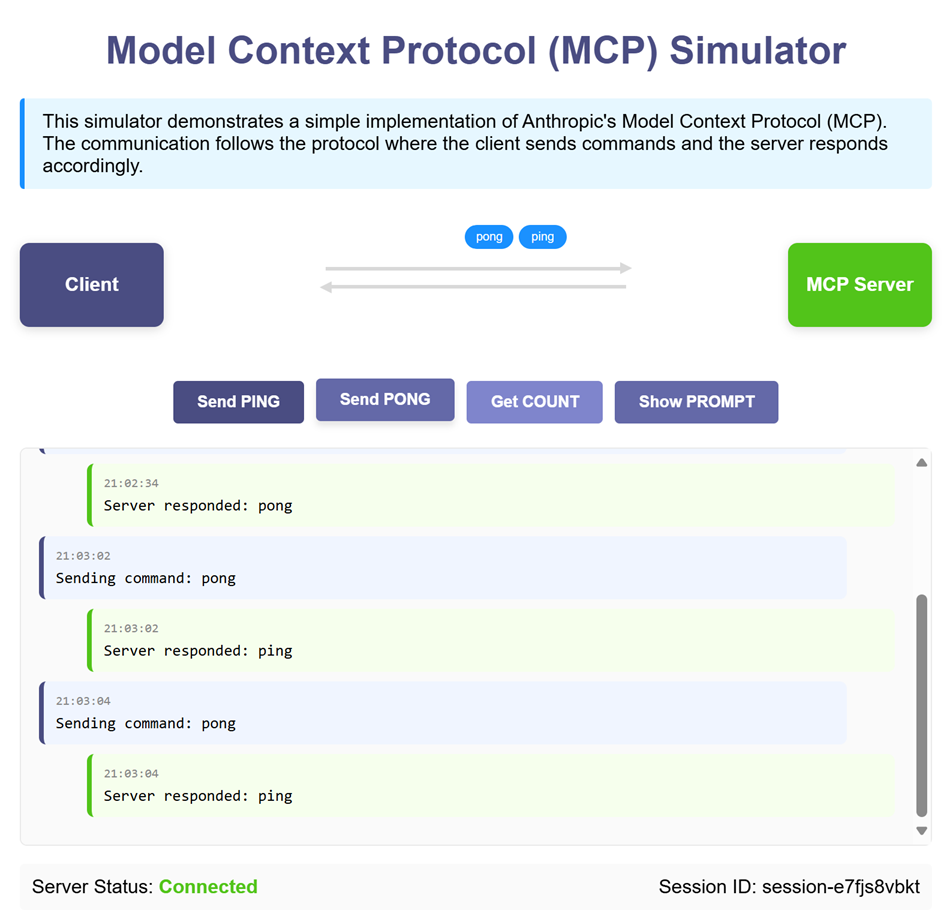
API Endpoints
GET /ping-pong?prompt_name=<prompt_name>: Retrieves the specified prompt.POST /ping-pong: Invokes MCP tool commands (ping,pong,count).
2. Call MCP Tool through SSE transport
The following example demonstrates using Server-Sent Events (SSE) for communication with the MCP server.
Run the SSE Server
python mcp-sse-server.py
Run the SSE Client
python mcp-sse-client.py
Sample Output
Type a command (e.g., 'ping', 'pong', 'count') or 'exit' to quit:
>>> ping
Sending command: ping
Result: pong
>>> pong
Sending command: pong
Result: ping
>>> count
Sending command: count
Result: 2
References
📄 License
MIT
Dev Tools Supporting MCP
The following are the main code editors that support the Model Context Protocol. Click the link to visit the official website for more information.







