
Mcp Rg Editor
What is Mcp Rg Editor
mcp-rg-editor is a project template that combines Tauri and Next.js, designed for building desktop applications with a modern web technology stack.
Use cases
Use cases include developing productivity tools, data visualization applications, and any desktop software that benefits from a responsive web interface.
How to use
To use mcp-rg-editor, clone the repository, change the app identifier in the ‘tauri.conf.json’ file, and run the development server to start building your application.
Key features
Key features include a TypeScript frontend using Next.js 15, TailwindCSS for styling, integrated linting and formatting tools, and GitHub Actions for continuous integration.
Where to use
mcp-rg-editor can be used in software development, particularly for creating cross-platform desktop applications that leverage web technologies.
Clients Supporting MCP
The following are the main client software that supports the Model Context Protocol. Click the link to visit the official website for more information.





Overview
What is Mcp Rg Editor
mcp-rg-editor is a project template that combines Tauri and Next.js, designed for building desktop applications with a modern web technology stack.
Use cases
Use cases include developing productivity tools, data visualization applications, and any desktop software that benefits from a responsive web interface.
How to use
To use mcp-rg-editor, clone the repository, change the app identifier in the ‘tauri.conf.json’ file, and run the development server to start building your application.
Key features
Key features include a TypeScript frontend using Next.js 15, TailwindCSS for styling, integrated linting and formatting tools, and GitHub Actions for continuous integration.
Where to use
mcp-rg-editor can be used in software development, particularly for creating cross-platform desktop applications that leverage web technologies.
Clients Supporting MCP
The following are the main client software that supports the Model Context Protocol. Click the link to visit the official website for more information.
Content
MCP RG Editor
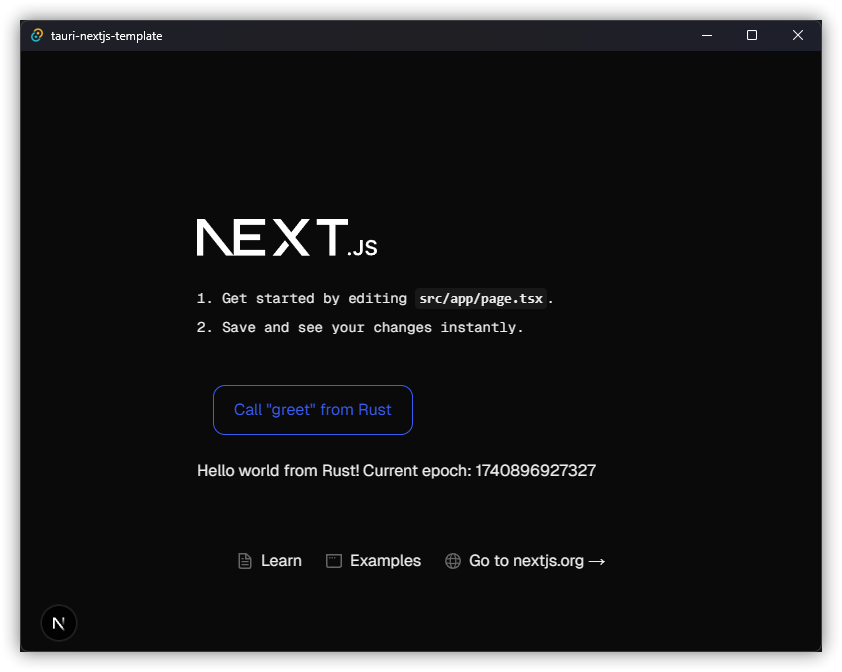
This is a Tauri project template using Next.js,
bootstrapped by combining create-next-app
and create tauri-app.
This template uses pnpm as the Node.js dependency
manager, and uses the App Router model for Next.js.
Template Features
- TypeScript frontend using Next.js 15 React framework
- TailwindCSS 4 as a utility-first atomic CSS framework
- The example page in this template app has been updated to use only TailwindCSS
- While not included by default, consider using
React Aria components
and/or HeadlessUI components for completely unstyled and
fully accessible UI components, which integrate nicely with TailwindCSS
- Opinionated formatting and linting already setup and enabled
- GitHub Actions to check code formatting and linting for both TypeScript and Rust
- Integrated MCP (Model Context Protocol) server backend with support for STDIO and SSE transports.
Getting Started
1. Initial Setup
After cloning for the first time:
-
Configure App Identifier:
Change your app identifier insidesrc-tauri/tauri.conf.jsonto your own:{ // ... // The default "com.tauri.dev" will prevent you from building in release mode "identifier": "com.your-organization.your-app-name", // Replace this // ... } -
Set Up Environment Variables:
Create a.envfile in thesrc-tauri/directory with the following content. This is crucial for the application to start correctly.# src-tauri/.env # CRITICAL: Set the root directory for all file operations. # Replace with an actual absolute path or a tilde-expanded path. # Example for Windows: FILES_ROOT=C:/Users/YourName/mcp_rg_editor_files # Example for macOS/Linux: FILES_ROOT=~/mcp_rg_editor_files FILES_ROOT=your/path/to/mcp_files # Choose the MCP transport mode. Options: "stdio", "sse", "disabled". # To use SSE, ensure you also enable the "mcp-sse-server" feature when running/building. MCP_TRANSPORT=sse # Optional: Port for the MCP SSE server (defaults to 3030 if not set). MCP_SSE_PORT=3030 # Optional: Host for the MCP SSE server (defaults to 127.0.0.1 if not set). # MCP_SSE_HOST=127.0.0.1 # Optional: Set the application's log level. Options: "trace", "debug", "info", "warn", "error". # LOG_LEVEL=info # Optional: Comma-separated list of additional directories the app can access. # If empty, defaults to FILES_ROOT. # ALLOWED_DIRECTORIES=~/another_project,/opt/shared_data # Optional: Comma-separated list of commands to block from terminal execution. # BLOCKED_COMMANDS=sudo,rm # Optional: Default shell for the 'execute_command' tool. System default if empty. # DEFAULT_SHELL=bashImportant: Make sure the directory specified for
FILES_ROOTexists, or the application will attempt to create it and might fail if permissions are insufficient.
2. Running Development Server and Tauri Window
To develop and run the frontend in a Tauri window:
-
For STDIO MCP Transport:
EnsureMCP_TRANSPORT=stdiois set insrc-tauri/.env.pnpm tauri dev --features "mcp-stdio-server"(If
mcp-stdio-serveris part of your default features insrc-tauri/Cargo.toml, you might not need to specify--featuresexplicitly if it’s the only MCP feature you want active). -
For SSE MCP Transport (Recommended for external tools like MCP Inspector):
EnsureMCP_TRANSPORT=sseand optionallyMCP_SSE_PORTare set insrc-tauri/.env.pnpm tauri dev --features "mcp-sse-server"The SSE server will typically start on
http://127.0.0.1:3030/sse(or the port specified byMCP_SSE_PORT). Check the console logs frompnpm tauri devfor the exact address. -
To have both transports compiled and switchable via
MCP_TRANSPORTenv var:pnpm tauri dev --features "mcp-stdio-server,mcp-sse-server"Then, you can change
MCP_TRANSPORTin your.envfile and restartpnpm tauri devto switch modes.
This will load the Next.js frontend directly in a Tauri webview window (served from http://localhost:3000 by Next.js) and start the Rust backend with the configured MCP server.
Press Ctrl+Shift+I (Windows/Linux) or Cmd+Option+I (macOS) in the Tauri window to open the web developer console.
3. Building for Release
To export the Next.js frontend via SSG and build the Tauri application for release:
- Ensure your
src-tauri/.envfile is configured for the desired MCP transport mode for the production build. - Run the build command with the appropriate feature flag:
- For SSE:
pnpm tauri build --features "mcp-sse-server" - For STDIO:
pnpm tauri build --features "mcp-stdio-server" - To build a debug version (not optimized, includes debug symbols):
pnpm tauri build --features "mcp-sse-server" --debug
- For SSE:
The bundled application will be located in src-tauri/target/release/bundle/ (or src-tauri/target/debug/bundle/ for debug builds).
Source Structure
Next.js frontend source files are located in src/ and Tauri Rust application source files are located in src-tauri/. Please consult the Next.js and Tauri documentation respectively for questions pertaining to either technology.
MCP Server Details
This application includes an embedded MCP server in its Rust backend (src-tauri).
Supported Transports:
- stdio: Communicates over standard input/output. This mode is primarily for internal use or when the Tauri app itself acts as the sole client.
- sse (Server-Sent Events): Starts an HTTP server for SSE.
- Default URL:
http://127.0.0.1:3030/sse - The port can be configured using the
MCP_SSE_PORTenvironment variable (e.g.,MCP_SSE_PORT=14338). - The host can be configured using the
MCP_SSE_HOSTenvironment variable (e.g.,MCP_SSE_HOST=0.0.0.0to listen on all interfaces, use with caution).
- Default URL:
- disabled: The MCP server will not be started.
The active transport mode is determined by the MCP_TRANSPORT environment variable at runtime, provided the corresponding feature (mcp-stdio-server or mcp-sse-server) was enabled during compilation. If both features are compiled, MCP_TRANSPORT dictates the choice. If only one feature is compiled, it becomes the default if MCP_TRANSPORT is not set or set to that mode.
File System Configuration:
FILES_ROOT(Required): This environment variable defines the primary directory the application’s file operations are sandboxed to. It must be an absolute path (e.g.,C:/Users/YourName/mcp_files) or a tilde-expanded path (e.g.,~/mcp_files). The application will attempt to create this directory if it doesn’t exist.ALLOWED_DIRECTORIES(Optional): A comma-separated list of additional absolute or tilde-expanded paths that the application is allowed to access. If not set, access is restricted toFILES_ROOT.MCP_LOG_DIR(Optional): Specifies the directory for storing audit and fuzzy search logs. Defaults to a subdirectory within Tauri’s application log directory (e.g.,~/.config/com.your-organization.your-app-name/logs/mcp-rg-editor-logson Linux).
Known Issues & Considerations
-
Terminal Command Output (MCP):
Theexecute_commandMCP tool currently has an issue where the session cleanup might occur too quickly after the command finishes. This can make it difficult for an MCP client to reliably retrieve the complete output or final status of a command using theread_session_output_statustool, especially for short-lived commands. The output is streamed to the Tauri frontend via events correctly, but direct MCP retrieval needs improvement for robustness. -
Ripgrep (
rg) Dependency:
Thesearch_codetool relies onripgrep(rg) being installed and available in the system’s PATH.- Consideration: For improved portability and to avoid external dependencies for the end-user, bundling
ripgrepas a Tauri sidecar is a potential future enhancement. This would ensurergis always available to the application.
- Consideration: For improved portability and to avoid external dependencies for the end-user, bundling
Caveats (from original template)
Static Site Generation / Pre-rendering
Next.js is a great React frontend framework which supports server-side rendering (SSR)
as well as static site generation (SSG or pre-rendering). For the purposes of creating a
Tauri frontend, only SSG can be used since SSR requires an active Node.js server.
Please read into the Next.js documentation for Static Exports
for an explanation of supported / unsupported features and caveats.
next/image
The next/image component
is an enhancement over the regular <img> HTML element with server-side optimizations
to dynamically scale the image quality. This is only supported when deploying the
frontend onto Vercel directly, and must be disabled to properly export the frontend
statically. As such, the
unoptimized property
is set to true for the next/image component in the next.config.ts configuration.
This will allow the image to be served as-is, without changes to its quality, size,
or format.
ReferenceError: window/navigator is not defined
If you are using Tauri’s invoke function or any OS related Tauri function from within
JavaScript, you may encounter this error when importing the function in a global,
non-browser context. This is due to the nature of Next.js’ dev server effectively
running a Node.js server for SSR and hot module replacement (HMR), and Node.js does not
have a notion of window or navigator.
The solution is to ensure that the Tauri functions are imported as late as possible
from within a client-side React component, or via lazy loading.
Planned improvement (from original template):
In the future, the app will provide a user-friendly wizard or installer to let users pick the transport mode and file root, so they never have to deal with environment variables or config files directly.
Learn More
To learn more about Next.js, take a look at the following resources:
- Next.js Documentation - learn about Next.js features and
API. - Learn Next.js - an interactive Next.js tutorial.
And to learn more about Tauri, take a look at the following resources:
- Tauri Documentation - Guides - learn about the Tauri
toolkit.
Dev Tools Supporting MCP
The following are the main code editors that support the Model Context Protocol. Click the link to visit the official website for more information.







