
Mcp Security Inspector
What is Mcp Security Inspector
MCP Security Inspector is a Chrome extension tool designed to detect the security of Model Context Protocol (MCP) implementations.
Use cases
Use cases include testing the security of MCP implementations, validating tool functionalities, analyzing potential security risks, and ensuring compliance with best practices in software development.
How to use
To use MCP Security Inspector, install the extension from the Chrome Web Store or build it from the source. Configure the MCP server settings, connect to the server, and start testing tools and resources through the user-friendly interface.
Key features
Key features include MCP server connection support (HTTP, SSE, Stdio), automatic discovery of tools and resources, dynamic testing with parameter forms, real-time security risk analysis, friendly result display, and complete call history tracking.
Where to use
MCP Security Inspector is suitable for developers and security analysts working with applications that utilize the Model Context Protocol, particularly in web development and API testing.
Clients Supporting MCP
The following are the main client software that supports the Model Context Protocol. Click the link to visit the official website for more information.





Overview
What is Mcp Security Inspector
MCP Security Inspector is a Chrome extension tool designed to detect the security of Model Context Protocol (MCP) implementations.
Use cases
Use cases include testing the security of MCP implementations, validating tool functionalities, analyzing potential security risks, and ensuring compliance with best practices in software development.
How to use
To use MCP Security Inspector, install the extension from the Chrome Web Store or build it from the source. Configure the MCP server settings, connect to the server, and start testing tools and resources through the user-friendly interface.
Key features
Key features include MCP server connection support (HTTP, SSE, Stdio), automatic discovery of tools and resources, dynamic testing with parameter forms, real-time security risk analysis, friendly result display, and complete call history tracking.
Where to use
MCP Security Inspector is suitable for developers and security analysts working with applications that utilize the Model Context Protocol, particularly in web development and API testing.
Clients Supporting MCP
The following are the main client software that supports the Model Context Protocol. Click the link to visit the official website for more information.
Content
MCP Security Inspector
一个用于检测Model Context Protocol (MCP)安全性的Chrome扩展工具。
(该项目纯cursor生成)
插件地址:https://chromewebstore.google.com/detail/mcp-security-inspector/opajbcoflmgkjmjafchlgehgllbekgeo
功能特性
🔧 核心功能
- MCP服务器连接: 支持SSE方式连接远程MCP服务器
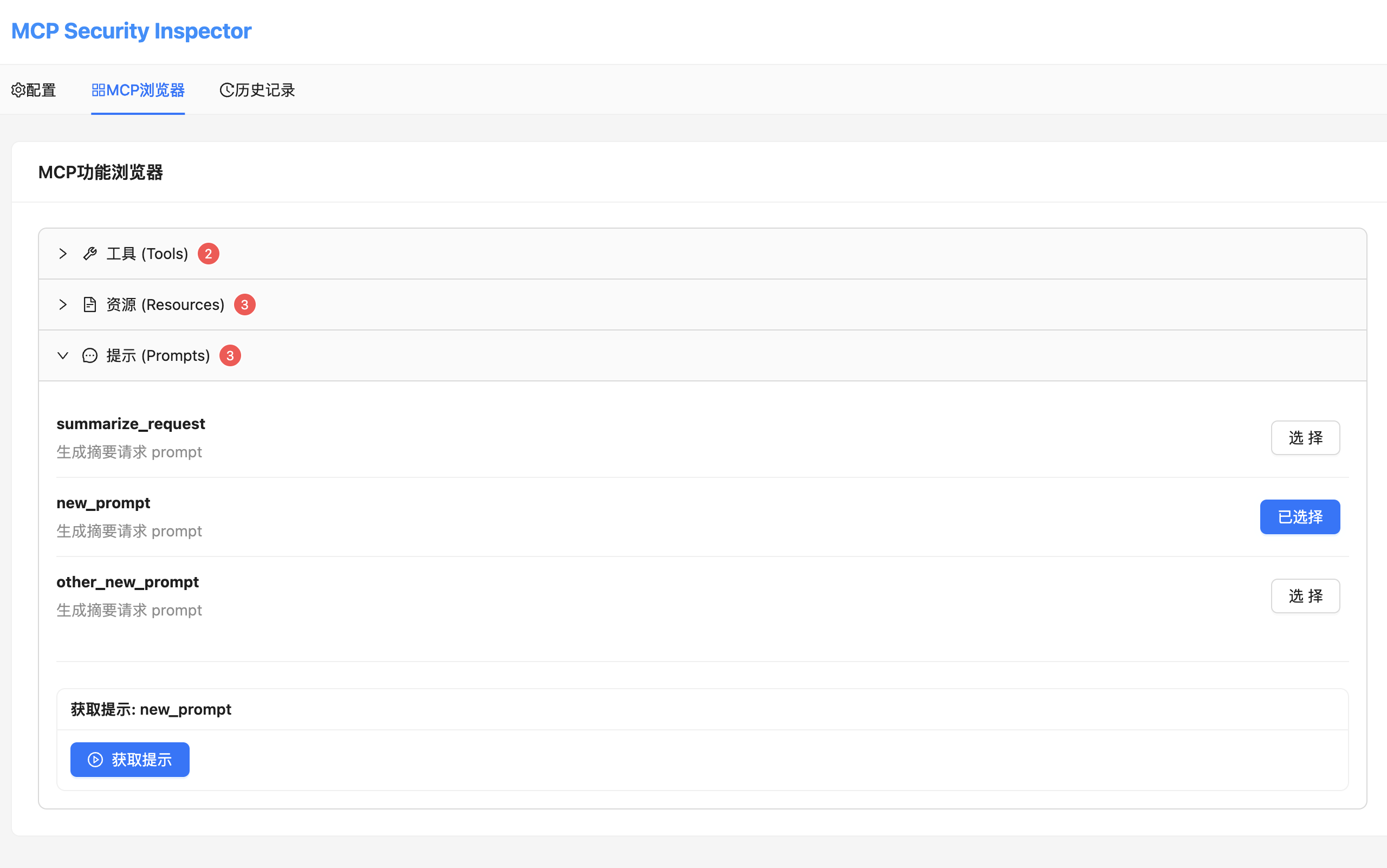
- 自动发现: 自动获取并展示MCP服务器的tools、resources、prompts
- 动态测试: 支持选择工具并动态生成参数表单进行测试
- 结果展示: 友好展示调用结果,支持多种内容类型
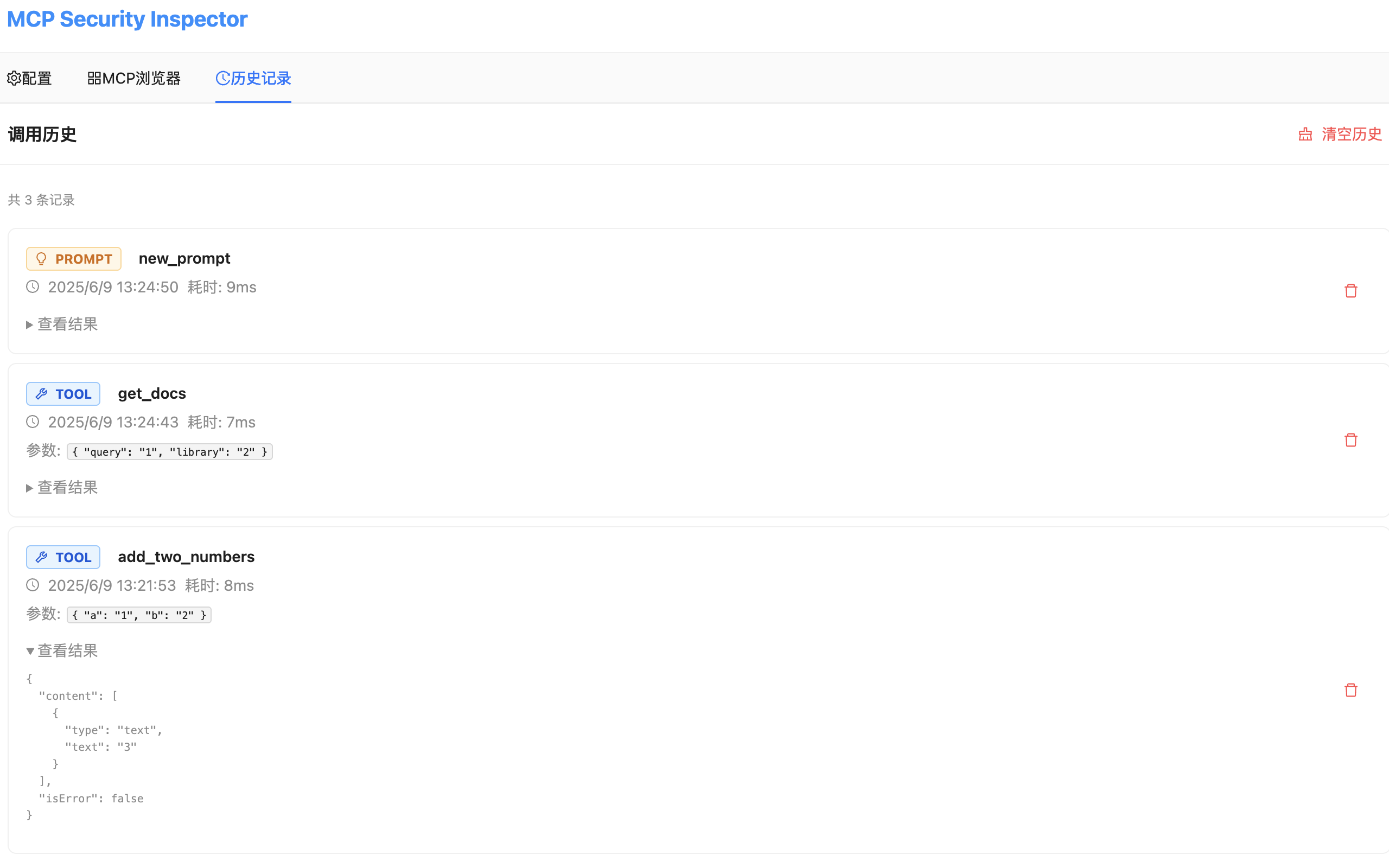
- 历史记录: 完整记录所有调用历史,支持回溯和分析
📊 界面功能
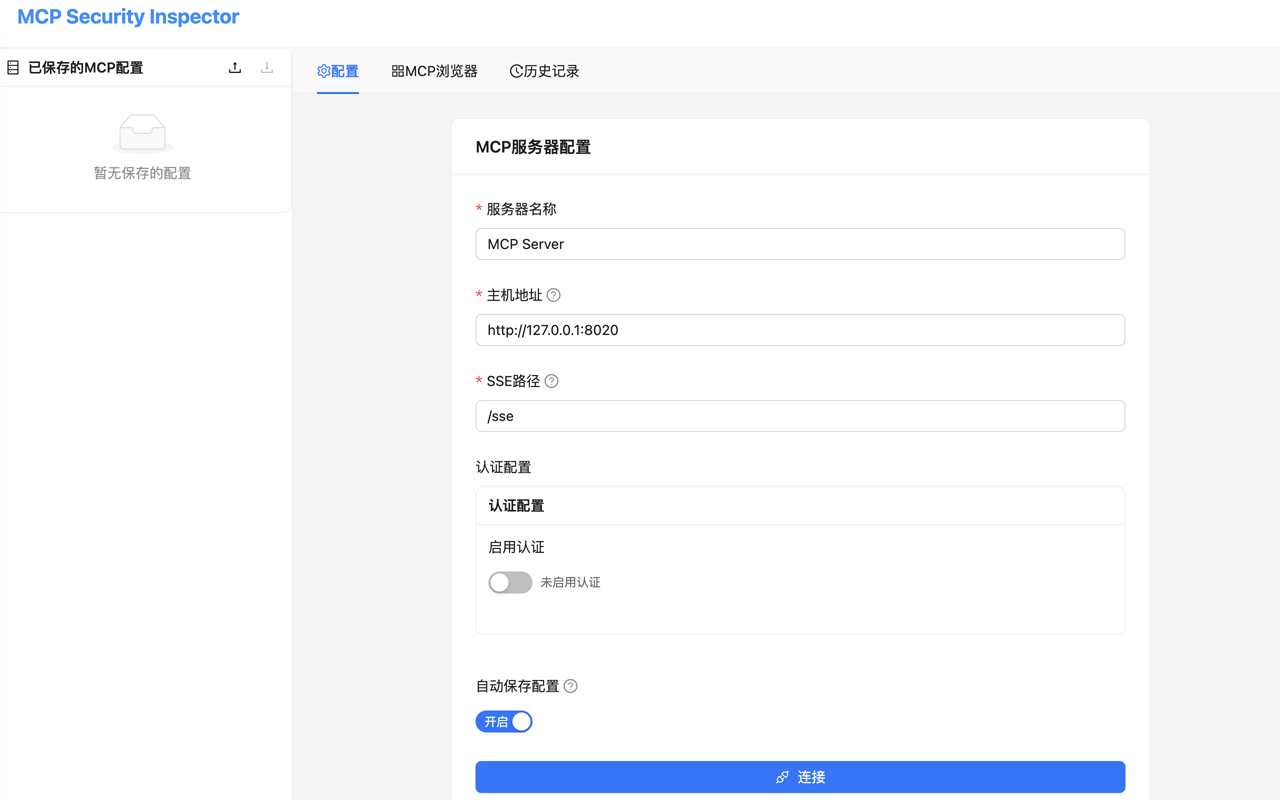
- 配置面板: 支持手动输入MCP服务器配置
- 工具面板: 展示可用工具,支持参数配置和调用
- 资源面板: 查看和读取MCP资源
- 提示面板: 管理和使用MCP提示模板
- 历史面板: 查看调用历史,支持筛选和导出
使用截屏
index
explorer
history
快速开始
1. 安装扩展
-
下载或构建项目:
git clone https://github.com/purpleroc/mcp-security-inspector cd mcp-security-inspector npm install npm run build:extension -
准备扩展文件:
cp public/manifest.json dist/ cp public/background.js dist/ cp -r public/icons dist/ mv dist/public/index.html dist/index.html -
安装到Chrome:
- 打开Chrome浏览器
- 访问
chrome://extensions/ - 开启"开发者模式"
- 点击"加载已解压的扩展程序"
- 选择项目的
dist文件夹
技术架构
前端技术栈
- React 18 - 用户界面框架
- TypeScript - 类型安全
- Ant Design - UI组件库
- Redux Toolkit - 状态管理
- Vite - 构建工具
MCP协议支持
- JSON-RPC 2.0 - 消息格式
- 协议版本: 2025-06-09
- Server-Sent Events - 实时通信
- HTTP/HTTPS - 标准HTTP传输
- CORS支持 - 跨域请求处理
开发模式
开发时使用以下命令:
# 启动开发服务器
npm run dev

# 类型检查
npm run type-check

# 构建生产版本
npm run build:extension

# 启动测试MCP服务器
python3 test-mcp-server.py
更新日志
v1.0.2 (当前版本)
- 修复去掉host_permissions导致cors的错误
- 去掉多余配置,单纯从sse url获取
v1.0.1
- 🆕 新标签页模式,提供更好的用户体验
- 🔧 修复HTTP 400错误,改进MCP协议兼容性
- 📱 响应式布局,适配不同屏幕尺寸
- 🧪 内置测试服务器,便于功能验证
- 🎨 改进UI设计和交互体验
v1.0.0
- 初始版本发布
- 支持MCP协议的完整功能
- 安全检查和风险评估
- 完整的用户界面和历史记录
开发者: purpleroc
联系方式: GitHub Issues
Dev Tools Supporting MCP
The following are the main code editors that support the Model Context Protocol. Click the link to visit the official website for more information.







