
Mcp Server Java Sse Http Demo
What is Mcp Server Java Sse Http Demo
mcp-server-java-sse-http-demo is a Java-based implementation of the Model Context Protocol (MCP) that serves as a Server-Sent Events (SSE) HTTP server, designed to facilitate communication between MCP clients and weather data services.
Use cases
Use cases include developing a weather forecasting chatbot that retrieves and summarizes weather data for multiple cities, integrating weather data into mobile applications, and creating real-time dashboards for monitoring weather conditions.
How to use
To use mcp-server-java-sse-http-demo, clone the repository, build the project using Maven with ‘mvn clean package’, and start the server with ‘java -jar mcp-server/target/mcp-server-1.0-SNAPSHOT.jar’. Additionally, install the fast-agent using pip and configure the necessary API keys in the provided YAML files.
Key features
Key features include a fast-agent for seamless interaction with weather data, the ability to leverage multiple MCP servers (both local and remote), and minimal reliance on Spring framework, making it lightweight and easy to integrate.
Where to use
mcp-server-java-sse-http-demo can be used in applications requiring real-time weather data retrieval, such as weather forecasting applications, chatbots, and any system that benefits from dynamic data updates via SSE.
Clients Supporting MCP
The following are the main client software that supports the Model Context Protocol. Click the link to visit the official website for more information.





Overview
What is Mcp Server Java Sse Http Demo
mcp-server-java-sse-http-demo is a Java-based implementation of the Model Context Protocol (MCP) that serves as a Server-Sent Events (SSE) HTTP server, designed to facilitate communication between MCP clients and weather data services.
Use cases
Use cases include developing a weather forecasting chatbot that retrieves and summarizes weather data for multiple cities, integrating weather data into mobile applications, and creating real-time dashboards for monitoring weather conditions.
How to use
To use mcp-server-java-sse-http-demo, clone the repository, build the project using Maven with ‘mvn clean package’, and start the server with ‘java -jar mcp-server/target/mcp-server-1.0-SNAPSHOT.jar’. Additionally, install the fast-agent using pip and configure the necessary API keys in the provided YAML files.
Key features
Key features include a fast-agent for seamless interaction with weather data, the ability to leverage multiple MCP servers (both local and remote), and minimal reliance on Spring framework, making it lightweight and easy to integrate.
Where to use
mcp-server-java-sse-http-demo can be used in applications requiring real-time weather data retrieval, such as weather forecasting applications, chatbots, and any system that benefits from dynamic data updates via SSE.
Clients Supporting MCP
The following are the main client software that supports the Model Context Protocol. Click the link to visit the official website for more information.
Content
Weather Java SSE Transport MCP Service
A working implementation Model Context Protocol java-sdk. Includes
a fast-agent for the MCP Client to interact with the Weather mcp-server.
⚠️This isn’t remotely production grade, just demonstrating how to build
something working end to end that can leverage multiple MCP Servers both
local (Stdio Transport) and remote (HTTP SSE Transport). Also avoids
pulling in as much of Spring as possible, for those who don’t want it.
In the demo, you’ll see the agent:
- The agent uses Claude Sonnet 3.7 throughout for the LLM bits
- The agent calls out to the “fetch” websearch MCP Server tool to look up lat/long for each city I asked for.
- The agent then uses those lat/long values to call the weather MCP Server tool (implemented in this repository).
You can see the calls being made in the upper half of the terminal split window. - The agent summarizes the forecasts and determine which of the 4 cities is the warmest tomorrow.
The agent is figuring out which tools to call from the context of the user’s inputted prompts.
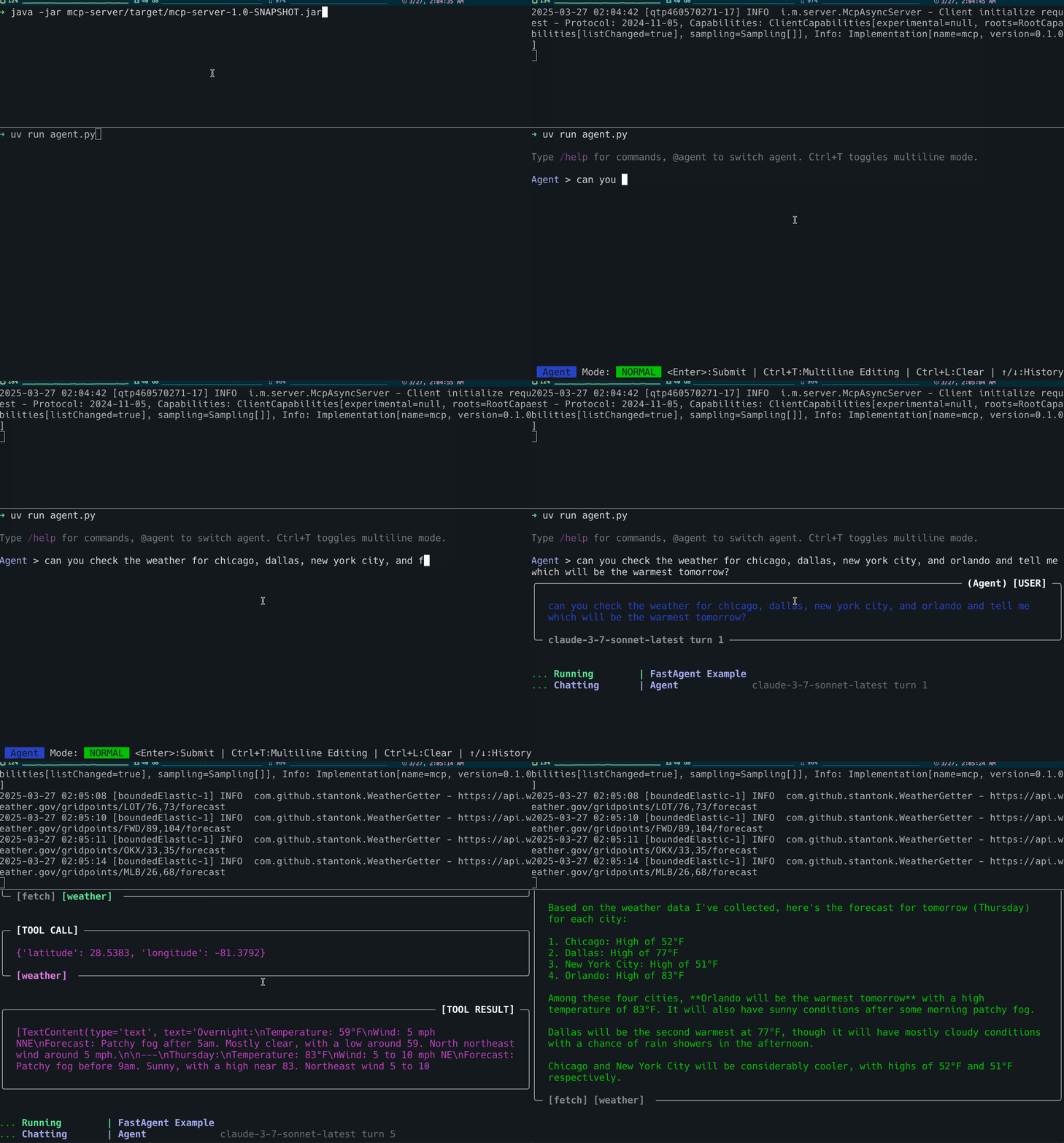
build and start Weather MCP Server
mvn clean package
java -jar java -jar mcp-server/target/mcp-server-1.0-SNAPSHOT.jar
install, configure, and start fast-agent
install
pip install uv
uv pip install fast-agent-mcp
uv run agent.py
Configure Claude and OpenAI api keys
cp fastagent.secrets.yaml.TEMPLATE fastagent.secrets.yaml
then add your api keys to that config file.
Note: Weather MCP Server config
Note, in fastagent.config.yaml we’ve configured the MCP Servers available to the agent,
in this case our server uses the SSE HTTP Transport, this enables
calling remote MCP Servers :).
mcp:
    servers:
        weather:
            transport: "sse"
            read_timeout_seconds: 10
            url: "http://localhost:8080/sse"
Lower level for testing
Connect to SSE stream
curl -v -H "Accept: text/event-stream" "http://localhost:8080/sse"
Send messages to /mcp/messages (note, include sessionId from SSE)
curl -X POST "http://localhost:8080/mcp/message?sessionId=b64ad193-6bb3-4e2e-b33c-27a23011acb4" -d '{"hi": "mynameis"}' | jq .
Things to check out:
Dev Tools Supporting MCP
The following are the main code editors that support the Model Context Protocol. Click the link to visit the official website for more information.







