
Mcp Server Mlflow
What is Mcp Server Mlflow
mcp-server-mlflow is a Model Context Protocol (MCP) Server designed for accessing prompt templates stored in the MLflow Prompt Registry. It enables users to discover and utilize prompt templates efficiently.
Use cases
Use cases for mcp-server-mlflow include automating tasks in Claude Desktop by loading prompt templates, enhancing user interaction with machine learning models, and streamlining workflows in data science projects.
How to use
To use mcp-server-mlflow, first install and start an MLflow server to host the Prompt Registry. Then, create a prompt template in MLflow. After that, build the MCP Server and configure it in Claude Desktop by editing the configuration file to include the server details.
Key features
Key features of mcp-server-mlflow include the ability to list available prompts, retrieve specific prompts, and compile them for use. It supports pagination and filtering for better prompt management.
Where to use
mcp-server-mlflow is primarily used in environments where MLflow is utilized for managing machine learning models and prompts, particularly in applications requiring repetitive tasks or common workflows.
Clients Supporting MCP
The following are the main client software that supports the Model Context Protocol. Click the link to visit the official website for more information.





Overview
What is Mcp Server Mlflow
mcp-server-mlflow is a Model Context Protocol (MCP) Server designed for accessing prompt templates stored in the MLflow Prompt Registry. It enables users to discover and utilize prompt templates efficiently.
Use cases
Use cases for mcp-server-mlflow include automating tasks in Claude Desktop by loading prompt templates, enhancing user interaction with machine learning models, and streamlining workflows in data science projects.
How to use
To use mcp-server-mlflow, first install and start an MLflow server to host the Prompt Registry. Then, create a prompt template in MLflow. After that, build the MCP Server and configure it in Claude Desktop by editing the configuration file to include the server details.
Key features
Key features of mcp-server-mlflow include the ability to list available prompts, retrieve specific prompts, and compile them for use. It supports pagination and filtering for better prompt management.
Where to use
mcp-server-mlflow is primarily used in environments where MLflow is utilized for managing machine learning models and prompts, particularly in applications requiring repetitive tasks or common workflows.
Clients Supporting MCP
The following are the main client software that supports the Model Context Protocol. Click the link to visit the official website for more information.
Content
MLflow Prompt Registry MCP Server
Model Context Protocol (MCP) Server for MLflow Prompt Registry, enabling access to prompt templates managed in MLflow.
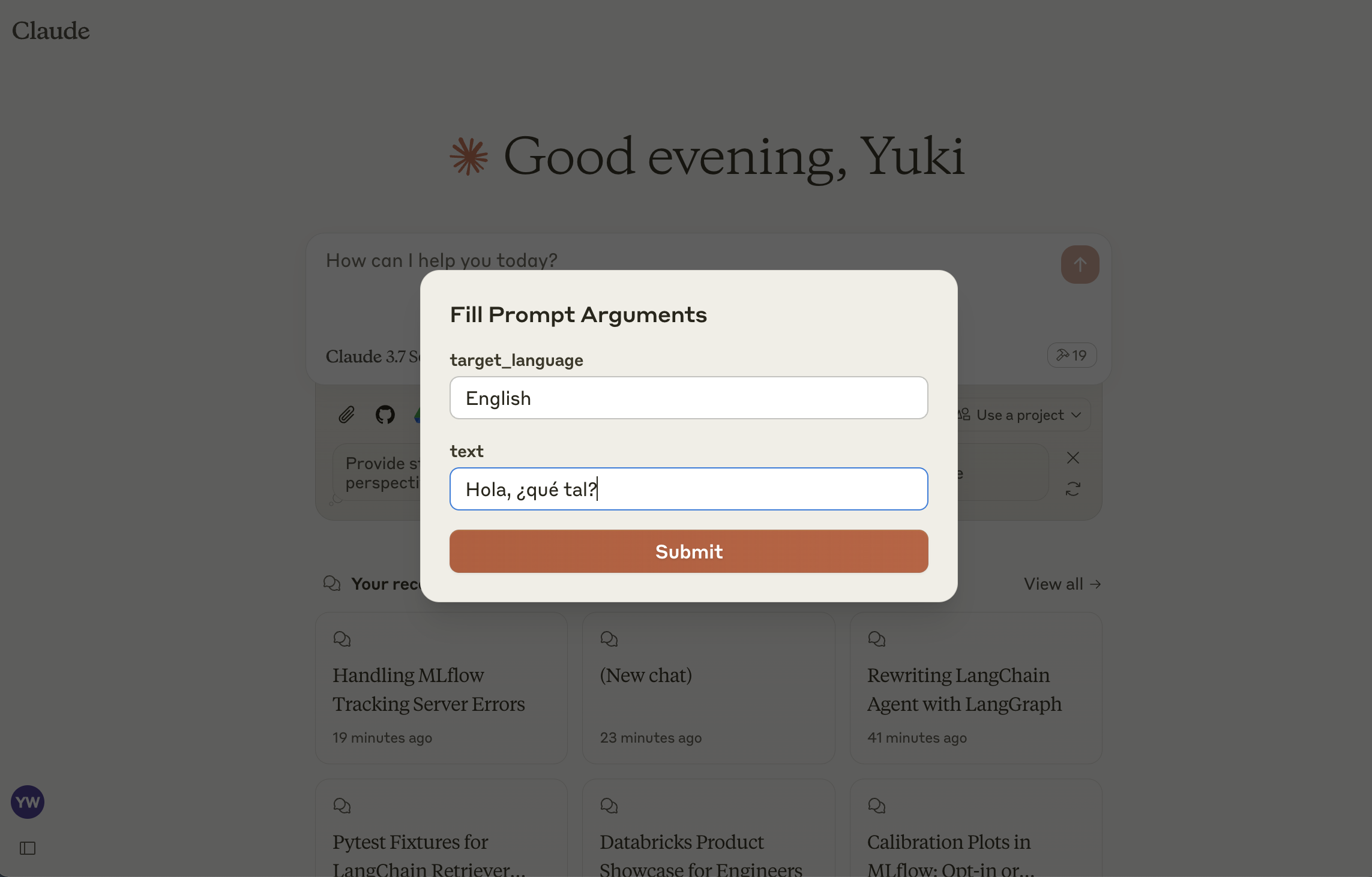
This server implements the MCP Prompts specification for discovering and using prompt templates from MLflow Prompt Registry. The primary use case is to load prompt templates from MLflow in Claude Desktop, allowing users to instruct Claude conveniently for repetitive tasks or common workflows.
Tools
list-prompts- List available prompts
- Inputs:
cursor(optional string): Cursor for paginationfilter(optional string): Filter for prompts
- Returns: List of prompt objects
get-prompt- Retrieve and compile a specific prompt
- Inputs:
name(string): Name of the prompt to retrievearguments(optional object): JSON object with prompt variables
- Returns: Compiled prompt object
Setup
1: Install MLflow and Start Prompt Registry
Install and start an MLflow server if you haven’t already to host the Prompt Registry:
pip install mlflow>=2.21.1
mlflow server --port 5000
2: Create a prompt template in MLflow
If you haven’t already, create a prompt template in MLflow following this guide.
3: Build MCP Server
npm install
npm run build
4: Add the server to Claude Desktop
Configure Claude for Desktop by editing claude_desktop_config.json:
{
  "mcpServers": {
    "mlflow": {
      "command": "node",
      "args": [
        "<absolute-path-to-this-repository>/dist/index.js"
      ],
      "env": {
        "MLFLOW_TRACKING_URI": "http://localhost:5000"
      }
    }
  }
}
Make sure to replace the MLFLOW_TRACKING_URI with your actual MLflow server address.
Dev Tools Supporting MCP
The following are the main code editors that support the Model Context Protocol. Click the link to visit the official website for more information.







