
Mcp Sidecar
What is Mcp Sidecar
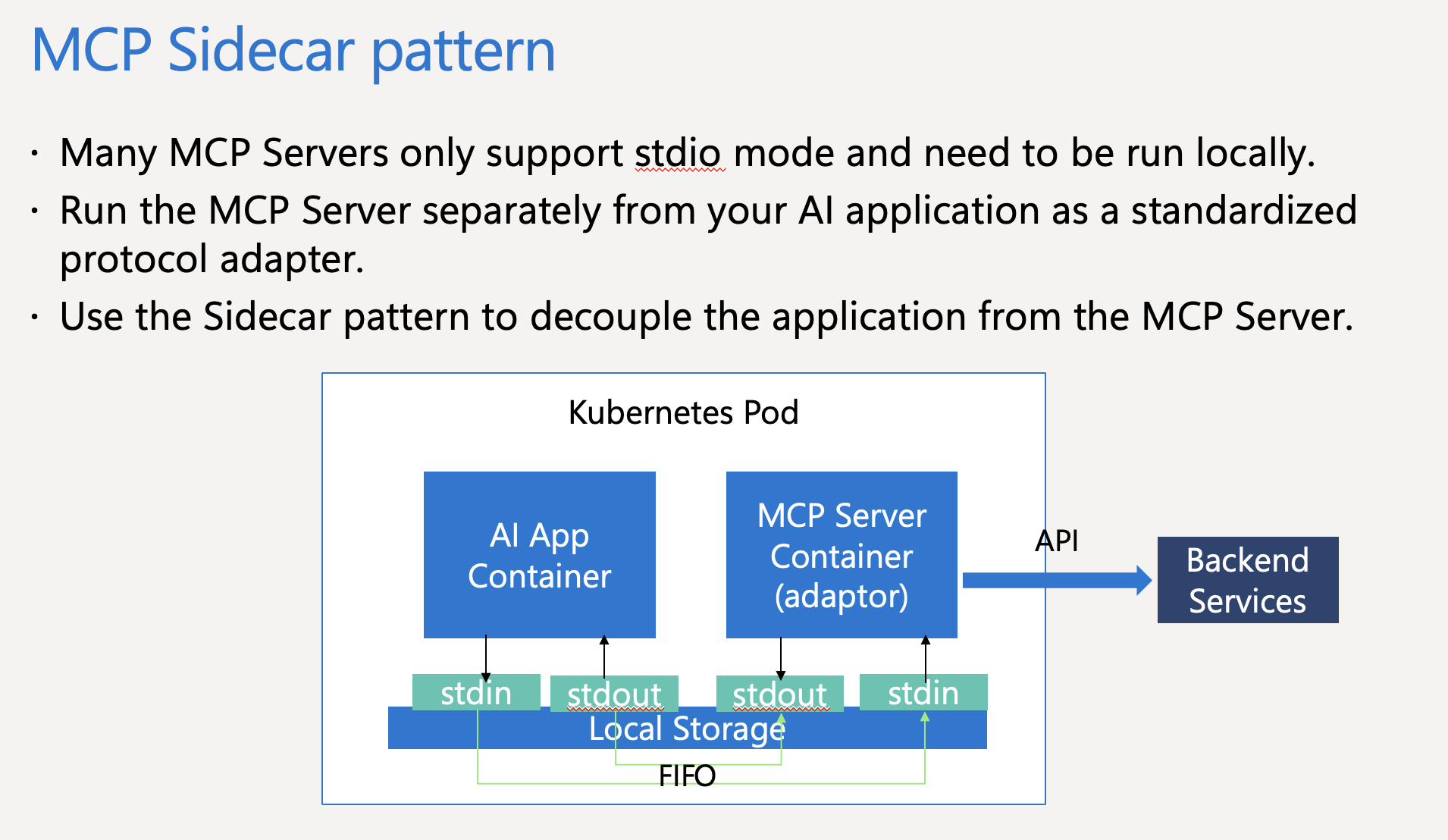
MCP-sidecar is a design pattern implemented on Kubernetes that allows the MCP server to run separately from the application, facilitating communication via standard input/output.
Use cases
Use cases for mcp-sidecar include applications that require interaction with GitHub repositories, such as fetching repository lists or managing GitHub actions through a sidecar architecture.
How to use
To use mcp-sidecar, build your app container using the provided Dockerfile-client-app, optionally build the GitHub MCP Server container, and deploy both on Kubernetes using the mcp-sidecar-deploy.yaml manifest. Finally, test your app to see the integration in action.
Key features
Key features of mcp-sidecar include the ability to run the MCP server in stdio mode, easy integration with Kubernetes, and sample Dockerfiles for building both the MCP server and client applications.
Where to use
MCP-sidecar can be used in cloud-native applications, particularly those running on Kubernetes, where there is a need for efficient communication between microservices or components.
Clients Supporting MCP
The following are the main client software that supports the Model Context Protocol. Click the link to visit the official website for more information.





Overview
What is Mcp Sidecar
MCP-sidecar is a design pattern implemented on Kubernetes that allows the MCP server to run separately from the application, facilitating communication via standard input/output.
Use cases
Use cases for mcp-sidecar include applications that require interaction with GitHub repositories, such as fetching repository lists or managing GitHub actions through a sidecar architecture.
How to use
To use mcp-sidecar, build your app container using the provided Dockerfile-client-app, optionally build the GitHub MCP Server container, and deploy both on Kubernetes using the mcp-sidecar-deploy.yaml manifest. Finally, test your app to see the integration in action.
Key features
Key features of mcp-sidecar include the ability to run the MCP server in stdio mode, easy integration with Kubernetes, and sample Dockerfiles for building both the MCP server and client applications.
Where to use
MCP-sidecar can be used in cloud-native applications, particularly those running on Kubernetes, where there is a need for efficient communication between microservices or components.
Clients Supporting MCP
The following are the main client software that supports the Model Context Protocol. Click the link to visit the official website for more information.
Content
MCP Sidecar Pattern
MCP sidecar pattern on Kubernetes
Your can run MCP server only support stdio mode separetely from your app!
MCP Sidecar concept
Contents
Dockerfile-github-mcp-server
Sample Dockerfile to build GitHub MCP Server container(to add some tools to create FIFO pipe in GitHub MCP Server)
Dockerfile-client-app
Dockerfile for Sample Apps
mcp-sidecar-deploy.yaml
Kubernetes manifest to run a pod of AI app and MCP server sidecar
Sample python app to get your GitHub Repo list via MCP Server
Local proxy to bridge stdin/stdout pipe between app container and MCP Server sidecar container
How to run the sample app
- Build your app container with Dockerfile-client-app
- cd ~
- git clone https://github.com/hatasaki/mcp-sidecar.git
- cd mcp-sidecar
- docker build --tag
your-app-container-image-f Dockerfile-client-app . - docker push
your-app-container-image
- Build your GitHub MCP Server container with Dockerfile-github-mcp-server
This is optional, only required for a MCP server container image without shell or mkfifo such as GitHub MCP Server- cd ~
- git clone https://github.com/github/github-mcp-server.git
- cd github-mcp-server
- cp …/mcp-sidecar/Dockerfile-github-mcp-server .
- docker build --tag
your-built-github-mcp-server-image>-f Dockerfile-github-mcp-server . - docker push
your-built-github-mcp-server-image>
- Run app on your Kubernetes
- cd …/mcp-sidecar
- kubectl create ns mcp
- kubectl create secret generic github-token --from-literal=token=
your GitHub PAT - kubectl apply -f MCP-sidecar-deploy.yaml
- Test your app
- kubectl get pod -n mcp
- kubectl exec github-mcp-sidecar-
your-pod-name-it – /bin/bash - python app.py
Then, you can see list of your GitHub repos detail
Contributing
This project has adopted the Microsoft Open Source Code of Conduct. For more information see the Code of Conduct FAQ or contact [email protected] with any additional questions or comments.
Dev Tools Supporting MCP
The following are the main code editors that support the Model Context Protocol. Click the link to visit the official website for more information.







