
Mcp Slackbot
What is Mcp Slackbot
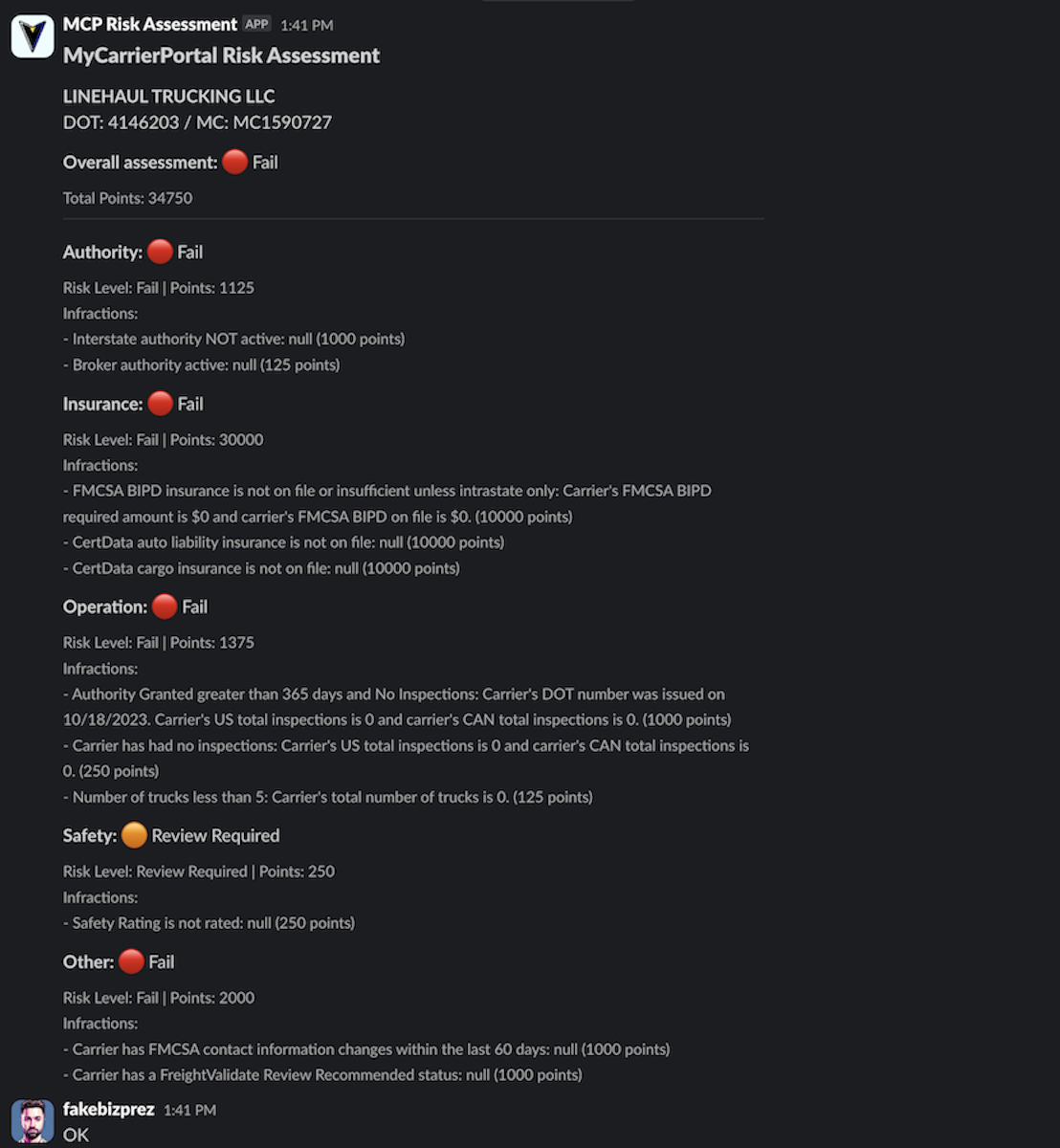
mcp-slackbot is a Slack bot designed to execute Carrier Risk Assessments directly within your Slack channels using the MCP API.
Use cases
Use cases include assessing the risk of carriers before shipment, monitoring carrier performance, and providing real-time data to teams in Slack for informed discussions.
How to use
To use mcp-slackbot, clone the repository, configure the environment variables in the .env file, and start the application using Docker Compose or directly with Node.js.
Key features
Key features include integration with the MCP API for real-time risk assessments, support for both public and private Slack channels, and secure handling of API tokens and secrets.
Where to use
mcp-slackbot can be used in logistics, shipping, and transportation industries where carrier risk assessments are essential for decision-making.
Clients Supporting MCP
The following are the main client software that supports the Model Context Protocol. Click the link to visit the official website for more information.





Overview
What is Mcp Slackbot
mcp-slackbot is a Slack bot designed to execute Carrier Risk Assessments directly within your Slack channels using the MCP API.
Use cases
Use cases include assessing the risk of carriers before shipment, monitoring carrier performance, and providing real-time data to teams in Slack for informed discussions.
How to use
To use mcp-slackbot, clone the repository, configure the environment variables in the .env file, and start the application using Docker Compose or directly with Node.js.
Key features
Key features include integration with the MCP API for real-time risk assessments, support for both public and private Slack channels, and secure handling of API tokens and secrets.
Where to use
mcp-slackbot can be used in logistics, shipping, and transportation industries where carrier risk assessments are essential for decision-making.
Clients Supporting MCP
The following are the main client software that supports the Model Context Protocol. Click the link to visit the official website for more information.
Content
MCP Slackbot
A Slack bot for executing Carrier Risk Assessments using the MyCarrierPortal API within your Slack environment.
Brought to you by Anthony Fecarotta of freightCognition & linehaul.ai
Prerequisites
- Docker and Docker Compose (Recommended)
- A Slack workspace with permissions to add apps
- MyCarrierPortal API access (including Bearer Token, Refresh Token, and Token Endpoint URL)
- Node.js >= 18.0.0 (if not using Docker)
Quick Start with Docker Compose
-
Clone the repository:
git clone https://github.com/freightcognition/mcp-slackbot.git cd mcp-slackbot -
Configure environment variables:
- Copy
.env.exampleto.env:cp .env.example .env - Edit
.envand fill in your credentials:BEARER_TOKEN: Your MyCarrierPortal API bearer token.REFRESH_TOKEN: Your MyCarrierPortal API refresh token.TOKEN_ENDPOINT_URL: The URL for the MyCarrierPortal token endpoint (e.g.,https://api.mycarrierpackets.com/token).SLACK_BOT_TOKEN: Your Slack bot’s token (starts withxoxb-).SLACK_SIGNING_SECRET: Your Slack app’s signing secret.SLACK_WEBHOOK_URL: Your Slack incoming webhook URL (optional, if used for specific notifications).PORT: The port number for the application (default:3001). You usually don’t need to change this unless there’s a port conflict on your server.
- Copy
-
Start the application:
- Production mode:
docker compose up -d - Development mode (with hot-reloading and debugging):
If you have adocker-compose.debug.yml(or similar for development):
(Adjust the command if your development compose file has a different name.)docker compose -f docker-compose.debug.yml up
- Production mode:
-
Verify the application is running:
# Check container status
docker compose ps

# View logs
docker compose logs -f mcpslackbot
(Assuming your service is named
mcpslackbotindocker-compose.yml)
Alternative Deployment Methods (Without Docker)
If you prefer not to use Docker, you can run the application directly using Node.js.
Prerequisites for Direct Deployment
- Node.js >= 18.0.0
- npm (Node Package Manager)
Setup and Running
-
Install dependencies:
npm install -
Configure environment variables:
Create a.envfile in the root of the project (as described in step 2 of the Docker setup) with all the necessary tokens and URLs. -
Run the application:
- Development mode (e.g., using
nodemonif configured inpackage.json):
(Check yournpm run devpackage.jsonfor the exact development script command.) - Production mode (e.g., using
pm2or justnode):
or, if using PM2 (ensure it’s installed:npm startnpm install -g pm2):npm run pm2:start # Or pm2 start app.js --name mcp-slackbot npm run pm2:logs # Or pm2 logs mcp-slackbot npm run pm2:stop # Or pm2 stop mcp-slackbotpackage.jsonforpm2scripts.)
- Development mode (e.g., using
Slack App Configuration
To use this bot, you need to create a Slack App:
- Go to https://api.slack.com/apps and click “Create New App”.
- Choose “From scratch”.
- Name your app (e.g., “MCP Bot”) and select your workspace.
- Slash Commands:
- Navigate to “Features” -> “Slash Commands”.
- Click “Create New Command”.
- Command:
/mcp(or your preferred command) - Request URL:
https://your-public-url.com/slack/commands(This needs to be the publicly accessible URL where your bot is running. For local development, you’ll need a tunneling service like ngrok:ngrok http 3001). - Short Description: e.g., “Fetch MCP Carrier Risk Assessment”
- Save the command.
- Event Subscriptions (Optional but Recommended for more interactive features):
- Navigate to “Features” -> “Event Subscriptions”.
- Toggle “Enable Events” to ON.
- Request URL:
https://your-public-url.com/slack/events(If using Event Subscriptions, update this to your events endpoint. It’s often the same as Slash Commands but can be different). The URL will be verified. - You might subscribe to specific bot events if needed by your bot’s functionality.
- Permissions (OAuth & Permissions):
- Navigate to “Features” -> “OAuth & Permissions”.
- Bot Token Scopes: Add necessary scopes. At a minimum, you’ll likely need:
commands(for slash commands)chat:write(to send messages)- Possibly others depending on functionality (e.g.,
users:readif you need user info).
- Install the app to your workspace. This will generate the Bot User OAuth Token (
SLACK_BOT_TOKENstarting withxoxb-).
- App Credentials:
- Navigate to “Settings” -> “Basic Information”.
- Find your Signing Secret under “App Credentials” (
SLACK_SIGNING_SECRET).
Environment Variables Summary
-
BEARER_TOKEN- Description: MyCarrierPortal API bearer token.
- Example:
your_long_bearer_token_here - Required: Yes
-
REFRESH_TOKEN- Description: MyCarrierPortal API refresh token.
- Example:
your_refresh_token_here - Required: Yes
-
TOKEN_ENDPOINT_URL- Description: MyCarrierPortal API token refresh endpoint.
- Example:
https://api.mycarrierpackets.com/token - Required: Yes
-
SLACK_BOT_TOKEN- Description: Slack Bot User OAuth Token.
- Example:
xoxb-your-slack-bot-token - Required: Yes
-
SLACK_SIGNING_SECRET- Description: Slack App Signing Secret.
- Example:
your_slack_signing_secret - Required: Yes
-
SLACK_WEBHOOK_URL- Description: Slack Incoming Webhook URL (optional).
- Example:
https://hooks.slack.com/services/... - Required: No
-
PORT- Description: Port the application listens on.
- Example:
3001 - Required: No
Testing
The package.json might contain test scripts. For example, to test your MyCarrierPortal API token:
# Using Docker (if a test script is configured in your Docker setup)
# docker compose run --rm mcpslackbot npm run test:token

# Without Docker
npm run test:token
(This assumes a test:token script exists in package.json. Adapt as necessary.)
Security Notes
- Never commit your
.envfile (or any file with real credentials) to version control. The.gitignorefile should already list.env. - Keep your API tokens and secrets secure.
- Consider using a secrets management solution for production environments.
- Regularly rotate your credentials if possible.
- The
.env.examplefile is a template and should never contain real credentials.
License
This project is licensed under version 3 of the GNU Affero General Public License (AGPL-3.0). See the LICENSE.TXT file for details.
Dev Tools Supporting MCP
The following are the main code editors that support the Model Context Protocol. Click the link to visit the official website for more information.







