
Mcp Sniffer
What is Mcp Sniffer
MCP Sniffer is a tool that captures network traffic between MCP clients and servers, functioning as a reverse proxy to visualize request and response payloads in a web UI.
Use cases
Use cases for MCP Sniffer include debugging network issues, analyzing client-server communication, and developing applications that utilize the MCP protocol.
How to use
To use MCP Sniffer, install it via ‘pipx install mcp-sniffer’ and run the command with options to specify the listening host, port, upstream host, and web UI settings.
Key features
Key features of MCP Sniffer include real-time traffic capture, a web-based user interface for visualizing network interactions, and customizable settings for hosts and ports.
Where to use
MCP Sniffer can be used in network diagnostics, application development, and testing environments where monitoring of MCP protocol traffic is required.
Clients Supporting MCP
The following are the main client software that supports the Model Context Protocol. Click the link to visit the official website for more information.





Overview
What is Mcp Sniffer
MCP Sniffer is a tool that captures network traffic between MCP clients and servers, functioning as a reverse proxy to visualize request and response payloads in a web UI.
Use cases
Use cases for MCP Sniffer include debugging network issues, analyzing client-server communication, and developing applications that utilize the MCP protocol.
How to use
To use MCP Sniffer, install it via ‘pipx install mcp-sniffer’ and run the command with options to specify the listening host, port, upstream host, and web UI settings.
Key features
Key features of MCP Sniffer include real-time traffic capture, a web-based user interface for visualizing network interactions, and customizable settings for hosts and ports.
Where to use
MCP Sniffer can be used in network diagnostics, application development, and testing environments where monitoring of MCP protocol traffic is required.
Clients Supporting MCP
The following are the main client software that supports the Model Context Protocol. Click the link to visit the official website for more information.
Content
MCP Sniffer
MCP Sniffer captures network traffic between MCP clients and servers.
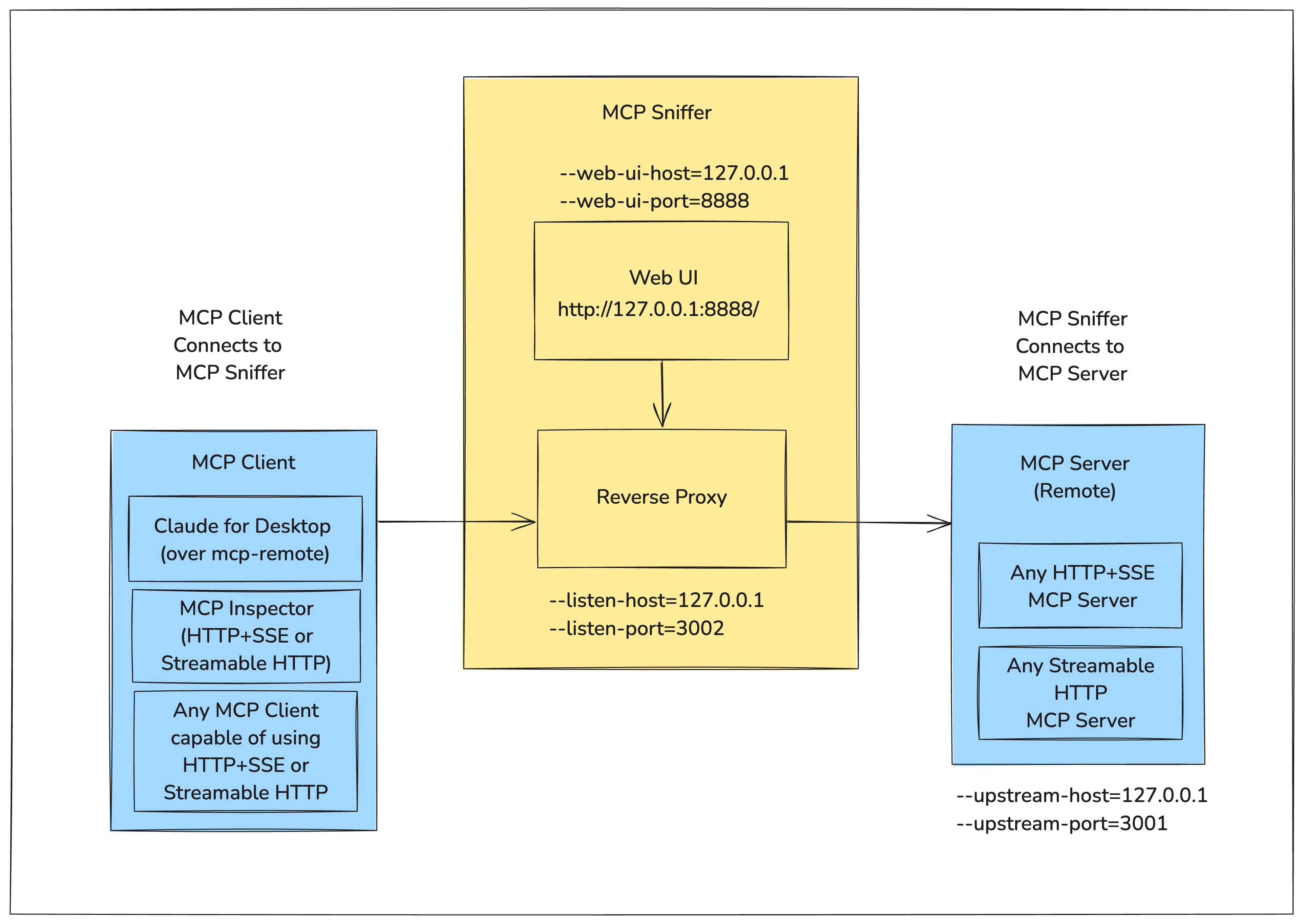
It runs as a reverse proxy between the client and server, capturing request and response payloads that can be visualized in a web UI.
The following diagram shows how MCP Sniffer fits into the MCP Client-Server Model.
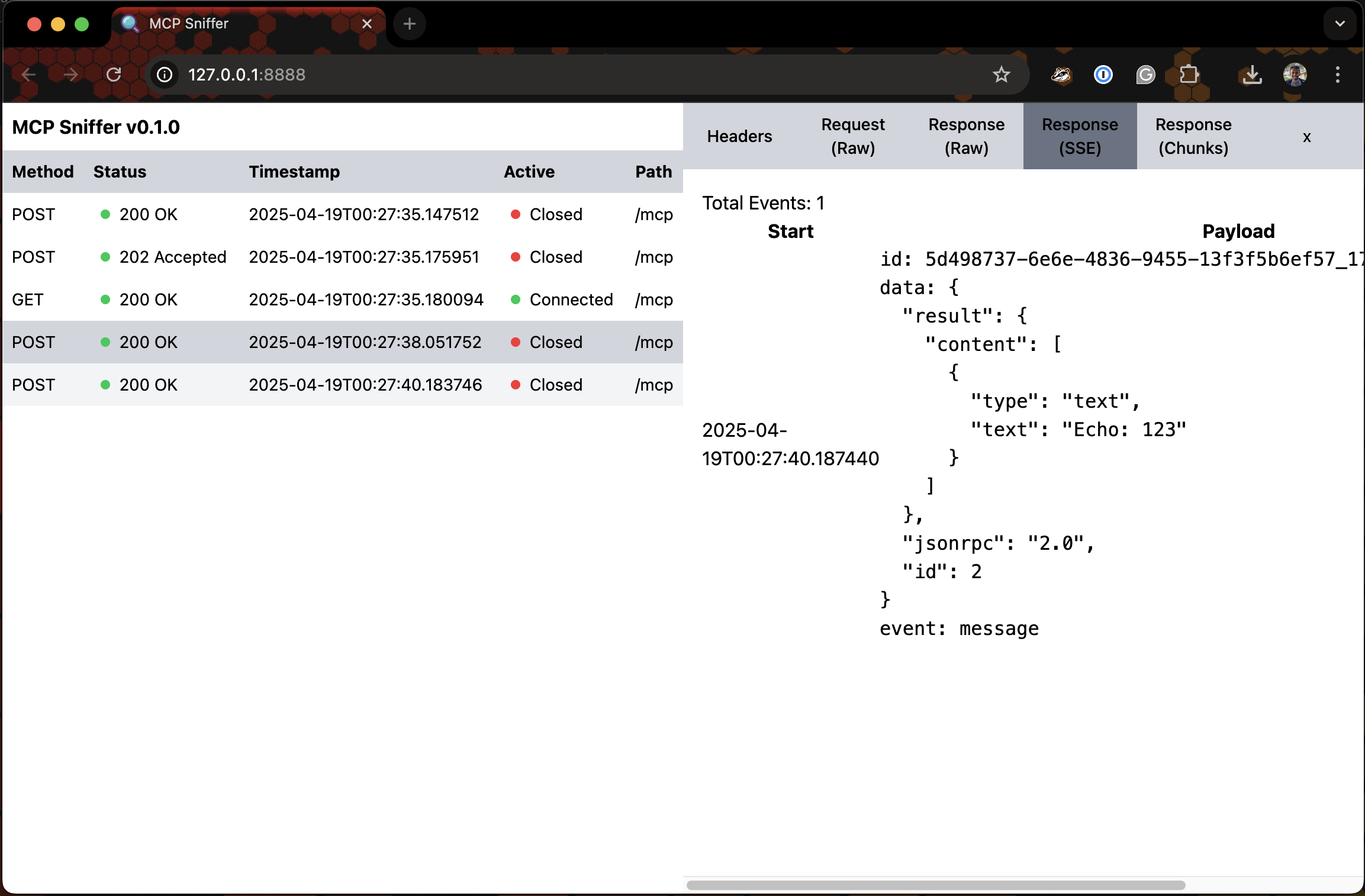
For the Web UI - Imagine Google Chrome DevTools’ Network Tab for Model Context Protocol.
Following is a very early version of it.


Install
pipx install mcp-sniffer
Usage
$ mcp-sniffer --help
usage: mcp-sniffer [-h] [--listen-host LISTEN_HOST] [--listen-port LISTEN_PORT] [--upstream-host UPSTREAM_HOST]
                   [--upstream-port UPSTREAM_PORT] [--web-ui-host WEB_UI_HOST] [--web-ui-port WEB_UI_PORT]
                   [--log-level LOG_LEVEL]

MCP Sniffer

options:
  -h, --help            show this help message and exit
  --listen-host LISTEN_HOST
                        Host to listen on (default: env LISTEN_HOST or 127.0.0.1)
  --listen-port LISTEN_PORT
                        Port to listen on (default: env LISTEN_PORT or 3002)
  --upstream-host UPSTREAM_HOST
                        Upstream host (default: env UPSTREAM_HOST or 127.0.0.1)
  --upstream-port UPSTREAM_PORT
                        Upstream port (default: env UPSTREAM_PORT or 3001)
  --web-ui-host WEB_UI_HOST
                        Web UI host (default: env WEB_UI_HOST or 127.0.0.1)
  --web-ui-port WEB_UI_PORT
                        Web UI port (default: env WEB_UI_PORT or 8888)
  --log-level LOG_LEVEL
                        Log level (default: env LOG_LEVEL or INFO)
Run
mcp-sniffer --listen-port 3002 --upstream-port 3001
INFO:     Started server process [6174]
INFO:     Waiting for application startup.
INFO:     Application startup complete.
2025-04-27 19:52:53 devmachine.local mcp_sniffer.proxy[6174] INFO Listening on ('127.0.0.1', 3002)...
INFO:     Uvicorn running on http://127.0.0.1:8888 (Press CTRL+C to quit)
Web UI
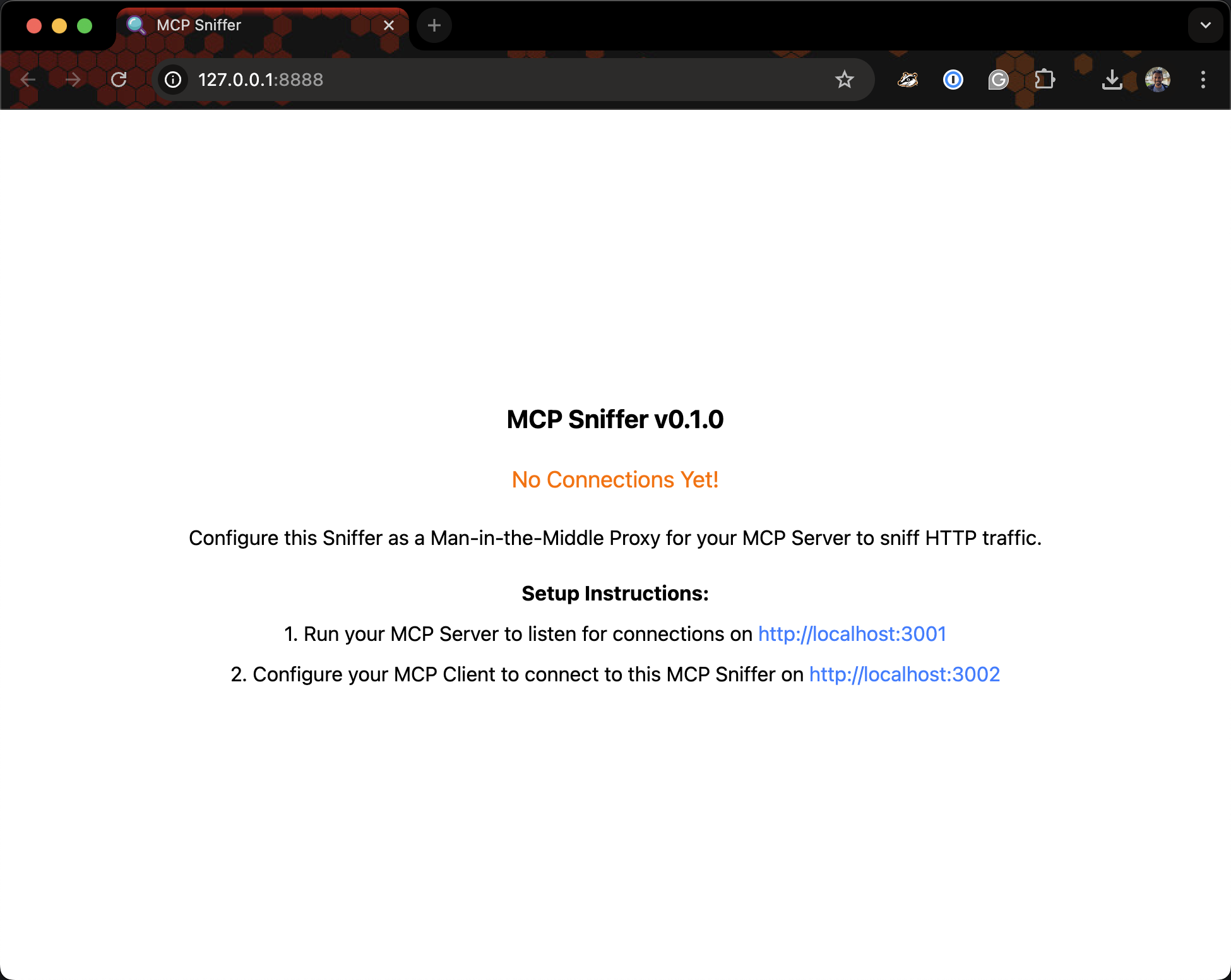
Visit http://127.0.0.1:8888.
Setup
Dev Tools Supporting MCP
The following are the main code editors that support the Model Context Protocol. Click the link to visit the official website for more information.







