
Mcp Spotify
What is Mcp Spotify
mcp-spotify is a FastMCP tool designed to interact with Spotify directly from the Cursor environment, allowing users to control their Spotify player using natural language commands.
Use cases
Use cases include managing playlists, controlling playback with voice commands, retrieving music information, and providing personalized music recommendations.
How to use
To use mcp-spotify, clone the repository, set up your Spotify API credentials in a .env file, and add the MCP server in Cursor settings. Once installed, you can control Spotify through the Cursor Composer in ‘agent’ mode.
Key features
Key features include the ability to view playlists, play or pause songs, resume playback, identify currently playing songs, retrieve artist information, and search for tracks or artists.
Where to use
mcp-spotify can be used in personal projects, music applications, or any environment where integration with Spotify is beneficial, especially in voice-controlled or automated systems.
Clients Supporting MCP
The following are the main client software that supports the Model Context Protocol. Click the link to visit the official website for more information.





Overview
What is Mcp Spotify
mcp-spotify is a FastMCP tool designed to interact with Spotify directly from the Cursor environment, allowing users to control their Spotify player using natural language commands.
Use cases
Use cases include managing playlists, controlling playback with voice commands, retrieving music information, and providing personalized music recommendations.
How to use
To use mcp-spotify, clone the repository, set up your Spotify API credentials in a .env file, and add the MCP server in Cursor settings. Once installed, you can control Spotify through the Cursor Composer in ‘agent’ mode.
Key features
Key features include the ability to view playlists, play or pause songs, resume playback, identify currently playing songs, retrieve artist information, and search for tracks or artists.
Where to use
mcp-spotify can be used in personal projects, music applications, or any environment where integration with Spotify is beneficial, especially in voice-controlled or automated systems.
Clients Supporting MCP
The following are the main client software that supports the Model Context Protocol. Click the link to visit the official website for more information.
Content
Spotify MCP
A FastMCP tool for Spotify.
Demo
Link: https://drive.google.com/file/d/1jGGQBzeXSKSJijeUwFZLdvrKPmPuogGd/
Pre-requisites
Installation
- Clone this repository
- Create a
.envfile in the root of the repository and add your Spotify API credentials (copy over from.env.example) - You can get your credentials by going to the Spotify Developer Dashboard and creating an app.
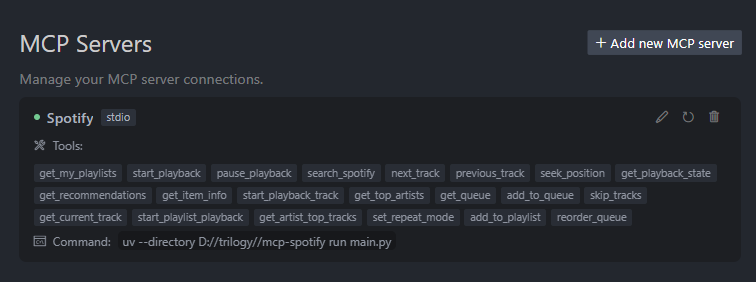
- Go to Cursor Settings > Features > MCP Servers > + Add new MCP server
- Name: Spotify, Type: command, Command: uv --directory <path-to-repository/mcp-spotify> run main.py
You should see the tool installed now.
Trying it out
- Open
Composerin “agent” mode and voila, you can have cursor control your Spotify player. (make sure you have spotify open on an active device)
Features
Below is an example conversation showcasing how you can interact with the Spotify MCP tool through Cursor Composer:
-
User: “Show me my playlists.”
Response: “Here are your playlists: Chill Vibes, Workout Mix, Top Hits.” -
User: “Play my ‘Chill Vibes’ playlist.”
-
User: “Pause song.”
Response: “Playback paused.” -
User: “Resume song.”
Response: “Resuming playback…” -
User: “What song is this?”
Response: “You’re listening to ‘Faded’ by Alan Walker.” -
User: “Tell me about this artist and show me some popular tracks.”
Response: “Artist Info: Alan Walker.” -
User: “Show me my top artists from the last 6 months.”
Response: “Here are your most played artists…” -
User: “Search for Coldplay.”
Response: “Found artist: Coldplay. Here are their top tracks…” -
User: “Play song ‘Fix You’.”
Response: “Starting playback for ‘Fix You’…” -
User: “Show me my queue.”
Response: “Current queue: Track 1, Track 2, Track 3…” -
User: “Add ‘Paradise’ to my queue.”
Response: “Added ‘Paradise’ by Coldplay to your queue.” -
User: “Move ‘Paradise’ up in the queue.”
-
User: “Set it on repeat.”
-
User: “I like this song. Recommend some similar tracks.”
Response: “Here are some recommendations based on this track…” -
User: “Add this track to my ‘Chill Vibes’ playlist.”
Additional Available Features:
- Seek to specific position in track
- View detailed playback state
- Skip multiple tracks at once
If you want more features to be supported, feel free to raise an issue!
Dev Tools Supporting MCP
The following are the main code editors that support the Model Context Protocol. Click the link to visit the official website for more information.







