
Mcp Sql Query
What is Mcp Sql Query
mcp-sql-query is a chat-based interface designed for querying databases using natural language, built with the Model Context Protocol (MCP).
Use cases
Use cases include querying user statistics, retrieving specific user information, calculating averages, and analyzing user engagement metrics.
How to use
To use mcp-sql-query, clone the repository, install the required Python packages, ensure MCP is installed, set up your OpenAI API key and database connection string in the .env file, start the Flask server, and navigate to http://localhost:5000 to begin querying your database.
Key features
Key features include a clean and modern UI, a chat-style interface for natural language queries, real-time interaction with PostgreSQL databases, support for code block formatting in responses, and status indicators with loading animations.
Where to use
mcp-sql-query can be used in various fields such as data analysis, business intelligence, and any application where natural language querying of databases is beneficial.
Clients Supporting MCP
The following are the main client software that supports the Model Context Protocol. Click the link to visit the official website for more information.





Overview
What is Mcp Sql Query
mcp-sql-query is a chat-based interface designed for querying databases using natural language, built with the Model Context Protocol (MCP).
Use cases
Use cases include querying user statistics, retrieving specific user information, calculating averages, and analyzing user engagement metrics.
How to use
To use mcp-sql-query, clone the repository, install the required Python packages, ensure MCP is installed, set up your OpenAI API key and database connection string in the .env file, start the Flask server, and navigate to http://localhost:5000 to begin querying your database.
Key features
Key features include a clean and modern UI, a chat-style interface for natural language queries, real-time interaction with PostgreSQL databases, support for code block formatting in responses, and status indicators with loading animations.
Where to use
mcp-sql-query can be used in various fields such as data analysis, business intelligence, and any application where natural language querying of databases is beneficial.
Clients Supporting MCP
The following are the main client software that supports the Model Context Protocol. Click the link to visit the official website for more information.
Content
DataQuest - Database Query Assistant
A chat-based interface for querying your database using natural language. Built with MCP (Model Context Protocol).
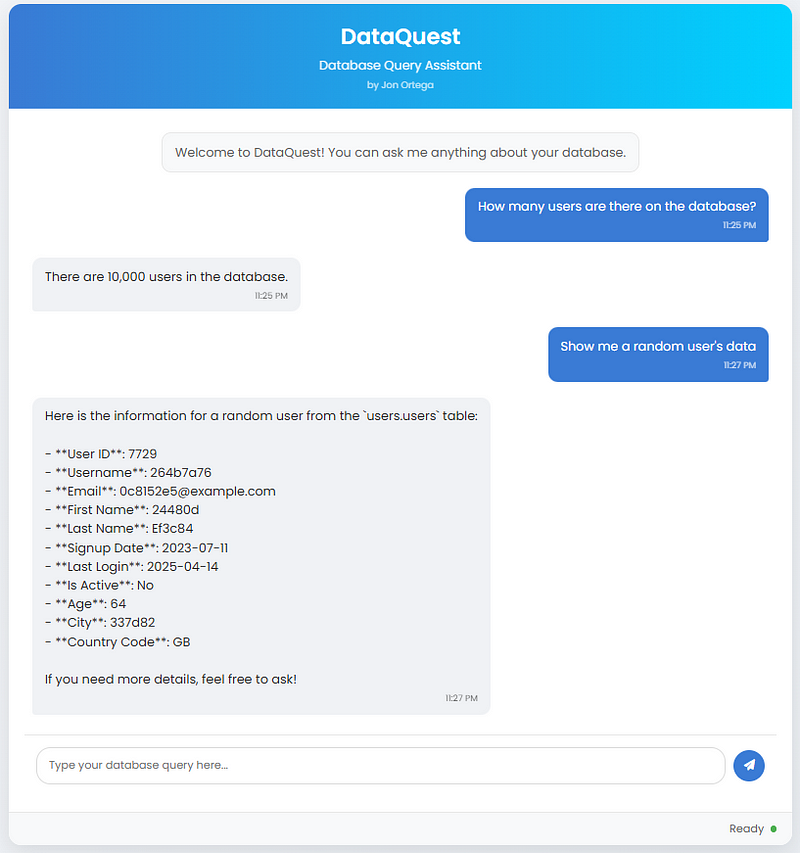
Read the full article on Medium here: https://medium.com/@jonortega20/building-a-database-querier-with-mcp-17df0f49a2de
Features
- Clean, modern UI with responsive design
- Chat-style interface for natural language database queries
- Real-time interaction with your PostgreSQL database
- Supports code block formatting in responses
- Status indicators and loading animations
Requirements
- Python 3.11+
- Flask
- LangChain OpenAI
- Postgre MCP
Installation
-
Clone this repository
-
Install the required Python packages:
pip install flask flask-cors langchain_openai python-dotenv
- Make sure you have MCP installed:
pip install mcp_use
- Make sure you have an OpenAI API key and your database connection string in your .env file:
OPENAI_API_KEY=your_api_key_here
DB_LINK=your_database_connection_string_here
Usage
- Start the Flask server:
python app.py
- Open your browser and navigate to:
http://localhost:5000
- Start asking questions about your database!
Example Queries
- “How many users are in the database?”
- “Show me a random user’s information”
- “What is the average age of the users?”
- “What is the percentage of active users?”
- “How many users are there per country?”
Created By
Jon Ortega
Dev Tools Supporting MCP
The following are the main code editors that support the Model Context Protocol. Click the link to visit the official website for more information.







