
Mcp Sse Client Python
What is Mcp Sse Client Python
MCP Playground is a Python toolkit designed for seamless interaction with remote Model Context Protocol (MCP) endpoints, currently supporting Server-Sent Events (SSE) and planning to incorporate Streamable HTTP protocols in the future.
Use cases
Use MCP Playground to connect to MCP servers for tasks such as real-time data streaming, invoking various tools, and leveraging AI models for intelligent tool selection. It’s particularly useful in scenarios requiring dynamic interactions with remote AI services.
How to use
To get started, clone the repository, install the package using pip, and run the Streamlit app for interactive testing. Connect to MCP endpoints using URLs that end with ‘/sse’ and set necessary environment variables for API keys.
Key features
Key features include an advanced remote MCP client capable of listing and invoking tools, LLM integration for handling natural language queries, a command-line interface for interactive access, and a comprehensive testing interface via a Streamlit app.
Where to use
MCP Playground can be utilized in various environments where real-time interaction with AI tools is needed, such as in web applications, data analytics platforms, and machine learning workflows that rely on remote model APIs.
Clients Supporting MCP
The following are the main client software that supports the Model Context Protocol. Click the link to visit the official website for more information.





Overview
What is Mcp Sse Client Python
MCP Playground is a Python toolkit designed for seamless interaction with remote Model Context Protocol (MCP) endpoints, currently supporting Server-Sent Events (SSE) and planning to incorporate Streamable HTTP protocols in the future.
Use cases
Use MCP Playground to connect to MCP servers for tasks such as real-time data streaming, invoking various tools, and leveraging AI models for intelligent tool selection. It’s particularly useful in scenarios requiring dynamic interactions with remote AI services.
How to use
To get started, clone the repository, install the package using pip, and run the Streamlit app for interactive testing. Connect to MCP endpoints using URLs that end with ‘/sse’ and set necessary environment variables for API keys.
Key features
Key features include an advanced remote MCP client capable of listing and invoking tools, LLM integration for handling natural language queries, a command-line interface for interactive access, and a comprehensive testing interface via a Streamlit app.
Where to use
MCP Playground can be utilized in various environments where real-time interaction with AI tools is needed, such as in web applications, data analytics platforms, and machine learning workflows that rely on remote model APIs.
Clients Supporting MCP
The following are the main client software that supports the Model Context Protocol. Click the link to visit the official website for more information.
Content
MCP Playground
A comprehensive Python toolkit for interacting with remote Model Context Protocol (MCP) endpoints. Currently supports Server-Sent Events (SSE) with planned support for Streamable HTTP protocols.
🎯 Project Focus
MCP Playground is specifically designed for remote MCP client capabilities, providing robust tools for connecting to and interacting with MCP servers over network protocols:
- ✅ Server-Sent Events (SSE) - Full implementation with real-time streaming
- 🔄 Streamable HTTP - Planned for future releases
- 🤖 LLM Integration - AI-driven tool selection and execution
- 🧪 Interactive Testing - Comprehensive testing environments
🚀 Quick Start
Get up and running in minutes:
# Clone the repository
git clone https://github.com/zanetworker/mcp-playground.git
cd mcp-playground

# Install the package
pip install -e .

# Try the interactive Streamlit app
cd mcp-streamlit-app
pip install -r requirements.txt
streamlit run app.py
🚨 IMPORTANT: When connecting to MCP servers, always use URLs ending with
/sse
Example:http://localhost:8000/sse(nothttp://localhost:8000)
Environment Variables
For convenience, you can set API keys and OpenRouter configuration via environment variables:
# Required for LLM providers
export OPENAI_API_KEY="your-openai-key"
export ANTHROPIC_API_KEY="your-anthropic-key"
export OPENROUTER_API_KEY="your-openrouter-key"

# Optional OpenRouter configuration for better rankings
export OPENROUTER_SITE_URL="https://your-site.com"
export OPENROUTER_SITE_NAME="Your App Name"
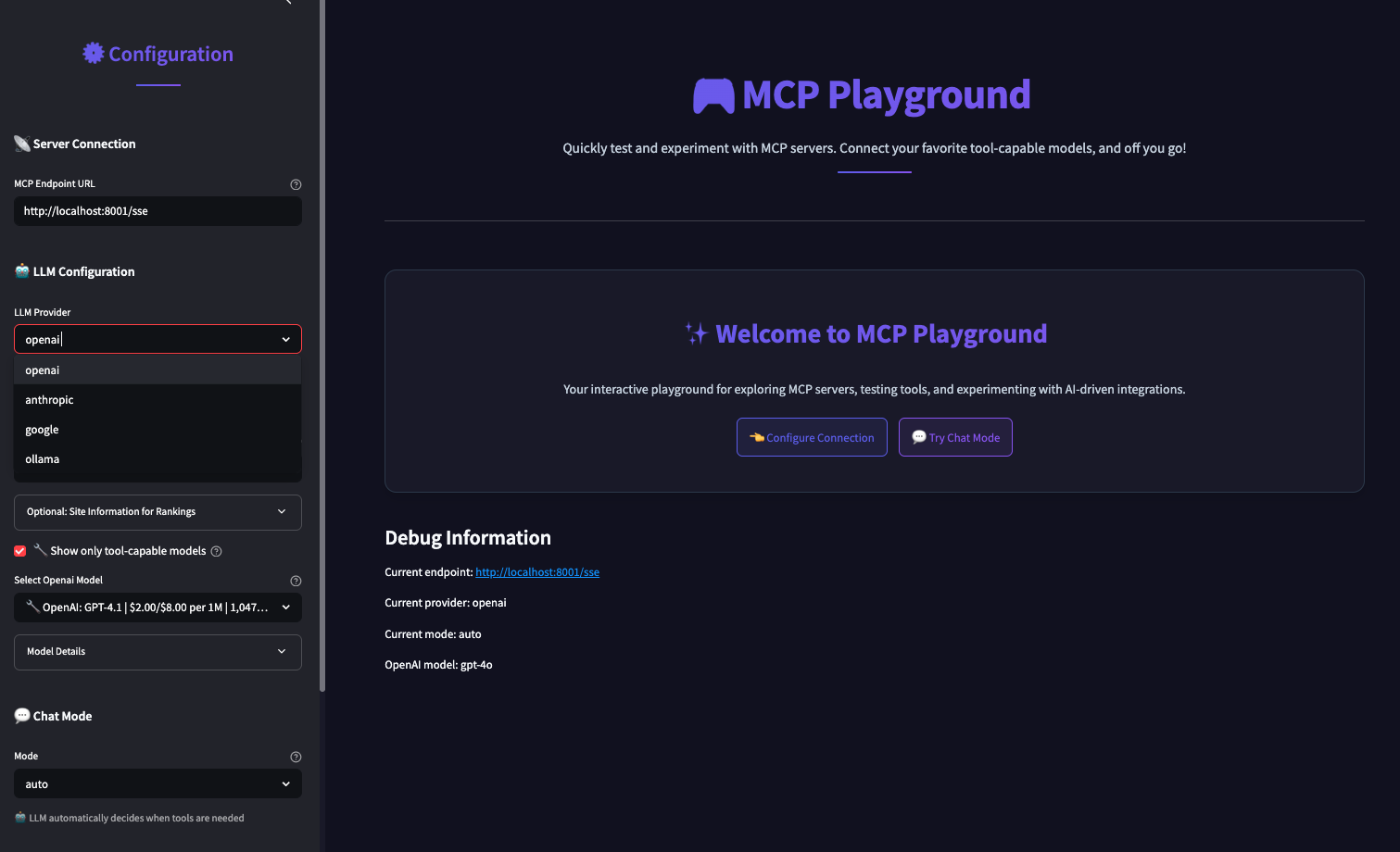
The Streamlit interface prominently highlights the /sse URL requirement with helpful tooltips and validation.
🛠️ Supported Protocols
Current Support
- Server-Sent Events (SSE) - Real-time streaming communication with MCP servers
- HTTP/HTTPS - Standard request-response patterns
Planned Support
- Streamable HTTP - Enhanced HTTP streaming capabilities
- WebSocket - Bidirectional real-time communication
- gRPC Streaming - High-performance streaming protocol
🤖 LLM Provider Support
MCP Playground integrates with multiple LLM providers for intelligent tool selection:
- OpenAI: GPT-4o, GPT-4, GPT-3.5-Turbo
- Anthropic: Claude 3 Opus, Claude 3 Sonnet, Claude 3 Haiku
- Ollama: Llama 3, Mistral, and other locally hosted models
- OpenRouter: Access to 100+ models through a unified API
📋 Core Features
1. Remote MCP Client
Easily connect to any remote MCP endpoint and interact with available tools:
import asyncio
from mcp_playground import MCPClient

async def main():
    # Connect to a remote MCP endpoint with optional timeout and retry settings
    # IMPORTANT: URL must end with /sse for Server-Sent Events
    client = MCPClient(
        "http://localhost:8000/sse",  # Note the /sse suffix!
        timeout=30.0,      # Connection timeout in seconds
        max_retries=3      # Maximum retry attempts
    )

    # List available tools
    tools = await client.list_tools()
    print(f"Found {len(tools)} tools")

    # Invoke a calculator tool
    result = await client.invoke_tool(
        "calculator",
        {"x": 10, "y": 5, "operation": "add"}
    )
    print(f"Result: {result.content}")  # Output: Result: 15
    print(f"Success: {result.error_code == 0}")

asyncio.run(main())
2. LLM-Powered Tool Selection
Let AI choose the right tool based on natural language queries:
import os
from mcp_playground import MCPClient, OpenAIBridge

# Connect to MCP endpoint and create an LLM bridge
client = MCPClient("http://localhost:8000/sse")
bridge = OpenAIBridge(
    client,
    api_key=os.environ.get("OPENAI_API_KEY"),
    model="gpt-4o"
)

# Process a natural language query
result = await bridge.process_query(
    "Convert this PDF to text: https://example.com/document.pdf"
)

# The LLM automatically selects the appropriate tool and parameters
if result["tool_call"]:
    print(f"Tool: {result['tool_call']['name']}")
    print(f"Result: {result['tool_result'].content}")
3. Command-Line Interface
The package includes a powerful CLI tool for interactive testing and analysis:
# Run the CLI tool (note the /sse suffix in the endpoint URL)
python -m mcp_playground.examples.llm_example --provider openai --endpoint http://localhost:8000/sse
Configuration Options:
usage: llm_example.py [-h] [--provider {openai,anthropic,ollama}]
                     [--openai-model {gpt-4o,gpt-4-turbo,gpt-4,gpt-3.5-turbo}]
                     [--anthropic-model {claude-3-opus-20240229,claude-3-sonnet-20240229,claude-3-haiku-20240307}]
                     [--ollama-model OLLAMA_MODEL] [--ollama-host OLLAMA_HOST]
                     [--endpoint ENDPOINT] [--openai-key OPENAI_KEY]
                     [--anthropic-key ANTHROPIC_KEY]
4. Interactive Testing Environment
The included Streamlit app provides a comprehensive testing interface:
Key Features:
- Multiple Chat Modes:
- Auto Mode: LLM automatically decides when to use tools
- Chat Mode: Direct conversation without MCP tools
- Tools Mode: Always attempt to use MCP tools
- Multi-LLM Support: OpenAI, Anthropic, Ollama, and OpenRouter integration
- Dynamic Configuration: Connect to any MCP endpoint with real-time status
- Tool Discovery: Automatic detection and display of available tools
- Beautiful Response Formatting: Special formatting for structured data
- Error Handling: Robust connection management with clear error messages
To run the Streamlit app:
cd mcp-streamlit-app
pip install -r requirements.txt
streamlit run app.py
📦 Installation
From Source
git clone https://github.com/zanetworker/mcp-playground.git
cd mcp-playground
pip install -e .
Using pip (once published)
pip install mcp-playground
🔧 API Reference
MCPClient
client = MCPClient(endpoint, timeout=30.0, max_retries=3)
Parameters:
endpoint: The MCP endpoint URL (must be http or https and end with/sse)timeout: Connection timeout in seconds (default: 30.0)max_retries: Maximum number of retry attempts (default: 3)
⚠️ URL Requirements:
- The endpoint URL must end with
/ssefor Server-Sent Events communication - Examples of correct URLs:
http://localhost:8000/ssehttps://my-mcp-server.com/ssehttp://192.168.1.100:3000/sse
Methods
async list_tools() -> List[ToolDef]
Lists available tools from the MCP endpoint.
async invoke_tool(tool_name: str, kwargs: Dict[str, Any]) -> ToolInvocationResult
Invokes a specific tool with parameters.
async check_connection() -> bool
Check if the MCP endpoint is reachable.
get_endpoint_info() -> Dict[str, Any]
Get information about the configured endpoint.
Error Handling
The client includes robust error handling with specific exception types:
from mcp_playground import MCPClient, MCPConnectionError, MCPTimeoutError

try:
    client = MCPClient("http://localhost:8000/sse")
    tools = await client.list_tools()
except MCPConnectionError as e:
    print(f"Connection failed: {e}")
except MCPTimeoutError as e:
    print(f"Operation timed out: {e}")
LLM Bridges
OpenAIBridge
bridge = OpenAIBridge(mcp_client, api_key, model="gpt-4o")
AnthropicBridge
bridge = AnthropicBridge(mcp_client, api_key, model="claude-3-opus-20240229")
OllamaBridge
bridge = OllamaBridge(mcp_client, model="llama3", host=None)
OpenRouterBridge
bridge = OpenRouterBridge(mcp_client, api_key, model="anthropic/claude-3-opus")
🔄 Advanced Features
Retry Logic and Resilience
The client includes automatic retry logic with exponential backoff:
# Configure custom retry behavior
client = MCPClient(
    "http://localhost:8000/sse",
    timeout=60.0,     # Longer timeout for slow servers
    max_retries=5     # More retry attempts
)

# The client automatically retries failed operations
# with exponential backoff: 1s, 2s, 4s, 8s, 16s
Connection Health Monitoring
# Check if endpoint is reachable before operations
if await client.check_connection():
    tools = await client.list_tools()
else:
    print("Server is not reachable")

# Get detailed endpoint information
info = client.get_endpoint_info()
print(f"Connected to: {info['hostname']}:{info['port']}")
📋 Requirements
- Python 3.8+
mcp>=0.1.0(Model Context Protocol library)pydantic>=2.0.0(Data validation)openai>=1.70.0(for OpenAI integration)anthropic>=0.15.0(for Anthropic integration)ollama>=0.1.7(for Ollama integration)streamlit(for the interactive test app)
🐛 Troubleshooting
Common Issues
“unhandled errors in a TaskGroup” Error:
This typically occurs with asyncio compatibility issues. The Streamlit app handles this automatically, but for custom implementations, ensure proper async context management.
Connection Timeouts:
- Increase the timeout parameter:
MCPClient(endpoint, timeout=60.0) - Check if the MCP server is running and accessible
- Verify the endpoint URL is correct and ends with
/sse
Import Errors:
- Ensure all dependencies are installed:
pip install -e . - Check Python version compatibility (3.8+)
LLM Integration Issues:
- Verify API keys are set correctly
- Check model names match supported versions
- For Ollama, ensure the service is running locally
🚀 Roadmap
Upcoming Features
- Streamable HTTP Support - Enhanced HTTP streaming capabilities
- WebSocket Integration - Real-time bidirectional communication
- Connection Pooling - Improved performance for multiple connections
- Advanced Caching - Smart caching for tool definitions and results
- Monitoring Dashboard - Real-time monitoring of MCP connections
- Plugin System - Extensible architecture for custom protocols
🤝 Development
For information on development setup, contributing guidelines, and available make commands, see DEVELOPMENT.md.
📄 License
This project is licensed under the MIT License - see the LICENSE file for details.
🙏 Acknowledgments
- Model Context Protocol (MCP) specification and community
- OpenAI, Anthropic, and Ollama for LLM API access
- Streamlit for the interactive testing framework
Dev Tools Supporting MCP
The following are the main code editors that support the Model Context Protocol. Click the link to visit the official website for more information.







