
Mcp Template Dotnet
What is Mcp Template Dotnet
mcp-template-dotnet is a template repository designed for creating applications that utilize the Model Context Protocol (MCP) in the .NET framework. It provides a foundational structure and example code to facilitate the development of MCP-enabled applications.
Use cases
Use cases for mcp-template-dotnet include developing applications that require data retrieval from external sources, creating LLM applications that need to interact with databases, and building systems that leverage the Model Context Protocol for enhanced data management.
How to use
To use mcp-template-dotnet, you need to install the template via the command line using the command ‘dotnet new install Nall.ModelContextProtocol.Template’. After installation, you can verify it by running ‘dotnet new list mcp’ to see the available MCP templates.
Key features
Key features of mcp-template-dotnet include a basic application structure, example code for quick start, and integration capabilities with external data sources through the Model Context Protocol.
Where to use
mcp-template-dotnet is primarily used in software development environments where there is a need for seamless integration between large language model (LLM) applications and various external data sources.
Clients Supporting MCP
The following are the main client software that supports the Model Context Protocol. Click the link to visit the official website for more information.





Overview
What is Mcp Template Dotnet
mcp-template-dotnet is a template repository designed for creating applications that utilize the Model Context Protocol (MCP) in the .NET framework. It provides a foundational structure and example code to facilitate the development of MCP-enabled applications.
Use cases
Use cases for mcp-template-dotnet include developing applications that require data retrieval from external sources, creating LLM applications that need to interact with databases, and building systems that leverage the Model Context Protocol for enhanced data management.
How to use
To use mcp-template-dotnet, you need to install the template via the command line using the command ‘dotnet new install Nall.ModelContextProtocol.Template’. After installation, you can verify it by running ‘dotnet new list mcp’ to see the available MCP templates.
Key features
Key features of mcp-template-dotnet include a basic application structure, example code for quick start, and integration capabilities with external data sources through the Model Context Protocol.
Where to use
mcp-template-dotnet is primarily used in software development environments where there is a need for seamless integration between large language model (LLM) applications and various external data sources.
Clients Supporting MCP
The following are the main client software that supports the Model Context Protocol. Click the link to visit the official website for more information.
Content
Model Context Protocol .NET Template

A protocol for seamless integration between LLM applications and external data sources
Documentation | Specification | Discussions
This repository contains a template for creating a Model Context Protocol (MCP) application in .NET. It provides a basic structure and example code to help you get started with building your own MCP-enabled applications.
| Package | Version | Description |
|---|---|---|
Nall.ModelContextProtocol.Template |
 |
Templates |
Nall.ModelContextProtocol.Inspector.Aspire.Hosting |
 |
Aspire Hosting Integration |
Getting Started
Install:
dotnet new install Nall.ModelContextProtocol.Template
Verify installation:
dotnet new list mcp
# These templates matched your input: 'mcp'

# Template Name      Short Name         Language  Tags
# -----------------  -----------------  --------  -------------
# MCP Server         mcp-server         [C#]      dotnet/ai/mcp
# MCP Server HTTP    mcp-server-http    [C#]      dotnet/ai/mcp
# MCP Server Hybrid  mcp-server-hybrid  [C#]      dotnet/ai/mcp
[!TIP]
Practically, you want to switch between modes, so I recommend using themcp-server-hybridtemplate. It allows you to run the server in both Stdio and HTTP modes.
Verify output:
dotnet new mcp-server -o MyAwesomeMCPServer -n MyAwesomeMCPServer --dry-run
# File actions would have been taken:
#   Create: MyAwesomeMCPServer\.vscode\launch.json
#   Create: MyAwesomeMCPServer\MyAwesomeMCPServer.csproj
#   Create: MyAwesomeMCPServer\Program.cs
#   Create: MyAwesomeMCPServer\Properties\launchSettings.json
#   Create: MyAwesomeMCPServer\README.md
#   Create: MyAwesomeMCPServer\appsettings.Development.json
#   Create: MyAwesomeMCPServer\appsettings.json
Create from template:
dotnet new mcp-server -o MyAwesomeMCPServer -n MyAwesomeMCPServer
Here is a content of Program.cs:
using Microsoft.Extensions.Hosting;

var builder = Host.CreateApplicationBuilder(args);
builder.Services
    .AddMcpServer()
    .WithStdioServerTransport()
    .WithToolsFromAssembly();

await builder.Build().RunAsync();

[McpServerToolType]
public static class EchoTool
{
    [McpServerTool, Description("Echoes the message back to the client.")]
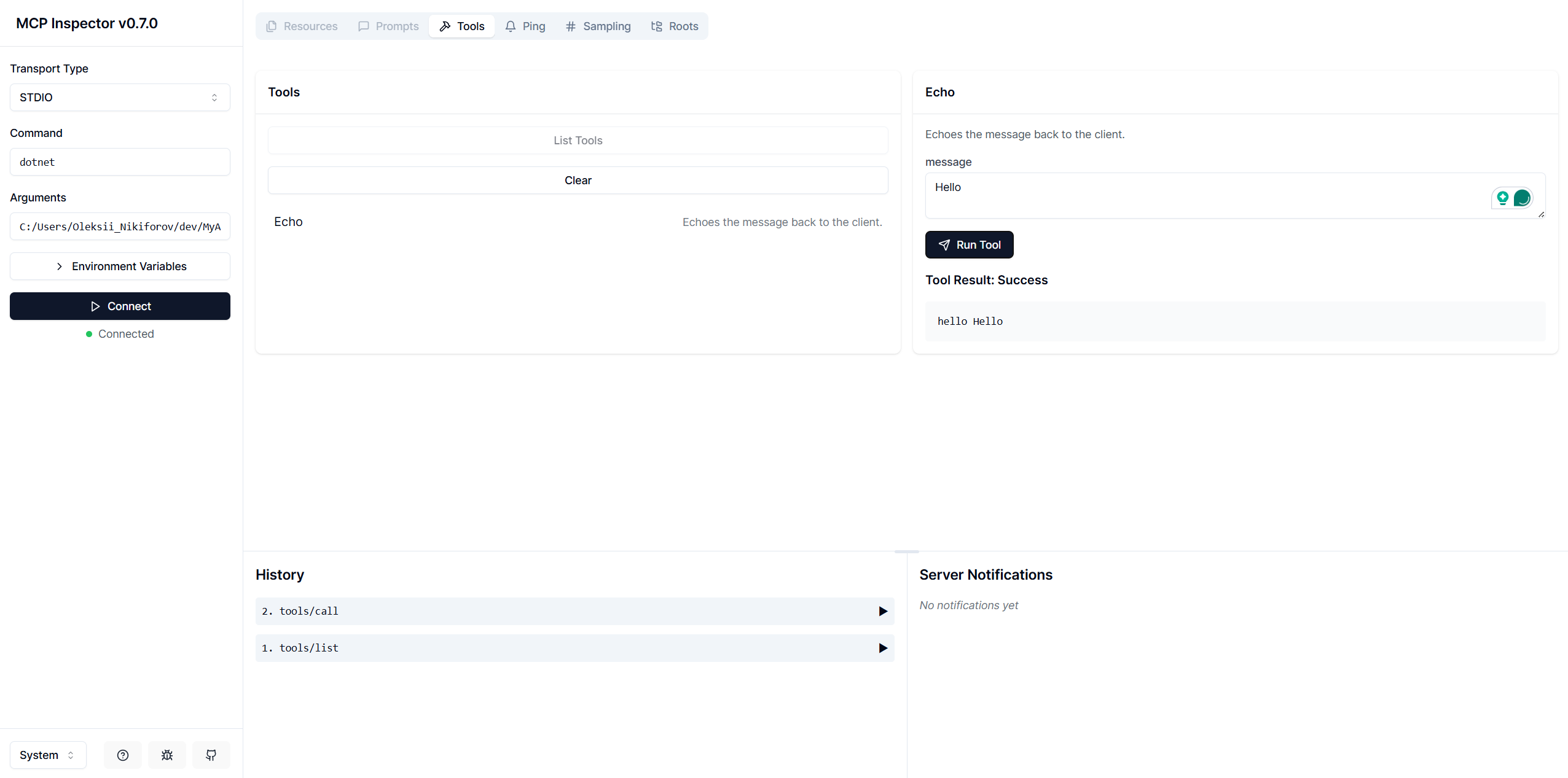
    public static string Echo(string message) => $"hello {message}";
}
It is a simple echo server that listens for incoming messages and responds with a greeting. You can add more tools by creating additional methods with the [McpServerTool] attribute. The WithToolsFromAssembly() method automatically registers all tools in the assembly.
Run Locally
Build from the project directory:
dotnet build -o Artefacts -c Release
Run the inspector:
npx @modelcontextprotocol/inspector -e DOTNET_ENVIRONMENT=Production dotnet "$(PWD)/Artefacts/MyAwesomeMCPServer.dll"
Open inspector in your browser and test the server:
Distribute as .NET Tool
Pack from the project directory:
dotnet pack -o Artefacts -c Release
Install the tool globally:
dotnet tool install --global --add-source ./Artefacts MyAwesomeMCPServer
Now, after you installed this tool globally, you can run it from anywhere on your system. The tool will be available as MyAwesomeMCPServer (or myawesomemcpserver) in your terminal.
💡 You can also create local tool manifest and install MCPs as tools locally.
Run the inspector:
npx @modelcontextprotocol/inspector -e DOTNET_ENVIRONMENT=Production myawesomemcpserver
Run with Aspire
In Stdio mode
In AppHost/Program.cs:
var builder = DistributedApplication.CreateBuilder(args);

builder.AddMCPInspector().WithStdio<Projects.MCPServer>();

builder.Build().Run();
In HTTP mode
In AppHost/Program.cs:
var builder = DistributedApplication.CreateBuilder(args);

var mcp = builder.AddProject<Projects.MCPServerRemote>("server");
builder.AddMCPInspector().WithMcp(mcp);

builder.Build().Run();
Reference
Dev Tools Supporting MCP
The following are the main code editors that support the Model Context Protocol. Click the link to visit the official website for more information.







