
Mcp Twitter
What is Mcp Twitter
mcp-twitter is a Multi-Channel Platform (MCP) server designed to help users manage their Twitter accounts programmatically, offering a variety of powerful features.
Use cases
Use cases for mcp-twitter include automating tweet posting, analyzing public sentiment through hashtag searches, managing customer interactions via direct messages, and summarizing engagement on tweets.
How to use
To use mcp-twitter, clone the repository, install the required dependencies, set up your Twitter API credentials in the .env file, and run the application using the provided command.
Key features
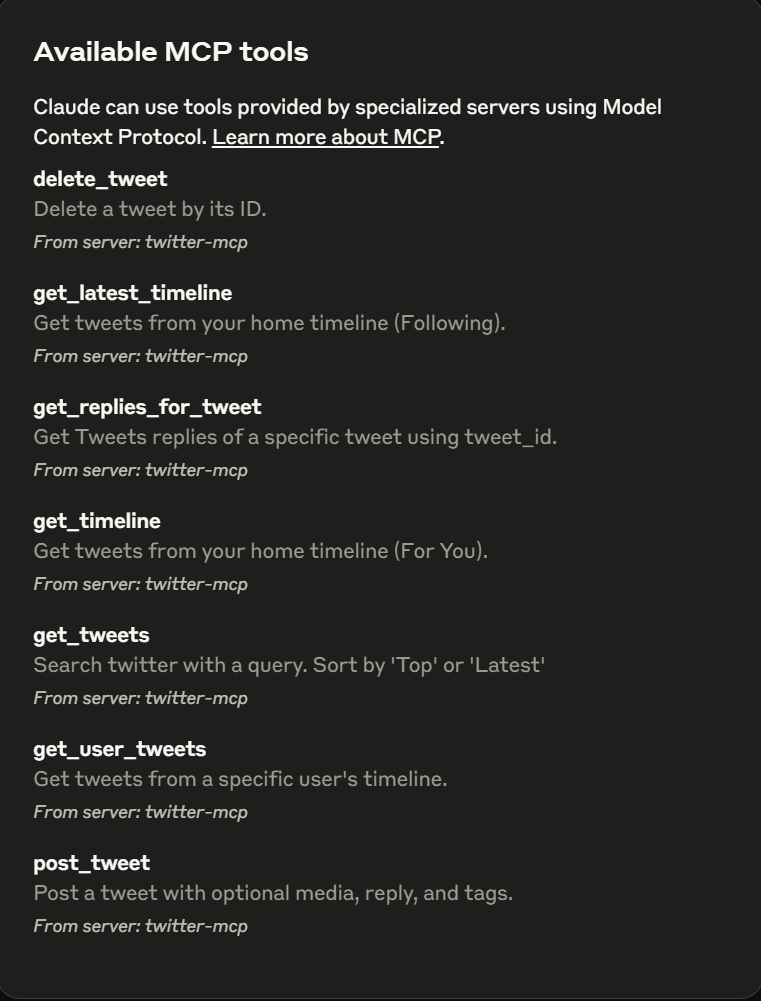
Key features include retrieving the home timeline, fetching tweets from any public user, searching for hashtags, retrieving replies and summaries, sending and receiving direct messages, creating and deleting tweets, and more.
Where to use
mcp-twitter can be used in various fields such as social media management, data analysis, marketing, and customer service, where automated interaction with Twitter is beneficial.
Clients Supporting MCP
The following are the main client software that supports the Model Context Protocol. Click the link to visit the official website for more information.





Overview
What is Mcp Twitter
mcp-twitter is a Multi-Channel Platform (MCP) server designed to help users manage their Twitter accounts programmatically, offering a variety of powerful features.
Use cases
Use cases for mcp-twitter include automating tweet posting, analyzing public sentiment through hashtag searches, managing customer interactions via direct messages, and summarizing engagement on tweets.
How to use
To use mcp-twitter, clone the repository, install the required dependencies, set up your Twitter API credentials in the .env file, and run the application using the provided command.
Key features
Key features include retrieving the home timeline, fetching tweets from any public user, searching for hashtags, retrieving replies and summaries, sending and receiving direct messages, creating and deleting tweets, and more.
Where to use
mcp-twitter can be used in various fields such as social media management, data analysis, marketing, and customer service, where automated interaction with Twitter is beneficial.
Clients Supporting MCP
The following are the main client software that supports the Model Context Protocol. Click the link to visit the official website for more information.
Content
Twitter MCP Server
Welcome to the Twitter MCP (Multi-Channel Platform) Server! This application helps you manage your Twitter account programmatically with a variety of powerful features.
Features
- Get Timeline: Retrieve your Twitter home timeline.
- Get Any User’s Tweets: Fetch tweets from any public Twitter user.
- Hashtag Search: Search for tweets containing any hashtag (e.g.,
#AI). - Get Replies & Summaries: Retrieve replies to tweets and get summarized insights.
- User Direct Messages: Send and receive Twitter DMs.
- Create Post: Programmatically create new tweets.
- Delete Post: Delete your tweets through the API.
- And much more…
Getting Started
Prerequisites
- Python 3.11+
- uvicorn (for running the server)
- Twitter API credentials (set in
.envfile)
Installation
- Clone this repository.
- Install dependencies:
pip install -r requirements.txt - Set up your
.envfile with your Twitter API credentials (see.env.example).
Running the Application
To start the server, run:
uv run --with twikit --with mcp Path\\src\\tweet_service.py
{
  "mcpServers": {
  "twitter-mcp": {
    "command": "uv",
    "args": [
      "--directory",
      "Path\\src\\",
      "run",
      "--with",
      "twikit",
      "--with",
      "mcp",
      "tweet_service.py"
    ],
    "env": {
      "COOKIES_PATH": "Path\\cookies.json",
      "ENV_FILE": ".env"
    }
  }

}
}
Feel free to contribute or suggest new features!
Dev Tools Supporting MCP
The following are the main code editors that support the Model Context Protocol. Click the link to visit the official website for more information.







