
Mcp Twitterio
What is Mcp Twitterio
mcp-twitterio is a Twitter API client based on the Model Context Protocol (MCP) that utilizes the twitterapi.io service to retrieve Twitter data. It allows AI assistants, such as Claude, to query Twitter data including user information, tweets, trends, and more.
Use cases
Use cases include retrieving user profiles, searching for tweets on specific topics, displaying a user’s recent tweets, and obtaining replies to specific tweets.
How to use
To use mcp-twitterio, install the required dependencies using pip, set your Twitter API key as an environment variable, and then you can run the service via Cherry Studio or the MCP CLI. You can also execute it directly with Python.
Key features
Key features include fetching user information and relationships, searching and retrieving tweets, obtaining tweet details, replies, quotes, and retweets, as well as advanced tweet search capabilities.
Where to use
mcp-twitterio can be used in various fields such as social media analysis, marketing research, data mining, and AI-driven applications that require real-time Twitter data.
Clients Supporting MCP
The following are the main client software that supports the Model Context Protocol. Click the link to visit the official website for more information.





Overview
What is Mcp Twitterio
mcp-twitterio is a Twitter API client based on the Model Context Protocol (MCP) that utilizes the twitterapi.io service to retrieve Twitter data. It allows AI assistants, such as Claude, to query Twitter data including user information, tweets, trends, and more.
Use cases
Use cases include retrieving user profiles, searching for tweets on specific topics, displaying a user’s recent tweets, and obtaining replies to specific tweets.
How to use
To use mcp-twitterio, install the required dependencies using pip, set your Twitter API key as an environment variable, and then you can run the service via Cherry Studio or the MCP CLI. You can also execute it directly with Python.
Key features
Key features include fetching user information and relationships, searching and retrieving tweets, obtaining tweet details, replies, quotes, and retweets, as well as advanced tweet search capabilities.
Where to use
mcp-twitterio can be used in various fields such as social media analysis, marketing research, data mining, and AI-driven applications that require real-time Twitter data.
Clients Supporting MCP
The following are the main client software that supports the Model Context Protocol. Click the link to visit the official website for more information.
Content
Twitter API MCP服务
这是一个基于Model Context Protocol (MCP)的Twitter API客户端,使用twitterapi.io的API服务来获取Twitter数据。该服务允许AI助手(如Claude)查询Twitter数据,包括用户信息、推文、趋势等。
功能
- 获取用户信息和用户关系数据(粉丝、关注)
- 搜索和获取推文,包括用户时间线、列表推文
- 获取推文详情、回复、引用和转发信息
- 高级推文搜索功能
环境要求
- Python 3.12或更高版本
- mcp库 >= 1.6.0
- httpx >= 0.28.1
- python-dotenv >= 1.0.0 (可选,用于加载环境变量)
安装
-
确保你已安装必要的依赖:
pip install "mcp>=1.6.0" "httpx>=0.28.1" "python-dotenv>=1.0.0"或者使用uv:
uv pip install "mcp>=1.6.0" "httpx>=0.28.1" "python-dotenv>=1.0.0" -
设置Twitter API密钥:
export TWITTER_API_KEY="your_api_key_here"或者创建一个
.env文件:TWITTER_API_KEY=your_api_key_here
使用方法
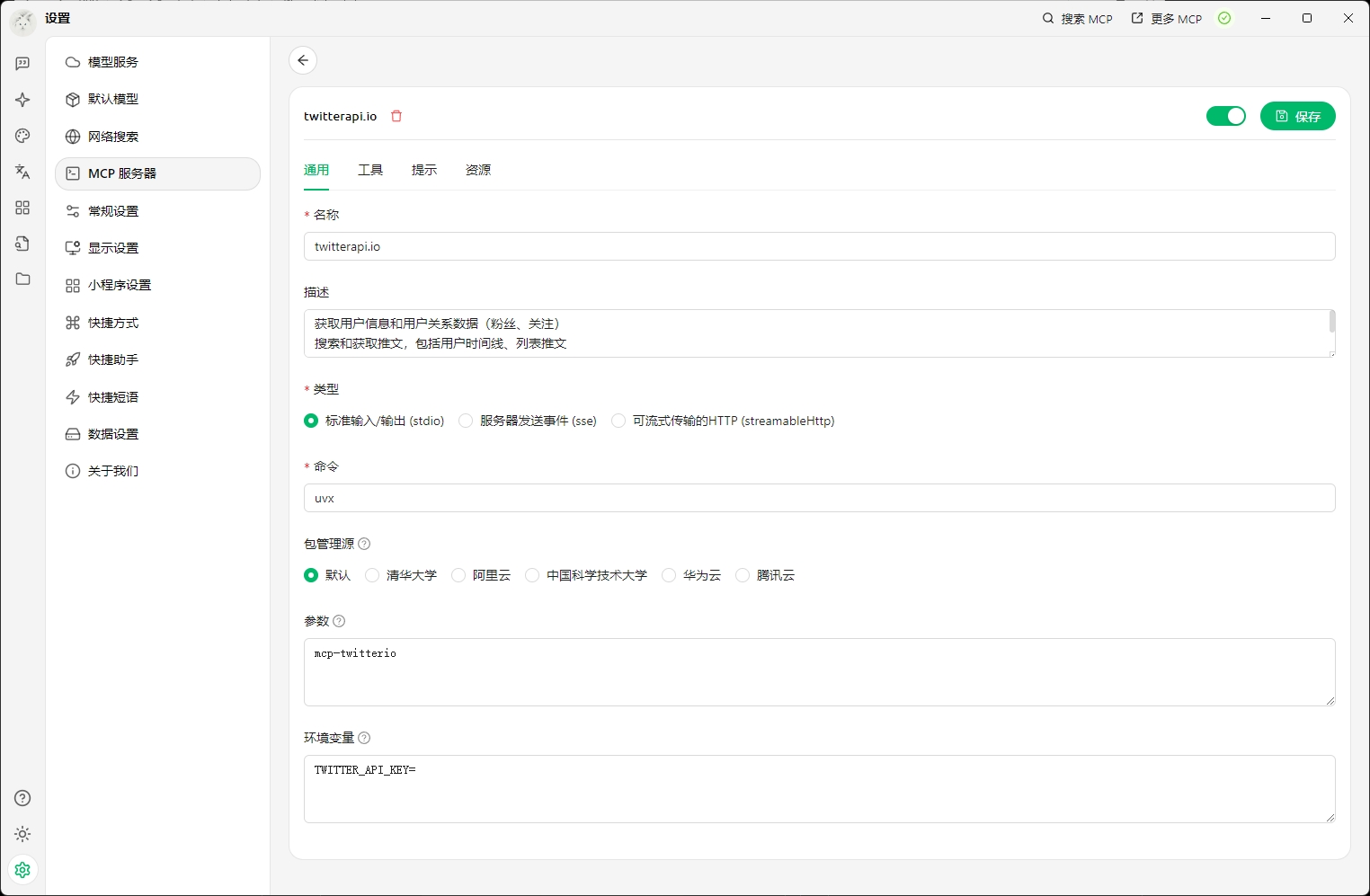
使用uvx命令直接在Cherry Studio等终端中使用
本项目已经上传到PyPI,可直接通过uvx在Cherry Studio中使用:
mcp-twitterio
需要从twitterapi.io官网获得TWITTER_API_KEY作为环境变量。
Cherry Studio使用示例
在Cherry Studio中使用mcp-twitterio服务:
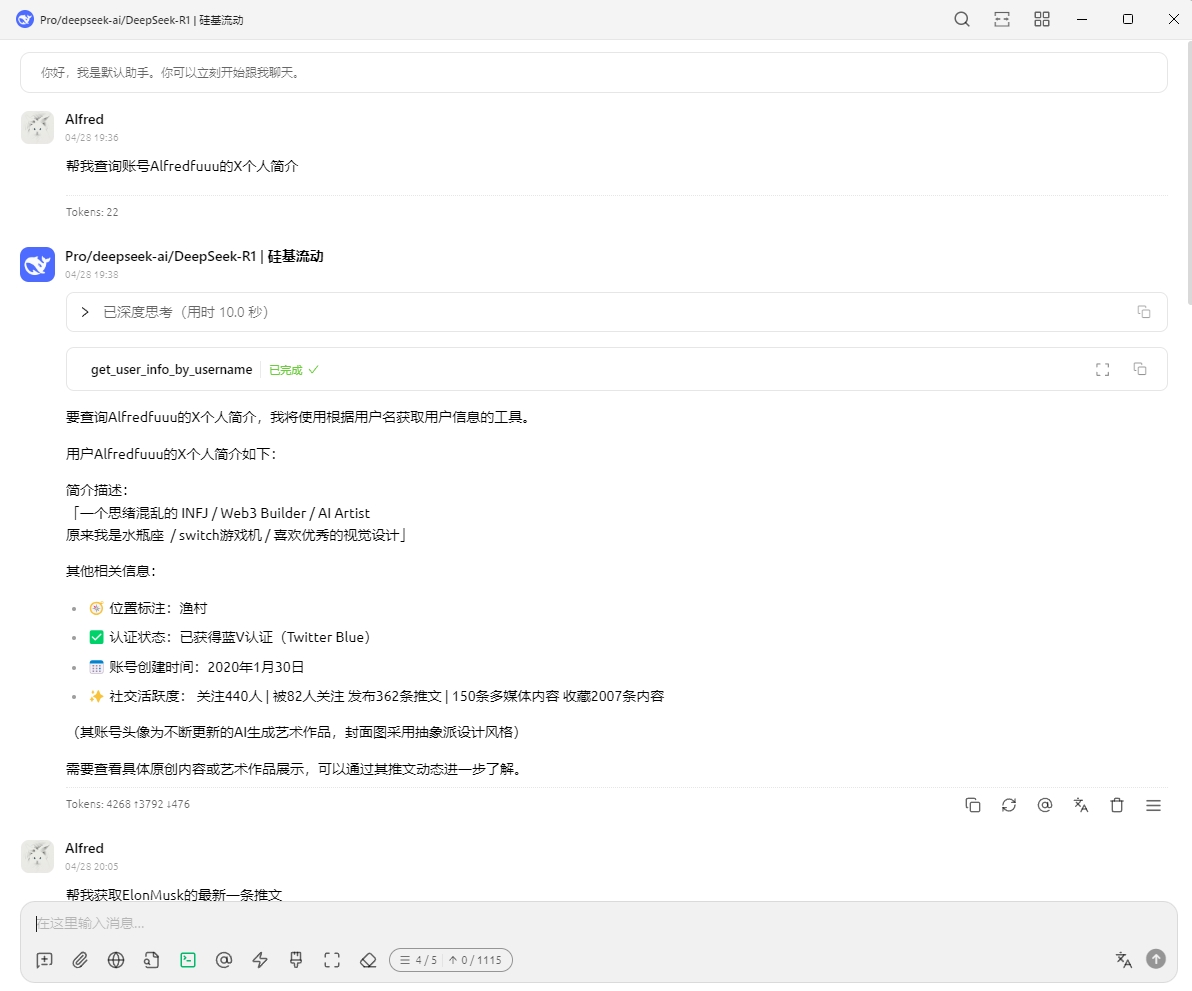
查询Twitter用户信息示例:
使用MCP CLI运行服务
mcp dev main.py
这将使用MCP Inspector启动服务,可通过本地网页界面测试其功能。
安装到Claude Desktop
要在Claude Desktop中使用此服务:
mcp install main.py --name "Twitter API"
直接执行
python main.py
可用的工具
用户相关工具
get_user_info_by_username- 根据用户名获取Twitter用户信息batch_get_users_by_ids- 批量获取用户信息get_user_last_tweets- 获取用户最新的推文get_user_followers- 获取用户的粉丝列表get_user_followings- 获取用户的关注列表get_user_mentions- 获取用户被提及的推文
推文相关工具
get_tweets_by_ids- 通过推文ID获取推文get_tweet_replies- 获取推文的回复get_tweet_quotations- 获取引用推文的推文get_tweet_retweeters- 获取转发推文的用户get_list_tweets- 获取列表中的推文advanced_search_tweets- 高级搜索推文
示例使用场景
使用Claude与此MCP服务的交互示例:
-
获取用户信息:
“请获取Twitter用户’elonmusk’的个人资料信息。” -
搜索推文:
“请通过高级搜索找到关于’人工智能’的最新推文,限制结果为5条。” -
查看用户推文:
“显示用户’elonmusk’的最新3条推文。” -
获取推文回复:
“获取ID为’1234567890’的推文的所有回复。” -
了解推文引用:
“查看有哪些用户引用了ID为’1234567890’的推文。”
注意事项
- 你需要一个有效的twitterapi.io API密钥才能使用此服务
- 某些API调用可能受到twitterapi.io的速率限制
- 确保遵守Twitter的服务条款和API使用政策
开发与测试
项目包含examples目录中的客户端示例代码,可用于了解如何从Python程序中调用此MCP服务。
tests目录包含基本的单元测试,可确保服务核心功能正常工作。
Dev Tools Supporting MCP
The following are the main code editors that support the Model Context Protocol. Click the link to visit the official website for more information.







