
Mcp Web Search Tool
What is Mcp Web Search Tool
The mcp-web-search-tool is a powerful Model Context Protocol (MCP) server that provides real-time web search capabilities to any AI model, allowing for the retrieval of up-to-date information through pluggable search providers.
Use cases
Use cases include asking about current events, weather updates, sports scores, stock market performance, and general information queries that require timely answers.
How to use
To use the mcp-web-search-tool, clone the repository, install dependencies, configure environment variables, build the project, and start the server. Integration with AI models like Claude Desktop is also supported for real-time queries.
Key features
Key features include real-time information access, pluggable search providers for modularity, structured output in JSON format, and smart query handling that categorizes queries for context-aware responses.
Where to use
The mcp-web-search-tool can be used in various fields such as AI development, customer service, news aggregation, and any application requiring real-time information retrieval.
Clients Supporting MCP
The following are the main client software that supports the Model Context Protocol. Click the link to visit the official website for more information.





Overview
What is Mcp Web Search Tool
The mcp-web-search-tool is a powerful Model Context Protocol (MCP) server that provides real-time web search capabilities to any AI model, allowing for the retrieval of up-to-date information through pluggable search providers.
Use cases
Use cases include asking about current events, weather updates, sports scores, stock market performance, and general information queries that require timely answers.
How to use
To use the mcp-web-search-tool, clone the repository, install dependencies, configure environment variables, build the project, and start the server. Integration with AI models like Claude Desktop is also supported for real-time queries.
Key features
Key features include real-time information access, pluggable search providers for modularity, structured output in JSON format, and smart query handling that categorizes queries for context-aware responses.
Where to use
The mcp-web-search-tool can be used in various fields such as AI development, customer service, news aggregation, and any application requiring real-time information retrieval.
Clients Supporting MCP
The following are the main client software that supports the Model Context Protocol. Click the link to visit the official website for more information.
Content
MCP Web Search Tool
A powerful Model Context Protocol (MCP) server providing real-time web search capabilities through pluggable search providers. Currently integrated with the Brave Search API.
✨ Features
- Real-Time Information Access: Enables AI assistants to retrieve up-to-date information from the web
- Pluggable Search Providers: Modular architecture allows for easy switching between different search engines
- Structured Output Format: Returns search results in a clean, consistent JSON format
- Smart Query Handling: Automatically categorizes queries and provides AI assistants with context-aware guidance
📋 Requirements
- Node.js: v16.x or newer
- npm: v7.x or newer
- Brave Search API Key: Required for accessing the Brave Search API
🚀 Installation
-
Clone the Repository:
git clone https://github.com/gabrimatic/mcp-web-search-tool.git cd mcp-web-search-tool -
Install Dependencies:
npm install -
Configure Environment Variables:
Create a.envfile in the project root:BRAVE_API_KEY=your_api_key_here MAX_RESULTS=10 # Optional: Default is 10 REQUEST_TIMEOUT=10000 # Optional: Default is 10000ms -
Build the Project:
npm run build
💻 Usage
Starting the Server
npm start
Testing the Server
node test-server.js
Integration with Claude Desktop App (optional)
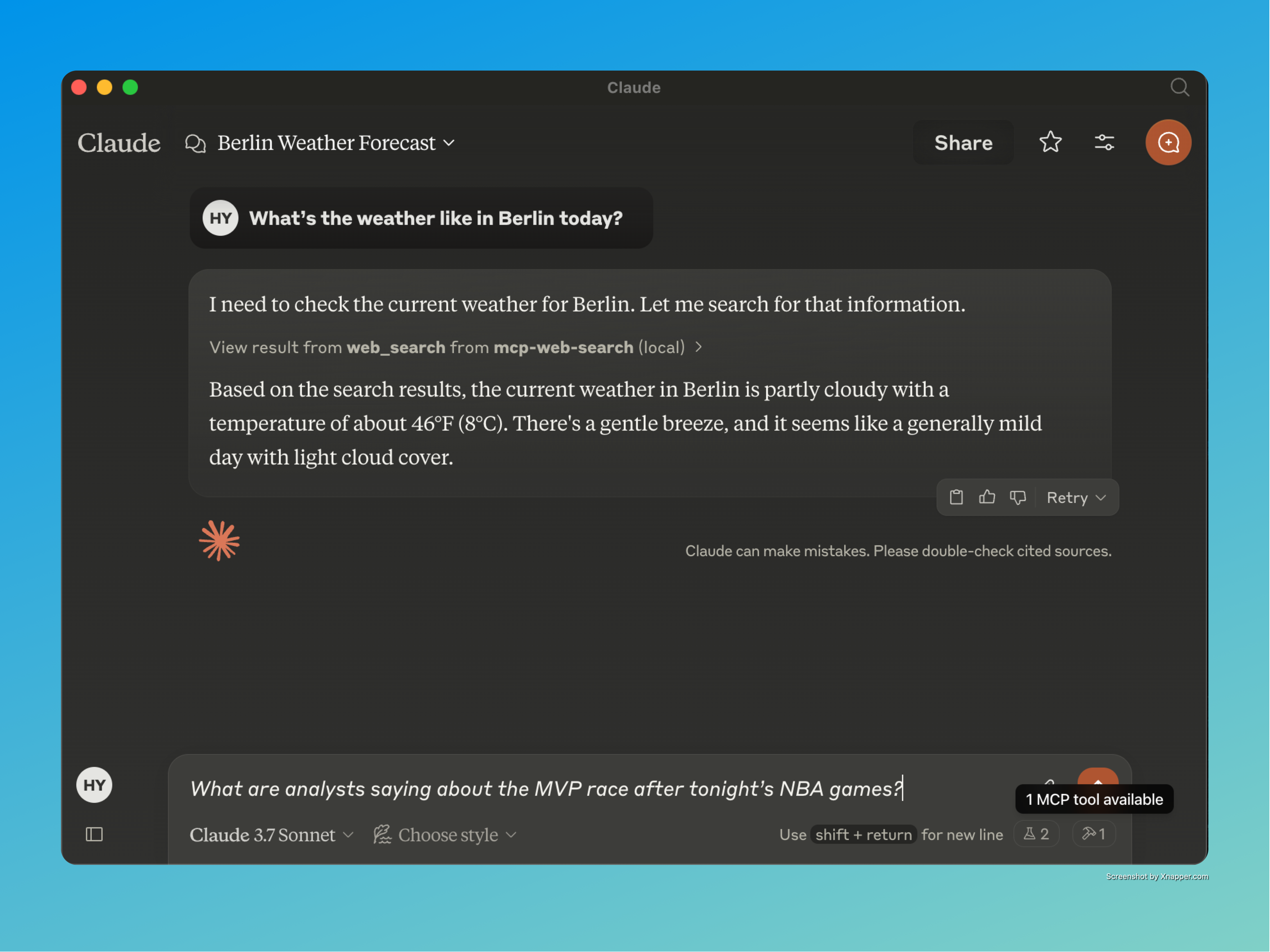
One of the most exciting aspects of this project is its seamless integration with the Claude Desktop app. This integration allows users to ask Claude questions that require real-time information, and Claude will automatically use the web search tool to provide up-to-date answers.
Configuration
-
Create a
claude_desktop_config.jsonfile:{ "mcpServers": { "mcp-web-search": { "command": "node", "args": [ "/path/to/your/mcp-web-search-tool/build/index.js" ] } } } -
Launch Claude Desktop with your configuration file.
-
Ask Claude questions requiring real-time information, and it will automatically use the web search tool.
🎥 YouTube Video
Watch Claude in action using the MCP Web Search Tool for real-time AI browsing!
📺 Claude + MCP Web Search – Live Demo
Example Queries:
- “What are analysts saying about the MVP race after tonight’s NBA games?”
- “What are the latest news about artificial intelligence?”
- “What’s the weather like in New York today?”
- “How is the stock market performing right now?”
🛠️ Available Tools
Web Search
- Tool Name:
web_search - Description: Search the web for REAL-TIME information
- Necessarily For: Weather, current events, sports scores, stock market updates
- Parameters:
search_term(string): The search term to look upprovider(string, optional): Search provider (defaults to Brave)
Query Categories
The tool automatically categorizes queries into:
- Weather information
- Current events and news
- Sports scores and results
- Stock market and financial data
- Time-sensitive information
- General information seeking
📜 License
👨💻 Developer
© All rights reserved.
📝 Medium Article
Read more about the MCP Web Search Tool, its capabilities, and how it enhances AI-driven web search in our detailed Medium article:
📖 Deep Dive into MCP Web Search Tool
☕ Support

Dev Tools Supporting MCP
The following are the main code editors that support the Model Context Protocol. Click the link to visit the official website for more information.







