
Mcp Wikipedia
What is Mcp Wikipedia
mcp-wikipedia is a Model Control Protocol (MCP) server implemented in Python, designed to provide Wikipedia content related to specific topics in the context of Generative AI.
Use cases
Use cases for mcp-wikipedia include generating educational content, answering questions in real-time, enhancing chatbot responses, and supporting research by providing quick access to Wikipedia articles.
How to use
To use mcp-wikipedia, install the required dependencies using ‘pip install -r requirements.txt’, then start the server with ‘python src/server.py’. You can send a POST request to ‘/mcp’ with a JSON body containing a ‘topic’ field to retrieve information.
Key features
Key features of mcp-wikipedia include easy setup, a simple API for retrieving Wikipedia content, and integration capabilities with tools like Cursor Composer for enhanced user interaction.
Where to use
mcp-wikipedia can be used in various fields such as education, research, content creation, and any application requiring access to Wikipedia information for topic analysis.
Clients Supporting MCP
The following are the main client software that supports the Model Context Protocol. Click the link to visit the official website for more information.





Overview
What is Mcp Wikipedia
mcp-wikipedia is a Model Control Protocol (MCP) server implemented in Python, designed to provide Wikipedia content related to specific topics in the context of Generative AI.
Use cases
Use cases for mcp-wikipedia include generating educational content, answering questions in real-time, enhancing chatbot responses, and supporting research by providing quick access to Wikipedia articles.
How to use
To use mcp-wikipedia, install the required dependencies using ‘pip install -r requirements.txt’, then start the server with ‘python src/server.py’. You can send a POST request to ‘/mcp’ with a JSON body containing a ‘topic’ field to retrieve information.
Key features
Key features of mcp-wikipedia include easy setup, a simple API for retrieving Wikipedia content, and integration capabilities with tools like Cursor Composer for enhanced user interaction.
Where to use
mcp-wikipedia can be used in various fields such as education, research, content creation, and any application requiring access to Wikipedia information for topic analysis.
Clients Supporting MCP
The following are the main client software that supports the Model Context Protocol. Click the link to visit the official website for more information.
Content
Wikipedia MCP Server
This is an MCP (Model Control Protocol) server that provides Wikipedia content for the requested topic.
Setup
- Install the required dependencies:
pip install -r requirements.txt
- Start the server:
python src/server.py
The server will run on http://localhost:5000.
API Usage
Using the API from the CLI
Send a POST request to /mcp with a JSON body containing a topic field:
curl -X POST http://localhost:5000/mcp \
  -H "Content-Type: application/json" \
  -d '{"topic": "Python_(programming_language)"}'
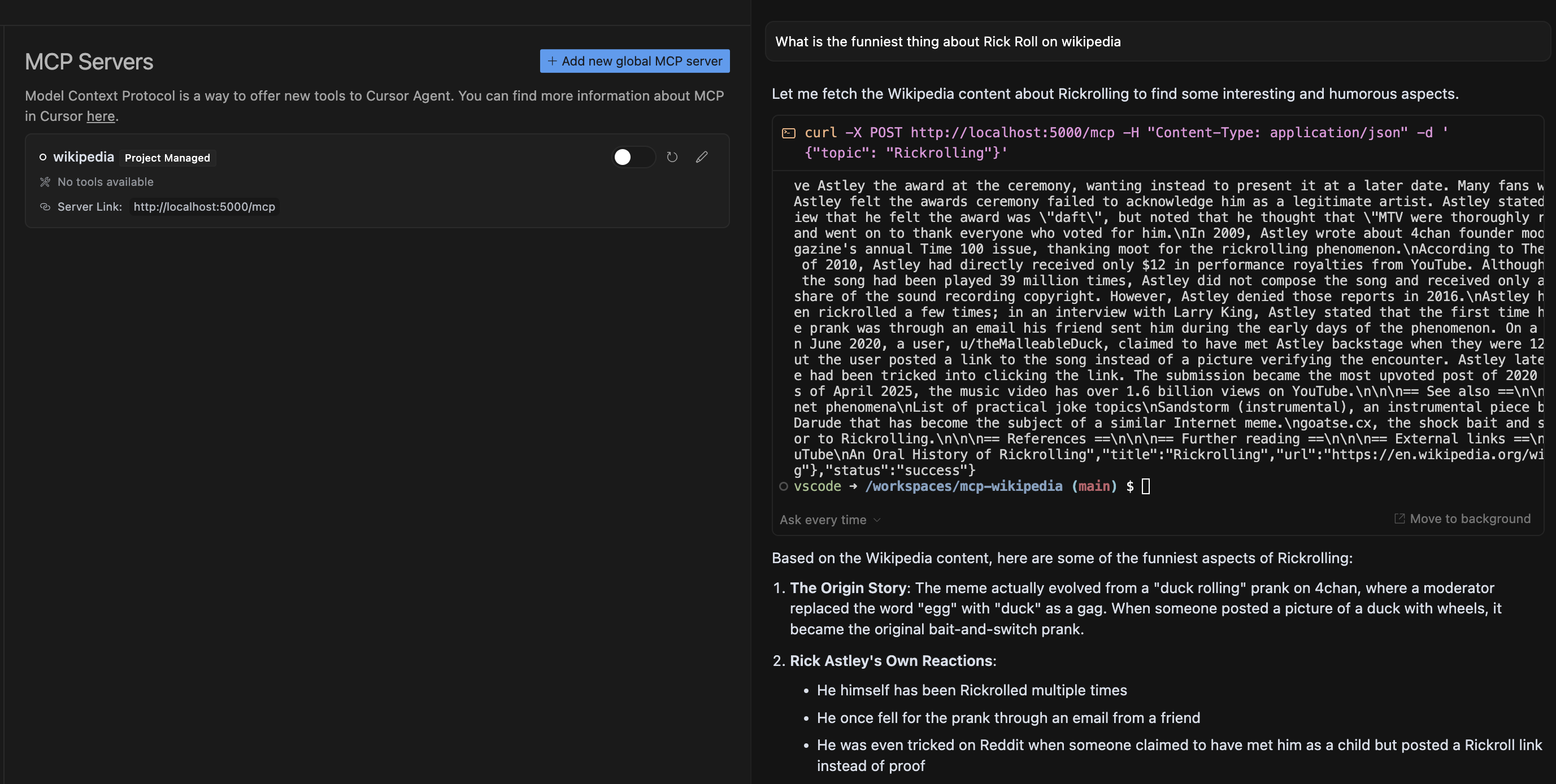
Using the API from Cursor Composer
- Ask a question about a topic on Wikipedia
- Cursor will display a proposed MCP request and ask for your permission to run the tool
- After approving, Cursor will execute the request to the MCP Server
- The prompt result will be based on the selected models analysis of the MCP Server response
Response Format
Successful response:
{
  "status": "success",
  "data": {
    "title": "Page Title",
    "content": "Page Content",
    "url": "Wikipedia URL"
  }
}
Error response:
{
  "status": "error",
  "error": "Error message"
}
Testing
Run the test script to verify the server is working:
python src/test_server.py
Dev Tools Supporting MCP
The following are the main code editors that support the Model Context Protocol. Click the link to visit the official website for more information.







