
Mcp Windows Website Downloader
What is Mcp Windows Website Downloader
mcp-windows-website-downloader is an MCP tool designed to download entire Windows documentation websites and their assets, organizing them for AI use, particularly for RAG indexing.
Use cases
Use cases include downloading technical documentation for software projects, archiving educational materials for machine learning applications, and preparing website content for analysis and indexing in AI systems.
How to use
To use mcp-windows-website-downloader, clone the repository, set up a virtual environment, install the necessary packages, and configure the command in your claude_desktop_config.json. Then, you can start the server and call the download tool with the desired URL.
Key features
Key features include the ability to download complete documentation sites, maintain a basic link structure, organize assets like CSS, JS, and images, and create an index for RAG systems.
Where to use
mcp-windows-website-downloader can be used in fields such as software documentation, educational resources, and any scenario where comprehensive website content needs to be archived for AI processing.
Clients Supporting MCP
The following are the main client software that supports the Model Context Protocol. Click the link to visit the official website for more information.





Overview
What is Mcp Windows Website Downloader
mcp-windows-website-downloader is an MCP tool designed to download entire Windows documentation websites and their assets, organizing them for AI use, particularly for RAG indexing.
Use cases
Use cases include downloading technical documentation for software projects, archiving educational materials for machine learning applications, and preparing website content for analysis and indexing in AI systems.
How to use
To use mcp-windows-website-downloader, clone the repository, set up a virtual environment, install the necessary packages, and configure the command in your claude_desktop_config.json. Then, you can start the server and call the download tool with the desired URL.
Key features
Key features include the ability to download complete documentation sites, maintain a basic link structure, organize assets like CSS, JS, and images, and create an index for RAG systems.
Where to use
mcp-windows-website-downloader can be used in fields such as software documentation, educational resources, and any scenario where comprehensive website content needs to be archived for AI processing.
Clients Supporting MCP
The following are the main client software that supports the Model Context Protocol. Click the link to visit the official website for more information.
Content

MCP Website Downloader
Simple MCP server for downloading documentation websites and preparing them for RAG indexing.
Features
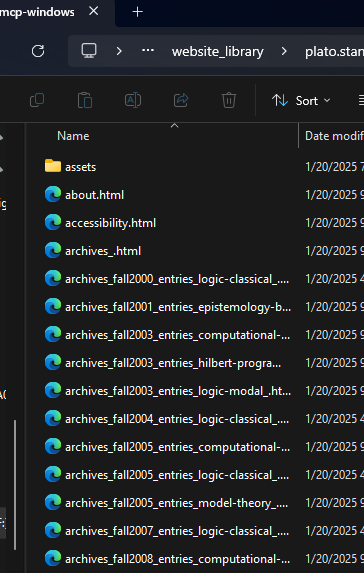
- Downloads complete documentation sites, well big chunks anyway.
- Maintains link structure and navigation, not really. lol
- Downloads and organizes assets (CSS, JS, images), but isn’t really AI friendly and it all probably needs some kind of parsing or vectorizing into a db or something.
- Creates clean index for RAG systems, currently seems to make an index in each folder, not even looked at it.
- Simple single-purpose MCP interface, yup.
Installation
Fork and download, cd to the repository.
uv venv
./venv/Scripts/activate
pip install -e .
Put this in your claude_desktop_config.json with your own paths:
Other Usage you don’t need to worry about and may be hallucinatory lol:
- Start the server:
python -m mcp_windows_website_downloader.server --library docs_library
- Use through Claude Desktop or other MCP clients:
result = await server.call_tool("download", {
    "url": "https://docs.example.com"
})
Output Structure
docs_library/
  domain_name/
    index.html
    about.html
    docs/
      getting-started.html
      ...
    assets/
      css/
      js/
      images/
      fonts/
    rag_index.json
Development
The server follows standard MCP architecture:
src/
  mcp_windows_website_downloader/
    __init__.py
    server.py    # MCP server implementation
    core.py      # Core downloader functionality
    utils.py     # Helper utilities
Components
server.py: Main MCP server implementation that handles tool registration and requestscore.py: Core website downloading functionality with proper asset handlingutils.py: Helper utilities for file handling and URL processing
Design Principles
-
Single Responsibility
- Each module has one clear purpose
- Server handles MCP interface
- Core handles downloading
- Utils handles common operations
-
Clean Structure
- Maintains original site structure
- Organizes assets by type
- Creates clear index for RAG systems
-
Robust Operation
- Proper error handling
- Reasonable depth limits
- Asset download verification
- Clean URL/path processing
RAG Index
The rag_index.json file contains:
{
  "url": "https://docs.example.com",
  "domain": "docs.example.com",
  "pages": 42,
  "path": "/path/to/site"
}
Contributing
- Fork the repository
- Create a feature branch
- Make your changes
- Submit a pull request
License
MIT License - See LICENSE file
Error Handling
The server handles common issues:
- Invalid URLs
- Network errors
- Asset download failures
- Malformed HTML
- Deep recursion
- File system errors
Error responses follow the format:
{
  "status": "error",
  "error": "Detailed error message"
}
Success responses:
{
  "status": "success",
  "path": "/path/to/downloaded/site",
  "pages": 42
}
Dev Tools Supporting MCP
The following are the main code editors that support the Model Context Protocol. Click the link to visit the official website for more information.







