
Mcp Wolframalpha
What is Mcp Wolframalpha
mcp-wolframalpha is a Python-powered Model Context Protocol (MCP) server and client that integrates the Wolfram Alpha API, enabling chat applications to perform computational queries and access structured knowledge for enhanced conversational capabilities.
Use cases
Use cases include educational chatbots that assist students with math and science problems, research assistants that provide quick data analysis, and interactive applications that require real-time knowledge retrieval from Wolfram Alpha.
How to use
To use mcp-wolframalpha, clone the repository, set up environment variables including your Wolfram Alpha API key, install the required packages, and configure the MCP server according to your application needs. You can then interact with the server through a client that connects to Wolfram Alpha.
Key features
Key features include seamless Wolfram|Alpha integration for math and science queries, a modular architecture for easy extension, multi-client support for handling various interactions, an MCP-Client example using Gemini via LangChain, and a user-friendly web interface using Gradio.
Where to use
mcp-wolframalpha can be used in various fields such as education, research, data analysis, and any chat-based applications that require computational intelligence and structured information retrieval.
Clients Supporting MCP
The following are the main client software that supports the Model Context Protocol. Click the link to visit the official website for more information.





Overview
What is Mcp Wolframalpha
mcp-wolframalpha is a Python-powered Model Context Protocol (MCP) server and client that integrates the Wolfram Alpha API, enabling chat applications to perform computational queries and access structured knowledge for enhanced conversational capabilities.
Use cases
Use cases include educational chatbots that assist students with math and science problems, research assistants that provide quick data analysis, and interactive applications that require real-time knowledge retrieval from Wolfram Alpha.
How to use
To use mcp-wolframalpha, clone the repository, set up environment variables including your Wolfram Alpha API key, install the required packages, and configure the MCP server according to your application needs. You can then interact with the server through a client that connects to Wolfram Alpha.
Key features
Key features include seamless Wolfram|Alpha integration for math and science queries, a modular architecture for easy extension, multi-client support for handling various interactions, an MCP-Client example using Gemini via LangChain, and a user-friendly web interface using Gradio.
Where to use
mcp-wolframalpha can be used in various fields such as education, research, data analysis, and any chat-based applications that require computational intelligence and structured information retrieval.
Clients Supporting MCP
The following are the main client software that supports the Model Context Protocol. Click the link to visit the official website for more information.
Content
MCP Wolfram Alpha (Server + Client)
Seamlessly integrate Wolfram Alpha into your chat applications.
This project implements an MCP (Model Context Protocol) server designed to interface with the Wolfram Alpha API. It enables chat-based applications to perform computational queries and retrieve structured knowledge, facilitating advanced conversational capabilities.
Included is an MCP-Client example utilizing Gemini via LangChain, demonstrating how to connect large language models to the MCP server for real-time interactions with Wolfram Alpha’s knowledge engine.

Features
-
Wolfram|Alpha Integration for math, science, and data queries.
-
Modular Architecture Easily extendable to support additional APIs and functionalities.
-
Multi-Client Support Seamlessly handle interactions from multiple clients or interfaces.
-
MCP-Client example using Gemini (via LangChain).
-
UI Support using Gradio for a user-friendly web interface to interact with Google AI and Wolfram Alpha MCP server.
Installation
Clone the Repo
git clone https://github.com/ricocf/mcp-wolframalpha.git

cd mcp-wolframalpha
Set Up Environment Variables
Create a .env file based on the example:
-
WOLFRAM_API_KEY=your_wolframalpha_appid
-
GeminiAPI=your_google_gemini_api_key (Optional if using Client method below.)
Install Requirements
pip install -r requirements.txt
Configuration
To use with the VSCode MCP Server:
- Create a configuration file at
.vscode/mcp.jsonin your project root. - Use the example provided in
configs/vscode_mcp.jsonas a template. - For more details, refer to the VSCode MCP Server Guide.
To use with Claude Desktop:
{
  "mcpServers": {
    "WolframAlphaServer": {
      "command": "python3",
      "args": [
        "/path/to/src/core/server.py"
      ]
    }
  }
}
Client Usage Example
This project includes an LLM client that communicates with the MCP server.
Run with Gradio UI
- Required: GeminiAPI
- Provides a local web interface to interact with Google AI and Wolfram Alpha.
- To run the client directly from the command line:
python main.py --ui
Docker
To build and run the client inside a Docker container:
docker build -t wolframalphaui -f .devops/ui.Dockerfile .

docker run wolframalphaui
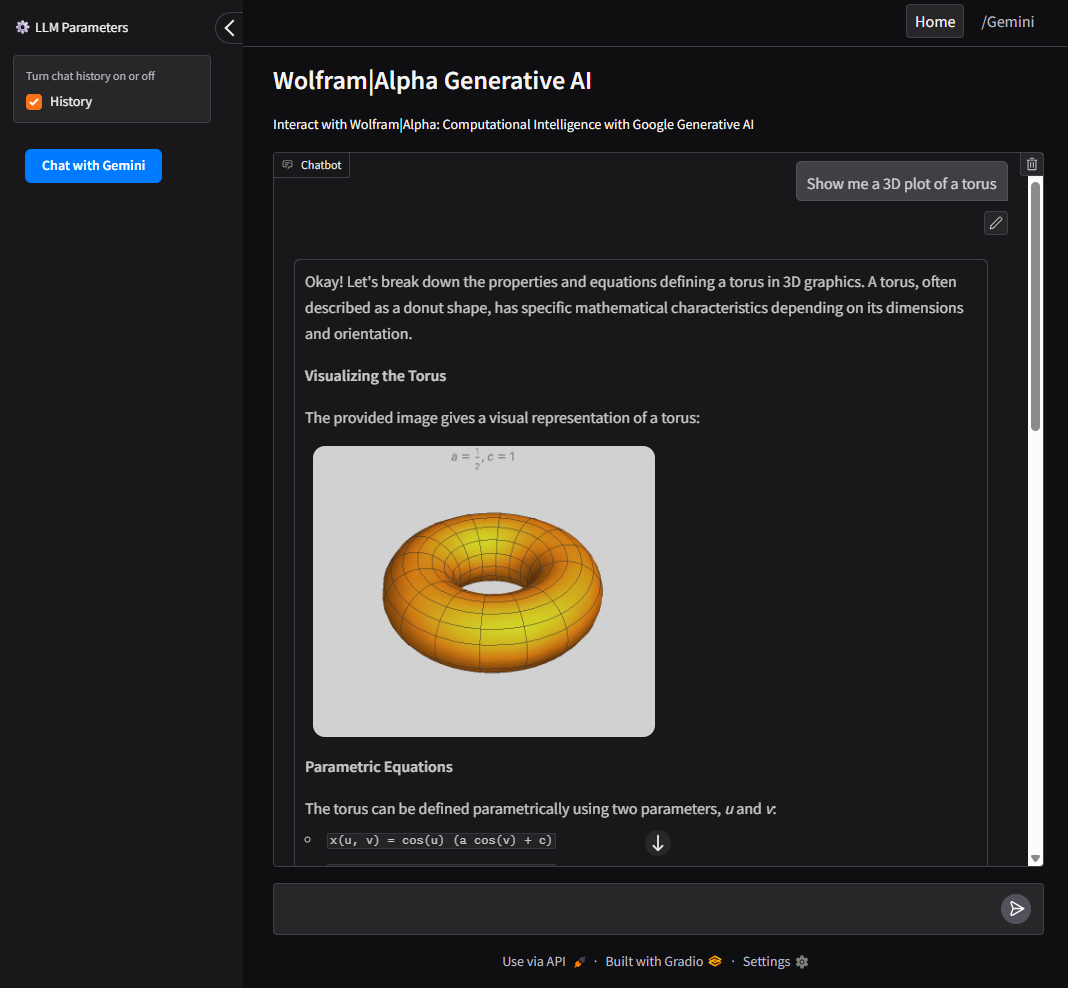
UI
- Intuitive interface built with Gradio to interact with both Google AI (Gemini) and the Wolfram Alpha MCP server.
- Allows users to switch between Wolfram Alpha, Google AI (Gemini), and query history.
Run as CLI Tool
- Required: GeminiAPI
- To run the client directly from the command line:
python main.py
Docker
To build and run the client inside a Docker container:
docker build -t wolframalpha -f .devops/llm.Dockerfile .

docker run -it wolframalpha
Dev Tools Supporting MCP
The following are the main code editors that support the Model Context Protocol. Click the link to visit the official website for more information.







