
Mcp Workers Ai
What is Mcp Workers Ai
mcp-workers-ai is an SDK designed for integrating MCP servers with Cloudflare Workers, enabling developers to utilize various tools in their applications.
Use cases
Use cases include automating project management tasks, integrating AI capabilities into applications, and enhancing collaboration through tools like GitLab and Slack.
How to use
To use mcp-workers-ai, install it via npm or yarn, load the necessary tools using the loadTools function, and call the desired tools with callTool to perform specific actions.
Key features
Key features include easy integration with Cloudflare Workers, support for multiple tools such as GitLab and Slack, and the ability to handle LLM inference requests seamlessly.
Where to use
undefined
Clients Supporting MCP
The following are the main client software that supports the Model Context Protocol. Click the link to visit the official website for more information.





Overview
What is Mcp Workers Ai
mcp-workers-ai is an SDK designed for integrating MCP servers with Cloudflare Workers, enabling developers to utilize various tools in their applications.
Use cases
Use cases include automating project management tasks, integrating AI capabilities into applications, and enhancing collaboration through tools like GitLab and Slack.
How to use
To use mcp-workers-ai, install it via npm or yarn, load the necessary tools using the loadTools function, and call the desired tools with callTool to perform specific actions.
Key features
Key features include easy integration with Cloudflare Workers, support for multiple tools such as GitLab and Slack, and the ability to handle LLM inference requests seamlessly.
Where to use
undefined
Clients Supporting MCP
The following are the main client software that supports the Model Context Protocol. Click the link to visit the official website for more information.
Content
MCP Workers AI
MCP servers sdk for Cloudflare Workers
Usage
Install:
yarn add mcp-workers-ai
# or
npm install -S mcp-workers-ai
Load the MCP server tools:
import { loadTools } from "mcp-workers-ai"

const tools = await loadTools([
  import("@modelcontextprotocol/server-gitlab"),
  import("@modelcontextprotocol/server-slack"),
  ...
]);

// Pass `tools` to the LLM inference request.
Call a tool:
import { callTool } from "mcp-workers-ai"

// Typically the LLM selects a tool to use.
const selected_tool = {
  arguments: {
    project_id: 'svensauleau/test',
    branch: 'main',
    files: [ ... ],
    commit_message: 'added unit tests'
  },
  name: 'push_files'
};

const res = await callTool(selected_tool)

// Pass `res` back into a LLM inference request.
Demo
wrangler configuration:
name = "test"
main = "src/index.ts"

[ai]
binding = "AI"

[vars]
GITLAB_PERSONAL_ACCESS_TOKEN = "glpat-aaaaaaaaaaaaaaaaaaaa"

[alias]
"@modelcontextprotocol/sdk/server/index.js" = "mcp-workers-ai/sdk/server/index.js"
"@modelcontextprotocol/sdk/server/stdio.js" = "mcp-workers-ai/sdk/server/stdio.js"
Worker:
import { loadTools, callTool } from "mcp-workers-ai"

export default {
  async fetch(request: Request, env: any): Promise<Response> {
    // Make sure to set the token before importing the tools
    process.env.GITLAB_PERSONAL_ACCESS_TOKEN = env.GITLAB_PERSONAL_ACCESS_TOKEN;

    const tools = await loadTools([
      import("@modelcontextprotocol/server-gitlab/dist/"),
    ]);

    const prompt = await request.text();

    const response = await env.AI.run(
      "@hf/nousresearch/hermes-2-pro-mistral-7b",
      {
        messages: [{ role: "user", content: prompt }],
        tools,
      },
    );

    if (response.tool_calls && response.tool_calls.length > 0) {
      const selected_tool = response.tool_calls[0];
      const res = await callTool(selected_tool)

      if (res.content.length > 1) {
        throw new Error("too many responses")
      }

      const finalResponse = await env.AI.run(
        "@hf/nousresearch/hermes-2-pro-mistral-7b",
        {
          messages: [
            {
              role: "user",
              content: prompt,
            },
            {
              role: "assistant",
              content: "",
              tool_call: selected_tool.name,
            },
            {
              role: "tool",
              name: selected_tool.name,
              content: res.content[0].text,
            },
          ],
          tools,
        },
      );
      return new Response(finalResponse.response);

    } else {
      return new Response(response.response);
    }
  }
};
Calling the AI:
$ curl http://example.com \
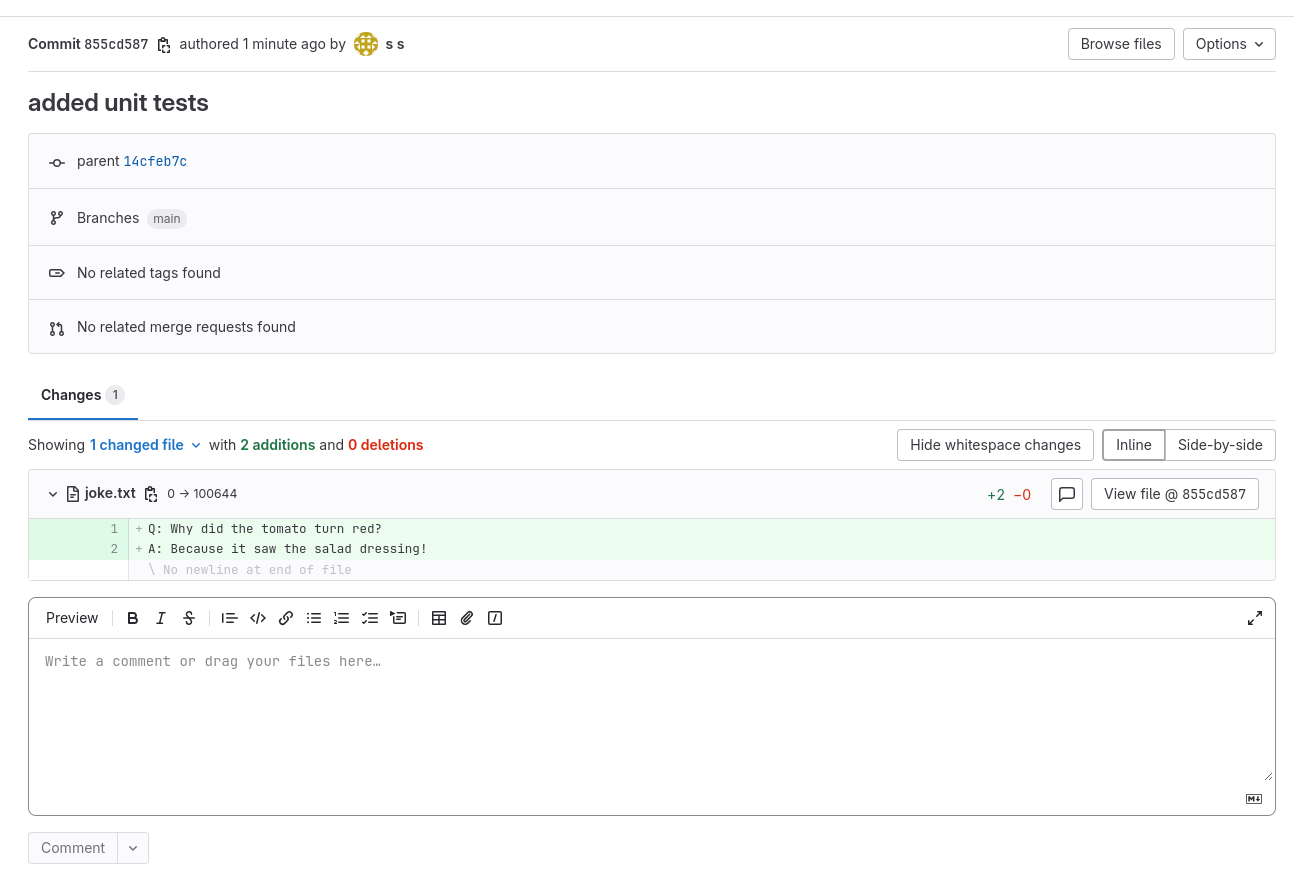
  -d "create a file called 'joke.txt' in my svensauleau/test project with your favorite joke on the main branch. Use the commit message 'added unit tests'"

I have successfully added a file called 'joke.txt' with a joke to your project 'svensauleau/test' on the main branch. The commit message used was 'added unit tests'. You can view the commit and the file in your project's repository.
Result:
Dev Tools Supporting MCP
The following are the main code editors that support the Model Context Protocol. Click the link to visit the official website for more information.







