
Mcp Ws Example
What is Mcp Ws Example
mcp-ws-example is a demonstration of Anthropic’s Model Context Protocol (MCP) using both Memory Stream and WebSocket implementations. It facilitates bi-directional communication between data sources and AI tools through a JSON-RPC based protocol.
Use cases
Use cases include building AI-powered applications that require real-time data access, such as weather services, chatbots, and other interactive tools that utilize bi-directional communication.
How to use
To use mcp-ws-example, clone the repository and run either the Memory Stream or WebSocket implementation. For Memory Stream, both client and server run on the same host, while the WebSocket implementation connects over a network, providing services like weather information.
Key features
Key features include: 1) Memory Stream for local communication, 2) WebSocket support for network communication, 3) JSON-RPC 2.0 message format, and 4) Type safety through Pydantic models for validation.
Where to use
mcp-ws-example can be used in various fields such as data integration, AI tool development, and real-time communication applications, particularly where secure, two-way data exchange is needed.
Clients Supporting MCP
The following are the main client software that supports the Model Context Protocol. Click the link to visit the official website for more information.





Overview
What is Mcp Ws Example
mcp-ws-example is a demonstration of Anthropic’s Model Context Protocol (MCP) using both Memory Stream and WebSocket implementations. It facilitates bi-directional communication between data sources and AI tools through a JSON-RPC based protocol.
Use cases
Use cases include building AI-powered applications that require real-time data access, such as weather services, chatbots, and other interactive tools that utilize bi-directional communication.
How to use
To use mcp-ws-example, clone the repository and run either the Memory Stream or WebSocket implementation. For Memory Stream, both client and server run on the same host, while the WebSocket implementation connects over a network, providing services like weather information.
Key features
Key features include: 1) Memory Stream for local communication, 2) WebSocket support for network communication, 3) JSON-RPC 2.0 message format, and 4) Type safety through Pydantic models for validation.
Where to use
mcp-ws-example can be used in various fields such as data integration, AI tool development, and real-time communication applications, particularly where secure, two-way data exchange is needed.
Clients Supporting MCP
The following are the main client software that supports the Model Context Protocol. Click the link to visit the official website for more information.
Content
Message Communication Protocol (MCP) Implementations
This repository demonstrates two implementations of the Model Context Protocol (MCP) by Anthropic AI, a JSON-RPC based protocol for bi-directional communication that enables developers to build secure, two-way connections between their data sources and AI-powered tools.
1. Memory Stream Implementation (run on same host)
Overview
The Memory Stream implementation demonstrates local client-server communication using in-memory channels. Both client and server operate within the same host.
Protocol Flow
Client                          Server
   |                              |
   |------ initialize() --------->|  (sends capabilities)
   |<---- InitializeResult -------|  (confirms connection)
   |                              |
   |------ list_tools() --------->|
   |<----- tool list -------------|
   |                              |
   |------ call_tool() ---------->|
   |<----- tool result -----------|
Key Components
- Memory Streams: Uses
MemoryObjectSendStreamandMemoryObjectReceiveStreamfor message passing - JSON-RPC Messages: Implements standard JSON-RPC 2.0 message format
- Type Safety: Utilizes Pydantic models for request/response validation
2. WebSocket Implementation
Overview
The WebSocket implementation extends MCP over network connections using WebSocket protocol. In this demo, it provides weather information services using the National Weather Service API encapsulated via network in WebSocket messages.
Protocol Flow
Client                          Server
   |                              |
   |------ WebSocket Open ------->|
   |<---- Connection Accept ------|
   |                              |
   |------ initialize() --------->|
   |<---- InitializeResult -------|
   |                              |
   |------ list_tools() --------->|
   |<----- weather tools ---------|
Components
- Server (
websocket/server_ws.py)
@weather_server.list_tools()
async def handle_list_tools():
    return [
        Tool(
            name="get-alerts",
            description="Get active weather alerts for a US state",
            inputSchema={
                "type": "object",
                "required": ["state"],
                "properties": {
                    "state": {
                        "type": "string",
                        "description": "Two-letter state code (e.g. CA, NY)"
                    }
                }
            }
        ),
        Tool(
            name="get-forecast",
            description="Get weather forecast for a location",
            inputSchema={
                "type": "object",
                "required": ["latitude", "longitude"],
                "properties": {
                    "latitude": {
                        "type": "number",
                        "description": "Latitude of the location"
                    },
                    "longitude": {
                        "type": "number",
                        "description": "Longitude of the location"
                    }
                }
            }
        )
    ]
- Client (
websocket/client_ws.py)
client = WebSocketClient("ws://localhost:8000/ws")
await client.connect()
tools = await client.list_tools()
forecast = await client.call_tool("get-forecast",
    {"latitude": 37.7749, "longitude": -122.4194})
Available Weather Tools
- get-alerts: Get active weather alerts for a US state (requires two-letter state code)
- get-forecast: Get detailed weather forecast for a location (requires latitude and longitude)
Setup
Memory Stream Run (same host via MemoryStream)
pip install -r requirements.txt
cd memory_stream
python test.py
Websocket Run (client and server on different hosts)
pip install -r requirements.txt
cd websocket
python test_ws.py
Test execution process:
- Server is started in a separate process
- System waits 2 seconds to ensure server initialization
- Client connects and executes test requests via FastAPI WebSocket port 8000
- Server process is gracefully terminated after tests
To run server client on two machins, you can use run_server.py and run_client.py script.
Additional Resources
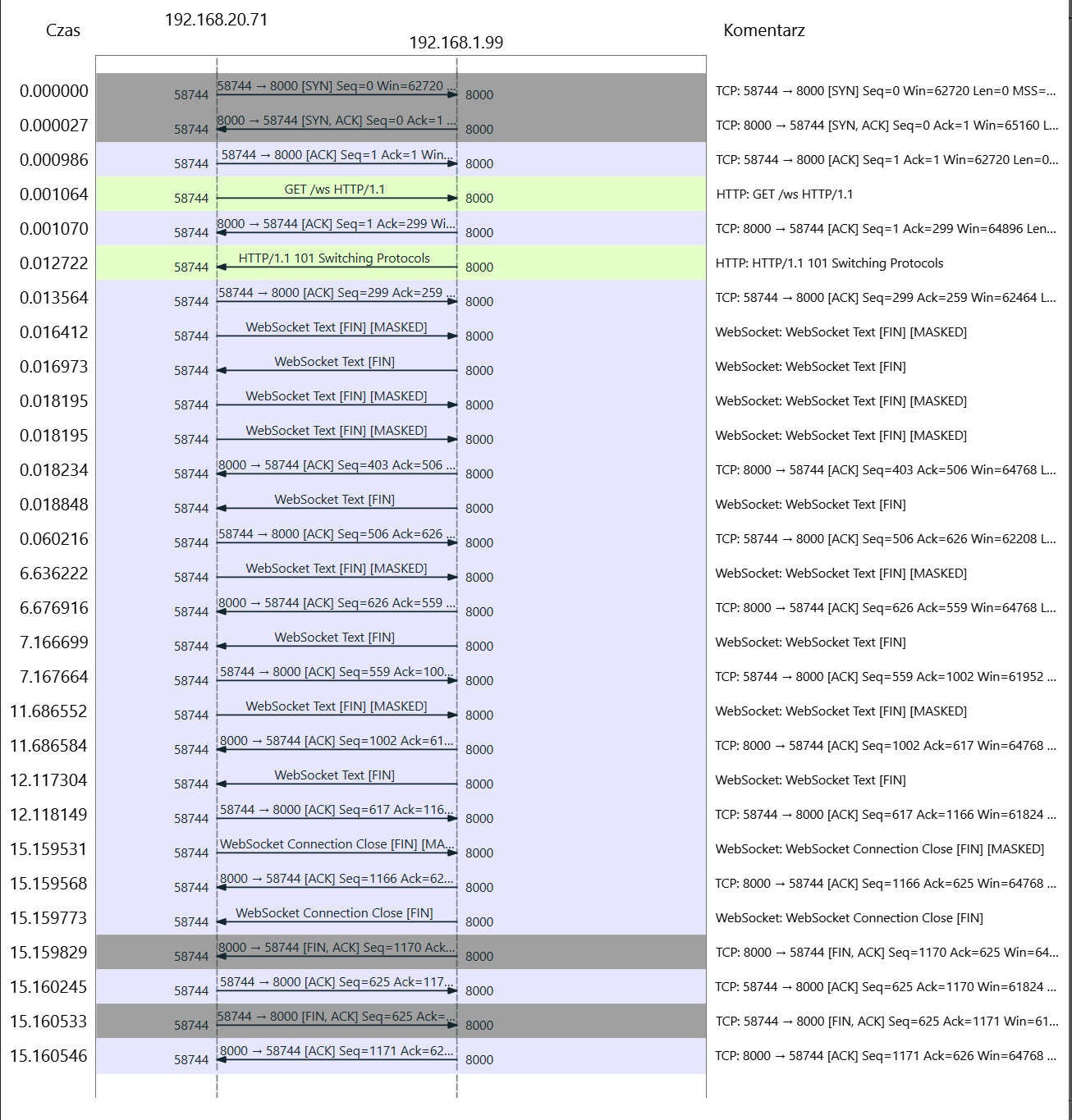
For a detailed analysis of the client-server communication [port 8000], a PCAP (Packet Capture) file is available in the repository. This capture contains the complete WebSocket conversation between client and server components. This implementation is not encrypted, so the data is transmitted in plain text.
The PCAP file can be opened using Wireshark, a popular network protocol analyzer. It provides a comprehensive view of the communication, including the request headers and their content.
Dev Tools Supporting MCP
The following are the main code editors that support the Model Context Protocol. Click the link to visit the official website for more information.







