
Mcp Autogen Sse Stdio
What is Mcp Autogen Sse Stdio
mcp_autogen_sse_stdio is a repository that demonstrates the integration of local and remote MCP (Model Context Protocol) servers using the AutoGen framework. It showcases a local math tool and a remote web browsing tool, illustrating how AI agents can utilize these tools for various tasks.
Use cases
Use cases include solving arithmetic problems using the local math server and retrieving recent news or information from the web using the remote Apify tool, demonstrating the versatility of AI agents in accessing diverse resources.
How to use
To use mcp_autogen_sse_stdio, set up the environment by ensuring Python 3.12 is installed and install necessary packages like uv. Run the local math server (math_server.py) and connect it with the remote Apify tool via SSE to facilitate communication between the tools and the AI agent.
Key features
Key features include dual MCP integration with a local tool server using Stdio and a remote tool server using Server-Sent Events (SSE). It provides examples of a local calculator and a remote web browsing tool, all managed by an AutoGen agent to handle user queries.
Where to use
mcp_autogen_sse_stdio can be used in fields requiring AI-driven tool integration, such as education for math problem solving, web scraping for data retrieval, and any application needing real-time interaction with local and remote services.
Clients Supporting MCP
The following are the main client software that supports the Model Context Protocol. Click the link to visit the official website for more information.





Overview
What is Mcp Autogen Sse Stdio
mcp_autogen_sse_stdio is a repository that demonstrates the integration of local and remote MCP (Model Context Protocol) servers using the AutoGen framework. It showcases a local math tool and a remote web browsing tool, illustrating how AI agents can utilize these tools for various tasks.
Use cases
Use cases include solving arithmetic problems using the local math server and retrieving recent news or information from the web using the remote Apify tool, demonstrating the versatility of AI agents in accessing diverse resources.
How to use
To use mcp_autogen_sse_stdio, set up the environment by ensuring Python 3.12 is installed and install necessary packages like uv. Run the local math server (math_server.py) and connect it with the remote Apify tool via SSE to facilitate communication between the tools and the AI agent.
Key features
Key features include dual MCP integration with a local tool server using Stdio and a remote tool server using Server-Sent Events (SSE). It provides examples of a local calculator and a remote web browsing tool, all managed by an AutoGen agent to handle user queries.
Where to use
mcp_autogen_sse_stdio can be used in fields requiring AI-driven tool integration, such as education for math problem solving, web scraping for data retrieval, and any application needing real-time interaction with local and remote services.
Clients Supporting MCP
The following are the main client software that supports the Model Context Protocol. Click the link to visit the official website for more information.
Content
🤖 MCP Server Examples with AutoGen
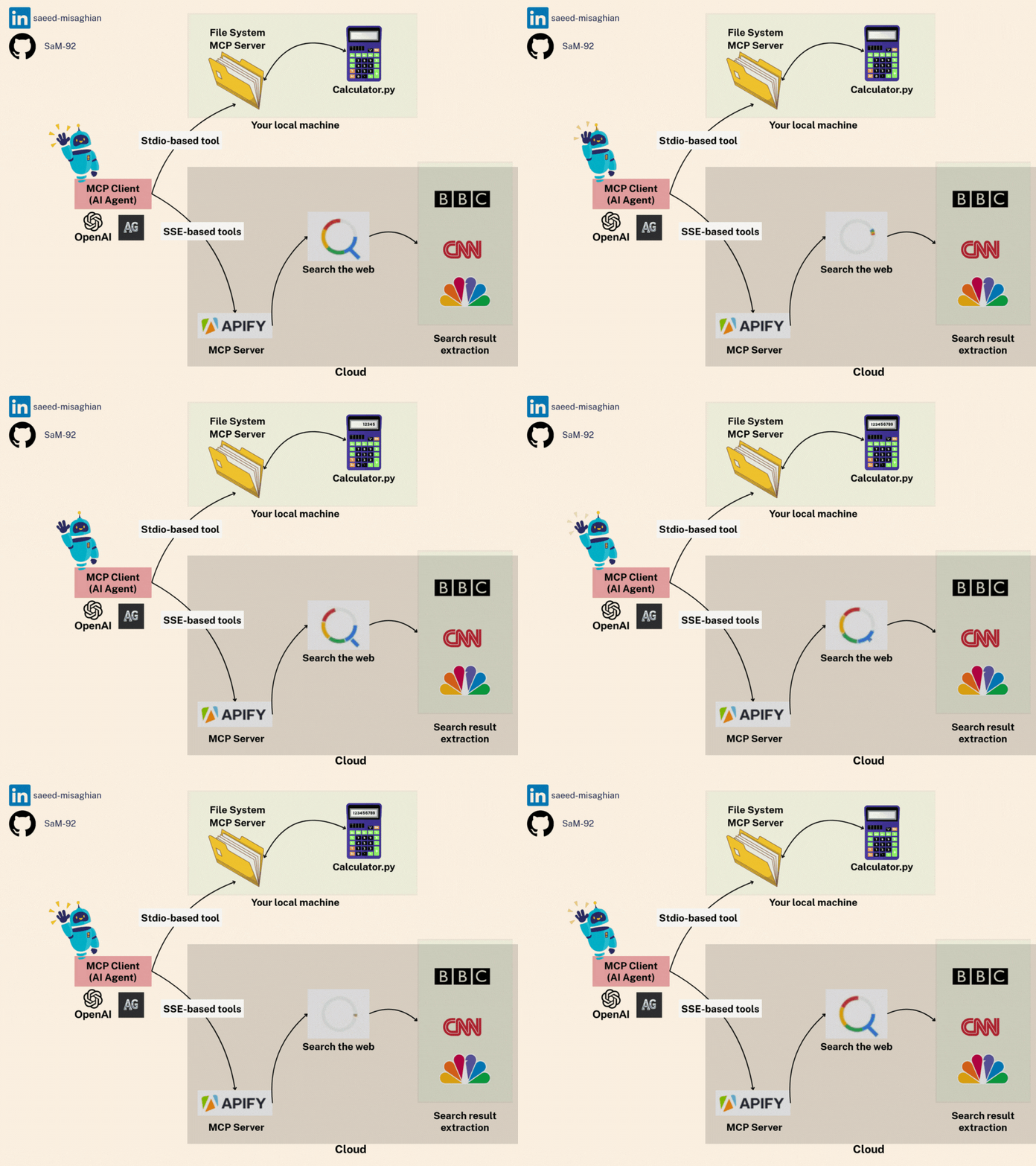
This repository provides a practical demonstration of integrating tools with AI agents using the Model Context Protocol (MCP) within the AutoGen framework.
Key Features Demonstrated:
- Dual MCP Integration: Shows how to connect an AutoGen agent to:
- A local tool server (
math_server.py) using Stdio transport. - A remote tool server (Apify’s RAG Web Browser Actor) using Server-Sent Events (SSE) transport.
- A local tool server (
- Local Tool Example: A simple calculator (
add,multiply) running locally viamath_server.py. - Remote Tool Example: Leveraging Apify’s RAG Web Browser Actor via their MCP Server for web searching and content retrieval.
- AutoGen Agent: An
AssistantAgentconfigured to utilize both sets of tools to answer user queries.
Goal: To illustrate the flexibility of MCP in enabling AI agents to access diverse tools, whether hosted locally or remotely, through standardized communication protocols (Stdio and SSE).
Scenario: The example agent answers two distinct questions:
- A math problem (
(3 + 5) x 12?), expected to use the localmath_server.py. - A request for recent news (“Summarise the latest news of Iran and US negotiations…”), expected to use the remote Apify web browsing tool.
📚 Libraries & Frameworks Used
- AutoGen: AI agent framework (autogen_agentchat, autogen_core, autogen_ext)
- MCP: Model Context Protocol for tool integration
- Python-dotenv: For environment variable management
- OpenAI API: For LLM capabilities
- Apify API: For web browsing capabilities
🛠️ Setup
Follow these steps carefully to set up your environment:
-
Prerequisites:
- Ensure you have Python 3.12 installed.
- Install
uvif not already installed:pip install uv
-
Navigate to Project Directory:
cd mcp_autogen_sse_stdio -
Create and Activate Virtual Environment:
# Create virtual environment using uv uv venv --python 3.12 # Activate the virtual environment source .venv/bin/activate # On macOS/Linux # OR .\.venv\Scripts\activate # On Windows -
Install Dependencies:
# Install project dependencies
uv pip install -e .
Troubleshooting Note: If you encounter any issues with the MCP CLI installation, you can manually install it:
uv add "mcp[cli]" -
Configure Environment Variables:
- Create a
.envfile in themcp_autogen_sse_stdiodirectory. - Add your API keys:
OPENAI_API_KEY=your_openai_api_key_here APIFY_API_KEY=your_apify_api_key_here - Get your Apify API key from Apify MCP Server page
- Create a
🚀 Running the Project
-
Make sure you’re in the parent directory (one level up from the project directory):
cd .. -
Run the main script using
uv:uv run mcp_autogen_sse_stdio/main.py
This will run the demo that:
- Summarizes news about Iran-US negotiations using the Apify tool
- Solves a simple math problem:
(3 + 5) x 12using the local math tool
🔌 Understanding MCP (Model Context Protocol)
MCP is a protocol that standardizes communication between AI models and tools. This example demonstrates two ways to use MCP:
1. Local Tools (StdioServerParams)
- Uses standard input/output for communication
- Tools run locally on your machine
- Example: Our
math_server.pyprovides simple math operations
2. Remote Tools (SseServerParams)
- Uses Server-Sent Events (SSE) for communication
- Tools run on remote servers (like Apify)
- Example: Web browsing capabilities via Apify’s rag-web-browser
📝 Code Walkthrough
Our main.py demonstrates:
-
Environment Setup:
- Loads API keys and validates them
-
Tool Configuration:
- Sets up local math tools using StdioServerParams
- Connects to Apify’s web browser using SseServerParams (API from https://apify.com/apify/actors-mcp-server)
-
Agent Creation:
- Creates an AutoGen assistant with both tool sets
- Uses GPT-4 as the base model
-
Task Execution:
- Runs two demo tasks showing both tools in action
- Web browsing for news summarization
- Math calculations for arithmetic problem
🔄 Communication Flow
User → AutoGen Agent → MCP Tools → Results → User
This example shows how easily different tool types can be integrated into one agent using MCP!
Dev Tools Supporting MCP
The following are the main code editors that support the Model Context Protocol. Click the link to visit the official website for more information.







