
Mcp Calendar
What is Mcp Calendar
mcp_calendar is a component of the Duke MCP (Multi-purpose Communication Protocol) that provides natural language access to Duke University’s event calendar system, allowing users to query campus events using conversational language.
Use cases
Use cases for mcp_calendar include students inquiring about upcoming campus events, faculty checking schedules for meetings or seminars, and event coordinators managing and promoting university events.
How to use
Users can interact with the mcp_calendar by inputting natural language queries about events, such as asking for events happening ‘this weekend’ or ‘next Monday’. The system interprets these queries and retrieves relevant event information.
Key features
Key features of mcp_calendar include natural language time parsing, event filtering and categorization, simplified data representation to reduce token usage, and intelligent handling of large result sets.
Where to use
mcp_calendar can be used in educational institutions, event management systems, and any platform that requires user-friendly access to event information through natural language.
Clients Supporting MCP
The following are the main client software that supports the Model Context Protocol. Click the link to visit the official website for more information.





Overview
What is Mcp Calendar
mcp_calendar is a component of the Duke MCP (Multi-purpose Communication Protocol) that provides natural language access to Duke University’s event calendar system, allowing users to query campus events using conversational language.
Use cases
Use cases for mcp_calendar include students inquiring about upcoming campus events, faculty checking schedules for meetings or seminars, and event coordinators managing and promoting university events.
How to use
Users can interact with the mcp_calendar by inputting natural language queries about events, such as asking for events happening ‘this weekend’ or ‘next Monday’. The system interprets these queries and retrieves relevant event information.
Key features
Key features of mcp_calendar include natural language time parsing, event filtering and categorization, simplified data representation to reduce token usage, and intelligent handling of large result sets.
Where to use
mcp_calendar can be used in educational institutions, event management systems, and any platform that requires user-friendly access to event information through natural language.
Clients Supporting MCP
The following are the main client software that supports the Model Context Protocol. Click the link to visit the official website for more information.
Content
Duke MCP (Multi-purpose Communication Protocol)
Project Overview
The Duke MCP is a unified backend server that provides natural language access to various Duke University services through OpenWebUI. This system allows users to interact with university resources through simple, conversational queries rather than navigating complex APIs or web interfaces.
The MCP acts as a middleware layer between Duke’s existing data services and the Large Language Model (LLM) interface, providing intelligent caching, data transformation, and integration between systems.
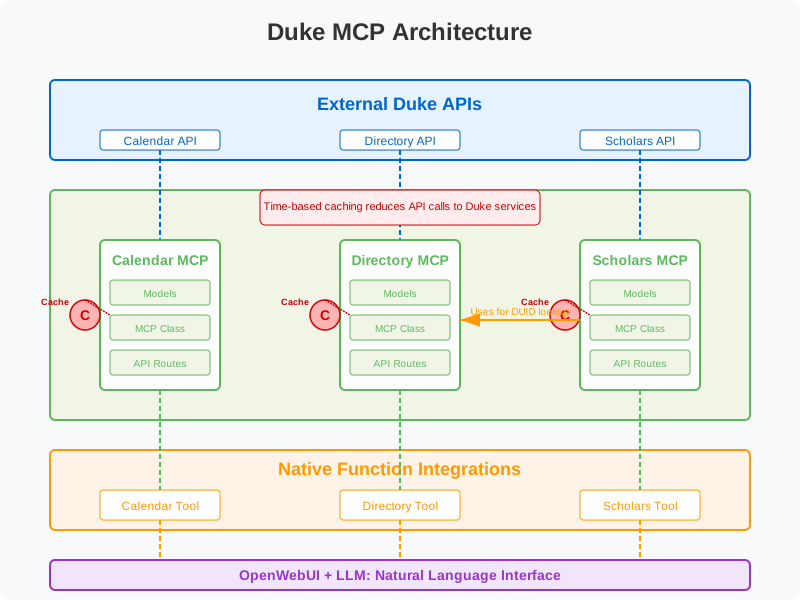
Core Components
The Duke MCP currently integrates three main services:
1. Calendar MCP
The Calendar MCP provides access to Duke’s event calendar system, allowing natural language queries about campus events.
Key Features:
- Natural language time parsing (e.g., “this weekend”, “next Monday”)
- Event filtering and categorization
- Simplified data representation to reduce token usage
- Intelligent handling of large result sets
Strategy:
Our Calendar MCP approach addresses several challenges with the Duke calendar system:
- Data Volume & Quality: We handle thousands of groups/sponsors (many orphaned), hundreds of ad-hoc categories, and inconsistent data entry by implementing a streamlined data model. The data feed is so bad and a nightmare to work with.
- Complex Hierarchies: Rather than struggling with traditional filtering approaches, we leverage the LLM’s abilities to understand query intent and match relevant events.
- Time-bound Data: We provide native time expression handling to convert natural language to API parameters.
2. Directory MCP
The Directory MCP connects to Duke’s LDAP directory service, making it easy to find contact information for Duke community members.
Key Features:
- Name and NetID-based search
- Detailed contact information retrieval
- Efficient caching to reduce load on Duke LDAP services
- Privacy-conscious data presentation
Strategy:
The Directory MCP takes a straightforward approach to providing contact information:
- Data Simplification: We extract and present only the most useful contact details.
- Efficient Caching: Directory information changes infrequently, so aggressive caching reduces load on Duke systems.
- Name Resolution: We optimize for the most common use case - finding someone by name - with fallbacks to NetID search.
3. Scholars MCP
The Scholars MCP provides access to Duke’s scholarly database, enabling queries about research, publications, and grants.
Key Features:
- Integration with Directory for DUID lookup
- Publication and grant information retrieval
- Research profile access
- Complex data extraction and formatting
Strategy:
The Scholars MCP addresses unique challenges:
- Two-stage Lookup: We handle the complexity of first finding a DUID from the Directory and then using it for Scholars queries, making this transparent to users.
- Data Complexity: The Scholars API returns deeply nested, complex data structures that we intelligently parse to extract the most relevant information.
- Connected Presentation: We connect biographical information with research interests, publications, and grants to create comprehensive profiles.
Technical Architecture
Core Design Principles
- Modular Components: Each service has dedicated models, MCP implementation, and routes.
- Shared Infrastructure: All components run on the same server with consistent patterns.
- Intelligent Caching: Time-based caching reduces load on Duke’s services.
- Native Function Support: Optimized for OpenWebUI’s native function capabilities.
Server Structure
duke-mcp/
├── app/
│   ├── mcp/
│   │   ├── __init__.py
│   │   ├── calendar.py
│   │   ├── directory.py
│   │   └── scholars.py
│   ├── models/
│   │   ├── __init__.py
│   │   ├── calendar.py
│   │   ├── directory.py
│   │   └── scholars.py
│   ├── routers/
│   │   ├── calendar.py
│   │   ├── directory.py
│   │   └── scholars.py
│   ├── __init__.py
│   ├── config.py
│   └── main.py
├── duke_calendar_tool.py
├── duke_directory_tool.py
├── duke_scholars_tool.py
├── requirements.txt
├── .env
└── README.md
Component Architecture
Each service component follows the same architecture pattern:
- Models: Define data structures for API requests and responses
- MCP Implementation: Business logic, API communication, and caching
- API Routes: FastAPI endpoints for accessing the service
- OpenWebUI Tool: Client-side tool for interacting with the MCP
Caching Strategy
To reduce load on Duke’s services and improve performance, we implement a time-based caching system:
- TTL-based Cache: Data is cached with a configurable time-to-live (default: 1 hour)
- Cache Keys: Structured to allow granular invalidation
- Service-specific Caching: Each MCP component implements caching tailored to its data patterns
OpenWebUI Integration
Native Functions
Each MCP component is paired with an OpenWebUI tool that provides:
- Specialized functions for service-specific queries
- Clear instructions for the LLM
- Error handling and fallback strategies
- User-friendly response formatting
LLM Strategy
Our approach to working with the LLM includes:
- Clear Instructions: Well-defined usage steps for each tool
- Contextual Examples: Common query patterns to guide the LLM
- Formatting Guidelines: How to present different types of results
- Educational Prompts: Helping the LLM understand the domain context
Installation and Setup
Prerequisites
- Python 3.8 or higher
- FastAPI and Uvicorn
- Access to Duke API services
Configuration
Create a .env file with the following variables:
# General settings
DEBUG=False
REFERENCE_CACHE_TTL=3600

# Calendar API
DUKE_CALENDAR_API_URL=https://calendar.duke.edu/events/index.json

# Directory API
DUKE_DIRECTORY_API_KEY=your_directory_api_key
DUKE_DIRECTORY_BASE_URL=https://streamer.oit.duke.edu/ldap/people

# Scholars API
DUKE_SCHOLARS_BASE_URL=https://scholars.duke.edu/widgets/api/v0.9
Running the Server
uvicorn app.main:app --host 0.0.0.0 --port 8000
For production, you may want to use Gunicorn with Uvicorn workers:
gunicorn app.main:app -w 4 -k uvicorn.workers.UvicornWorker -b 0.0.0.0:8000
OpenWebUI Tool Setup
- Import each tool file into your OpenWebUI installation
- Update the
mcp_urlin each tool to point to your MCP server
API Documentation
Interactive API documentation is available at /docs when the server is running.
Calendar Endpoints
GET /api/v1/calendar/simplified-events: Get events for a date rangePOST /api/v1/calendar/events-by-local-ids: Get full event details by IDs
Directory Endpoints
GET /api/v1/directory/search: Search the directoryGET /api/v1/directory/person/{ldapkey}: Get detailed person informationGET /api/v1/directory/netid/{netid}: Search by NetIDGET /api/v1/directory/name/{name}: Search by name
Scholars Endpoints
GET /api/v1/scholars/details: Get scholar profileGET /api/v1/scholars/publications: Get scholar publicationsGET /api/v1/scholars/grants: Get scholar grants
Future Development
Planned Components
- Course MCP: Access to course information and schedules
- Maps MCP: Building locations and directions
- Dining MCP: Dining locations and menus
Roadmap
- Enhanced Integration: Deeper connections between components (e.g., event locations linked to maps)
- Advanced Caching: More sophisticated cache strategies with selective invalidation
- Personalization: User-specific customization and preferences
- Analytics: Usage tracking to improve service quality
Contributing
Contributions are welcome! Please feel free to submit a Pull Request.
License
This project is licensed under the MIT License - see the LICENSE file for details.
Dev Tools Supporting MCP
The following are the main code editors that support the Model Context Protocol. Click the link to visit the official website for more information.







