
Mcp Cosmosdb Go
What is Mcp Cosmosdb Go
mcp_cosmosdb_go is a sample implementation of a MCP server designed for Azure Cosmos DB, utilizing the Go SDK. It serves as a demonstration of how to interact with Cosmos DB through a Go-based MCP server.
Use cases
Use cases for mcp_cosmosdb_go include developing microservices that interact with Azure Cosmos DB, building data-driven applications that require efficient data management, and creating prototypes for testing Cosmos DB functionalities.
How to use
To use mcp_cosmosdb_go, clone the repository from GitHub, build the application using Go, and configure the MCP server by creating a mcp.json file with the necessary server details. Ensure you have the appropriate Azure Cosmos DB RBAC permissions for CRUD operations.
Key features
Key features of mcp_cosmosdb_go include seamless integration with Azure Cosmos DB via the Go SDK, support for RBAC permissions, and a straightforward setup process for running the MCP server locally.
Where to use
mcp_cosmosdb_go can be used in cloud applications that require a backend service for managing data in Azure Cosmos DB, particularly in scenarios where Go is the preferred programming language.
Clients Supporting MCP
The following are the main client software that supports the Model Context Protocol. Click the link to visit the official website for more information.





Overview
What is Mcp Cosmosdb Go
mcp_cosmosdb_go is a sample implementation of a MCP server designed for Azure Cosmos DB, utilizing the Go SDK. It serves as a demonstration of how to interact with Cosmos DB through a Go-based MCP server.
Use cases
Use cases for mcp_cosmosdb_go include developing microservices that interact with Azure Cosmos DB, building data-driven applications that require efficient data management, and creating prototypes for testing Cosmos DB functionalities.
How to use
To use mcp_cosmosdb_go, clone the repository from GitHub, build the application using Go, and configure the MCP server by creating a mcp.json file with the necessary server details. Ensure you have the appropriate Azure Cosmos DB RBAC permissions for CRUD operations.
Key features
Key features of mcp_cosmosdb_go include seamless integration with Azure Cosmos DB via the Go SDK, support for RBAC permissions, and a straightforward setup process for running the MCP server locally.
Where to use
mcp_cosmosdb_go can be used in cloud applications that require a backend service for managing data in Azure Cosmos DB, particularly in scenarios where Go is the preferred programming language.
Clients Supporting MCP
The following are the main client software that supports the Model Context Protocol. Click the link to visit the official website for more information.
Content
MCP server for Azure Cosmos DB using the Go SDK
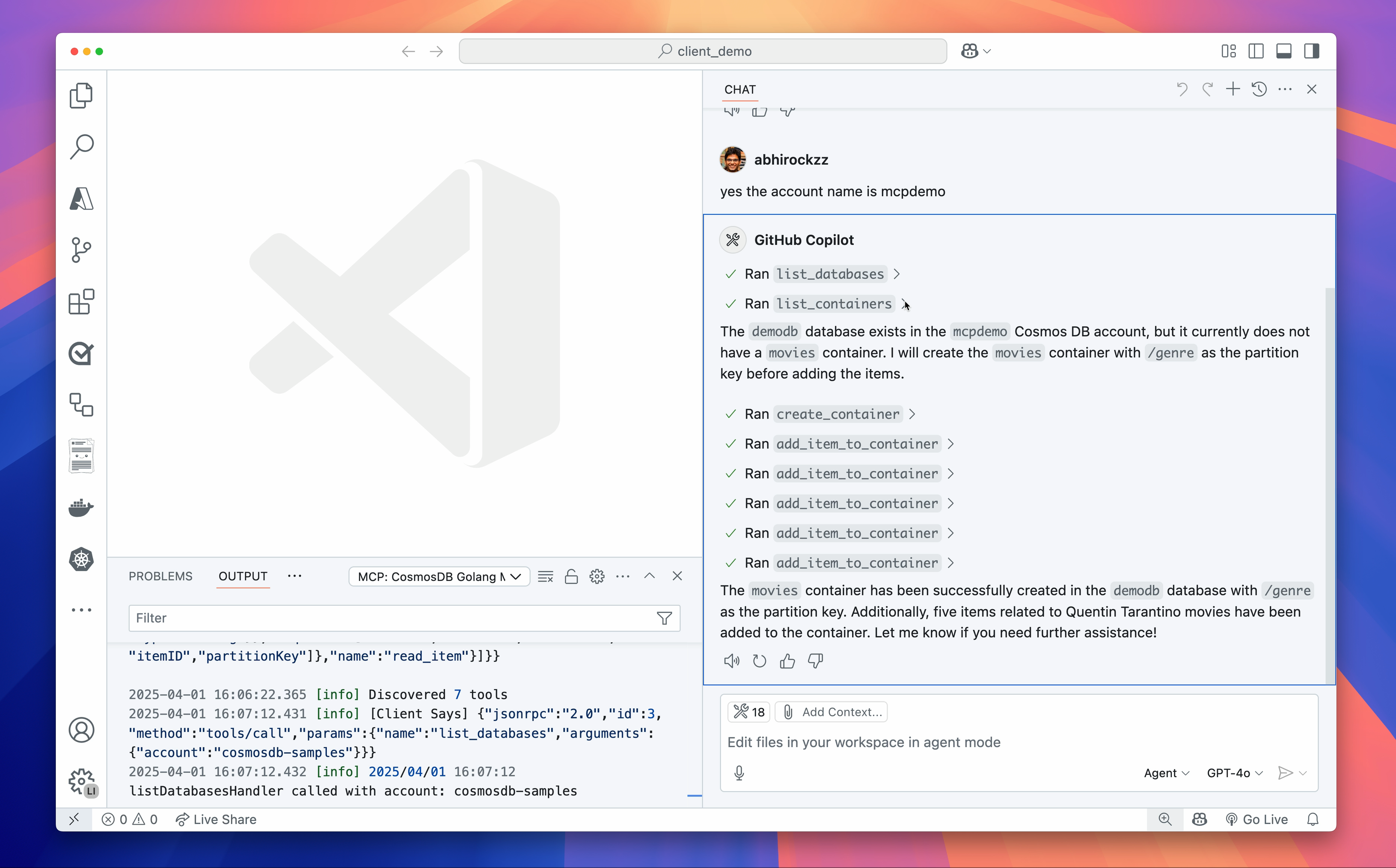
This is an implementation of a MCP server for Azure Cosmos DB built using its Go SDK. It exposes the following tools for interacting with Azure Cosmos DB:
- List Databases: Retrieve a list of all databases in a Cosmos DB account.
- List Containers: Retrieve a list of all containers in a specific database.
- Read Container Metadata: Fetch metadata or configuration details of a specific container.
- Create Container: Create a new container in a specified database with a defined partition key.
- Add Item to Container: Add a new item to a specified container in a database.
- Read Item: Read a specific item from a container using its ID and partition key.
- Execute Query: Execute a SQL query on a Cosmos DB container with optional partition key scoping.
The project uses mcp-go as the MCP implementation.
Here is a demo (recommend watching at 2x speed 😉) using VS Code in Agent Mode:
How to run
Word(s) of caution: As much as I want folks to benefit from this, I have to call out that Large Language Models (LLMs) are non-deterministic by nature and can make mistakes. I would recommend you to always validate the results and queries before making any decisions based on them.
git clone https://github.com/abhirockzz/mcp_cosmosdb_go
cd mcp_cosmosdb_go

go build -o mcp_azure_cosmosdb main.go
Configure the MCP server
This will differ based on the MCP client/tool you use. For VS Code you can follow these instructions on how to configure this server using a mcp.json file.
Here is an example of the mcp.json file:
{
  "servers": {
    "Azure Cosmos DB MCP (Golang)": {
      "type": "stdio",
      "command": "enter path to binary e.g. /Users/demo/Desktop/mcp_azure_cosmosdb"
    }
  }
}
Here is an example of Claude Desktop configuration:
Azure Cosmos DB RBAC permissions and authentication
-
The user principal you will be using should have permissions (control and data plane) to execute CRUD operations on database, container, and items.
-
Authentication
- Local credentials - Just login locally using Azure CLI (az login) and the MCP server will use the DefaultAzureCredential implementation automatically.
- Or, you can set the
COSMOSDB_ACCOUNT_KEYenvironment variable in the MCP server configuration:
{
  "servers": {
    "CosmosDB Golang MCP": {
      "type": "stdio",
      "command": "/Users/demo/mcp_azure_cosmosdb",
      "env": {
        "COSMOSDB_ACCOUNT_KEY": "enter the key"
      }
    }
  }
}
You are good to go! Now spin up VS Code in Agent Mode, or any other MCP tool (like Claude Desktop) and try this out!
Local dev/testing
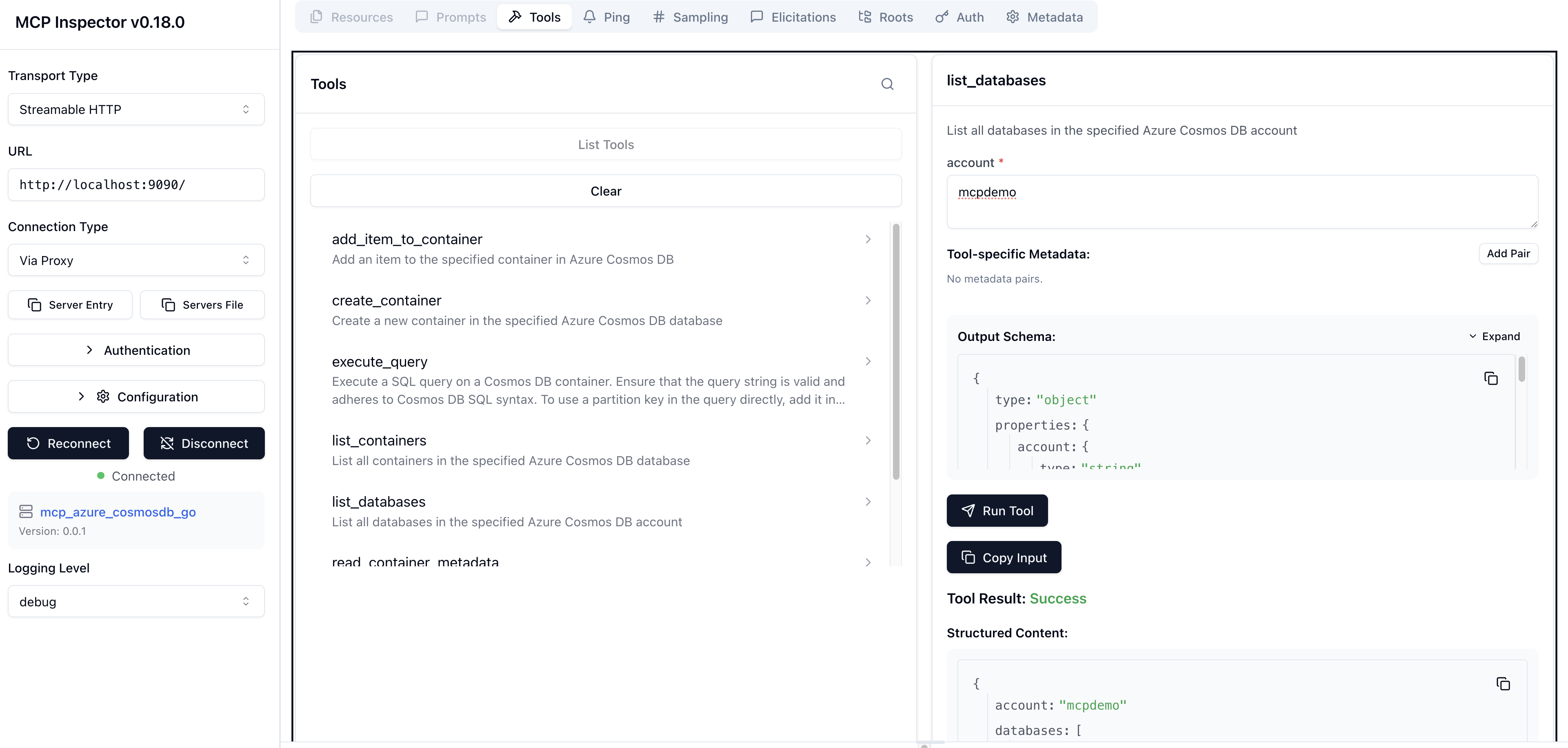
Start with MCP inspector - npx @modelcontextprotocol/inspector ./mcp_azure_cosmosdb
Dev Tools Supporting MCP
The following are the main code editors that support the Model Context Protocol. Click the link to visit the official website for more information.







