
Mcpauth
What is Mcpauth
MCPAuth is an authentication and authorization component of the MCP Gateway, designed to facilitate secure enterprise integrations using the Model Context Protocol (MCP).
Use cases
Use cases for MCPAuth include managing authentication for enterprise applications, securing API access, and implementing identity management solutions in cloud-native environments.
How to use
To use MCPAuth, integrate it as an OAuth 2.1-based gateway in your enterprise architecture, allowing it to manage identity, authorization, and policy enforcement for your MCP servers.
Key features
Key features of MCPAuth include decoupling security logic from MCP servers, centralized identity management, dynamic client registration, fine-grained token scopes, and compliance with the MCP Specification.
Where to use
MCPAuth is used in enterprise environments that require secure, scalable, and compliant integrations, particularly in Zero Trust architectures.
Clients Supporting MCP
The following are the main client software that supports the Model Context Protocol. Click the link to visit the official website for more information.





Overview
What is Mcpauth
MCPAuth is an authentication and authorization component of the MCP Gateway, designed to facilitate secure enterprise integrations using the Model Context Protocol (MCP).
Use cases
Use cases for MCPAuth include managing authentication for enterprise applications, securing API access, and implementing identity management solutions in cloud-native environments.
How to use
To use MCPAuth, integrate it as an OAuth 2.1-based gateway in your enterprise architecture, allowing it to manage identity, authorization, and policy enforcement for your MCP servers.
Key features
Key features of MCPAuth include decoupling security logic from MCP servers, centralized identity management, dynamic client registration, fine-grained token scopes, and compliance with the MCP Specification.
Where to use
MCPAuth is used in enterprise environments that require secure, scalable, and compliant integrations, particularly in Zero Trust architectures.
Clients Supporting MCP
The following are the main client software that supports the Model Context Protocol. Click the link to visit the official website for more information.
Content
MCPAuth
MCPAuth: Gateway Authentication for Secure Enterprise MCP Integrations




🔐 MCPAuth: Gateway Authentication for Secure Enterprise MCP Integrations
McpAuth is the authentication and authorization component of the MCP Gateway Proof of Concept (PoC) described in the paper:
Simplified and Secure MCP Gateways for Enterprise AI Integration
Ivo Brett, CISSP, B.Eng, MSc
View Paper (2025)
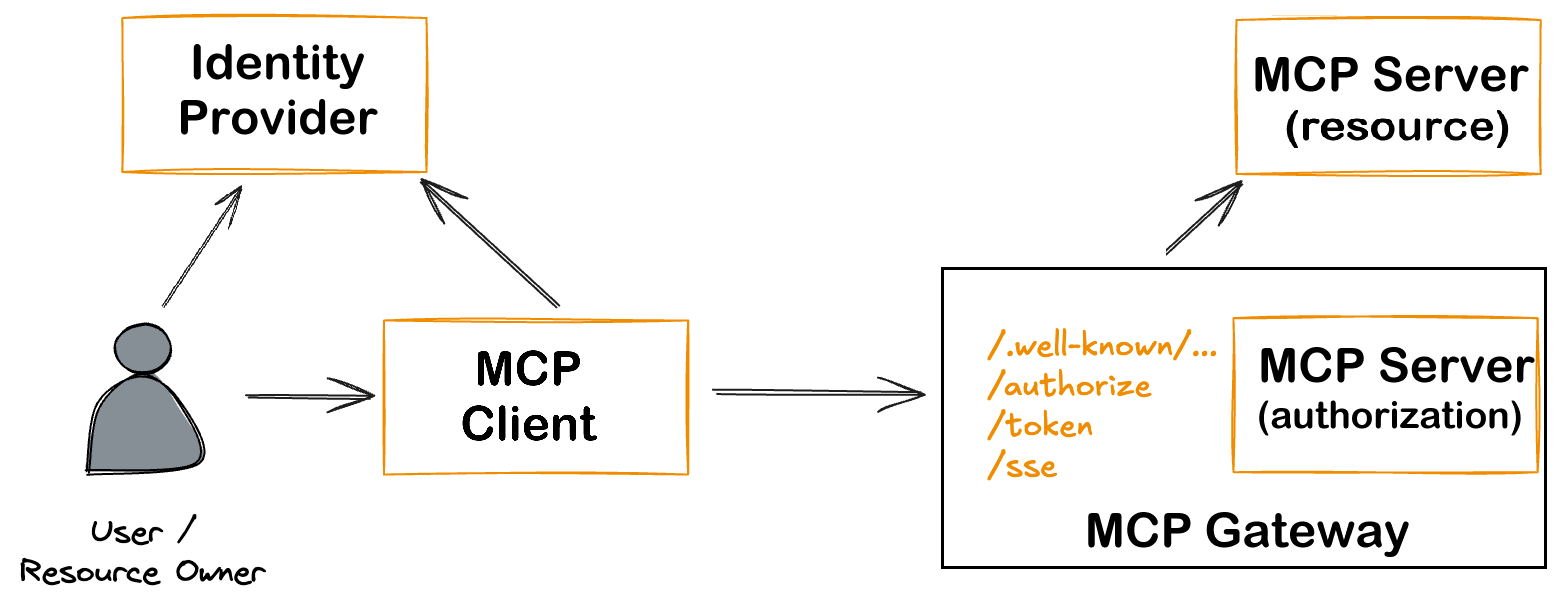
This repository is part of a broader initiative to enable secure, scalable, and compliant enterprise integration with the Model Context Protocol (MCP). See the website SelfHostedMCP.com. It provides an extensible OAuth2.1-based authentication gateway that offloads identity, authorization, and policy management from backend MCP servers—ensuring conformance with the 2025-03-26 MCP Specification.
 ---
---
🔍 Purpose
McpAuth is designed to:
- Decouple security logic from MCP servers
- Centralize identity management using OAuth 2.1 & OIDC
- Support dynamic client registration
- Enforce fine-grained token scopes and policy controls
- Act as a composable module in enterprise-grade Zero Trust architectures
📚 Background
This implementation is part of a larger PoC that validates:
- A reference MCP Gateway architecture for secure deployments
- Threat model mapping aligned with frameworks such as MAESTRO and Narajala & Habler
- Real-world compatibility with tools like Cloudflare Tunnels, WireGuard, Traefik, and CrowdSec
The full proof of concept includes:
- Two isolated MCP servers (local and cloud-based)
- Secure tunneling via WireGuard and Pangolin
- Centralized intrusion detection and observability
- Seamless integration with Anthropic’s MCP Inspector
✨ Features
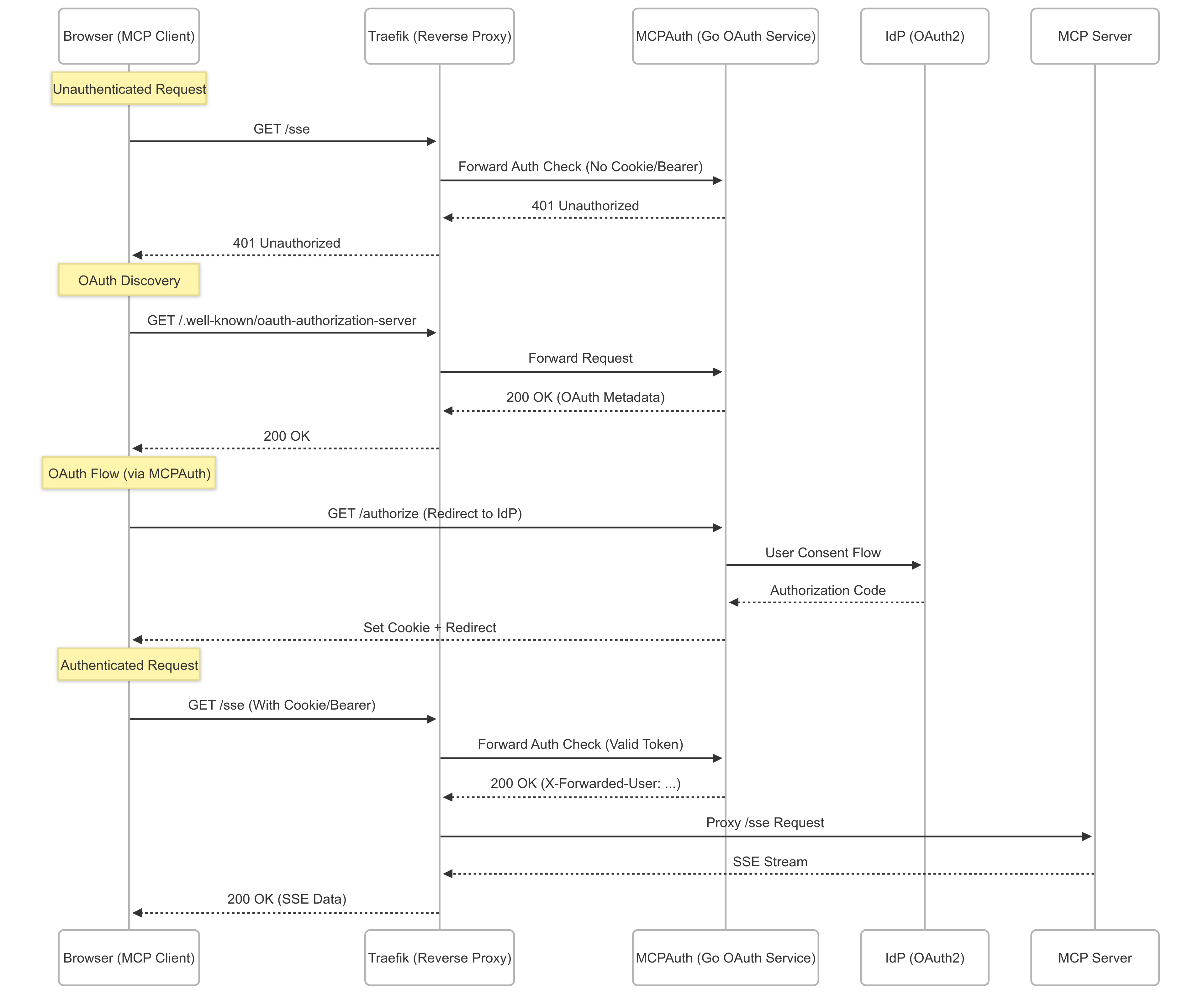
- 🔐 OAuth2 authentication with PKCE via Traefik
forwardAuth - ⚡ Seamless integration with MCP Gateway SSE endpoints
- ✅ Email whitelisting for controlled access
- 🐳 Docker-ready, easy to deploy
- 🧪 Includes a Python-based test server
🚀 Quick Start (assuming a completely standalone working environment)
Set Up Google OAuth
Go to the Google Cloud Console
Navigate to APIs & Services > Credentials
Click Create Credentials → OAuth client ID
Choose Web Application
Add an Authorized redirect URI — you’ll get this later when you set up Traefik, but it will look like:
https://oauth.yourdomain.com/callback
Save the Client ID and Client Secret for later use.
Create .env file
CLIENT_ID=<INSERT_VALUE_FROM_GOOGLE>
CLIENT_SECRET=<INSERT_VALUE_FROM_GOOGLE>
🔧 Note the Configuration Flags
Use flags or environment variables:
| Variable | Default | Description |
|---|---|---|
PORT |
11000 |
Port for the auth server |
PROTECTED_PATH |
/sse |
Protected endpoint path |
OAUTH_DOMAIN |
(none) | OAuth issuer domain |
CLIENT_ID |
(none) | OAuth client ID |
CLIENT_SECRET |
(none) | OAuth client secret |
ALLOWED_EMAILS |
(none) | Comma-separated list of allowed emails |
LOG_LEVEL |
1 |
0=debug, 1=info, 2=minimal |
Docker Compose
services:
  mcpauth:
    image: oideibrett/mcpauth:latest
    environment:
      - PORT=11000
      - CLIENT_ID=${CLIENT_ID}
      - CLIENT_SECRET=${CLIENT_SECRET}
    ports:
      - "11000:11000"

  traefik:
    image: traefik::v3.4.1
    command:
      - "--providers.docker=true"
      - "--entrypoints.websecure.address=:443"
    ports:
      - "443:443"
    volumes:
      - /var/run/docker.sock:/var/run/docker.sock
🚀 Developers Installation
📦 Prerequisites
- Go 1.21+
- Traefik v2.x+
- An OAuth provider (e.g., Google, GitHub)
🛠️ Installation
git clone https://github.com/oidebrett/mcpauth
cd mcpauth
go mod tidy
go run cmd/main.go -port=11000 -oauthDomain=your-domain.com
🐳 Docker Deployment
Basic Docker Compose
services:
  mcpauth:
    build: .
    environment:
      - PORT=11000
      - CLIENT_ID=${CLIENT_ID}
      - CLIENT_SECRET=${CLIENT_SECRET}
    ports:
      - "11000:11000"
🔐 Traefik Integration
ForwardAuth Middleware
http:
  middlewares:
    mcp-auth:
      forwardAuth:
        address: "http://mcpauth:11000/sse"
        authResponseHeaders:
          - "X-Forwarded-User"
Attach to a Router
labels:
  - "traefik.http.routers.myapp.middlewares=mcp-auth@file"
🧪 Testing
Run Included Test Server
cd test_mcp_server
python3 -m venv venv
source venv/bin/activate
pip install -r requirements.txt
python mcp-server-sse.py
With curl
curl -i http://localhost:11000/health
curl -i http://localhost:11000/sse
🧱 Middleware Chain (Traefik)
Apply middlewares in this order:
mcp-cors-headersredirect-regexmcp-auth
Example dynamic config:
http:
  middlewares:
    mcp-cors-headers:
      headers:
        accessControlAllowCredentials: true
        accessControlAllowHeaders:
          - Authorization
          - Content-Type
          - mcp-protocol-version
        accessControlAllowMethods:
          - GET
          - POST
          - OPTIONS
        accessControlAllowOriginList:
          - "*"
        accessControlMaxAge: 86400
        addVaryHeader: true

    redirect-regex:
      redirectRegex:
        regex: "^https://([a-z0-9-]+)\\.(.+)/\\.well-known/(.+)"
        replacement: "https://oauth.${2}/.well-known/${3}"
        permanent: true

    mcp-auth:
      forwardAuth:
        address: "http://mcpauth:11000/sse"
        authResponseHeaders:
          - X-Forwarded-User
🧠 Middleware Manager Support
This project supports middleware-manager.
Example templates.yml:
middlewares:
  - id: mcp-auth
    name: MCP Authentication
    type: forwardAuth
    config:
      address: "http://mcpauth:11000/sse"
      authResponseHeaders:
        - "X-Forwarded-User"

  - id: mcp-cors-headers
    name: MCP CORS Headers
    type: headers
    config:
      accessControlAllowMethods:
        - GET
        - POST
        - OPTIONS
      accessControlAllowOriginList:
        - "*"
      accessControlAllowHeaders:
        - Authorization
        - Content-Type
        - mcp-protocol-version
      accessControlMaxAge: 86400
      accessControlAllowCredentials: true
      addVaryHeader: true

  - id: redirect-regex
    name: Regex Redirect
    type: redirectregex
    config:
      regex: "^https://([a-z0-9-]+)\\.yourdomain\\.com/\\.well-known/oauth-authorization-server"
      replacement: "https://oauth.yourdomain.com/.well-known/oauth-authorization-server"
      permanent: true
📜 License
Licensed under the GNU General Public License v3.0.
Dev Tools Supporting MCP
The following are the main code editors that support the Model Context Protocol. Click the link to visit the official website for more information.







