
Mcpc
What is Mcpc
MCPC is a Minecraft server platform that allows users to create and manage their own multiplayer Minecraft servers with enhanced features and customization options.
Use cases
Use cases of MCPC include setting up a private gaming server for friends, creating a public server for a gaming community, and using the platform for educational purposes in schools.
How to use
To use MCPC, download the server software from the official repository, configure the server settings in the configuration files, and run the server application. Players can then connect to the server using the provided IP address.
Key features
Key features of MCPC include support for plugins, customizable game modes, enhanced performance, and a user-friendly interface for server management.
Where to use
MCPC can be used in various fields such as gaming communities, educational institutions for teaching programming and teamwork, and for hosting events or competitions.
Clients Supporting MCP
The following are the main client software that supports the Model Context Protocol. Click the link to visit the official website for more information.





Overview
What is Mcpc
MCPC is a Minecraft server platform that allows users to create and manage their own multiplayer Minecraft servers with enhanced features and customization options.
Use cases
Use cases of MCPC include setting up a private gaming server for friends, creating a public server for a gaming community, and using the platform for educational purposes in schools.
How to use
To use MCPC, download the server software from the official repository, configure the server settings in the configuration files, and run the server application. Players can then connect to the server using the provided IP address.
Key features
Key features of MCPC include support for plugins, customizable game modes, enhanced performance, and a user-friendly interface for server management.
Where to use
MCPC can be used in various fields such as gaming communities, educational institutions for teaching programming and teamwork, and for hosting events or competitions.
Clients Supporting MCP
The following are the main client software that supports the Model Context Protocol. Click the link to visit the official website for more information.
Content
MCPC · 
MCPC: One prompt instantly builds your scalable agentic MCP server from thousands of dependent MCPs.
Read more at Introducing MCPC: One Prompt for Your Agentic MCP Server, Powered by Thousands
- One-Prompt General Automation Workflow Declaration;
- Save token by internally calling dependent MCP servers;
- Community & Custom MCPs Support.
Getting Started
1. Get Started Instantly via Our Website
For the fastest and most straightforward path, simply visit mcpc.tech. Our user-friendly online platform provides an intuitive interface where you can declare your agentic workflows and provision your MCP servers with ease – all just with a few clicks. It’s the ideal way to grasp the power of one-prompt automation firsthand.
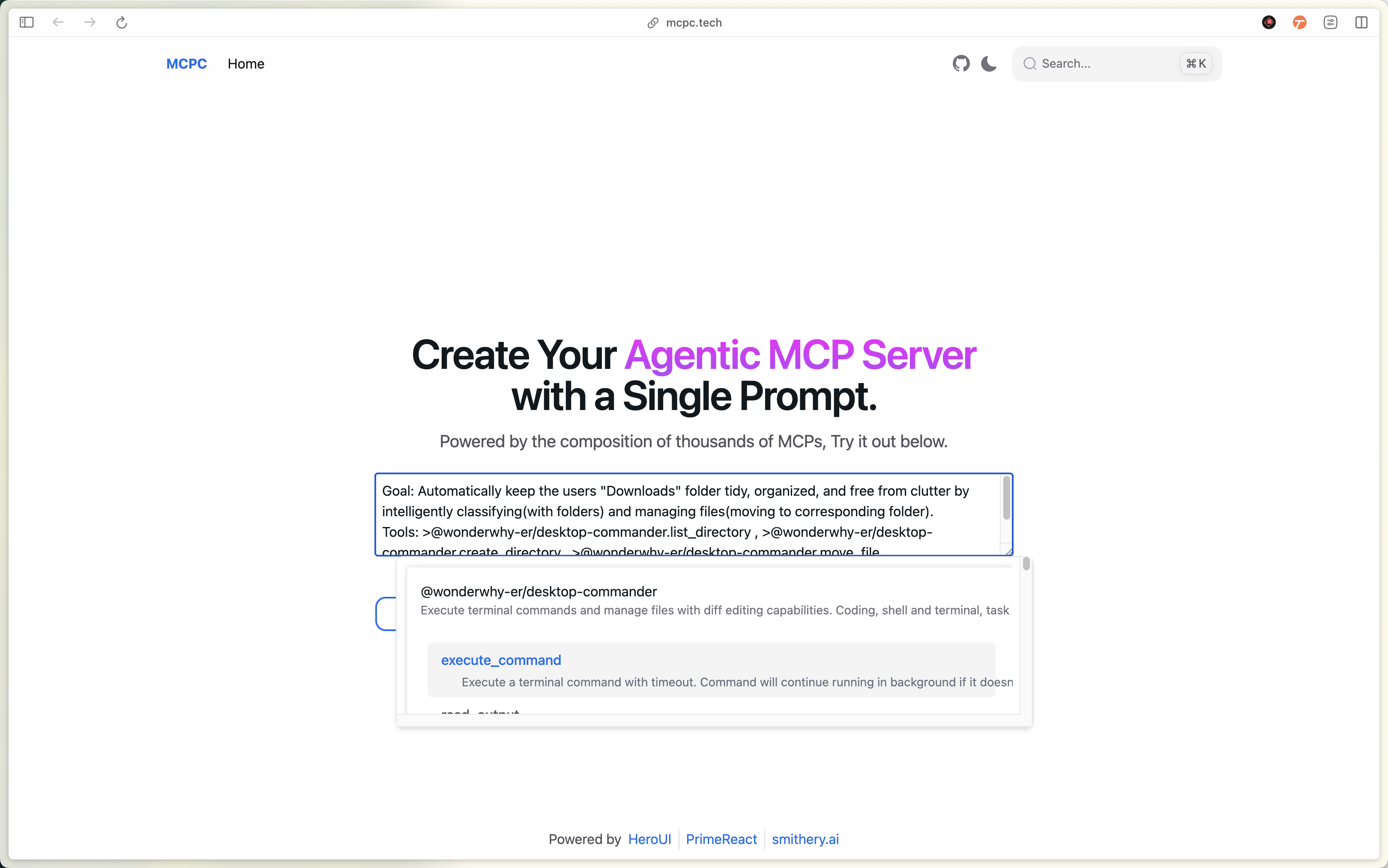
After defining your agentic workflow, simply click the “Generate” button to effortlessly create your custom Agentic MCP Server. You can then seamlessly copy and paste the generated configuration into your preferred MCP client (e.g., Claude Desktop) for rapid integration.
What’s more, this powerful workflow configuration can be easily shared with your colleagues or anyone interested. This not only fosters team collaboration and knowledge sharing but also allows more people to experience the automation solutions you’ve built.
2. Integrate Deeply Using Code
For developers who prefer a programmatic approach, or for seamless integration into existing pipelines, MCP Compose offers robust code-based options. Leverage our comprehensive SDK, API, or CLI tools to declaratively define your workflows, compose MCPs. This method provides ultimate control and flexibility for advanced automation scenarios.
To get started, first install @mcpc/core SDK:
# Use with deno
deno install jsr:@mcpc/core
# Use with pnpm
pnpm install jsr:@mcpc/core
# Use with yarn
yarn add jsr:@mcpc/core
# Use with npm
npx jsr add @mcpc/core
Then create your composiable MCP server:
import { StdioServerTransport } from "@modelcontextprotocol/sdk";
import { mcpc } from "@mcpc/core";

export const server = await mcpc(
  [
    {
      name: "mcpc",
      version: "0.1.0",
    },
    { capabilities: { tools: { listChanged: true } } },
  ],
  [
    {
      name: "tidy-folder",
      description: `Goal: Automatically keep the users folder tidy, organized, and free from clutter by intelligently classifying(with folders) and managing files(moving to corresponding folder).
Tools: <tool name="@wonderwhy-er/desktop-commander.list_directory"/> , <tool name="@wonderwhy-er/desktop-commander.create_directory"/> , <tool name="@wonderwhy-er/desktop-commander.move_file"/>
`,
      deps: {
        mcpServers: {
          "@wonderwhy-er/desktop-commander": {
            command: "npx",
            args: ["-y", "@wonderwhy-er/desktop-commander@latest"],
          },
        },
      },
    },
  ]
);

const transport = new StdioServerTransport();
await server.connect(transport);
See more example code snippets at: https://github.com/mcpc-tech/mcpc/tree/main/packages/core/examples
Dev Tools Supporting MCP
The following are the main code editors that support the Model Context Protocol. Click the link to visit the official website for more information.







