
Mcpport
What is Mcpport
mcpport is a lightweight gateway and registry for the Model Context Protocol (MCP), designed to enable standardized connectivity for AI applications.
Use cases
Use cases for mcpport include connecting AI models to data sources, enabling real-time event streaming, and facilitating communication between different AI services in a microservices architecture.
How to use
To use mcpport, start the MCP Gateway with the command ‘uvx mcpport gateway’. Register your MCP Server to the Gateway using the provided registration command, specifying the server details and gateway URL.
Key features
Key features of mcpport include support for WebSocket and HTTP endpoints, IPv6 support, customizable gateway options (like host, port, log level), and a simple registration process for MCP servers.
Where to use
mcpport can be used in various fields where AI applications require standardized communication and data exchange, such as machine learning, data processing, and real-time analytics.
Clients Supporting MCP
The following are the main client software that supports the Model Context Protocol. Click the link to visit the official website for more information.





Overview
What is Mcpport
mcpport is a lightweight gateway and registry for the Model Context Protocol (MCP), designed to enable standardized connectivity for AI applications.
Use cases
Use cases for mcpport include connecting AI models to data sources, enabling real-time event streaming, and facilitating communication between different AI services in a microservices architecture.
How to use
To use mcpport, start the MCP Gateway with the command ‘uvx mcpport gateway’. Register your MCP Server to the Gateway using the provided registration command, specifying the server details and gateway URL.
Key features
Key features of mcpport include support for WebSocket and HTTP endpoints, IPv6 support, customizable gateway options (like host, port, log level), and a simple registration process for MCP servers.
Where to use
mcpport can be used in various fields where AI applications require standardized communication and data exchange, such as machine learning, data processing, and real-time analytics.
Clients Supporting MCP
The following are the main client software that supports the Model Context Protocol. Click the link to visit the official website for more information.
Content
mcpport
mcpport — A lightweight gateway & registry for Model Context Protocol (MCP), enabling standardized connectivity for AI applications.
Quick Start
- Start your MCP Gateway
uvx mcpport gateway
It will start the gateway on port 8765 by default. And the common access points are:
ws://localhost:8765/mcp/registeris the registration endpoint.http://localhost:8765/sseis the event stream endpoint(SSE).http://localhost:8765/messagesis the message endpoint(HTTP).
- Register your MCP Server to the Gateway
uvx mcpport register \
--stdio "npx -y @modelcontextprotocol/server-filesystem ./" \
--gateway-url "ws://localhost:8765/mcp/register" \
--server-name "file"
It will register a MCP server named file to the gateway. The server is a simple file system server, which is implemented by @modelcontextprotocol/server-filesystem.
Authentication
You can use --auth-token to set the auth token for the gateway.
uvx mcpport gateway --auth-token "my-token1" --auth-token "my-token2"
The default authentication method is Bearer token(Set to Authorization header).
If you set the auth token for the gateway, you need to set the same auth token for the MCP server when you register it.
uvx mcpport register \
--stdio "npx -y @modelcontextprotocol/server-filesystem ./" \
--gateway-url "ws://localhost:8765/mcp/register" \
--server-name "file" \
--header "Authorization: Bearer my-token1"
And you must set the auth token for SSE connections. You can set the auth token in the Authorization header.
Architecture
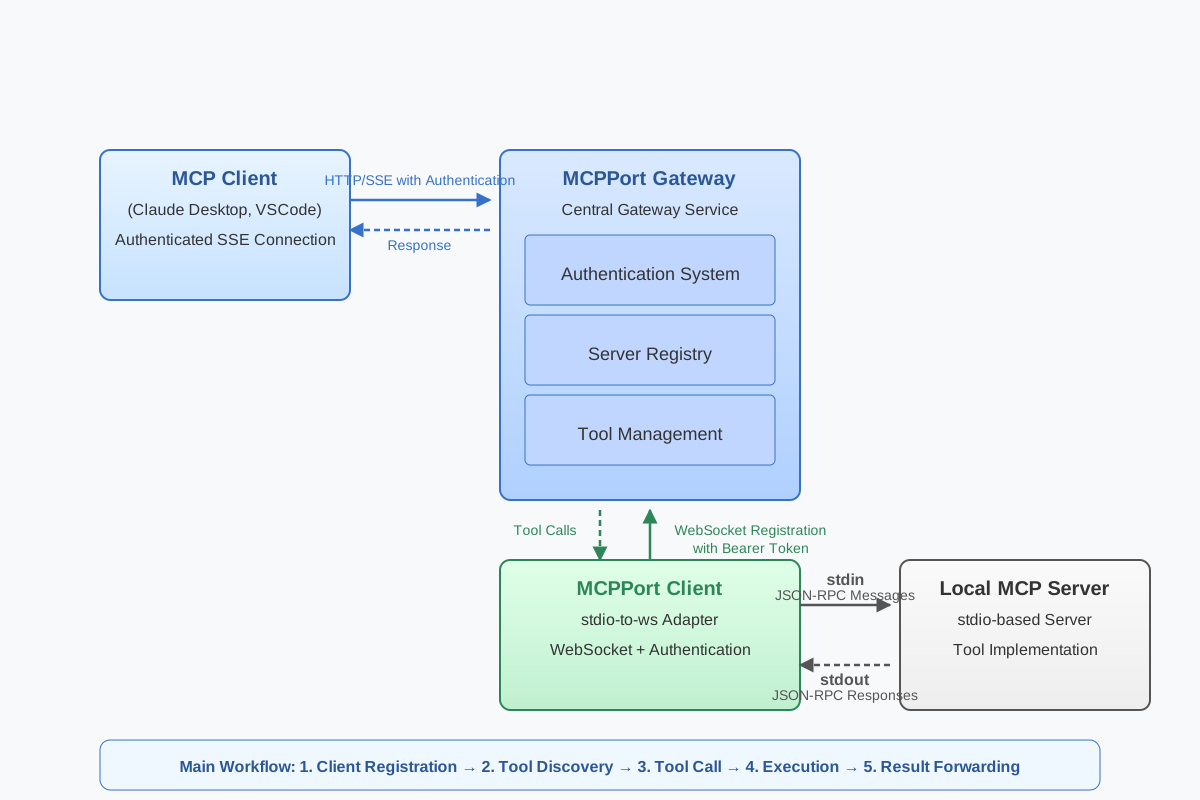
The architecture of the MCP gateway is as follows:
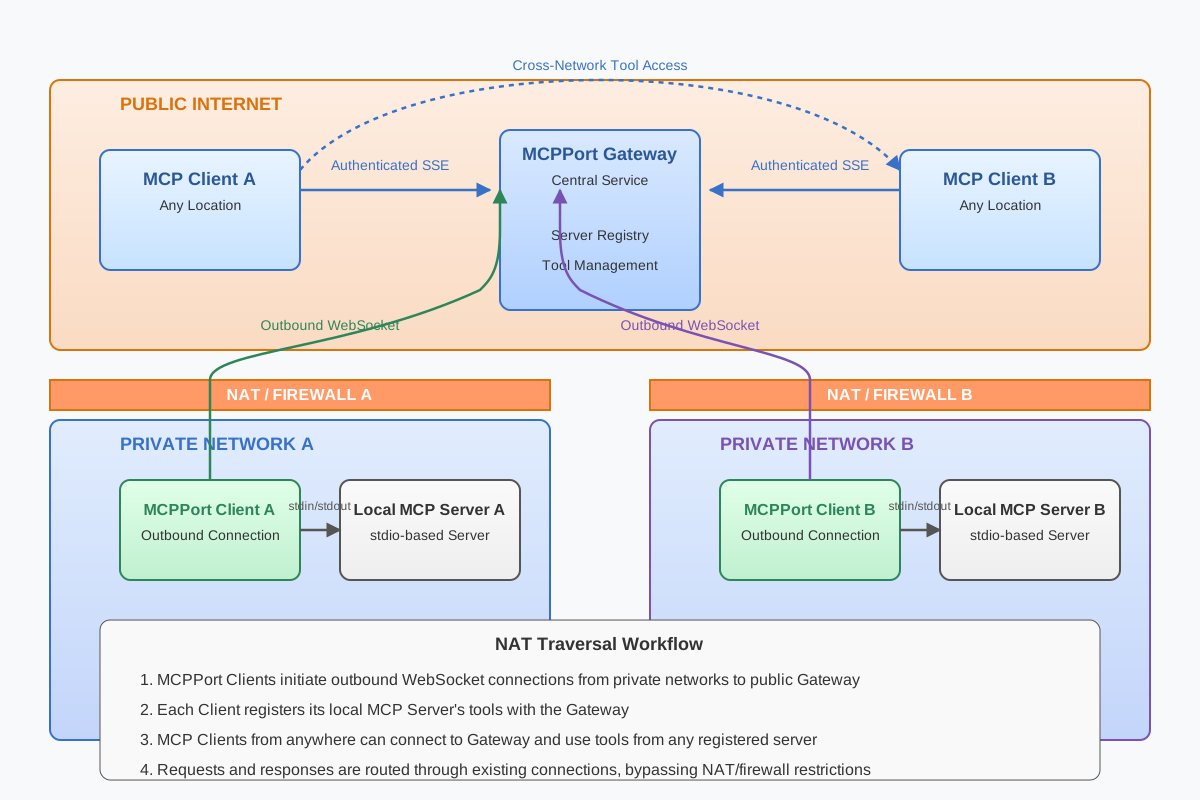
NAT Traversal Architecture for Cross-Network MCP Tool Access
The MCPPort solution enables edge devices to seamlessly provide MCP services through secure NAT traversal. By establishing persistent bidirectional WebSocket connections between MCPPort Clients (running on edge devices) and the central MCPPort Gateway, the system creates secure tunnels that bypass firewall restrictions.
Advanced Usage
ipv6 Support
Start Your MCP Gateway With ipv6 Support
uvx mcpport gateway --host "::" --ipv6
SSL Support
You can use --ssl-enabled to enable SSL support for the gateway.
uv run mcpport gateway \
--ssl-enabled \
--ssl-keyfile {path_to_your_keyfile} \
--ssl-certfile {path_to_your_certfile}
Then you can register your MCP server to the gateway with wss:// protocol. And access the SSE and message endpoints with https:// protocol.
uvx mcpport register \
--stdio "npx -y @modelcontextprotocol/server-filesystem ./" \
--gateway-url "wss://localhost:8765/mcp/register" \
--server-name "file"
If you want to disable the SSL verification, you can use --no-ssl-verify option.
uvx mcpport register \
--stdio "npx -y @modelcontextprotocol/server-filesystem ./" \
--gateway-url "wss://localhost:8765/mcp/register" \
--server-name "file" \
--no-ssl-verify
Note: This is not safe and should only be used for testing purposes.
SSL Support With CA Cert
You use your own CA cert to sign the server certificate. It is recommended if you not have a trusted CA cert.
Fist, you need to generate a CA cert and sign the server certificate with it. We have a script to do this. You can find it in the scripts folder.
./scripts/generate-certs.sh --domain localhost
The all generated files will be in the certs folder. It will generate the following files:
ls certs
ca.crt  ca.key  ca.srl  index.txt  openssl.cnf  serial  server.crt  server.csr  server.key
Then start the gateway with the CA cert.
uvx mcpport gateway \
--ssl-enabled \
--ssl-keyfile ./certs/server.key \
--ssl-certfile ./certs/server.crt
Then register your MCP server to the gateway with the CA cert.
uvx mcpport register \
--stdio "npx -y @modelcontextprotocol/server-filesystem ./" \
--gateway-url "wss://localhost:8765/mcp/register" \
--ssl-ca-cert ./certs/ca.crt
More Options
Other options are also available, you can use uvx mcpport gateway --help to get more information.
There are some options for the gateway:
--hostis the host of the gateway.--portis the port of the gateway, default is8765.--ipv6is to enableipv6support, default isfalse.--log-levelis the log level of the gateway, default isINFO.--timeout-rpcis the timeout of communication with the MCP server, default is10s.--timeout-run-toolis the timeout to run the tool, default is120s.--sse-pathis the path of the event stream endpoint, default is/sse.--messages-pathis the path of the message endpoint, default is/messages.--auth-tokenis the auth token for the gateway, (can be used multiple times).--ssl-enabledis to enable SSL support, default isfalse.--ssl-keyfileis the path to the SSL key file.--ssl-certfileis the path to the SSL cert file.--ssl-ca-certis the path to the SSL CA cert file.
And there are some options for the register command:
--stdiois the command to run the MCP server, it will be run in a subprocess.--gateway-urlis the URL of the gateway, default isws://localhost:8765/mcp/register.--portLocal HTTP port, 0 means don’t start local server, default is0.--enable-corsis to enable CORS for the local server, default isfalse.--health-endpointis the health endpoint of local server, default is/health.--server-nameis the name of the MCP server, must be provided.--server-idis the id of the MCP server, default isuuid.--require-gatewayExit if unable to connect to gateway--log-levelis the log level of the gateway, default isINFO.--headerAdd one or more headers (format: ‘Key: Value’). Can be used multiple times.--no-ssl-verifyDisable SSL certificate verification.--ssl-ca-certPath to CA certificate bundle for verification
Dev Tools Supporting MCP
The following are the main code editors that support the Model Context Protocol. Click the link to visit the official website for more information.







