
Mercari Jp Mcp
What is Mercari Jp Mcp
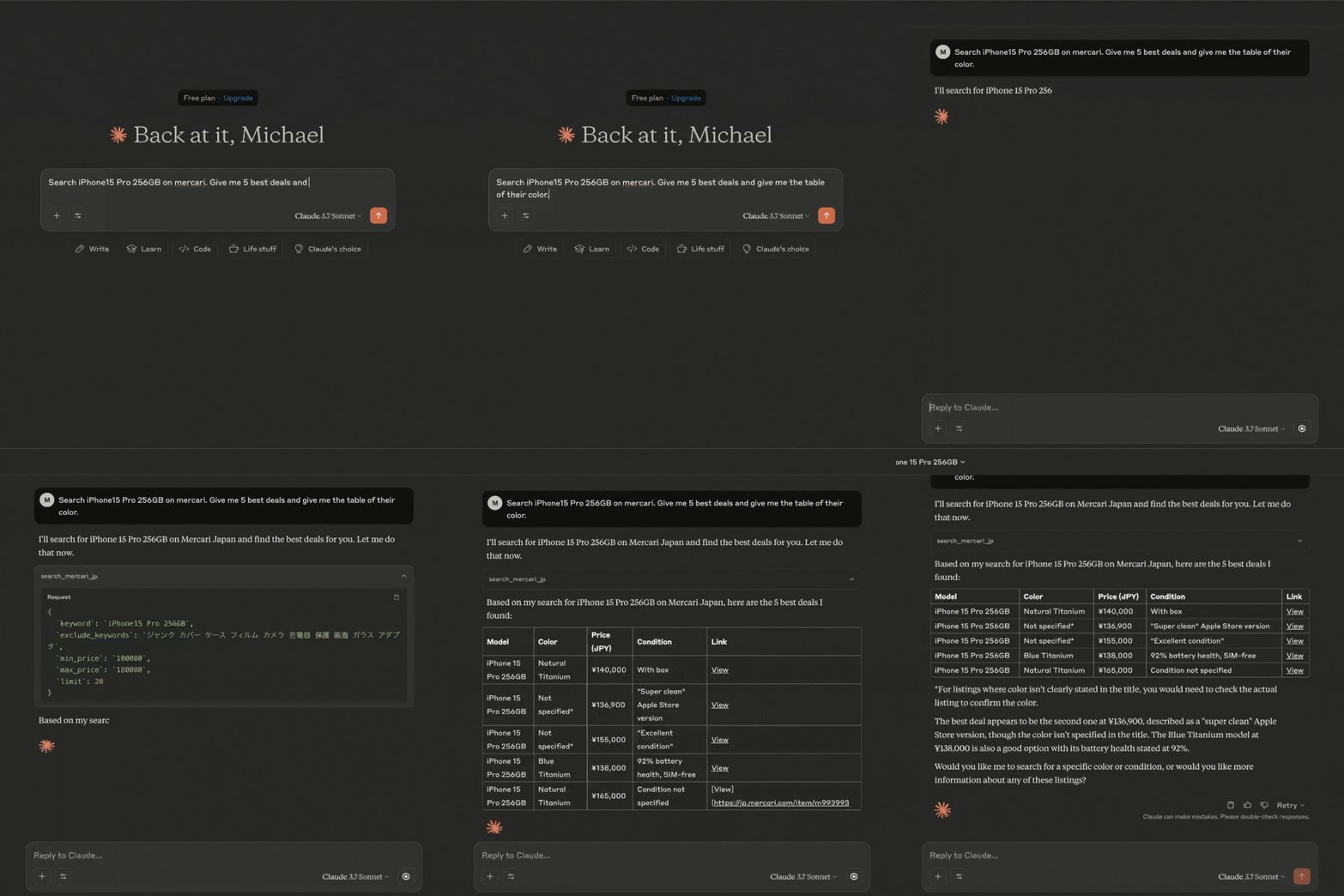
mercari-jp-mcp is a Model Context Protocol (MCP) server that provides real-time data from Japan’s Mercari platform (jp.mercari.com). It enables users to retrieve information about products and prices for analysis by large language models (LLMs).
Use cases
Use cases for mercari-jp-mcp include analyzing market trends on Mercari, developing price prediction models, and enhancing chatbot responses with up-to-date product information.
How to use
To use mercari-jp-mcp, clone the repository, set up a virtual environment, and install the required dependencies. You can run the server in development mode using ‘uv run server.py’ and test queries with ‘uv run check_server.py’. Integration with Claude for Desktop requires editing the configuration file to include the server’s command and arguments.
Key features
Key features of mercari-jp-mcp include real-time data retrieval, compatibility with large language models, and the ability to filter product queries based on keywords and price ranges.
Where to use
mercari-jp-mcp can be used in fields such as data analysis, e-commerce research, and machine learning applications where real-time product data is valuable.
Clients Supporting MCP
The following are the main client software that supports the Model Context Protocol. Click the link to visit the official website for more information.





Overview
What is Mercari Jp Mcp
mercari-jp-mcp is a Model Context Protocol (MCP) server that provides real-time data from Japan’s Mercari platform (jp.mercari.com). It enables users to retrieve information about products and prices for analysis by large language models (LLMs).
Use cases
Use cases for mercari-jp-mcp include analyzing market trends on Mercari, developing price prediction models, and enhancing chatbot responses with up-to-date product information.
How to use
To use mercari-jp-mcp, clone the repository, set up a virtual environment, and install the required dependencies. You can run the server in development mode using ‘uv run server.py’ and test queries with ‘uv run check_server.py’. Integration with Claude for Desktop requires editing the configuration file to include the server’s command and arguments.
Key features
Key features of mercari-jp-mcp include real-time data retrieval, compatibility with large language models, and the ability to filter product queries based on keywords and price ranges.
Where to use
mercari-jp-mcp can be used in fields such as data analysis, e-commerce research, and machine learning applications where real-time product data is valuable.
Clients Supporting MCP
The following are the main client software that supports the Model Context Protocol. Click the link to visit the official website for more information.
Content
Demo
Requirements
- Python 3.11 or higher
- Dependencies as listed in
pyproject.toml, including:- mcp
- mercari
- pydantic
Pre-setup
-
Microsoft C++ Build Tools (For Windows)
https://visualstudio.microsoft.com/visual-cpp-build-tools/
Setup
-
Clone this repository:
git clone https://github.com/msr2903/mercari-jp-mcp.git cd mercari-jp-mcp -
Create and activate a virtual environment and install dependencies:
uv venv
source .venv/bin/activate  # On Windows: .venv\Scripts\activate
uv pip install -e .
Usage
Development Mode
You can test the server with MCP Inspector by running:
uv run server.py
You can also test to input manually the query, exclude keywords, min and max price by running:
uv run check_server.py
This will start the server and allow you to test the available tools.
Integration with Claude for Desktop
To integrate this server with Claude for Desktop:
-
Install Claude for Desktop to your local machine.
-
Install VS Code to your local machine. Then run the following command to open the
claude_desktop_config.jsonfile:- MacOS:
code ~/Library/Application\ Support/Claude/claude_desktop_config.json - Windows:
code $env:AppData\Claude\claude_desktop_config.json
- MacOS:
-
Edit the Claude for Desktop config file, located at:
-
macOS:
{ "mcpServers": { "mercari": { "command": "uv", "args": [ "--directory", "/ABSOLUTE/PATH/TO/PARENT/FOLDER/mercari-jp-mcp", "run", "server.py" ] } } } -
Windows:
{ "mcpServers": { "mercari": { "command": "uv", "args": [ "--directory", "C:\\ABSOLUTE\\PATH\\TO\\PARENT\\FOLDER\\mercari-jp-mcp", "run", "server.py" ] } } } -
Note: You may need to put the full path to the uv executable in the command field. You can get this by running
which uvon MacOS/Linux orwhere uvon Windows.
-
-
Restart Claude for Desktop
Thanks
This work would not have been possible without amazing open source projects, including (but not limited to):
- jlowin/fastmcp (https://github.com/jlowin/fastmcp)
- marvinody/mercari (https://github.com/marvinody/mercari/)
Thank you to the authors of these projects for making them available to the community!
Dev Tools Supporting MCP
The following are the main code editors that support the Model Context Protocol. Click the link to visit the official website for more information.







