
Model Context Protocol Investigations
What is Model Context Protocol Investigations
The Model Context Protocol (MCP) is an open protocol that standardizes the way applications provide context to Large Language Models (LLMs), facilitating connections between AI models and various data sources and tools.
Use cases
Use cases for MCP include product backlog management through GitHub MCP Server, bug and incident triage, and enhancing AI capabilities in software delivery lifecycle.
How to use
To use MCP, applications act as clients that connect to MCP servers, which expose specific capabilities through the protocol. Clients can be LLM chat interfaces, code copilots in IDEs, or agent frameworks, and they are configured to utilize one or more LLMs.
Key features
Key features of MCP include a client-server architecture, standardization of context provision for LLMs, and the ability to connect to multiple data sources and tools seamlessly.
Where to use
MCP can be used in various fields, particularly in software development and AI applications, where efficient management of context and data integration is crucial.
Clients Supporting MCP
The following are the main client software that supports the Model Context Protocol. Click the link to visit the official website for more information.





Overview
What is Model Context Protocol Investigations
The Model Context Protocol (MCP) is an open protocol that standardizes the way applications provide context to Large Language Models (LLMs), facilitating connections between AI models and various data sources and tools.
Use cases
Use cases for MCP include product backlog management through GitHub MCP Server, bug and incident triage, and enhancing AI capabilities in software delivery lifecycle.
How to use
To use MCP, applications act as clients that connect to MCP servers, which expose specific capabilities through the protocol. Clients can be LLM chat interfaces, code copilots in IDEs, or agent frameworks, and they are configured to utilize one or more LLMs.
Key features
Key features of MCP include a client-server architecture, standardization of context provision for LLMs, and the ability to connect to multiple data sources and tools seamlessly.
Where to use
MCP can be used in various fields, particularly in software development and AI applications, where efficient management of context and data integration is crucial.
Clients Supporting MCP
The following are the main client software that supports the Model Context Protocol. Click the link to visit the official website for more information.
Content
Model Context Protocol Investigations
About MCP (Model Context Protocol)
The Model Context Protocol (MCP) is an open protocol that standardizes how applications provide context to Large Language Models (LLMs). MCP provides a standardized way to connect AI models to different data sources and tools.
It was introduced by Anthropic in November 2024 and has seen quick adoption in the open source community. Recently, we’ve learned GitHub CoPilot in VS Code is working on support and OpenAI has announced they will adopt the standard.
MCP follows a client-server architecture where:
- MCP client: Different types such as LLM chat clients, Code copilots in IDEs and agent frameworks
- MCP Servers: Lightweight programs that expose specific capabilities through the standardized Model Context Protocol
Overview image from Building Agents with Model Context Protocol - Full Workshop with Mahesh Murag of Anthropic
Note: The MCP client is configured to use one or more LLMs (not shown in the overview image) and the LLM recommends to the MCP client which MCP server tool to use.
The Model Context Specifiction is available at spec.modelcontextprotocol.io. LLMs can be provided with https://modelcontextprotocol.io/llms-full.txt in order to understand the MCP protocol.
MCP use cases for AI in Software Delivery Lifecycle
Example use cases:
- Product backlog management through GitHub MCP Server
- Bug/incident triage through a combination of GitHub MCP Server and mcp-server-app-insight
- Team coordination through Slack MCP Server
- Release and deployment review and triggering of GitHub actions through GitHub MCP Server (will require extensions to MCP server)
- FinOps evaluations (through establishing MCP server on top of cost data such as Azure Consumption API)
- Security scanning of code in progress (perform before pull request is established through tools such as Snyk and allow llm to adjust code based on results)
- Add additional document based context (for example through establishing MCP server on top of Microsoft Graph API)
- Add Architecture Decision Record (ADR) context (for example through establishing MCP server on websites containing ADRs at corporate, portfolio or solution level))
The video below is showing a bug triage with the combination of MCP GitHub MCP Server, mcp-server-app-insight and memory
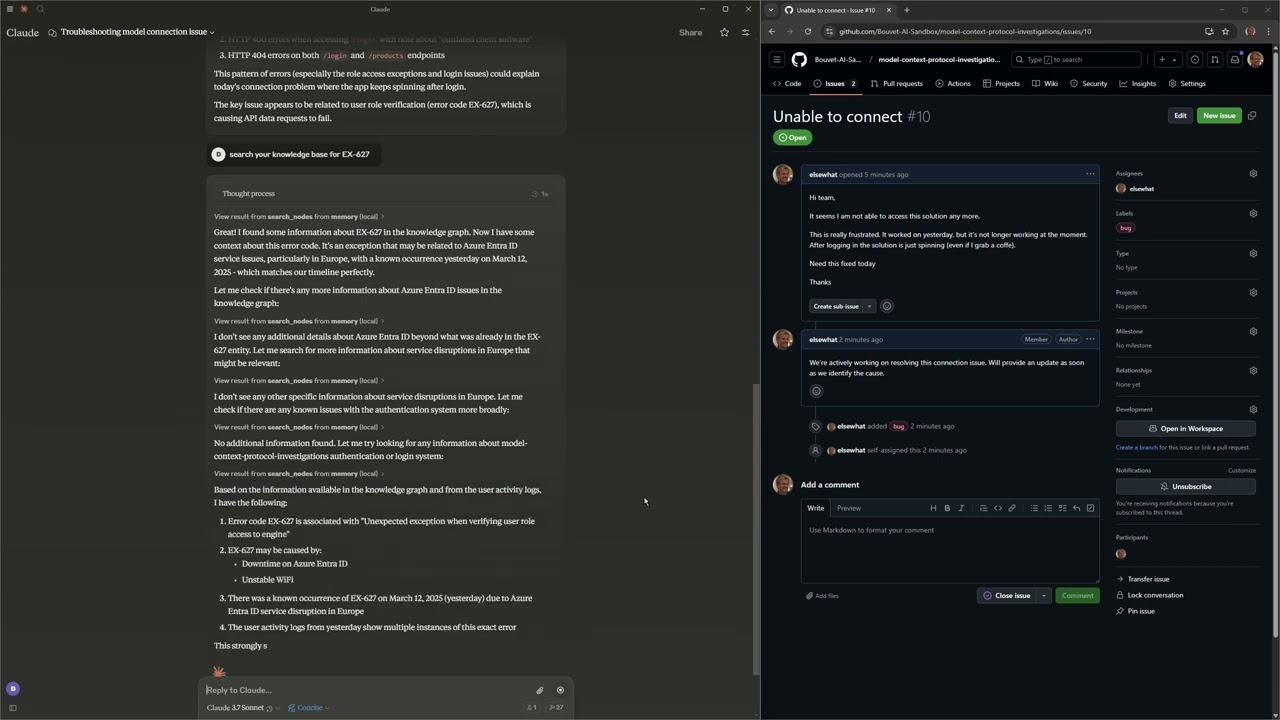
MCP has had an amazing adoption and has in March 2025 become a de-facto standard.
The article Why MCP Won explains a lot of the background for this. After this was published GitHub CoPilot in VS Code is working on support and OpenAI has announced they will adopt the standard.
MCP Servers
MCP servers can provide:
- Tools - This is the core functionality and provides a set of function call the LLM used by the MCP client can choose to use
- Resources - Similar to tools, but not focused on function calling from an LLM
- Prompts - Templates suggestions an MCP client expose to the end-user
Several SDKs are available to help build MCP servers including Python, TypeScript, Java and Kotlin. We’ve explored the Python SDK and recommend it.
The MCP protocol transport layer consists of Standard Input/Output (stdio) and Server-Sent Events (SSE), but can easily be extended. Today most MCP client mainly use stdio as transport layer but this will likely change in the near future as reflected in the MCP roadmap.
As MCP servers are lightweight and often require secrets related to actual end-user, we recommend deploying it locally on a developer computer. It should support both stdio and sse and be possible to run in a docker container.
Services such as GitHub and Slack will in the future expose MCP servers over HTTPS and use OAuth for authentication and authorization.
Anthropic is actively working on an Official MCP Registry API for discovery of MCP servers.
List of MCP servers are available through modelcontextprotocol/servers
Example MCP Server
The following show the key elements of an MCP server implementation
import os
from dotenv import load_dotenv
from mcp.server.fastmcp import FastMCP, Context
from pydantic import Field

# Load environment variables
load_dotenv()

# Get secrets used by the MCP Server
MY_SECRET = os.getenv("MY_SECRET")

# Validate environment variables
if not MY_SECRET :
    raise ValueError("MY_SECRET must be set in .env file")

# Create an MCP server
mcp = FastMCP(
    name="AppInsightsServer",
    log_level="DEBUG",
    debug=True,
    port=8080
)

@mcp.tool()
def user_activity(
    userId: str = Field(description="The email address of the user to get activity for"),
    duration: str = Field(description="Duration to get activity for in ISO8601 format. Default: P1D (1 day)", default="P1D"),
    ctx: Context = Field(description="MCP context"),
) -> Dict[str, Any]:
    """Get a list of all HTTP requests for a specific user in a given duration.

    Returns Application Insights data including requests, exceptions, and traces.
    """
    return _app_insight_call(userId, duration, ctx)

def _app_insight_call(userId: str, duration: str, ctx: Context) -> Optional[Dict[str, Any]]:
    #internal method doing the performing the tool call
    return None

# Allow run directly from python
# Alternatively run with: mcp run server.py --transport sse
# or through MCP Inspector with: npx @modelcontextprotocol/inspector
if __name__ == "__main__":
    mcp.run(transport="sse")
This results in the follow functional calling definition provided to the LLM choosen by the MCP client
{
  "tools": [
    {
      "name": "user_activity",
      "description": "Get a list of all HTTP requests for a specific user in a given duration.\n    \n    Returns Application Insights data including requests, exceptions, and traces.\n    ",
      "inputSchema": {
        "type": "object",
        "properties": {
          "userId": {
            "description": "The email address of the user to get activity for",
            "title": "Userid",
            "type": "string"
          },
          "duration": {
            "default": "P1D",
            "description": "Duration to get activity for in ISO8601 format. Default: P1D (1 day)",
            "title": "Duration",
            "type": "string"
          }
        },
        "required": [
          "userId"
        ],
        "title": "user_activityArguments"
      }
    }
  ]
}
MCP Clients
MCP Clients control the LLM and the end-user interaction (if any). The MCP client is configured with a relevant set of MCP servers. It’s up to the LLM to recommend a tool from an MCP server to be used and the MCP client will typically ask the end-user to confirm before initiating the tool call through the MCP server.
Additionally, the MCP clients can provide:
- Sampling - This allows MCP servers to request LLM completions through the MCP client (not commonly used today)
We’ve investigated the following MCP clients:
- LLM chat clients - Codename Goose and LibreChat
- Code copilots in IDEs - Cline, Claude Code and GitHub CoPilot (VS Code insiders edition
- Agent frameworks - Lanchain (through langchain-mcp-adapters)
MCP Inspector
Use the MCP Inspector as an interactive developer tool and a method to test MCP servers directly.
Run it through npx @modelcontextprotocol/inspector.
Repository components
A server providing MCP capabilities for Azure Application Insights data.
- Exposes tools for retrieving user activity data
- Supports querying across requests, exceptions, and traces
- Uses the FastMCP framework for easy implementation
A tool for generating test data for Azure Application Insights in order to demonstrate a bug triage scenario
- Creates simulated web requests with various status codes and response times
A Python application for retrieving GitHub issues and using LLMs to suggest solutions.
- Fetches issues from a GitHub repository
- Sends issue content to an LLM for analysis
- Being updated to leverage MCP integration
Demonstration of the MCP client Claude Code (Anthropic’s command-line tool)
- Seamless integration with MCP servers
- Configured to connect to GitHub and Application Insights MCP servers
Demonstration of the MCP client Codename Goose :
- Configuration for connecting to multiple MCP servers
- LLM integration towards Azure OpenAI Services
Investigation recommendations for Model Context Protocol
We should start adopting MCP for the providing relevant concept for the Software Delivery Lifecycle into LLMs.
It’s independent of the actual LLMs used and compatible with our requirements related to information classification and data handling.
MCP Servers relevant for AI in SDLC
This list provides an example of MCP servers relevant for the Software Delivery Lifecycle:
- GitHub - https://github.com/modelcontextprotocol/servers/tree/main/src/github
- Slack - https://github.com/modelcontextprotocol/servers/tree/main/src/slack
- Memory - https://github.com/modelcontextprotocol/servers/tree/main/src/memory
- Whois - https://glama.ai/mcp/servers/@bharathvaj-ganesan/whois-mcp
- MCP remote - https://www.npmjs.com/package/mcp-remote?activeTab=readme
- Time - https://github.com/modelcontextprotocol/servers/tree/HEAD/src/time
- Sequentialthinking - https://github.com/modelcontextprotocol/servers/tree/main/src/sequentialthinking
- Browser tools - https://github.com/AgentDeskAI/browser-tools-mcp
- Architect - https://github.com/squirrelogic/mcp-architect
- Excel - https://github.com/haris-musa/excel-mcp-server
- GitHub Support Assistant - https://github.com/Jake-Mok-Nelson/mcp-find-similar-github-issues
- Neo4J - https://github.com/da-okazaki/mcp-neo4j-server
- Prompts - https://github.com/sparesparrow/mcp-prompts
- RFTM - https://github.com/ryanjoachim/mcp-rtfm
- Youtube transcript - https://github.com/sinco-lab/mcp-youtube-transcript
- Toggl - https://github.com/wolkwork/toggl-mcp
- Postman - https://github.com/delano/postman-mcp-server
- Dbhub - https://github.com/bytebase/dbhub
- Puppeteer - https://github.com/modelcontextprotocol/servers/tree/HEAD/src/puppeteer
- Grafana - https://github.com/grafana/mcp-grafana
- Office - https://github.com/microsoft/semanticworkbench/tree/1479ab09993070fc1e825c1016091e82a62dd138/mcp-servers/mcp-server-office
Reference videos - Tutorials & deep dives
How To Use Anthropic’s Model Context Protocol (MCP) | Setup Tutorial
- Step-by-step guide on setting up and using Anthropic’s MCP.
Exploring the Model Context Protocol - A Deep Dive into the Future of AI
- A three-part journey exploring MCP’s architecture, features, and real-world applications.
Anthropic’s Model Context Protocol: Add YOUR App to Claude AI!
- How to integrate applications with Claude AI using MCP.
Claude’s New Model Context Protocol is BIG AI NEWS (Hands-on Lab)
- Hands-on tutorial for integrating applications with MCP.
Model Context Protocol (MCP) Mastery
- A playlist covering MCP concepts, implementation, and real-world use cases.
(MCP) Model Context Protocol Tutorials
- Collection of video tutorials on MCP.
A Primer to Model Context Protocol (MCP)
- Breakdown of MCP’s functionalities, applications, and future implications.
Building a Model Context Protocol (MCP) Server
- Guide on creating an MCP server, including architecture, setup, and testing.
How to Set Up Model Context Protocol (MCP) with Claude AI
- First part of a series covering MCP setup with Claude AI.
Model Context Protocol from Claude - Open-Source Real-Time Data Integration
- Overview of MCP’s real-time data integration capabilities.
Building Agents with Model Context Protocol - Full Workshop with Mahesh Murag of Anthropic
- Recorded live at workshop day from the AI Engineer Summit 2025 in NY
Dev Tools Supporting MCP
The following are the main code editors that support the Model Context Protocol. Click the link to visit the official website for more information.







