
Mozisu Mcp Server
What is Mozisu Mcp Server
Mozisu MCP Server is a server designed to count characters in text, ensuring that large language models (LLMs) can generate text with accurate character counts. It supports multi-byte characters such as Japanese and emojis.
Use cases
Use cases for Mozisu MCP Server include integrating with LLMs for text generation, providing character count functionality in applications, and serving as a backend service for text analysis tools.
How to use
To use Mozisu MCP Server, you can run it directly as an MCP server, utilize it as a command-line tool, or access it via a web interface. Installation involves cloning the repository, installing dependencies, and building the project.
Key features
Key features include accurate character counting (including spaces and non-space characters), support for multi-byte characters, and multiple usage methods (MCP server, command-line tool, web interface).
Where to use
Mozisu MCP Server can be used in various fields where text processing is required, particularly in applications involving natural language processing, chatbots, and any system that needs precise character counting.
Clients Supporting MCP
The following are the main client software that supports the Model Context Protocol. Click the link to visit the official website for more information.





Overview
What is Mozisu Mcp Server
Mozisu MCP Server is a server designed to count characters in text, ensuring that large language models (LLMs) can generate text with accurate character counts. It supports multi-byte characters such as Japanese and emojis.
Use cases
Use cases for Mozisu MCP Server include integrating with LLMs for text generation, providing character count functionality in applications, and serving as a backend service for text analysis tools.
How to use
To use Mozisu MCP Server, you can run it directly as an MCP server, utilize it as a command-line tool, or access it via a web interface. Installation involves cloning the repository, installing dependencies, and building the project.
Key features
Key features include accurate character counting (including spaces and non-space characters), support for multi-byte characters, and multiple usage methods (MCP server, command-line tool, web interface).
Where to use
Mozisu MCP Server can be used in various fields where text processing is required, particularly in applications involving natural language processing, chatbots, and any system that needs precise character counting.
Clients Supporting MCP
The following are the main client software that supports the Model Context Protocol. Click the link to visit the official website for more information.
Content
📝 Mozisu MCP Server 📝
文字数をカウントして返す MCP サーバー


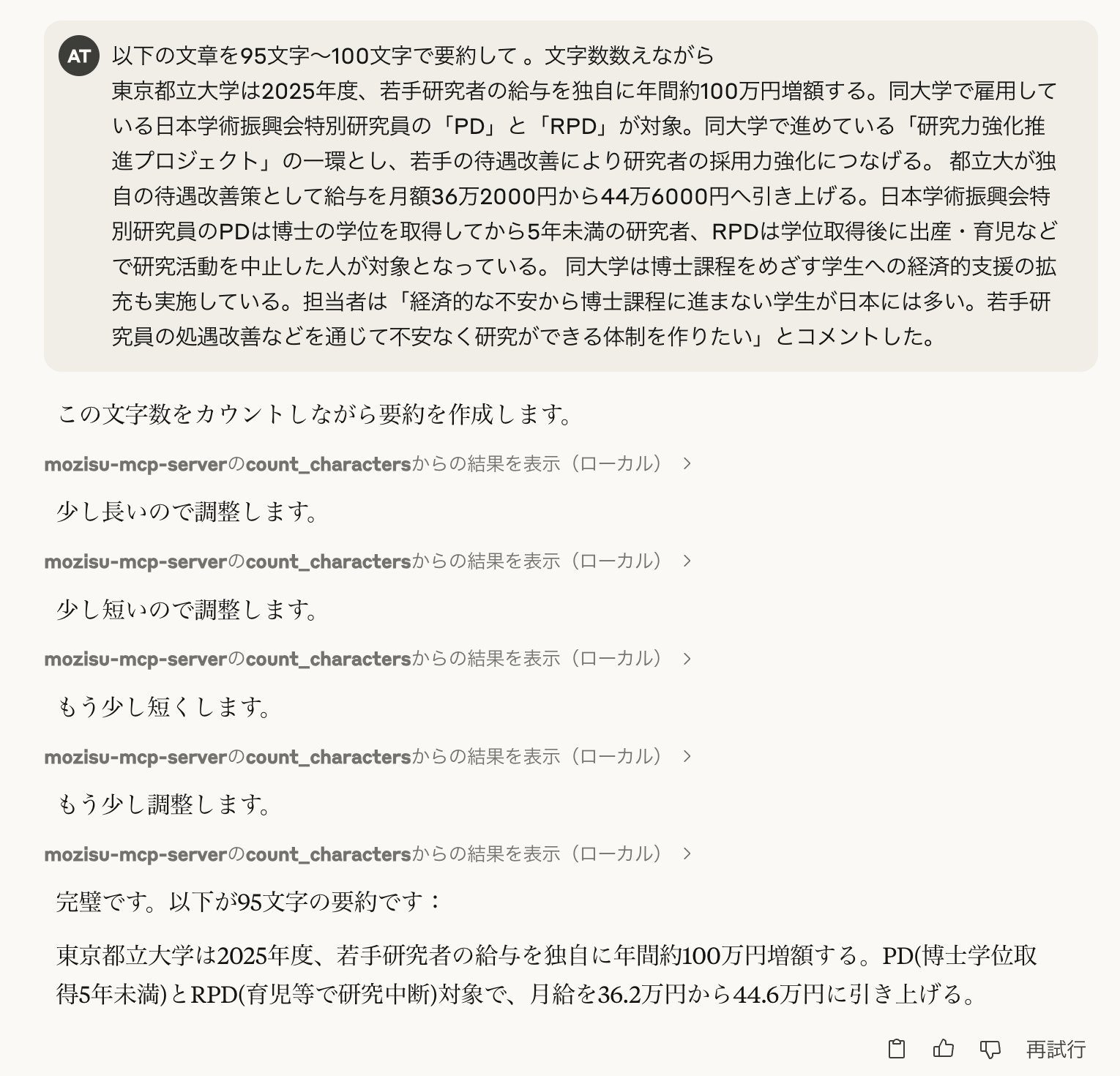
文字数をカウントして返すことで、LLMが正確な文字数で文章を作成できるようにするMCPサーバーです。日本語や絵文字などのマルチバイト文字にも対応しています。
📋 目次
✨ 機能
- 📊 文字数カウント
- 全文字数(スペースを含む)
- 空白以外の文字数
- 🈁 マルチバイト文字対応
- 日本語や絵文字などのUnicode文字を正確にカウント
- 🔄 複数の利用方法
- MCPサーバー
- コマンドラインツール
- Webインターフェース
🚀 インストール
# リポジトリのクローン
git clone https://github.com/Atotti/mozisu-mcp-server.git
cd mozisu-mcp-server

# 依存関係のインストール
go mod download

# ビルド
task build
⚙️ Claude Desktop の設定
claude_desktop_config.json に以下の設定を追加します:
📖 使用方法
🔌 MCPサーバーとして使用
# 直接実行
go run cmd/mcpserver/main.go

# または、ビルド済みのバイナリを使用
./bin/mozisu-mcp-server
これにより、LLMがcount_charactersツールを使用して文字数カウント機能を利用できます。
💻 コマンドラインツールとして使用
# ビルド済みのバイナリを使用
./bin/charcount "カウントしたいテキスト"

# または直接実行
go run cmd/charcount/main.go "カウントしたいテキスト"
対話モードで使用:
./bin/charcount -i
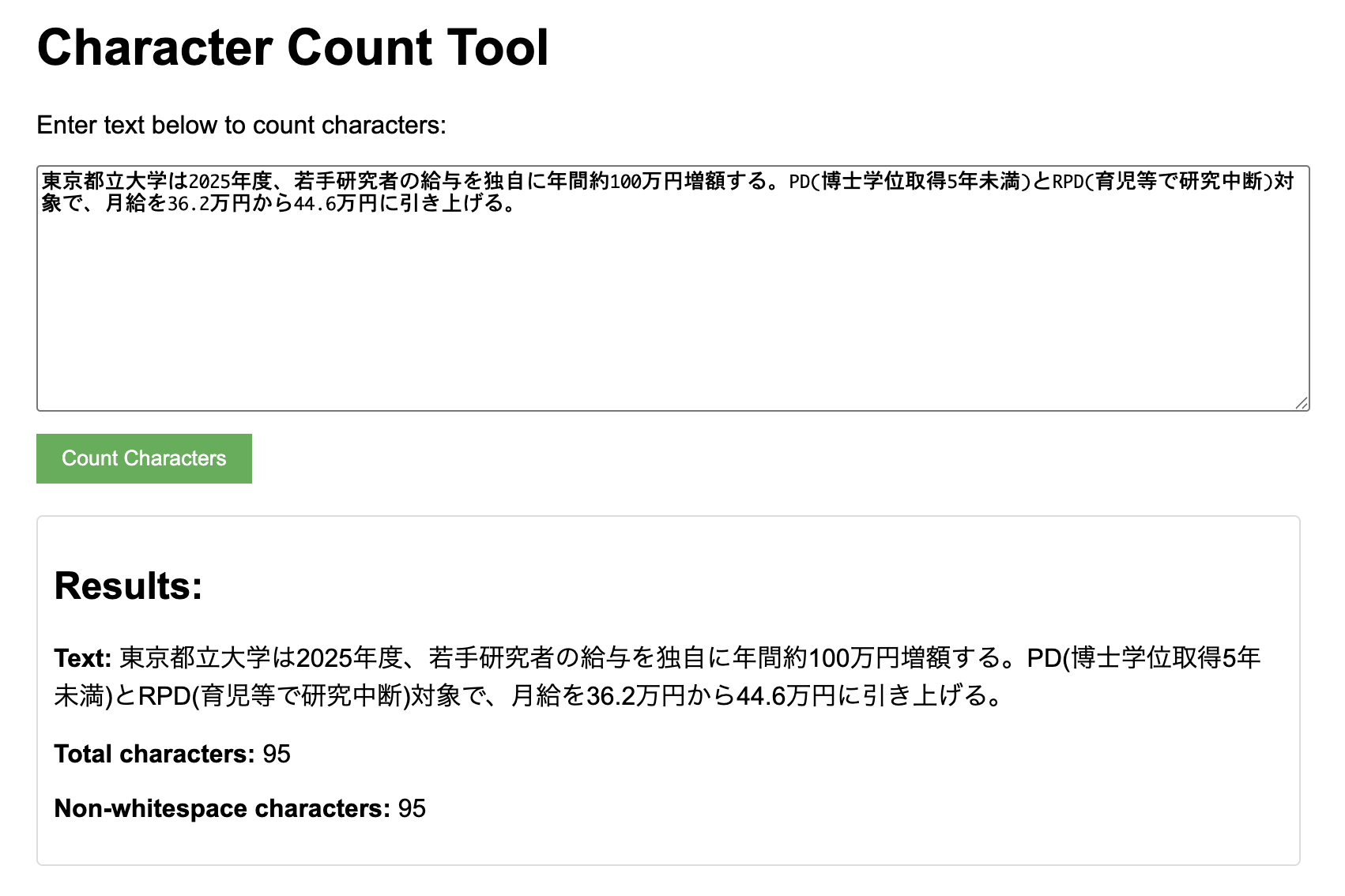
🌐 Webインターフェースとして使用
人間用のプロトコルもGUIで用意されています。
# ビルド済みのバイナリを使用
./bin/webserver

# または直接実行
go run cmd/webserver/main.go
その後、ブラウザで http://localhost:8080 にアクセスします。
👥 貢献方法
- このリポジトリをフォークします
- 新しいブランチを作成します (
git checkout -b feature/amazing-feature) - 変更をコミットします (
git commit -m 'Add some amazing feature') - ブランチにプッシュします (
git push origin feature/amazing-feature) - プルリクエストを作成します
バグ報告や機能リクエストは、Issueを作成してください。
📄 ライセンス
このプロジェクトは MIT License の下で公開されています。
Dev Tools Supporting MCP
The following are the main code editors that support the Model Context Protocol. Click the link to visit the official website for more information.







