
Myssl Mcp Server Go
What is Myssl Mcp Server Go
myssl-mcp-server-go is an implementation of an MCP server that provides domain and IP security checking capabilities through the MySSL API.
Use cases
Use cases include checking domain information for secure HTTPS deployments, verifying the operational status of the MySSL service, and integrating with AI clients for enhanced security functionalities.
How to use
To use myssl-mcp-server-go, download the appropriate release for your platform, extract the package, and set your MySSL API credentials as environment variables. Then, register the server with your compatible AI client.
Key features
Key features include a Domain Check Tool for querying domain information, a Health Check Tool to verify the MySSL service’s operational status, and seamless integration with AI clients via the MCP protocol.
Where to use
myssl-mcp-server-go can be used in various fields requiring secure domain and IP verification, such as web development, cybersecurity, and cloud services.
Clients Supporting MCP
The following are the main client software that supports the Model Context Protocol. Click the link to visit the official website for more information.





Overview
What is Myssl Mcp Server Go
myssl-mcp-server-go is an implementation of an MCP server that provides domain and IP security checking capabilities through the MySSL API.
Use cases
Use cases include checking domain information for secure HTTPS deployments, verifying the operational status of the MySSL service, and integrating with AI clients for enhanced security functionalities.
How to use
To use myssl-mcp-server-go, download the appropriate release for your platform, extract the package, and set your MySSL API credentials as environment variables. Then, register the server with your compatible AI client.
Key features
Key features include a Domain Check Tool for querying domain information, a Health Check Tool to verify the MySSL service’s operational status, and seamless integration with AI clients via the MCP protocol.
Where to use
myssl-mcp-server-go can be used in various fields requiring secure domain and IP verification, such as web development, cybersecurity, and cloud services.
Clients Supporting MCP
The following are the main client software that supports the Model Context Protocol. Click the link to visit the official website for more information.
Content
myssl-mcp-server
An MCP server implementation that provides domain and IP security checking capabilities through the MySSL API.
Features
- Domain Check Tool: Query information about domains to ensure secure HTTPS deployments
- Health Check Tool: Verify the MySSL service is operational
- AI Client Integration: Seamlessly integrates with compatible AI clients via the MCP protocol
Requirements
- MySSL API credentials (AccessKey and SecretKey)
- Compatible AI client that supports MCP servers
Installation
- Download the appropriate release for your platform from the Releases page
- Extract the package
- Set your MySSL API credentials as environment variables:
{
  "AccessKey": "ak_name",
  "SecretKey": "sk_value"
}- The following authorizations are available and are valid for 1 month:
msp-test-pub-2,6e01b7c975b23f87b6b71a7822fa330250997cc2e1b69f3db4638e2a57a0b0a7
Registering with AI Client
To use this MCP server, you need to register it with your AI client:
- Open your AI client’s plugin/extension management interface
- Add a new MCP server with:
- Name:
myssl-mcp-server - Version:
1.0.0 - Command: Path to the executable
- Working Directory: Where you extracted the files
Usage
Once registered with your AI client, you can use the following tools:
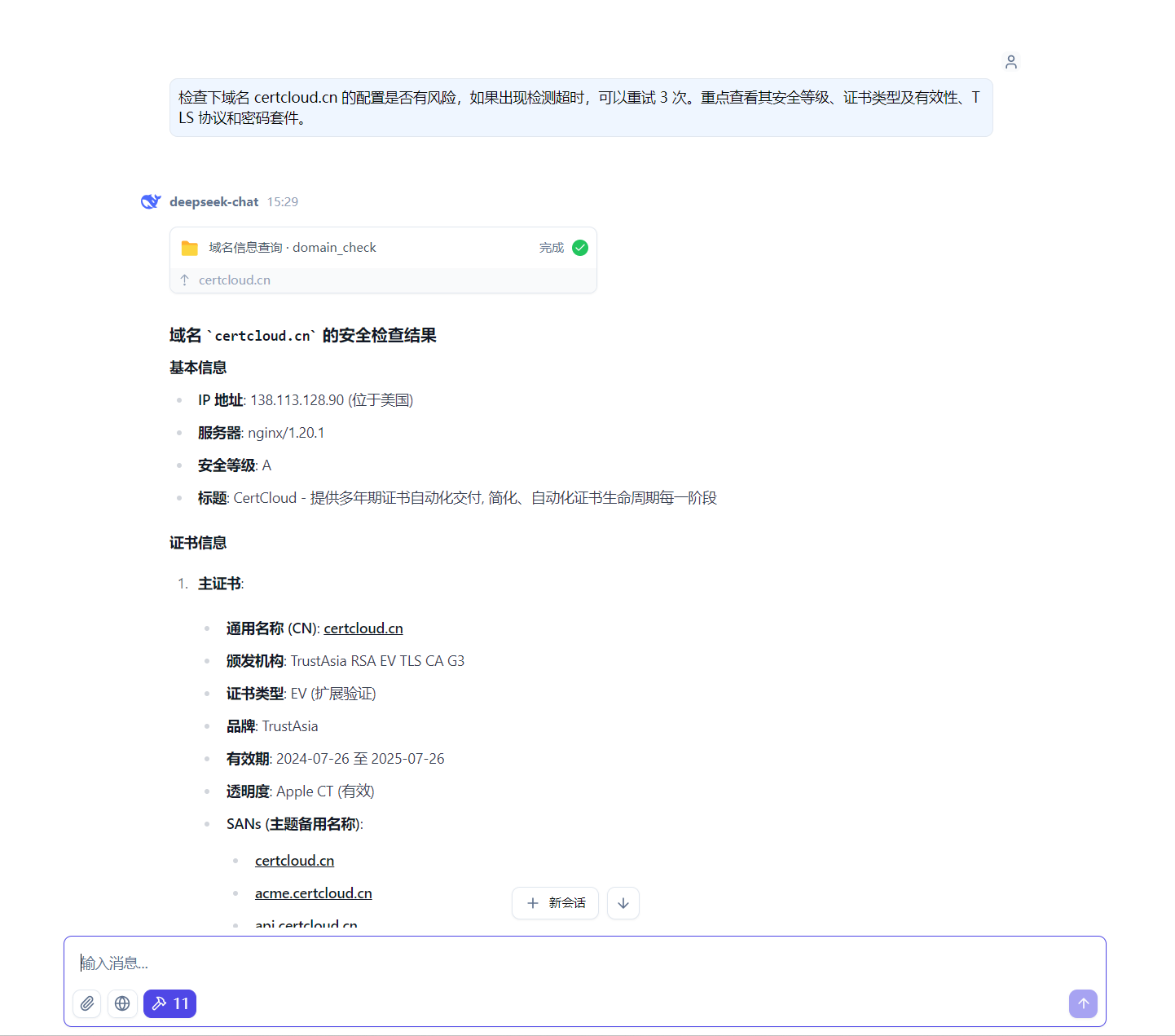
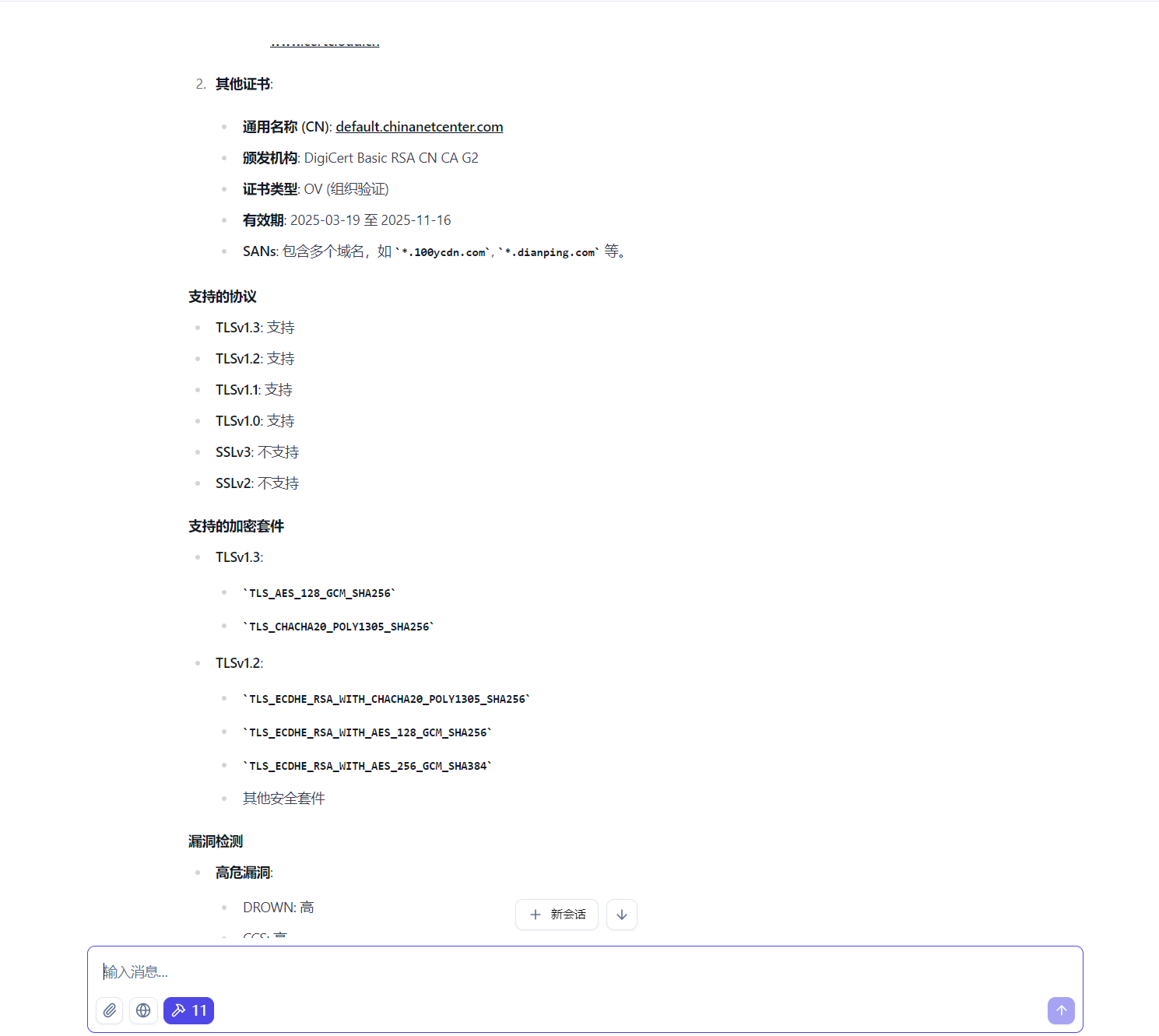
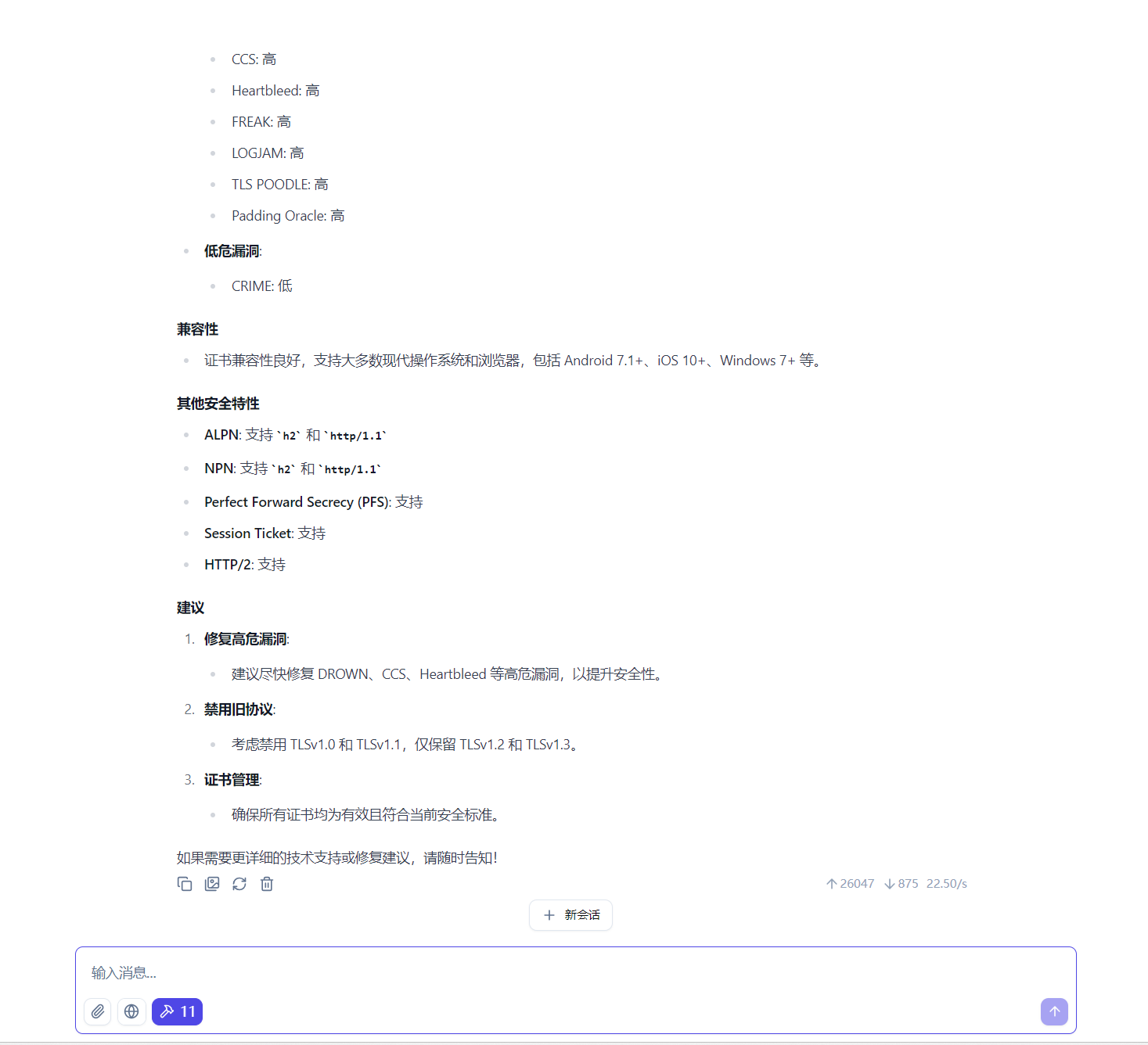
domain_check
Check information about a domain or IP.
Example prompt in your AI client:
health_check
Check if the MySSL service is operational.
Example prompt in your AI client:
Check if the MySSL service is working
Development
Building from source:
go build -o myssl-mcp-server .
Dev Tools Supporting MCP
The following are the main code editors that support the Model Context Protocol. Click the link to visit the official website for more information.







