
Nano Manus
What is Nano Manus
nano-manus is a project that implements some features of Manus using MCP, designed to streamline tasks by coordinating agents and executing plans.
Use cases
Use cases for nano-manus include finding and explaining Python files, retrieving and saving weather data in CSV format, and other automated tasks that benefit from agent coordination.
How to use
To use nano-manus, install NPM and Docker, set up your environment with the necessary API keys, and run the default command using ‘uv sync’ followed by ‘uv run examples/basic_planner.py’.
Key features
Key features of nano-manus include a small codebase of about 1000 lines of code, support for loading MCP from Docker and other platforms, and a plan-then-execute approach that organizes agents and assigns tasks effectively.
Where to use
nano-manus can be used in various fields such as software development, data analysis, and automation tasks where coordination of multiple agents is required.
Clients Supporting MCP
The following are the main client software that supports the Model Context Protocol. Click the link to visit the official website for more information.





Overview
What is Nano Manus
nano-manus is a project that implements some features of Manus using MCP, designed to streamline tasks by coordinating agents and executing plans.
Use cases
Use cases for nano-manus include finding and explaining Python files, retrieving and saving weather data in CSV format, and other automated tasks that benefit from agent coordination.
How to use
To use nano-manus, install NPM and Docker, set up your environment with the necessary API keys, and run the default command using ‘uv sync’ followed by ‘uv run examples/basic_planner.py’.
Key features
Key features of nano-manus include a small codebase of about 1000 lines of code, support for loading MCP from Docker and other platforms, and a plan-then-execute approach that organizes agents and assigns tasks effectively.
Where to use
nano-manus can be used in various fields such as software development, data analysis, and automation tasks where coordination of multiple agents is required.
Clients Supporting MCP
The following are the main client software that supports the Model Context Protocol. Click the link to visit the official website for more information.
Content
🐜 nano_manus
Implementing some features of Manus with MCP


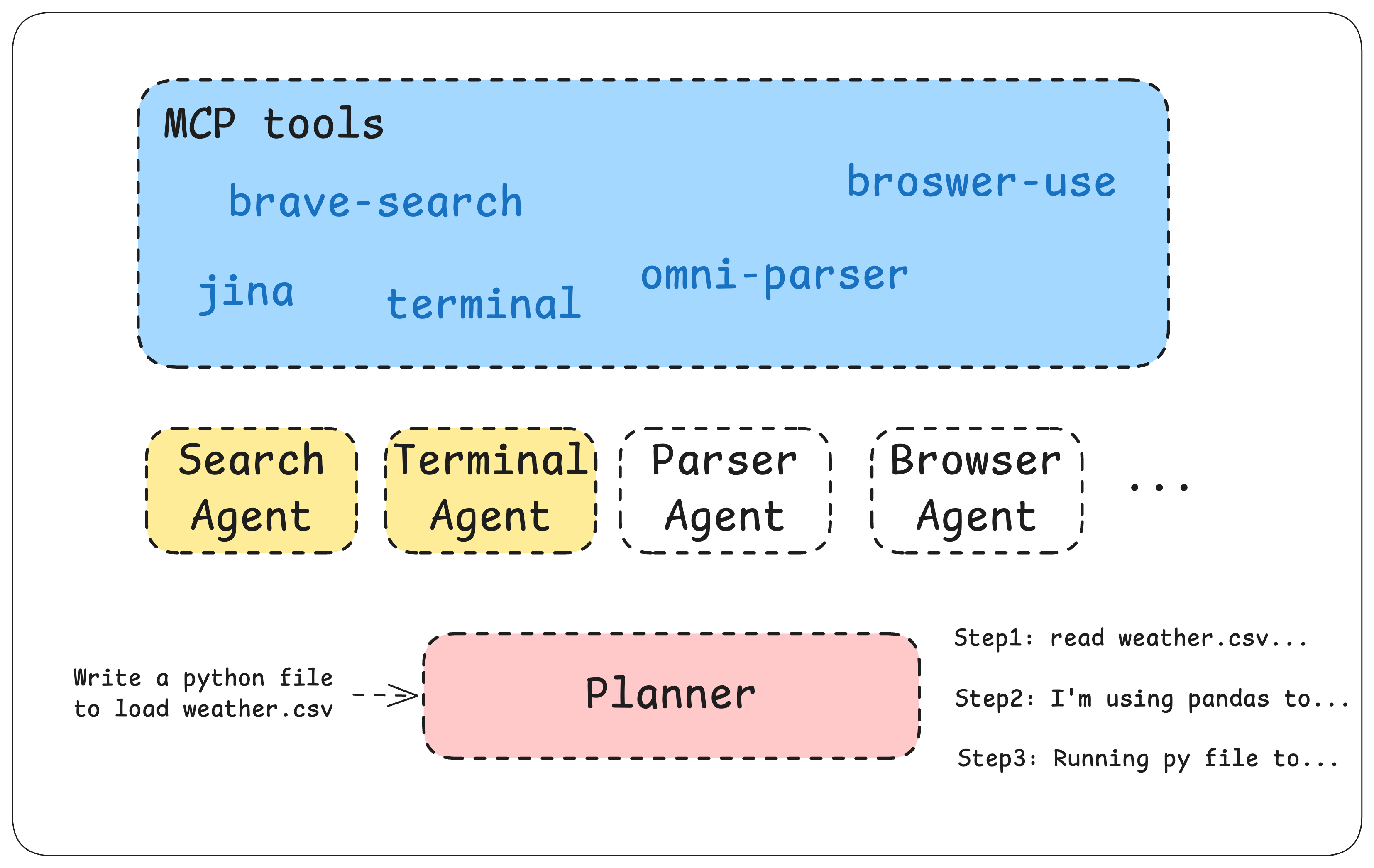
nano-manus
Features
- Small:
nano_manusis about 1000 LOC. - Using MCP:
nano_manussupports loading MCP from docker,npxand Smithery - Plan-then-Execute:
nano_manuswill gather your agents, make the plans and then assign the correct jobs to your agents
Use Cases
https://github.com/user-attachments/assets/33b90afc-2e30-4ab0-8988-bd7d6da065fb
Find all .py file and explain them to meGive me the latest weather in SF in last 7 days and save it to csv
Welcome to give more use cases!
QuickStart
Setup
Env
- Brave Search API key
- Jina API key
- OpenAI API key
Your .env should look like:
BRAVE_API_KEY=BSAxxxx
JINA_API_KEY=jina_xxxx
OPENAI_API_KEY=sk-proj-XXXXX
Run default nano-manus
uv sync
uv run examples/basic_planner.py
Abilities
- [x] Search Web (
mcp/brave-search,jina-ai-mcp-server) - [x] Local files operations (
@wonderwhy-er/desktop-commander) - [x] Execute codes and commands in your computer (
@wonderwhy-er/desktop-commander) - [ ] (coming soon) Implementing CodeAct
- [ ] (coming soon) Read
.pdf, .doc - [ ] (coming soon) browser use
- [ ] (coming soon) multi-model router (
claude,qwen,deepseek…)
Known Issues
nano-manusis extremely unstable! My guess isgpt-4ois not that good at tool use.Unable to exit: seem like some MCPs will cause the problems of unable to exit the program when all the tasks were done.nano-manuswill operate files and run command on the current dir of your local computer, make sure you don’t run it on some important folders.
Dev Tools Supporting MCP
The following are the main code editors that support the Model Context Protocol. Click the link to visit the official website for more information.







