
Nats Transport For Mcp
What is Nats Transport For Mcp
nats-transport-for-MCP is a transport implementation for the Model Context Protocol (MCP) that utilizes NATS.io as a communication mechanism for MCP clients and servers, enabling distributed and scalable deployments.
Use cases
Use cases include building scalable MCP servers and clients, implementing service discovery and load balancing in distributed systems, and enabling high availability and fault tolerance in applications.
How to use
To use nats-transport-for-MCP, install the package via pip, configure the NATS transport parameters in your server and client code, and then run the server and client asynchronously using the provided NATS transport functions.
Key features
Key features include NATS client and server transport implementations, support for distributed MCP deployments, service discovery, load balancing, high availability, and fault tolerance.
Where to use
nats-transport-for-MCP is suitable for applications requiring distributed architecture, such as microservices, cloud-native applications, and real-time data processing systems.
Clients Supporting MCP
The following are the main client software that supports the Model Context Protocol. Click the link to visit the official website for more information.





Overview
What is Nats Transport For Mcp
nats-transport-for-MCP is a transport implementation for the Model Context Protocol (MCP) that utilizes NATS.io as a communication mechanism for MCP clients and servers, enabling distributed and scalable deployments.
Use cases
Use cases include building scalable MCP servers and clients, implementing service discovery and load balancing in distributed systems, and enabling high availability and fault tolerance in applications.
How to use
To use nats-transport-for-MCP, install the package via pip, configure the NATS transport parameters in your server and client code, and then run the server and client asynchronously using the provided NATS transport functions.
Key features
Key features include NATS client and server transport implementations, support for distributed MCP deployments, service discovery, load balancing, high availability, and fault tolerance.
Where to use
nats-transport-for-MCP is suitable for applications requiring distributed architecture, such as microservices, cloud-native applications, and real-time data processing systems.
Clients Supporting MCP
The following are the main client software that supports the Model Context Protocol. Click the link to visit the official website for more information.
Content
MCP NATS Transport
NATS transport implementation for Model Context Protocol (MCP). This package enables using NATS.io as a transport mechanism for MCP clients and servers, providing distributed and scalable deployments.
Features
- NATS client transport implementation
- NATS server transport with micro-services API support
- Service discovery, monitoring, and statistics via NATS services
- Built-in observability with NATS CLI for service inspection
- Support for distributed MCP deployments
- Load balancing across multiple service instances
- High availability and fault tolerance
New: UNS-MCP with NATS.io Integration
This repository now includes a complete integration of UNS-MCP (Unstructured API MCP Server) with NATS.io transport.
⚠️ Important: External Dependency - This integration requires the UNS-MCP project code which is not included in this repository. See the UNS-MCP Integration README for setup instructions.
Quick Start with UNS-MCP Integration
-
Clone the UNS-MCP repository (contact Unstructured for access if necessary):
git clone https://github.com/Unstructured-IO/UNS-MCP.git UNS-MCP -
Clone this repository:
git clone https://github.com/dronomyio/nats-transport-for-MCP.git cd nats-transport-for-MCP -
Create a
.envfile in the root directory with your API keys:UNSTRUCTURED_API_KEY=your_unstructured_api_key ANTHROPIC_API_KEY=your_anthropic_api_key -
Start the services using Docker Compose:
docker-compose -f uns_nats_integration/docker-compose.yml up -d -
Connect to the interactive client:
docker-compose -f uns_nats_integration/docker-compose.yml exec uns-mcp-client python /app/uns_nats_integration/client.py
Running the UNS-MCP Examples
To run the UNS-MCP examples:
# Start the services if not already running
docker-compose -f uns_nats_integration/docker-compose.yml up -d

# Run the simple workflow example
docker-compose -f uns_nats_integration/docker-compose.yml exec uns-mcp-client python /app/uns_nats_integration/examples/simple_workflow.py

# Run the AI-assisted workflow example
docker-compose -f uns_nats_integration/docker-compose.yml exec uns-mcp-client python /app/uns_nats_integration/examples/simple_workflow.py --ai
For more details on the UNS-MCP integration, see the UNS-MCP Integration README.
Installation
pip install mcp-nats-transport
Quick Start
Server
from mcp.server.fastmcp.server import FastMcpServer
from mcp.server.fastmcp.tools import tool
from mcp.shared.session import Session
from mcp_nats_transport import NatsServerParameters, nats_server

# Define a simple tool
@tool
async def echo(text: str) -> str:
    """Echo the input text."""
    return text

# Create an MCP server
server = FastMcpServer()
server.tools.register(echo)

# Configure NATS transport with micro-services API
nats_params = NatsServerParameters(
    url="nats://localhost:4222",
    service_name="mcp.service",
    server_id="echo-server-1",
    description="MCP Echo Service",
    version="1.0.0",
    metadata={
        "environment": "development"
    }
)

# Start the server using NATS transport
async with nats_server(nats_params) as (read_stream, write_stream):
    session = Session()
    await server.run(session, read_stream, write_stream)
Client
from mcp.client.session import ClientSession
from mcp_nats_transport import NatsClientParameters, nats_client

# Configure NATS transport
nats_params = NatsClientParameters(
    url="nats://localhost:4222",
    service_name="mcp.service",
    client_id="echo-client-1"
)

# Connect to the server using NATS transport
async with nats_client(nats_params) as (read_stream, write_stream):
    # Create a client session
    client = ClientSession()

    # Run initialization
    await client.initialize(read_stream, write_stream)

    # Get available tools
    tools = await client.list_tools()
    print(f"Available tools: {[tool.name for tool in tools.tools]}")

    # Call the echo tool
    result = await client.call_tool("echo", {"text": "Hello via NATS!"})
    print(f"Echo result: {result.content[0].text}")
Docker Deployment
A Docker Compose configuration is provided for easy deployment of NATS server with examples:
Running the Full MCP Example
docker-compose up
This will start:
- A NATS server
- An example MCP server with tools
- An example MCP client that connects to the server
Running the Simple NATS Example
A simplified example that demonstrates the core NATS request/reply pattern is available:
docker-compose -f docker-compose-simple.yml up
This runs a single container that demonstrates both the server and client sides of NATS communication.
Testing Individually in Separate Windows
To test the components separately:
-
Start the NATS server in one terminal:
docker run -p 4222:4222 -p 8222:8222 nats:latest --jetstream -
Run the server component in another terminal:
python -c " import asyncio import logging from docker_example import run_server logging.basicConfig(level=logging.INFO) asyncio.run(run_server('nats://localhost:4222')) " -
Run the client component in a third terminal:
python -c "
import asyncio
import logging
from docker_example import run_client
logging.basicConfig(level=logging.INFO)
asyncio.run(run_client('nats://localhost:4222'))
"
You can also create simple server.py and client.py files to make this easier:
import asyncio
import logging
from docker_example import run_server

logging.basicConfig(level=logging.INFO)
asyncio.run(run_server('nats://localhost:4222'))
import asyncio
import logging
from docker_example import run_client

logging.basicConfig(level=logging.INFO)
asyncio.run(run_client('nats://localhost:4222'))
Then run each script in a separate terminal after starting the NATS server.
Implementation Details
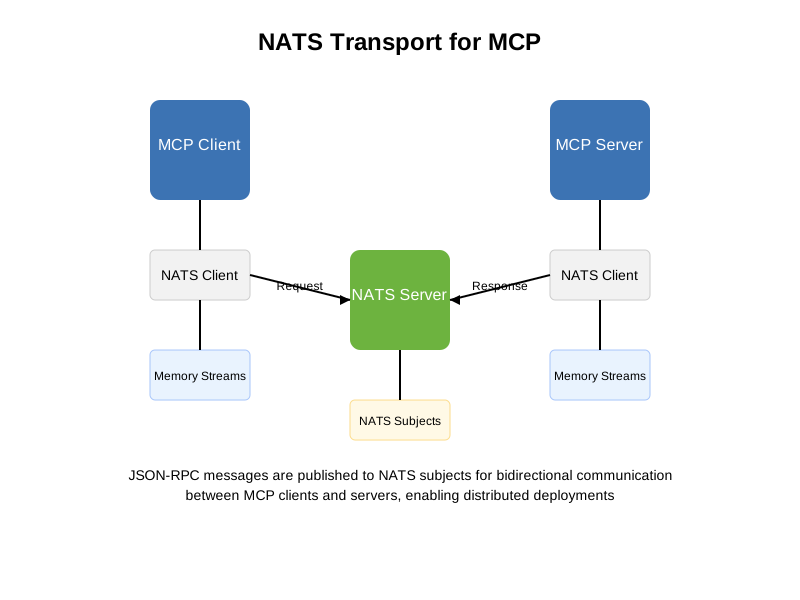
The NATS transport for MCP implements the JSON-RPC 2.0 protocol on top of NATS messaging system, with several key features:
NATS Services API Integration
The implementation uses the NATS request/reply pattern through its Services API:
-
Server-side:
- Uses proper NATS service handlers with reply subjects
- Maps JSON-RPC methods to service subjects (
service_name.method) - Tracks in-flight requests for response correlation
- Returns responses via the reply subject mechanism
-
Client-side:
- Uses the
nc.request()method for proper request/reply pattern - Automatically handles request timeouts
- Manages correlation between requests and responses
- Subscribes to notification channels for non-request messages
- Uses the
-
Subject Structure:
- Main requests:
service_name.method_name - Notifications:
service_name.notifications.type - Service discovery happens automatically through micro-services API
- Main requests:
-
NATS Micro-Services API:
- Services automatically register with the NATS server
- Built-in metrics for service health and performance
- Request count, error rates, and latency tracking
- Service endpoint discovery
- Management through NATS CLI commands:
nats service list               # List all services
nats service info mcp.service   # Get detailed service information
nats service stats mcp.service  # View service statistics
nats service monitor mcp.service # Monitor service performance
-
Error Handling:
- Proper propagation of JSON-RPC errors
- Timeout configuration and management
- Automatic reconnection handling
- Exception mapping to appropriate JSON-RPC error codes
This approach ensures reliable message delivery, proper correlation between requests and responses, and efficient routing of messages.
Asynchronous Callbacks for Long-Running Operations
The NATS transport includes support for asynchronous callbacks, enabling long-running operations without blocking:
-
Callback System:
- Client registers a callback for receiving async results
- Server acknowledges requests immediately
- Server processes requests in the background
- Results are delivered via dedicated callback subjects when ready
-
Progress Reporting:
- Support for progress updates during long-running operations
- Server can send incremental progress notifications
- Client can monitor progress of async operations
-
Extensions API:
CallbackEnabledClient- Client extension for async operationsCallbackEnabledServer- Server extension for handling callbacksasync_tooldecorator for creating progress-aware tools
-
Example Usage (Client):
# Create callback-enabled client callback_client = CallbackEnabledClient(mcp_client, nats_client) # Start async operation task = await callback_client.call_tool_async( "generate_report", {"report_type": "Financial", "size": 500} ) task_id = task["callback_id"] # Do other work while operation runs... # Get result when needed result = await callback_client.get_async_result(task_id) -
Example Usage (Server):
# Create callback-enabled server
callback_server = CallbackEnabledServer(server, nats_client)

# Register async-aware tool with progress reporting
@async_tool
async def generate_report(report_type, size, report_progress=None):
    # Start long operation
    for i in range(size):
        # Do work...

        # Report progress
        if report_progress:
            await report_progress(i/size, size, "Processing...")

    return "Completed report"
This callback mechanism is particularly valuable for distributed deployments with long-running operations such as ML inference, large text generation, or data processing tasks.
Documentation
For more detailed documentation, see the documentation.
Examples
Check out the examples directory for more usage patterns:
- Simple Example: Basic usage of NATS transport
- Distributed Example: Advanced distributed deployment with multiple servers and clients
- Docker Example: Simplified example demonstrating NATS request/reply pattern
- Callback Example: Asynchronous operations with callbacks and progress reporting
- UNS-MCP Examples: Examples for the UNS-MCP integration with NATS
Architecture
Requirements
- Python 3.8+
- MCP Python SDK
- NATS.io server (for production use)
License
dronomy.io License
Dev Tools Supporting MCP
The following are the main code editors that support the Model Context Protocol. Click the link to visit the official website for more information.







