
Nebulagraph Mcp Server
What is Nebulagraph Mcp Server
The nebulagraph-mcp-server is a Model Context Protocol Server designed for NebulaGraph 3.x, providing seamless access to graph data and functionalities.
Use cases
Use cases include graph data exploration, integration with large language models (LLMs), and executing graph algorithms for data analysis.
How to use
To use nebulagraph-mcp-server, install it via pip with ‘pip install nebulagraph-mcp-server’. Configure the server by setting environment variables in a .env file, including NEBULA_VERSION, NEBULA_HOST, NEBULA_PORT, NEBULA_USER, and NEBULA_PASSWORD.
Key features
Key features include seamless access to NebulaGraph 3.x, support for graph exploration with schema and query capabilities, adherence to the Model Context Protocol for integration with LLM tooling systems, and a simple command-line interface.
Where to use
Nebulagraph-mcp-server can be used in various fields that require graph data management and analysis, such as data science, machine learning, and software development.
Clients Supporting MCP
The following are the main client software that supports the Model Context Protocol. Click the link to visit the official website for more information.





Overview
What is Nebulagraph Mcp Server
The nebulagraph-mcp-server is a Model Context Protocol Server designed for NebulaGraph 3.x, providing seamless access to graph data and functionalities.
Use cases
Use cases include graph data exploration, integration with large language models (LLMs), and executing graph algorithms for data analysis.
How to use
To use nebulagraph-mcp-server, install it via pip with ‘pip install nebulagraph-mcp-server’. Configure the server by setting environment variables in a .env file, including NEBULA_VERSION, NEBULA_HOST, NEBULA_PORT, NEBULA_USER, and NEBULA_PASSWORD.
Key features
Key features include seamless access to NebulaGraph 3.x, support for graph exploration with schema and query capabilities, adherence to the Model Context Protocol for integration with LLM tooling systems, and a simple command-line interface.
Where to use
Nebulagraph-mcp-server can be used in various fields that require graph data management and analysis, such as data science, machine learning, and software development.
Clients Supporting MCP
The following are the main client software that supports the Model Context Protocol. Click the link to visit the official website for more information.
Content
Model Context Protocol Server for NebulaGraph
A Model Context Protocol (MCP) server implementation that provides access to NebulaGraph.



Features
- Seamless access to NebulaGraph 3.x .
- Get ready for graph exploration, you know, Schema, Query, and a few shortcut algorithms.
- Follow Model Context Protocol, ready to integrate with LLM tooling systems.
- Simple command-line interface with support for configuration via environment variables and .env files.
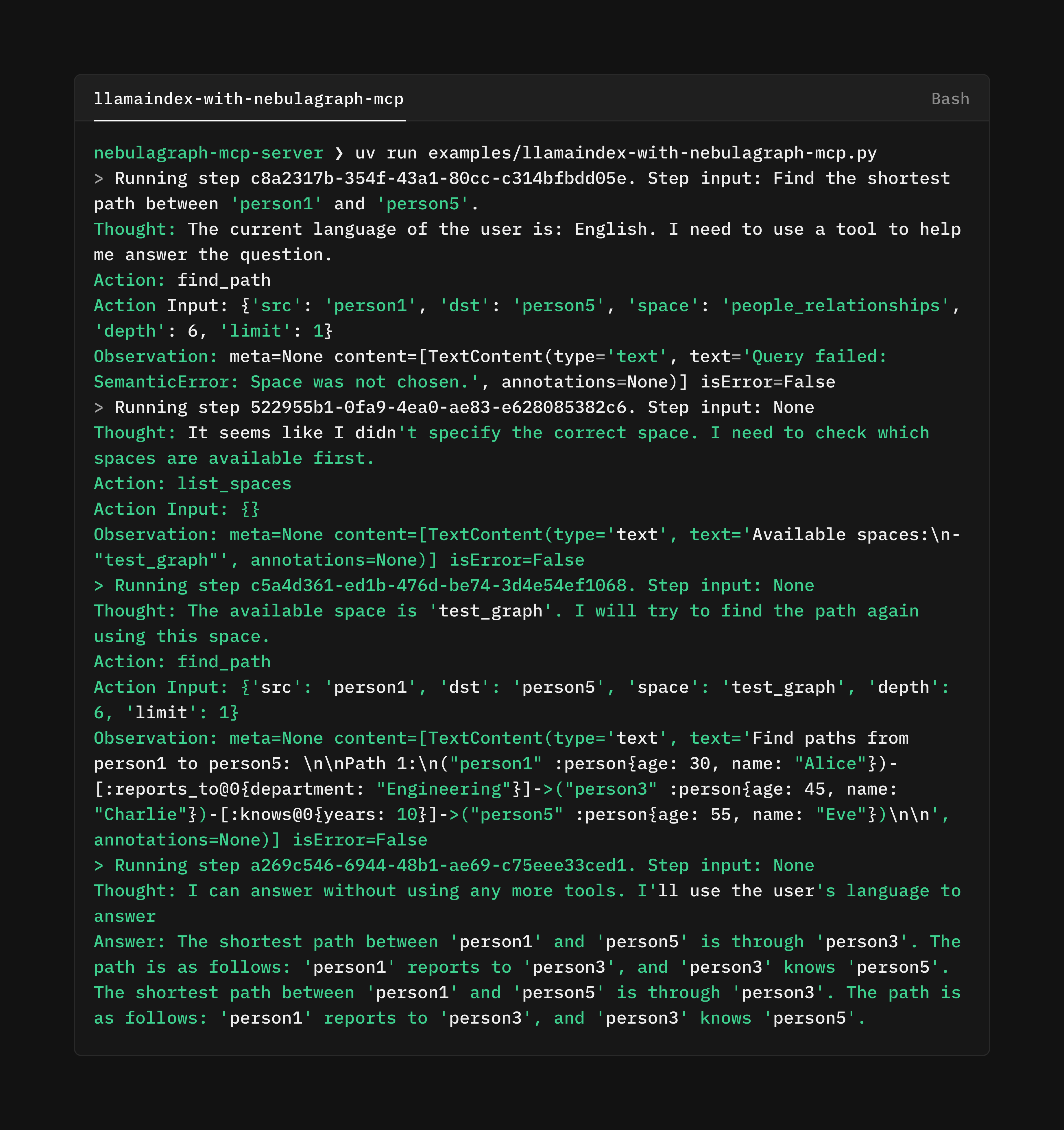
Installation
pip install nebulagraph-mcp-server
Usage
nebulagraph-mcp-server will load configs from .env, for example:
NEBULA_VERSION=v3 # only v3 is supported
NEBULA_HOST=<your-nebulagraph-server-host>
NEBULA_PORT=<your-nebulagraph-server-port>
NEBULA_USER=<your-nebulagraph-server-user>
NEBULA_PASSWORD=<your-nebulagraph-server-password>
It requires the value of
NEBULA_VERSIONto be equal to v3 until we are ready for v5.
Development
npx @modelcontextprotocol/inspector \
  uv run nebulagraph-mcp-server
Credits
The layout and workflow of this repo is copied from mcp-server-opendal.
Dev Tools Supporting MCP
The following are the main code editors that support the Model Context Protocol. Click the link to visit the official website for more information.







