
Netsensei
What is Netsensei
NetSensei is an MCP server designed to assist network administrators by providing various network utilities and tools for managing and analyzing network performance.
Use cases
Use cases include troubleshooting network issues, performing security assessments, monitoring network performance, and automating routine network tasks.
How to use
You can use NetSensei with Claude Desktop or OpenWebUI by utilizing the mcpo interface to communicate with the server and execute network-related commands.
Key features
Key features include Ping Test for connectivity checks, Traceroute for path identification, Nmap Scan for device discovery, Packet Sniffer for analyzing network packets, SSH connection for remote command execution, and an AI Assistant for automating tasks.
Where to use
NetSensei is suitable for use in network administration, IT support, cybersecurity, and educational environments where network management and analysis are required.
Clients Supporting MCP
The following are the main client software that supports the Model Context Protocol. Click the link to visit the official website for more information.





Overview
What is Netsensei
NetSensei is an MCP server designed to assist network administrators by providing various network utilities and tools for managing and analyzing network performance.
Use cases
Use cases include troubleshooting network issues, performing security assessments, monitoring network performance, and automating routine network tasks.
How to use
You can use NetSensei with Claude Desktop or OpenWebUI by utilizing the mcpo interface to communicate with the server and execute network-related commands.
Key features
Key features include Ping Test for connectivity checks, Traceroute for path identification, Nmap Scan for device discovery, Packet Sniffer for analyzing network packets, SSH connection for remote command execution, and an AI Assistant for automating tasks.
Where to use
NetSensei is suitable for use in network administration, IT support, cybersecurity, and educational environments where network management and analysis are required.
Clients Supporting MCP
The following are the main client software that supports the Model Context Protocol. Click the link to visit the official website for more information.
Content
NetSensei - MCP Server for Network Administration
NetSensei is an MCP server to assist network administrators. It provides various network utilities and tools such as ping, traceroute, Nmap scans, packet sniffing, and SSH using the Model Context Protocol (MCP) to communicate and process network-related commands.
Usage
You can use this with Claude Desktop or with OpenWebUI using mcpo
Features
- Ping Test: Quickly test network connectivity with detailed output.
- Traceroute: Identify the network path to any destination.
- Nmap Scan: Perform network scans with customizable arguments to discover devices and services.
- Packet Sniffer: Use
tsharkto capture and analyze network packets, filtered by custom criteria (e.g., DNS, HTTP, ICMP). - SSH connection: Connect to a device thru ssh and execute commands based on the device platform (e.g. Ubuntu Server, Cisco, Aruba, etc.).
- AI Assistant: Leverage the power of AI to automate routine network tasks and gain deeper insights.
Requirements
- Python 3.x
- MCP Python SDK - https://github.com/modelcontextprotocol/python-sdk
- uvicorn - ASGI server to run the FastAPI server.
- tshark (Wireshark’s command-line tool) must be installed and accessible from your system PATH.
- nmap - For network scanning.
- netmiko - For ssh connection and command execution.
- A supported network interface (e.g., Wi-Fi, Ethernet) for packet sniffing.
Installation
-
Clone this repository:
git clone https://github.com/yourusername/netsensei.git cd netsensei -
Add this to your Claude Desktop config file.
{ "mcpServers": { "NetSensei": { "command": "uv", "args": [ "run", "--with", "mcp[cli]", "mcp", "run", "C:\\path\\to\\cloned\\repo\\main.py" ] } } } -
Integrating with OpenWebUI
uvx mcpo --port 9003 -- mcp run main.py
Example
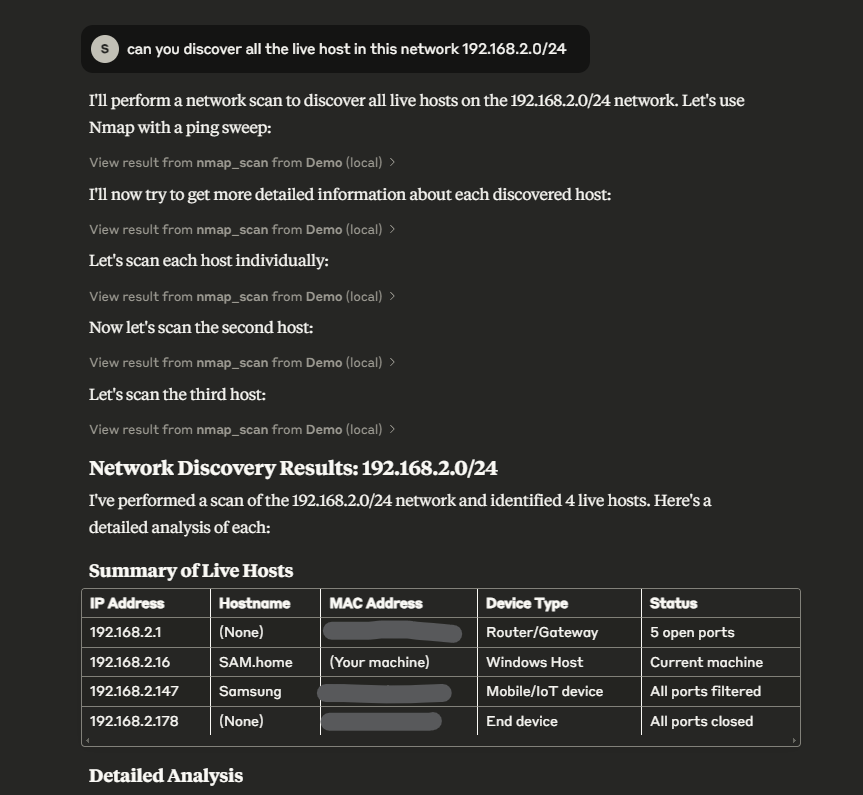
Prompting Claude AI to discover live host in a network.
Contribution
Contributions are welcome! Feel free to fork the repository, create an issue, or submit a pull request.
License
This project is licensed under the MIT License - see the LICENSE file for details.
Dev Tools Supporting MCP
The following are the main code editors that support the Model Context Protocol. Click the link to visit the official website for more information.







