
Nexsh
What is Nexsh
NexSh is a next-generation AI-powered shell that utilizes Google Gemini to interpret natural language commands, allowing users to interact with their systems in a more intuitive way without the need for traditional command-line syntax.
Use cases
Use cases for NexSh include simplifying command-line tasks for beginners, enhancing productivity for experienced users by allowing natural language commands, and providing a safer shell experience with built-in warnings for risky commands.
How to use
To use NexSh, download the appropriate pre-built binary from the GitHub Releases page for your platform (Windows, macOS, or Linux), then run the executable. You can enter commands in natural language, and NexSh will convert them into shell commands.
Key features
Key features of NexSh include AI-powered command interpretation, smart conversion of natural language to shell commands, an interactive experience with colorful output, enhanced command history for easy recall, safety warnings for potentially dangerous commands, multiple modes for interaction, and cross-platform compatibility.
Where to use
NexSh can be used in various fields including software development, system administration, and any environment where command-line interfaces are utilized, making it suitable for both casual users and professionals.
Clients Supporting MCP
The following are the main client software that supports the Model Context Protocol. Click the link to visit the official website for more information.





Overview
What is Nexsh
NexSh is a next-generation AI-powered shell that utilizes Google Gemini to interpret natural language commands, allowing users to interact with their systems in a more intuitive way without the need for traditional command-line syntax.
Use cases
Use cases for NexSh include simplifying command-line tasks for beginners, enhancing productivity for experienced users by allowing natural language commands, and providing a safer shell experience with built-in warnings for risky commands.
How to use
To use NexSh, download the appropriate pre-built binary from the GitHub Releases page for your platform (Windows, macOS, or Linux), then run the executable. You can enter commands in natural language, and NexSh will convert them into shell commands.
Key features
Key features of NexSh include AI-powered command interpretation, smart conversion of natural language to shell commands, an interactive experience with colorful output, enhanced command history for easy recall, safety warnings for potentially dangerous commands, multiple modes for interaction, and cross-platform compatibility.
Where to use
NexSh can be used in various fields including software development, system administration, and any environment where command-line interfaces are utilized, making it suitable for both casual users and professionals.
Clients Supporting MCP
The following are the main client software that supports the Model Context Protocol. Click the link to visit the official website for more information.
Content

NexSh 🤖



Next-generation AI-powered shell using Google Gemini
Installation •
Features •
Usage •
Configuration •
Contributing •
Documentation
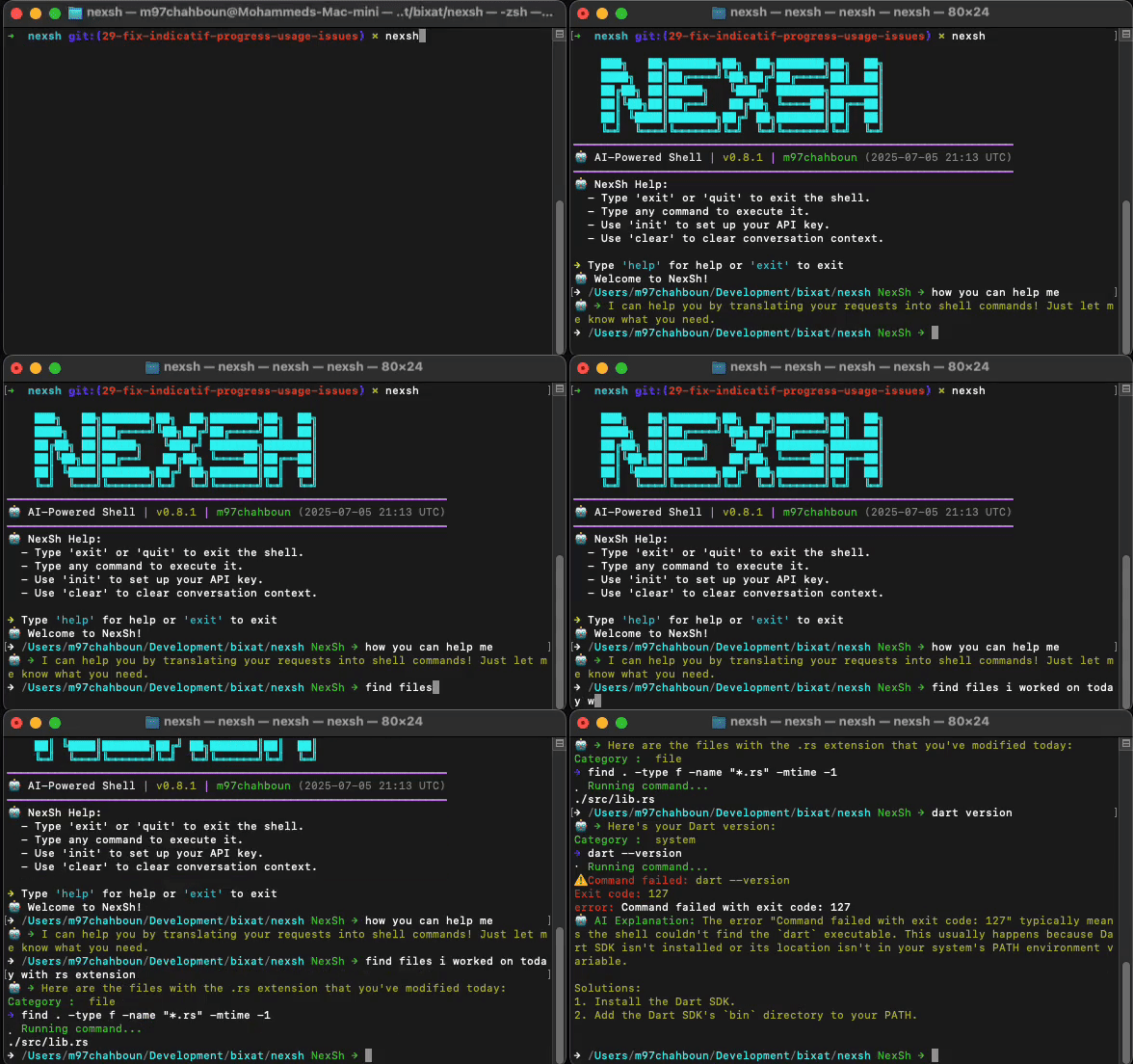
⚠️ Note: This project is under active development. Features and Commands may change.
🌟 Features
- 🧠 AI-powered command interpretation - Understands natural language commands
- 🔄 Smart conversion - Translates your words into precise shell commands
- 🎨 Interactive experience - Colorful output with intuitive formatting
- 📝 Enhanced history - Search and recall past commands easily
- 🛡️ Safety first - Warns before executing potentially dangerous commands
- 🚀 Multiple modes - Interactive shell or single-command execution
- 💻 Cross-platform - Works on Linux, macOS, and Windows
🚀 Installation
From GitHub Releases
You can download pre-built binaries for your platform from our GitHub Releases page.
- Visit the Releases page
- Download the appropriate file for your platform:
- Windows:
nexsh-windows.zip - macOS:
nexsh-macos.tar.gz - Linux:
nexsh-linux.tar.gz
- Windows:
- Verify the download using SHA256 checksum:
# Download both the binary and its checksum curl -LO https://github.com/M97Chahboun/nexsh/releases/latest/download/nexsh-linux.tar.gz curl -LO https://github.com/M97Chahboun/nexsh/releases/latest/download/nexsh-linux.sha256 # Verify the checksum (Linux/macOS) echo "$(cat nexsh-linux.sha256) nexsh-linux.tar.gz" | shasum -a 256 --check - Extract the archive:
# For Linux/macOS tar xzf nexsh-linux.tar.gz # For Windows unzip nexsh-windows.zip - Move the binary to a directory in your PATH:
# Linux/macOS
sudo mv nexsh /usr/local/bin/

# Windows: Move nexsh.exe to a directory in your PATH
Using Cargo (Recommended)
cargo install nexsh
From Source
# Clone the repository
git clone https://github.com/M97Chahboun/nexsh.git
cd nexsh

# Build and install
cargo build --release
sudo cp target/release/nexsh /usr/local/bin/
🛠️ Setup
First-time configuration:
You’ll need to:
- Enter your Gemini API key when prompted
- Get your API key from Google AI Studio
- The key will be securely stored in your system’s config directory
📚 Usage
Interactive Shell Mode
nexsh
Example session:
$ nexsh
🤖 Welcome to NexSh! Type 'exit' to quit or 'help' for assistance.

nexsh> show me system memory usage
→ free -h
              total        used        free      shared  buff/cache   available
Mem:           15Gi       4.3Gi       6.2Gi       386Mi       4.9Gi        10Gi
Swap:         8.0Gi          0B       8.0Gi

nexsh> find files modified in the last 24 hours
→ find . -type f -mtime -1
./src/main.rs
./Cargo.toml
./README.md
Single Command Mode
nexsh -e "show all running docker containers"
Key Commands
| Command | Action |
|---|---|
exit/quit |
Exit the shell |
help |
Show available commands |
Ctrl+C |
Cancel current operation |
Ctrl+D |
Exit the shell |
Up/Down |
Navigate command history |
⚙️ Configuration
Configuration files are stored in platform-specific locations:
- Linux:
~/.config/nexsh/ - macOS:
~/Library/Application Support/nexsh/ - Windows:
%APPDATA%\nexsh\
Configuration Options
Edit config.json to customize settings:
{
  "api_key": "your_gemini_api_key",
  "history_size": 1000,
  "max_context_messages": 10
}| Setting | Description | Default |
|---|---|---|
api_key |
Your Gemini API key | Required |
history_size |
Number of commands to keep in history | 1000 |
max_context_messages |
Maximum messages to keep in AI context | 10 |
🤝 Contributing
We welcome contributions! Here’s how to get started:
- Fork the repository
- Create your feature branch (
git checkout -b feature/amazing-feature) - Commit your changes (
git commit -m 'Add some amazing feature') - Push to the branch (
git push origin feature/amazing-feature) - Open a Pull Request
Please read our Contribution Guidelines for more details.
📝 License
MIT License - See LICENSE for full details.
🙏 Acknowledgments
- Google Gemini for powering the AI capabilities
- The Rust community for amazing crates and tools
- All contributors who helped shape this project
📱 Connect
- Author: M97Chahboun
- Report issues: Issue Tracker
- Follow updates: Twitter
Dev Tools Supporting MCP
The following are the main code editors that support the Model Context Protocol. Click the link to visit the official website for more information.







