
Nextjs Mastra Mcp With Aws
What is Nextjs Mastra Mcp With Aws
nextjs-mastra-mcp-with-aws is an AWS CDK project designed to run the Mastra Agent and a Next.js application using Amazon ECS and Amazon Bedrock, facilitating interaction with the MCP Server. It serves as an example implementation utilizing the Playwright MCP server.
Use cases
Use cases for nextjs-mastra-mcp-with-aws include developing web applications that require backend services, automating testing processes using the Playwright MCP server, and deploying scalable applications on AWS infrastructure.
How to use
To use nextjs-mastra-mcp-with-aws, first ensure you have Node.js, AWS CDK, Docker, and AWS credentials set up. Install the necessary dependencies by running ‘npm run install:all’ in the root directory. Configure your environment variables in the .env.development file and follow the project structure to build and deploy your application.
Key features
Key features include integration with AWS services like ECS and Bedrock, a structured project layout for easy navigation, support for TypeScript, and the ability to run a Next.js application alongside the Mastra Agent.
Where to use
nextjs-mastra-mcp-with-aws can be used in web application development, cloud-based services, and scenarios requiring interaction with the MCP Server, particularly in testing and automation environments.
Clients Supporting MCP
The following are the main client software that supports the Model Context Protocol. Click the link to visit the official website for more information.





Overview
What is Nextjs Mastra Mcp With Aws
nextjs-mastra-mcp-with-aws is an AWS CDK project designed to run the Mastra Agent and a Next.js application using Amazon ECS and Amazon Bedrock, facilitating interaction with the MCP Server. It serves as an example implementation utilizing the Playwright MCP server.
Use cases
Use cases for nextjs-mastra-mcp-with-aws include developing web applications that require backend services, automating testing processes using the Playwright MCP server, and deploying scalable applications on AWS infrastructure.
How to use
To use nextjs-mastra-mcp-with-aws, first ensure you have Node.js, AWS CDK, Docker, and AWS credentials set up. Install the necessary dependencies by running ‘npm run install:all’ in the root directory. Configure your environment variables in the .env.development file and follow the project structure to build and deploy your application.
Key features
Key features include integration with AWS services like ECS and Bedrock, a structured project layout for easy navigation, support for TypeScript, and the ability to run a Next.js application alongside the Mastra Agent.
Where to use
nextjs-mastra-mcp-with-aws can be used in web application development, cloud-based services, and scenarios requiring interaction with the MCP Server, particularly in testing and automation environments.
Clients Supporting MCP
The following are the main client software that supports the Model Context Protocol. Click the link to visit the official website for more information.
Content
Next.js Mastra MCP with AWS
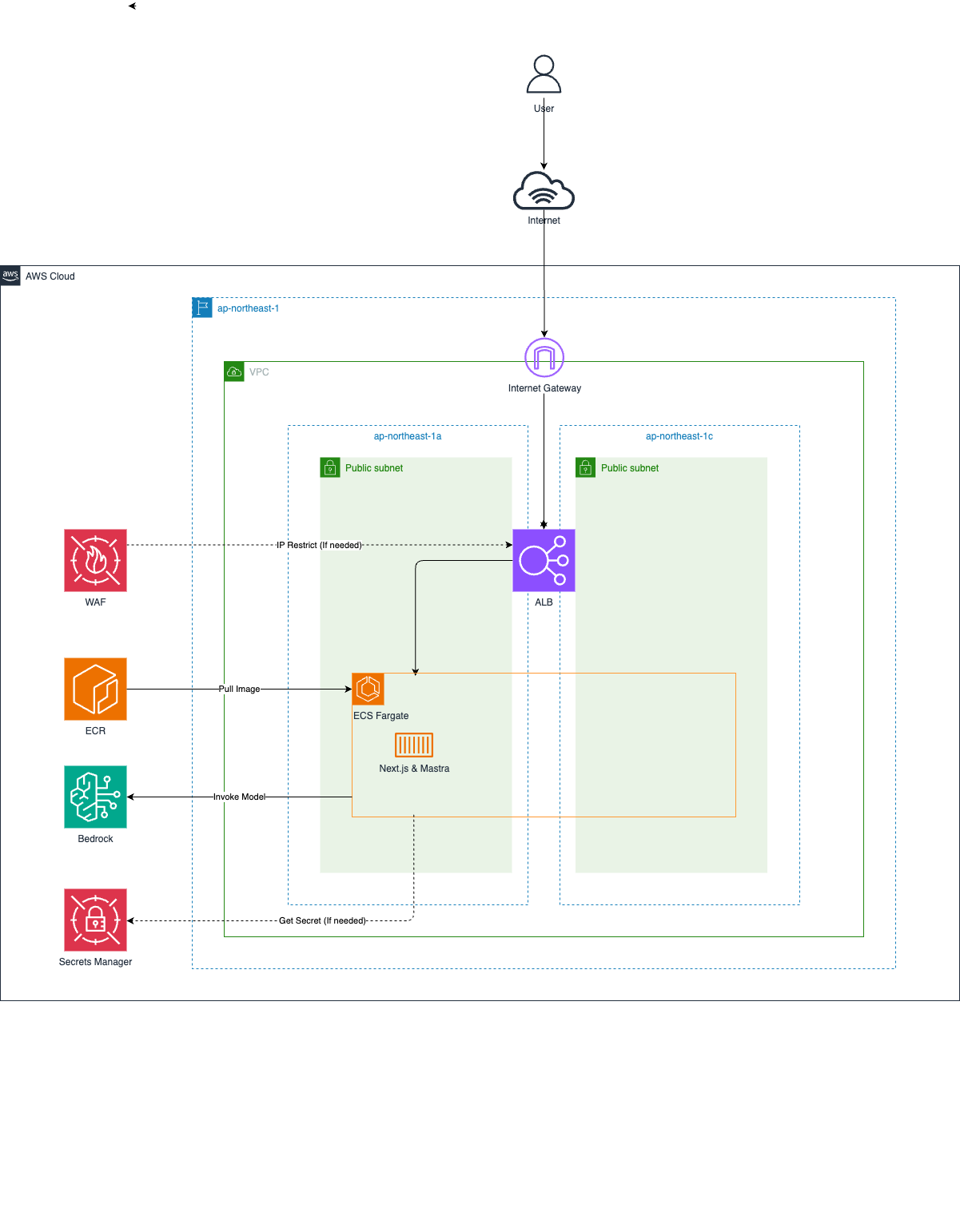
AWS CDK project for running Mastra Agent and Next.js application with Amazon ECS and Amazon Bedrock to interact with MCP Server.
As an example, this project uses Playwright MCP server.
Prerequisites
- Node.js: v20 or higher
- AWS CDK: v2 or higher
- Docker: v20 or higher
- AWS Credentials: Access Key / Secret Key / Session Token
Architecture
Project Structure
.
├── app/                    # Application root directory
│   ├── components/        # React components
│   ├── pages/            # Next.js pages
│   ├── styles/           # CSS styles
│   ├── src/              # Application source code
│   │   └── mastra/       # Mastra application root directory
│   │       ├── index.ts  # Mastra instance configuration
│   │       ├── agents/   # Agent definitions
│   │       └── mcp/      # MCP configuration
│   ├── .env.development  # Environment variables for development
│   ├── Dockerfile        # Container image definition
│   ├── package.json      # Application dependencies
│   └── tsconfig.json     # TypeScript configuration for app
├── infra/                # Infrastructure as Code directory
│   ├── bin/             # CDK application entry point
│   ├── lib/             # CDK stack definitions
│   ├── test/            # Infrastructure test files
│   ├── cdk.json         # CDK configuration
│   ├── package.json     # Infrastructure dependencies
│   └── tsconfig.json    # TypeScript configuration for infra
├── image/               # Architecture diagrams and images
├── package.json        # Root project dependencies
└── tsconfig.json       # Root TypeScript configuration
Getting Started
Install Dependencies
All commands should be executed at the repository root.
First, install dependencies for the root project.
npm run install:all
Next, set up environment variables by creating .env.development file which contains the aws credentials.
cat << EOF > web/.env.development
ACCESS_KEY_ID=XXXXXXXXXXXXXXXXXXXX
SECRET_ACCESS_KEY=XXXXXXXXXXXXXXXXXXXX
SESSION_TOKEN=XXXXXXXXXXXXXXXXXXXX
EOF
Local Development
If you want to change the application configuration, you can modify the app/parameter.ts.
To start local mastra http server only, run the following command.
npm run mastra:dev
To start local Next.js server with mastra, run the following command.
npm run next:dev
Production Deployment
If you want to change the infrastructure configuration, you can modify the infra/parameter.ts.
If you’ve never used CDK before, you need to Bootstrap for the first time only. The following command is unnecessary if your environment is already bootstrapped.
npx -w infra cdk bootstrap
To deploy the application to AWS, run the following command.
npm run cdk:deploy
To remove the application from AWS, run the following command.
npm run cdk:destroy
Dev Tools Supporting MCP
The following are the main code editors that support the Model Context Protocol. Click the link to visit the official website for more information.







