
Node Mcp Server
What is Node Mcp Server
node-mcp-server is a TypeScript template repository designed for creating Model Context Protocol (MCP) servers. It supports both standard input/output and server-sent events transports, providing a solid foundation for developers.
Use cases
Use cases for node-mcp-server include building chat applications, real-time data processing systems, and interactive web applications that require server-client communication.
How to use
To use node-mcp-server, create a repository from the template, clone it, install the dependencies using npm or yarn, and start the development server with ‘npm run dev’.
Key features
Key features include type safety with TypeScript, support for stdio and SSE transports, inclusion of example prompts and resources, and rapid development capabilities using FastMCP.
Where to use
node-mcp-server can be used in various fields such as web development, real-time applications, and any project that requires a structured approach to implementing the Model Context Protocol.
Clients Supporting MCP
The following are the main client software that supports the Model Context Protocol. Click the link to visit the official website for more information.





Overview
What is Node Mcp Server
node-mcp-server is a TypeScript template repository designed for creating Model Context Protocol (MCP) servers. It supports both standard input/output and server-sent events transports, providing a solid foundation for developers.
Use cases
Use cases for node-mcp-server include building chat applications, real-time data processing systems, and interactive web applications that require server-client communication.
How to use
To use node-mcp-server, create a repository from the template, clone it, install the dependencies using npm or yarn, and start the development server with ‘npm run dev’.
Key features
Key features include type safety with TypeScript, support for stdio and SSE transports, inclusion of example prompts and resources, and rapid development capabilities using FastMCP.
Where to use
node-mcp-server can be used in various fields such as web development, real-time applications, and any project that requires a structured approach to implementing the Model Context Protocol.
Clients Supporting MCP
The following are the main client software that supports the Model Context Protocol. Click the link to visit the official website for more information.
Content
MCP Server
A TypeScript template repository for creating Model Context Protocol (MCP) servers with support for both stdio (Standard Input/Output) and SSE (Server-Sent Events) transports. This template provides a solid foundation for building MCP servers with a well-organized structure and essential features.
Features
- 🚀 Built with TypeScript for type safety and better developer experience
- 🔄 Supports both stdio and SSE transports
- 📦 Includes example prompts, resources, and tools
- ⚡ Uses FastMCP for rapid development
Prerequisites
- Node.js
- npm or yarn package manager
Getting Started
-
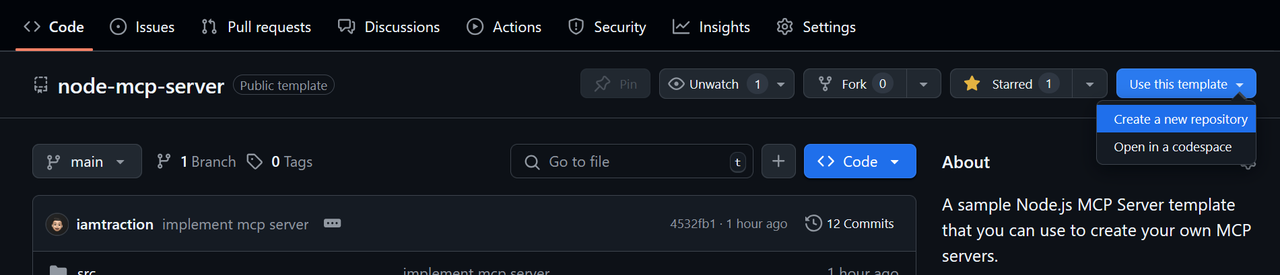
Create a repo from this template
Click Use this template > Create a new repository
-
Clone your repository
git clone https://github.com/iamtraction/node-mcp-server.git cd node-mcp-server -
Install dependencies
npm install -
Start development server
npm run dev
Project Structure
src/
├── prompts/     # MCP prompts
├── resources/   # MCP resources
├── tools/       # MCP tools
└── server.ts    # Main server file
Available Scripts
npm run dev- Start development server with hot reloadnpm run build- Build the TypeScript codenpm run start- Start the production servernpm run watch- Watch for TypeScript changesnpm run lint- Run ESLint to check code quality and style
Adding New Features
Adding a Prompt
Create a new file in src/prompts/ and add it to server.ts. Learn more about MCP Prompts:
import myPrompt from "./prompts/my-prompt.js";
server.addPrompt(myPrompt);
Adding a Resource
Create a new file in src/resources/ and add it to server.ts. Learn more about MCP Resources:
import myResource from "./resources/my-resource.js";
server.addResource(myResource);
Adding a Tool
Create a new file in src/tools/ and add it to server.ts. Learn more about MCP Tools:
import myTool from "./tools/my-tool.js";
server.addTool(myTool);
Configuration
The server can be configured in server.ts. By default, it runs on port 3000 with SSE transport. You can modify the configuration in the server.start() options.:
server.start({
    transportType: "httpStream", // or "stdio"
    httpStream: {
        port: 3000,
    },
});
Learn more about Transports.
Using the MCP Server
stdio Server Setup
{
  "mcpServers": {
    "example-server": {
      "command": "node",
      "args": [
        "dist/server.js"
      ]
    }
  }
}
SSE Server Setup
{
  "mcpServers": {
    "example-server": {
      "url": "https://example-server.com/sse"
    }
  }
}
Contributing
Contributions are welcome! Please feel free to submit a Pull Request.
Showcase
Have you built something cool with this template? Add it to the showcase!
To add your project to the showcase:
- Edit this README.md file
- Add your project to the list above using this format:
- [Your Project Name](https://raw.githubusercontent.com/iamtraction/node-mcp-server/master/link-to-your-project) - Brief description- Submit a pull request
License
This project is licensed under the MIT License - see the LICENSE file for details.
Acknowledgments
- Model Context Protocol - The protocol specification
- MCP TypeScript SDK - The official TypeScript SDK
- FastMCP - The underlying MCP framework
Dev Tools Supporting MCP
The following are the main code editors that support the Model Context Protocol. Click the link to visit the official website for more information.







