
Ollama Pydantic Project
What is Ollama Pydantic Project
The Ollama Pydantic Project is a sample project that demonstrates the integration of a local Ollama model with the Pydantic agent framework and MCP server, aimed at creating an intelligent agent with a user-friendly interface.
Use cases
Use cases for the Ollama Pydantic Project include building chatbots for customer service, creating intelligent assistants for data processing, and developing interactive applications that require real-time user input and response generation.
How to use
To use the Ollama Pydantic Project, clone the repository, set up a Python virtual environment, install the required dependencies, and ensure that both the Ollama server and MCP server are running. Then, you can interact with the agent through the Streamlit UI.
Key features
Key features include local Ollama model integration for generating responses, the Pydantic agent framework for data validation, MCP server connection for tool usage, and a Streamlit web-based interface for user interaction.
Where to use
The Ollama Pydantic Project can be used in fields such as chatbot development, intelligent agent creation, and any application requiring data validation and interaction with external tools via an MCP server.
Clients Supporting MCP
The following are the main client software that supports the Model Context Protocol. Click the link to visit the official website for more information.





Overview
What is Ollama Pydantic Project
The Ollama Pydantic Project is a sample project that demonstrates the integration of a local Ollama model with the Pydantic agent framework and MCP server, aimed at creating an intelligent agent with a user-friendly interface.
Use cases
Use cases for the Ollama Pydantic Project include building chatbots for customer service, creating intelligent assistants for data processing, and developing interactive applications that require real-time user input and response generation.
How to use
To use the Ollama Pydantic Project, clone the repository, set up a Python virtual environment, install the required dependencies, and ensure that both the Ollama server and MCP server are running. Then, you can interact with the agent through the Streamlit UI.
Key features
Key features include local Ollama model integration for generating responses, the Pydantic agent framework for data validation, MCP server connection for tool usage, and a Streamlit web-based interface for user interaction.
Where to use
The Ollama Pydantic Project can be used in fields such as chatbot development, intelligent agent creation, and any application requiring data validation and interaction with external tools via an MCP server.
Clients Supporting MCP
The following are the main client software that supports the Model Context Protocol. Click the link to visit the official website for more information.
Content
Ollama Pydantic Project
Welcome to the Ollama Pydantic Project! This project demonstrates how to use a local Ollama model with the Pydantic agent framework to create an intelligent agent. The agent is connected to an MCP server to utilize tools and provides a user-friendly interface using Streamlit.
This project is part of the blog post: Building a TypeScript MCP Server: A Guide for Integrating Existing Services. Visit the blog to learn more about the concepts and implementation details behind this project.
Overview
The main goal of this project is to showcase:
- Local Ollama Model Integration: Using a locally hosted Ollama model for generating responses.
- Pydantic Agent Framework: Creating an agent with Pydantic for data validation and interaction.
- MCP Server Connection: Enabling the agent to use tools via an MCP server.
- Streamlit UI: Providing a web-based chatbot interface for user interaction.
Prerequisites
Before setting up the project, ensure the following:
- Python: Install Python 3.8 or higher. You can download it from python.org.
- Ollama Model: Install and run the Ollama server locally:
- Download the Ollama CLI from Ollama’s official website.
- Install the CLI by following the instructions provided on their website.
- Start the Ollama server:
ollama serve - Ensure the server is running on
http://localhost:11434/v1.
- MCP Server: Set up an MCP server to enable agent tools. For more details, refer to MCP Server Sample.
Setup Instructions
Follow these steps to set up the project:
-
Clone the Repository:
git clone <repository-url> cd ollama-pydantic-project -
Create a Virtual Environment:
python3 -m venv venv -
Activate the Virtual Environment:
- On macOS/Linux:
source venv/bin/activate - On Windows:
venv\Scripts\activate
- On macOS/Linux:
-
Install Dependencies:
pip install -r requirements.txt -
Ensure the Ollama Server is Running:
Start the Ollama server as described in the prerequisites. -
Run the Application:
Start the Streamlit application:streamlit run src/streamlit_app.py
Usage
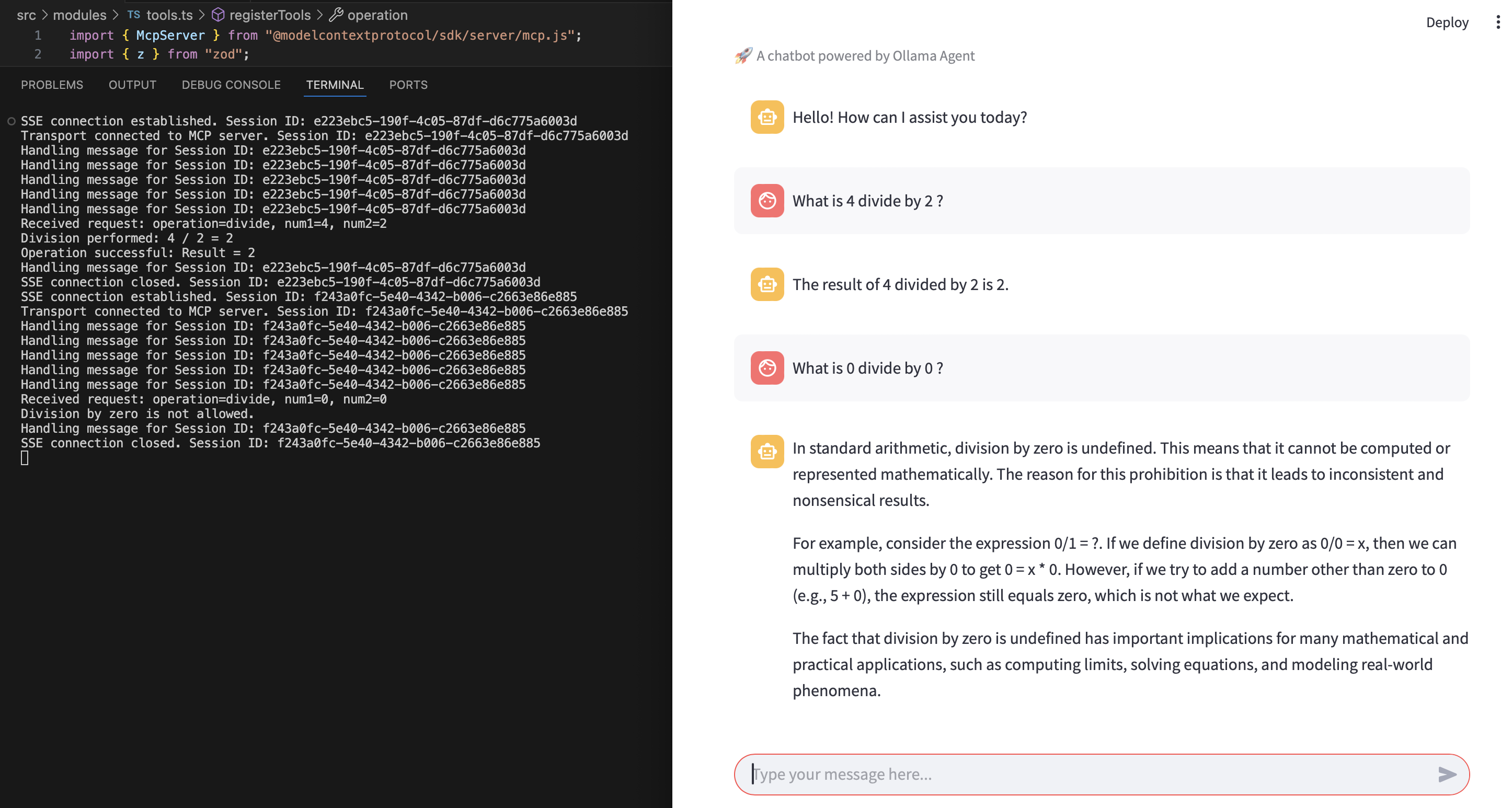
Once the application is running, open the provided URL in your browser (usually http://localhost:8501). You can interact with the chatbot by typing your queries in the input box. The agent will process your queries using the Ollama model and tools provided by the MCP server.
Example Interaction
Below is an example of how the chatbot interface looks when interacting with the agent:
Project Structure
The project is organized as follows:
ollama-pydantic-project/
├── src/
│   ├── streamlit_app.py        # Main Streamlit application
│   ├── agents/
│   │   ├── base_agent.py       # Abstract base class for agents
│   │   ├── ollama_agent.py     # Implementation of the Ollama agent
│   ├── utils/
│       ├── config.py           # Configuration settings
│       ├── logger.py           # Logger utility
├── requirements.txt            # Python dependencies
├── README.md                   # Project documentation
├── assets/
│   ├── ollama_agent_mcp_example.png  # Example interaction image
├── .gitignore                  # Git ignore file
Features
- Streamlit Chatbot: A user-friendly chatbot interface.
- Ollama Model Integration: Uses a local Ollama model for generating responses.
- MCP Server Tools: Connects to an MCP server to enhance agent capabilities.
- Pydantic Framework: Ensures data validation and type safety.
Related Projects
This project is closely related to another GitHub project that demonstrates how to set up an MCP server: Hello World MCP Server. The blog post associated with that project, Building a TypeScript MCP Server: A Guide for Integrating Existing Services, provides additional context and implementation details that complement this project.
Troubleshooting
- If you encounter issues with the Ollama server, ensure it is running on
http://localhost:11434/v1. - If dependencies fail to install, ensure you are using Python 3.8 or higher and that your virtual environment is activated.
- For MCP server-related issues, refer to the MCP Server Sample.
License
This project is licensed under the MIT License. You are free to use, modify, and distribute this project as per the terms of the license. See the LICENSE file for more details.
Contributing
Contributions are welcome! Feel free to open issues or submit pull requests.
Dev Tools Supporting MCP
The following are the main code editors that support the Model Context Protocol. Click the link to visit the official website for more information.







