
Open Multiple Model Mcp Client
What is Open Multiple Model Mcp Client
Open Multiple Model MCP Client is a flexible client designed to interact with multiple Model Control Protocol (MCP) servers through a unified interface, enabling Claude to access and utilize tools from various MCP servers seamlessly.
Use cases
Use cases include integrating multiple tools for AI applications, automating tasks across different MCP servers, and providing a unified interface for developers to interact with various services.
How to use
To use the Open Multiple Model MCP Client, clone the repository, set up a virtual environment, install dependencies, configure your Anthropic API key in the .env file, and define your MCP servers in the mcp_servers.json file. Finally, run the server to start interacting with the tools.
Key features
Key features include support for multiple MCP servers, flexible connection types (STDIO and SSE), dynamic tool management, a gateway API exposed via FastAPI, and a unified chat interface for seamless interaction with Claude and tools.
Where to use
The Open Multiple Model MCP Client can be used in various fields such as AI development, data processing, and any application requiring interaction with multiple MCP servers for enhanced functionality.
Clients Supporting MCP
The following are the main client software that supports the Model Context Protocol. Click the link to visit the official website for more information.





Overview
What is Open Multiple Model Mcp Client
Open Multiple Model MCP Client is a flexible client designed to interact with multiple Model Control Protocol (MCP) servers through a unified interface, enabling Claude to access and utilize tools from various MCP servers seamlessly.
Use cases
Use cases include integrating multiple tools for AI applications, automating tasks across different MCP servers, and providing a unified interface for developers to interact with various services.
How to use
To use the Open Multiple Model MCP Client, clone the repository, set up a virtual environment, install dependencies, configure your Anthropic API key in the .env file, and define your MCP servers in the mcp_servers.json file. Finally, run the server to start interacting with the tools.
Key features
Key features include support for multiple MCP servers, flexible connection types (STDIO and SSE), dynamic tool management, a gateway API exposed via FastAPI, and a unified chat interface for seamless interaction with Claude and tools.
Where to use
The Open Multiple Model MCP Client can be used in various fields such as AI development, data processing, and any application requiring interaction with multiple MCP servers for enhanced functionality.
Clients Supporting MCP
The following are the main client software that supports the Model Context Protocol. Click the link to visit the official website for more information.
Content
Open Multiple Model MCP Client
A flexible client for interacting with multiple Model Control Protocol (MCP) servers through a unified interface, enabling Claude to use tools from various MCP servers.
Overview
This project is designed to serve as a gateway between Anthropic’s Claude API and multiple downstream MCP servers. It allows Claude to:
- Access tools from multiple MCP servers in a unified way
- Invoke tools and receive their results
- Compose responses that incorporate tool output
Features
- Multiple MCP Server Support: Connect to multiple MCP servers simultaneously
- Flexible Connection Types: Support for both STDIO and SSE connections
- Dynamic Tool Management: Enable/disable servers and tools at runtime
- Gateway API: Expose MCP-compatible endpoints through FastAPI
- Unified Chat Interface: Simple API for interacting with Claude and tools
Prerequisites
- Python 3.12+
- Anthropic API key
Installation
-
Clone the repository:
git clone https://github.com/yourusername/open-mutiple-model-mcp-client.git cd open-mutiple-model-mcp-client -
Create a virtual environment and install dependencies:
python -m venv venv source venv/bin/activate # On Windows: venv\Scripts\activate uv sync -
Create an environment file:
cp .env-example .env -
Add your Anthropic API key to the
.envfile:ANTHROPIC_API_KEY=sk-ant-xxxxx OPENAI_API_KEY=sk-xxxx
Configuration
Environment Variables
ANTHROPIC_API_KEY: Your Anthropic API keyHOST: Host to bind the server to (default: 0.0.0.0)PORT: Port to run the server on (default: 8000)MCP_COMPOSER_PROXY_URL: URL for the MCP composer proxy (default: http://localhost:8000)MCP_SERVERS_CONFIG_PATH: Path to the MCP servers configuration file (default: ./mcp_servers.json)
MCP Servers Configuration
Configure MCP servers in the mcp_servers.json file:
{
  "mcpServers": {
    "time": {
      "command": "docker",
      "args": [
        "run",
        "-i",
        "--rm",
        "mcp/time"
      ]
    },
    "remote_server": {
      "url": "https://your-remote-mcp-server.com/mcp"
    }
  }
}
Usage
Starting the Server
python main.py
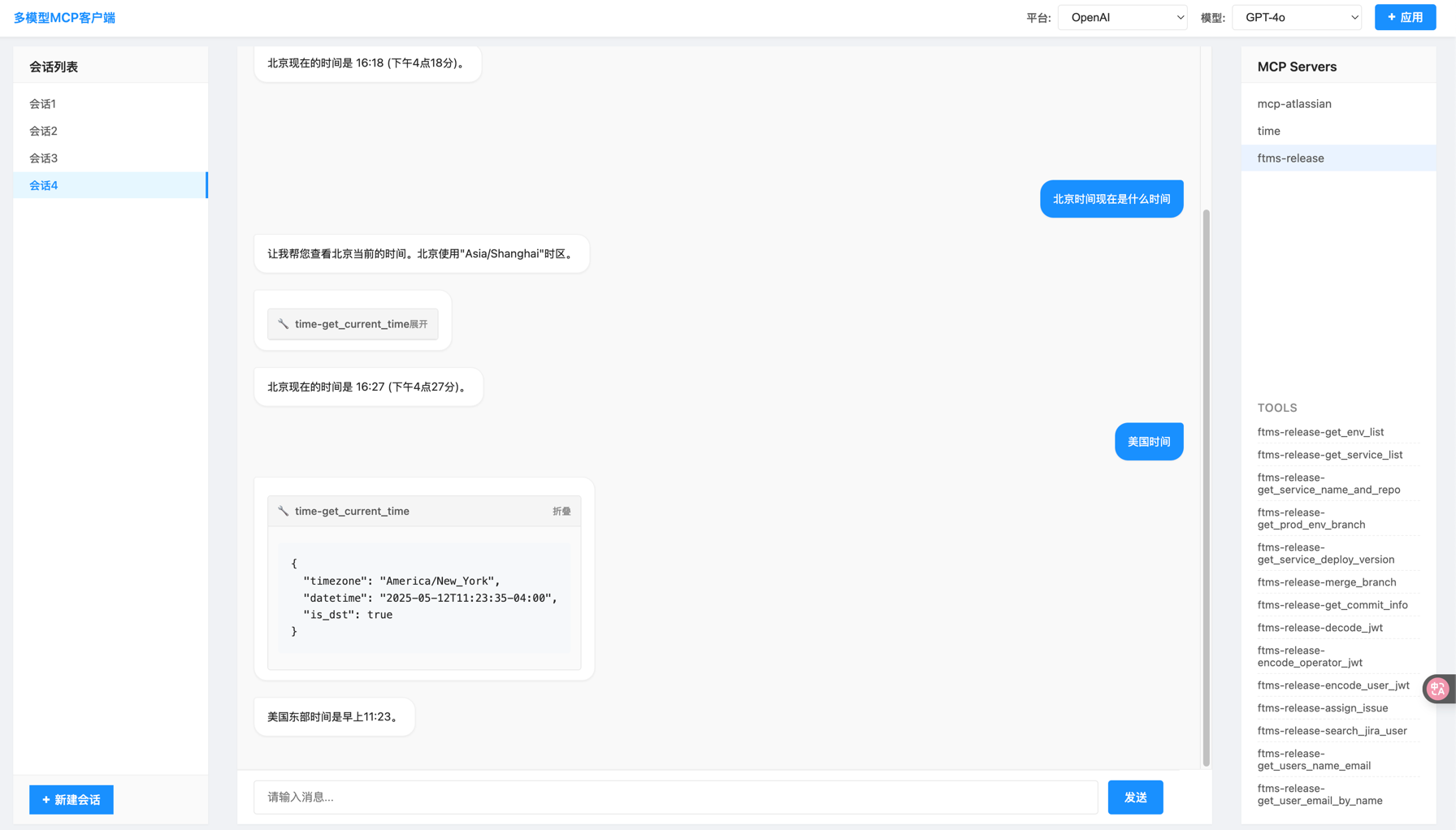
By default, the server runs on port 3333 and can be accessed at http://localhost:3333, you will see.
Using the Chat API
Send a POST request to the /chat endpoint:
curl -X POST "http://localhost:3333/chat" \
  -H "Content-Type: application/json" \
  -d '{"message": "What time is it now?"}'
API Endpoints
-
POST /chat: Main chat endpoint
- Accepts:
{ "message": "your message" } - Returns: Text response from Claude, including tool use results
- Accepts:
-
MCP Gateway:
/mcp/{server_kit_name}/mcp/{server_kit_name}/sse: SSE endpoint for MCP clients/mcp/{server_kit_name}/messages: HTTP POST endpoint for MCP messages
Architecture
The application follows a layered architecture:
- API Layer (
main.py): FastAPI application that exposes chat endpoints - Client Layer (
mcp_client.py): Handles communication with Anthropic’s API - Controller Layer (
downstream_controller.py): Manages downstream MCP servers - Composer Layer (
composer.py): Orchestrates server kits and gateways - Gateway Layer (
gateway.py): Provides MCP-compatible endpoints
Extending the Client
Adding New MCP Servers
To add a new MCP server:
- Update the
mcp_servers.jsonfile with your server configuration - Restart the application
Custom Server Implementations
You can implement custom MCP servers by:
- Creating a new server that follows the MCP specification
- Adding it to the
mcp_servers.jsonconfiguration
Dev Tools Supporting MCP
The following are the main code editors that support the Model Context Protocol. Click the link to visit the official website for more information.







