
Oracledb Mcp Server
What is Oracledb Mcp Server
oracledb_mcp_server is an MCP server designed to connect to Oracle Database, enabling Large Language Models (LLMs) to interact with Oracle Database tables and columns.
Use cases
Use cases include generating reports from Oracle Database, automating data retrieval processes, and enabling conversational interfaces for database queries.
How to use
To use oracledb_mcp_server, install the package using ‘pip install oracledb_mcp_server’, create a .env file with the Oracle DB connection string, and run the server using ‘uv run oracledb_mcp_server’.
Key features
Key features include the ability to provide configured Oracle Database tables and columns as context to LLMs, generate SQL statements, and return results based on LLM prompts.
Where to use
oracledb_mcp_server can be used in various fields such as data analytics, business intelligence, and applications that require dynamic interaction with Oracle databases.
Clients Supporting MCP
The following are the main client software that supports the Model Context Protocol. Click the link to visit the official website for more information.





Overview
What is Oracledb Mcp Server
oracledb_mcp_server is an MCP server designed to connect to Oracle Database, enabling Large Language Models (LLMs) to interact with Oracle Database tables and columns.
Use cases
Use cases include generating reports from Oracle Database, automating data retrieval processes, and enabling conversational interfaces for database queries.
How to use
To use oracledb_mcp_server, install the package using ‘pip install oracledb_mcp_server’, create a .env file with the Oracle DB connection string, and run the server using ‘uv run oracledb_mcp_server’.
Key features
Key features include the ability to provide configured Oracle Database tables and columns as context to LLMs, generate SQL statements, and return results based on LLM prompts.
Where to use
oracledb_mcp_server can be used in various fields such as data analytics, business intelligence, and applications that require dynamic interaction with Oracle databases.
Clients Supporting MCP
The following are the main client software that supports the Model Context Protocol. Click the link to visit the official website for more information.
Content
OracleDB MCP Server

Overview
- This project will install
MCP - Model Context Protocol Server, that provides configured Oracle Database Table/Columns as context to LLM’s. - Using this we can enable LLMs to interact with Oracle Database, Generate SQL Statements and Return Results using LLM prompts.
Installation
- Install package
pip install oracledb_mcp_server - Create .env in a folder with minimum value of
Oracle DB Connection String. Sample file available here - Test
oracledb_mcp_serverserver usinguv run oracledb_mcp_serverfrom the above folder.
Claud Desktop
- Configuration details for Claud Desktop
{
  "mcpServers": {
    "oracledb_mcp_server": {
      "command": "uv",
      "args": [
        "run",
        "oracledb_mcp_server"
      ],
      "env": {
        "DEBUG": "True",
        "COMMENT_DB_CONNECTION_STRING": "oracle+oracledb://USERNAME:PASSWORD@IP:PORT/?service_name=SERVICENAME",
        "DB_CONNECTION_STRING": "oracle+oracledb://USERNAME:PASSWORD@IP:PORT/?service_name=SERVICENAME",
        "TABLE_WHITE_LIST": "ACCOUNTS,CUS_ACC_RELATIONS,CUSTOMERS",
        "COLUMN_WHITE_LIST": "ACCOUNTS.ACC_AAD_ID,CUS_ACC_RELATIONS.CAR_CUS_ID,CUS_ACC_RELATIONS.CAR_AAD_ID,CUSTOMERS.CUS_ID"
      }
    }
  }
}
Configuration
- List of available environment variables
DEBUG: Enable debug logging (optional default is False)COMMENT_DB_CONNECTION_STRING: Oracle DB connection String for comments. (required)DB_CONNECTION_STRING: Oracle DB connection String for execution of queries. (required)TABLE_WHITE_LIST: White Listed table names in list format [“table1”, “table2”] (required)COLUMN_WHITE_LIST: White Listed table-column names in list format [“table.column1”, “table.column2”] (required)QUERY_LIMIT_SIZE: Default value is 10 records if not provided(optional default is 10)
Interceptor
npx @modelcontextprotocol/inspector uv --directory "D:\\MyDev\\mcp\\oracledb_mcp_server" run -m oracledb_mcp_server
Contributing
Contributions are welcome.
Please feel free to submit a Pull Request.
License
This project is licensed under the terms of the MIT license.
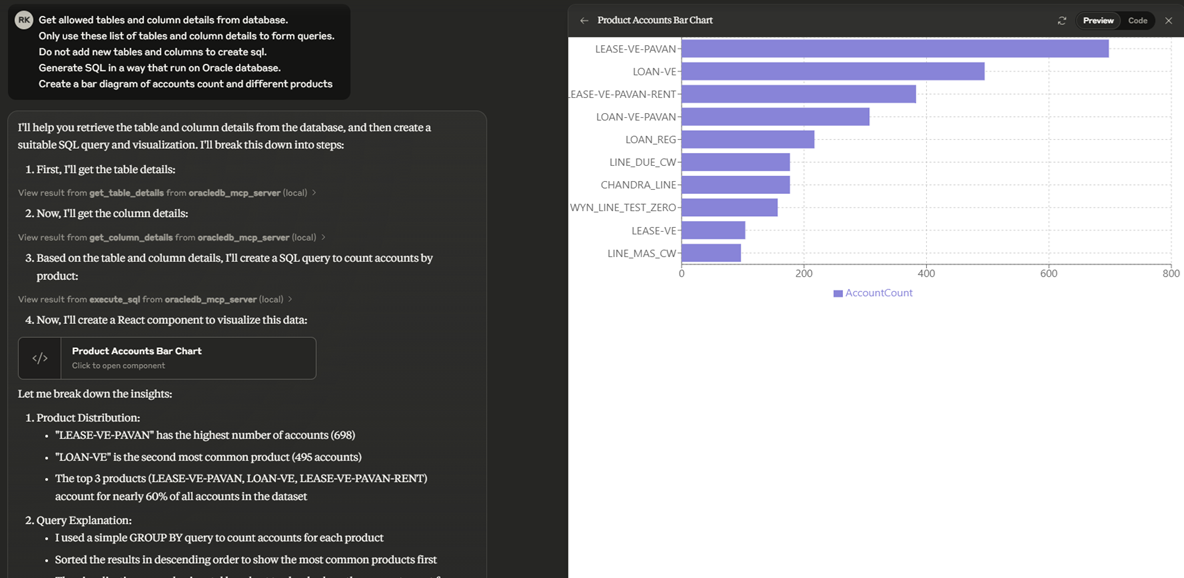
Demo
Github Stars
Dev Tools Supporting MCP
The following are the main code editors that support the Model Context Protocol. Click the link to visit the official website for more information.







