
Oura Mcp Server
What is Oura Mcp Server
The oura-mcp-server is a server that enables AI assistants to access and analyze data from the Oura Ring using the Model Controller Protocol (MCP). It provides a structured method for fetching and interpreting health metrics.
Use cases
Use cases include analyzing sleep data, understanding the impact of meals on health metrics, comparing stress levels, visualizing heart rate during sleep, and generating charts for health trends.
How to use
To use the oura-mcp-server, clone the repository, install dependencies, create a .env file with your Oura API token, build the project, and start the server. You can then interact with the server using predefined prompts to analyze your health data.
Key features
Key features include secure access to Oura Ring data, pre-defined prompts for common health analysis, customizable queries for specific insights, correlation analysis between metrics, proper handling of time units, and data visualization capabilities.
Where to use
The oura-mcp-server can be used in health and wellness applications, personal health tracking, fitness analysis, and any domain requiring detailed health metrics analysis.
Clients Supporting MCP
The following are the main client software that supports the Model Context Protocol. Click the link to visit the official website for more information.





Overview
What is Oura Mcp Server
The oura-mcp-server is a server that enables AI assistants to access and analyze data from the Oura Ring using the Model Controller Protocol (MCP). It provides a structured method for fetching and interpreting health metrics.
Use cases
Use cases include analyzing sleep data, understanding the impact of meals on health metrics, comparing stress levels, visualizing heart rate during sleep, and generating charts for health trends.
How to use
To use the oura-mcp-server, clone the repository, install dependencies, create a .env file with your Oura API token, build the project, and start the server. You can then interact with the server using predefined prompts to analyze your health data.
Key features
Key features include secure access to Oura Ring data, pre-defined prompts for common health analysis, customizable queries for specific insights, correlation analysis between metrics, proper handling of time units, and data visualization capabilities.
Where to use
The oura-mcp-server can be used in health and wellness applications, personal health tracking, fitness analysis, and any domain requiring detailed health metrics analysis.
Clients Supporting MCP
The following are the main client software that supports the Model Context Protocol. Click the link to visit the official website for more information.
Content
Oura Ring Model Controller Protocol (MCP) Server
This server enables AI assistants to access and analyze your Oura Ring data through the Model Controller Protocol (MCP). It provides a structured way to fetch and understand your health metrics.
Features
- Secure access to your Oura Ring data
- Pre-defined prompts for common health analysis tasks
- Customizable queries for specific health insights
- Support for analyzing correlations between different metrics
- Proper handling of time units and calculation guidelines
- Visualization capabilities for health metrics
Getting Started
Prerequisites
- Node.js v18 or higher
- An Oura Ring account with Personal Access Token
Installation
-
Clone the repository:
git clone https://github.com/yourusername/oura-mcp-server.git cd oura-mcp-server -
Install dependencies:
npm install -
Create a
.envfile in the root directory with your Oura API token:OURA_TOKEN=your_personal_access_token_here -
Build the project:
npm run build -
Start the server:
npm start
Getting an Oura Personal Access Token
- Go to the Oura Developer website
- Log in with your Oura account
- Create a new Personal Access Token
- Copy the token to your
.envfile
Example Prompts
You can ask Claude things like:
- “Show me my sleep data for the last week and explain what it means”
- “Analyze how my meals affect my readiness scores”
- “Compare my stress levels on workdays versus weekends”
- “Show me my heart rate during sleep for nights when I had alcohol”
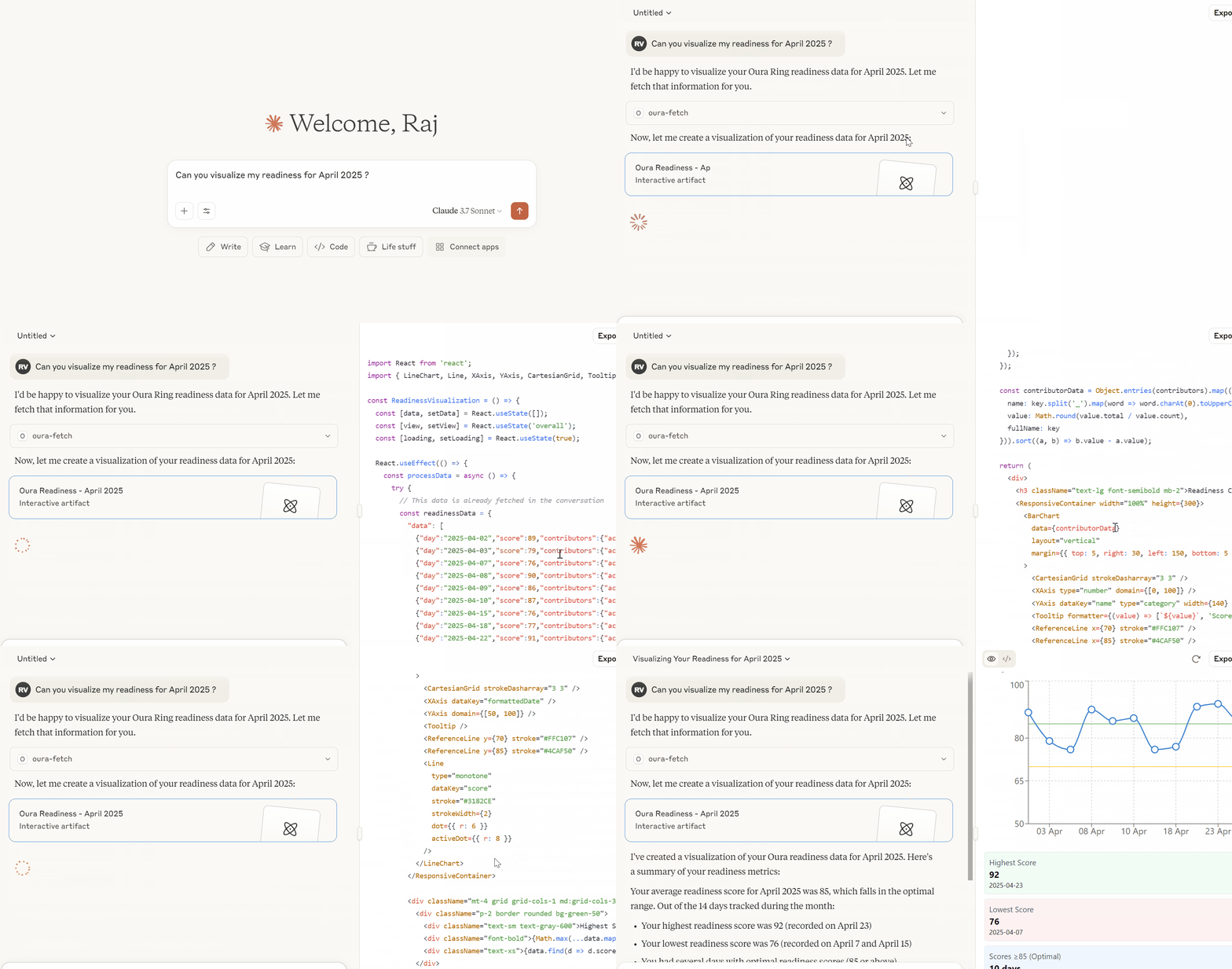
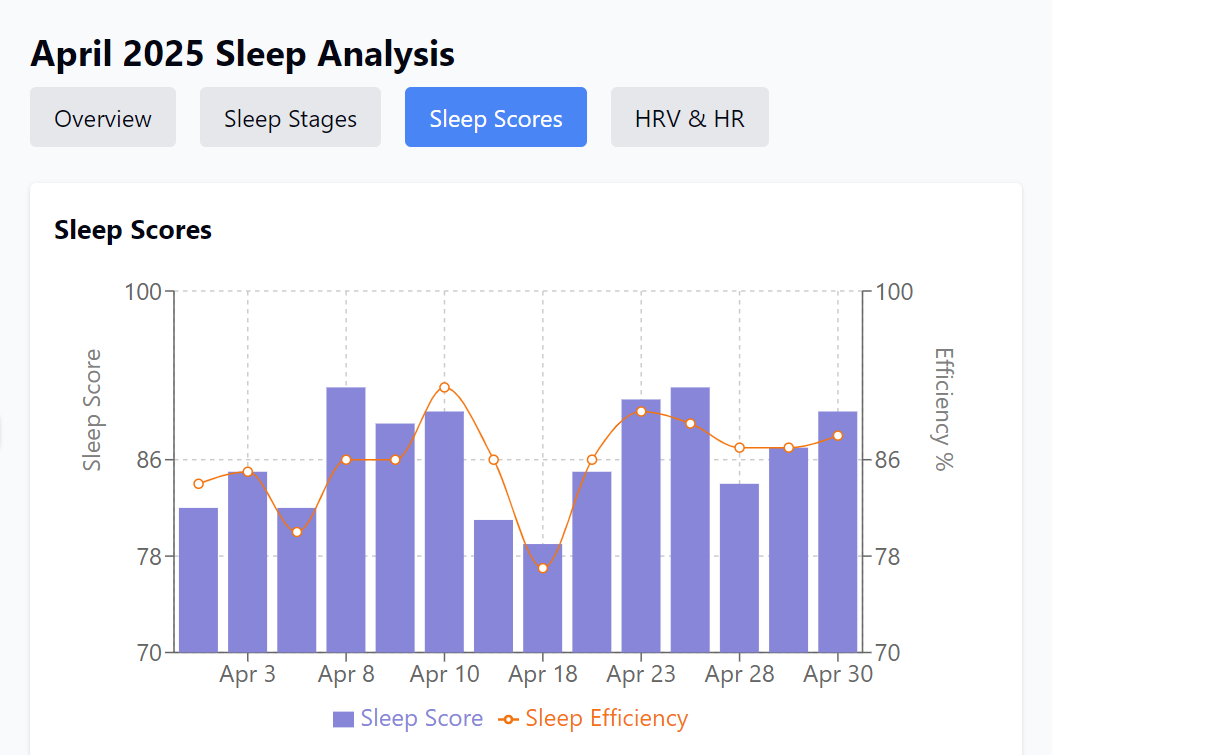
- “Visualize my sleep efficiency trends for the past month” (Claude will generate charts!)
- “Create a visualization comparing my readiness scores after different meals”
Data Visualization
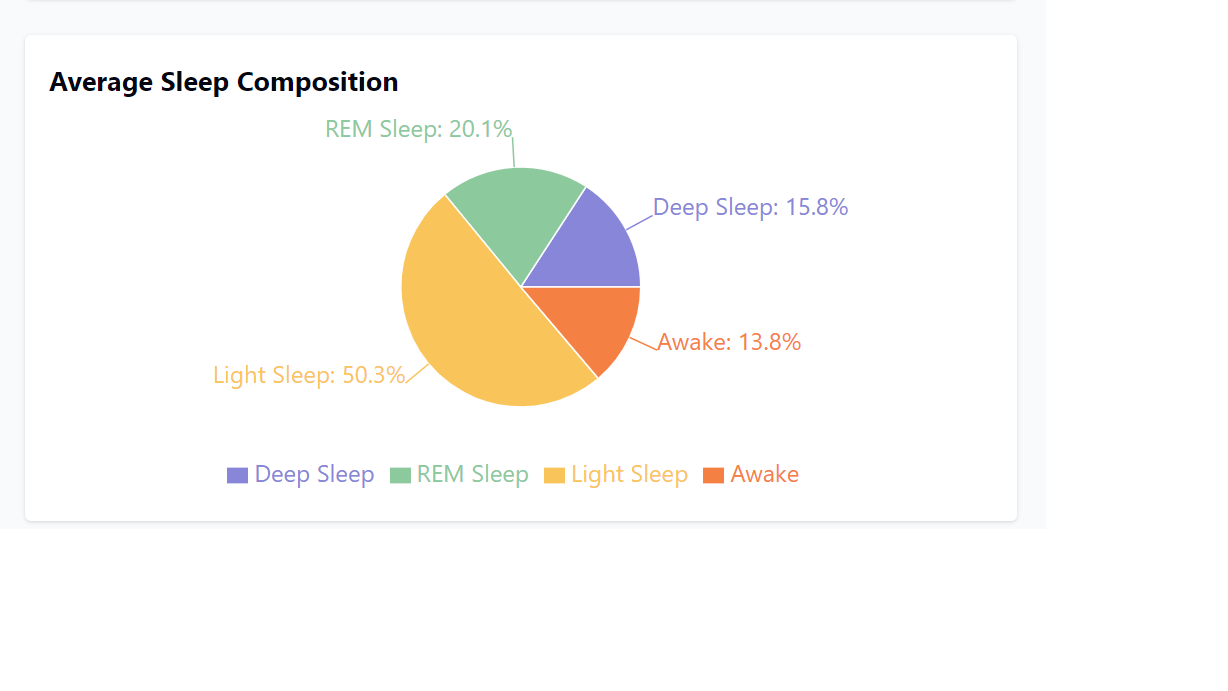
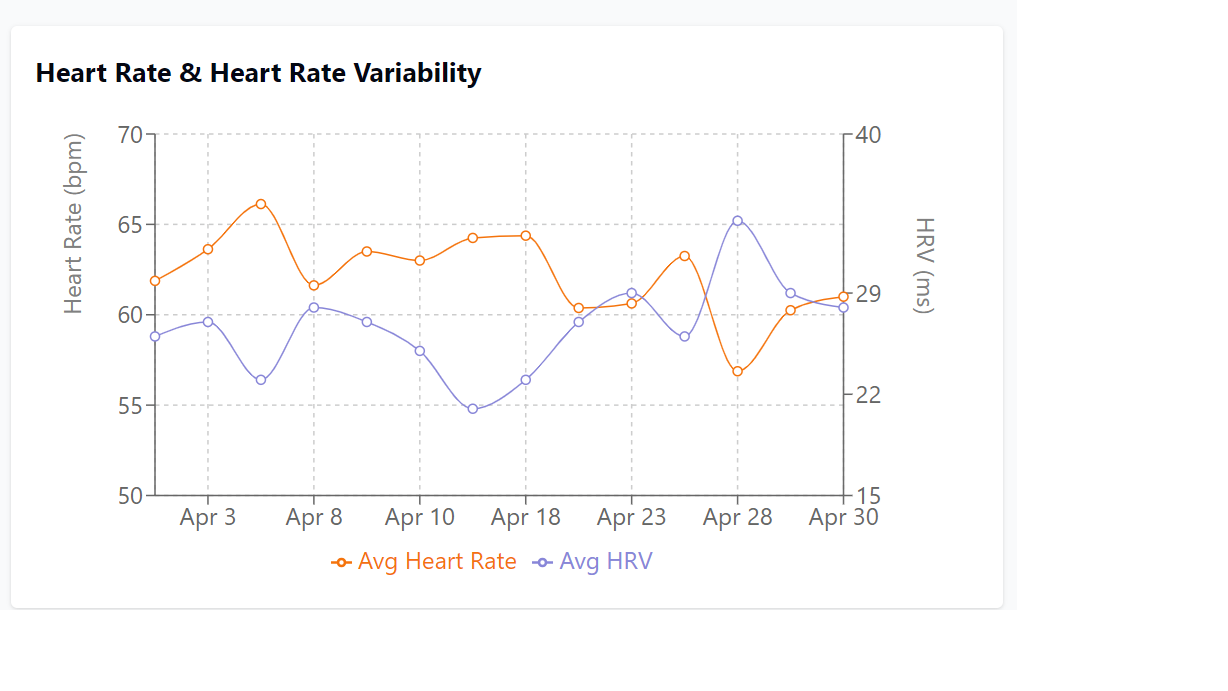
Claude can create visual charts to help you understand your health data. Simply ask Claude to “visualize” or “create a chart” of specific metrics. For example:
- “Visualize my sleep stages over the past week”
- “Create a chart showing the correlation between HRV and sleep quality”
- “Make a bar graph comparing my activity scores by day of week”
- “Plot my resting heart rate against stress levels”
Data Handling Guidelines
This server follows these key guidelines:
- All duration fields are in seconds and converted to hours/minutes for display
- Sleep percentages are calculated using total_sleep_duration as denominator
- Sleep efficiency is calculated as (total_sleep_duration / time_in_bed * 100)
- Custom tags contain meal information in the comment field
Contributing
Contributions are welcome! Please feel free to submit a Pull Request.
Dev Tools Supporting MCP
The following are the main code editors that support the Model Context Protocol. Click the link to visit the official website for more information.







