
Owl Mcp
What is Owl Mcp
OWL-MCP is a Model-Context-Protocol (MCP) server designed for working with Web Ontology Language (OWL) ontologies, facilitating the management and manipulation of ontological data.
Use cases
Use cases for owl-mcp include creating and editing ontologies for AI applications, managing complex ontological structures in research projects, and integrating OWL data with other systems for enhanced knowledge representation.
How to use
To use owl-mcp, install the Goose application, either Desktop or CLI version, and then install the OWL-MCP extension. You can create and modify ontologies by making function calls to the server, which manages OWL axioms and synchronizes changes with the disk.
Key features
Key features of owl-mcp include support for CRUD operations on OWL axioms, synchronization with local disk, compatibility with OBO-style ontologies, and real-time updates when used alongside Protege.
Where to use
OWL-MCP can be used in fields such as semantic web development, knowledge management, artificial intelligence, and any application that requires the manipulation of OWL ontologies.
Clients Supporting MCP
The following are the main client software that supports the Model Context Protocol. Click the link to visit the official website for more information.





Overview
What is Owl Mcp
OWL-MCP is a Model-Context-Protocol (MCP) server designed for working with Web Ontology Language (OWL) ontologies, facilitating the management and manipulation of ontological data.
Use cases
Use cases for owl-mcp include creating and editing ontologies for AI applications, managing complex ontological structures in research projects, and integrating OWL data with other systems for enhanced knowledge representation.
How to use
To use owl-mcp, install the Goose application, either Desktop or CLI version, and then install the OWL-MCP extension. You can create and modify ontologies by making function calls to the server, which manages OWL axioms and synchronizes changes with the disk.
Key features
Key features of owl-mcp include support for CRUD operations on OWL axioms, synchronization with local disk, compatibility with OBO-style ontologies, and real-time updates when used alongside Protege.
Where to use
OWL-MCP can be used in fields such as semantic web development, knowledge management, artificial intelligence, and any application that requires the manipulation of OWL ontologies.
Clients Supporting MCP
The following are the main client software that supports the Model Context Protocol. Click the link to visit the official website for more information.
Content
OWL-MCP
OWL-MCP is a Model-Context-Protocol (MCP) server for working with Web Ontology Language (OWL) ontologies.


Quick Start
This walks you through using owl-mcp with Goose, but any MCP-enabled AI host will work.
Install Goose
You can use either the Desktop or CLI version of Goose from here:
Follow the instructions for setting up an LLM provider (Anthropic recommended)
Install OWL-MCP extension
You can either install directly from this link:
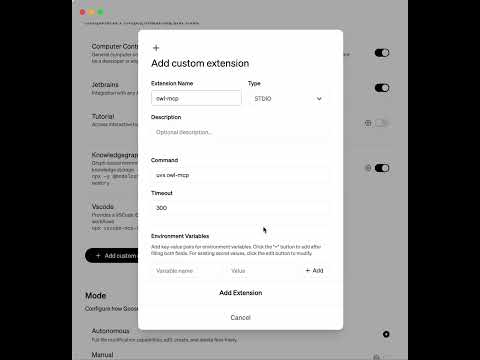
Or to do this manually, in the Extension section of Goose, add a new entry for owlmcp:
uvx owl-mcp
This video shows how to do this manually:
Try it out
You can ask to create an ontology, and add axioms to an ontology:

How this works
The MCP server provides function calls for finding, adding, or removing OWL axioms, using OWL functional syntax. Each function call is accompanied by the file path of the OWL file on your disk. Any format supported by py-horned-owl is accepted (we following OBO guidelines and recommend functional syntax for source).
The server takes care of keeping an instance of the ontology in memory and syncing it with disk. Any CRUD operation simultaneously updates the in-memory model and syncs this with disk. If you have Protege running, Protege will also
sync with local disk, and show updates.
The server is well adapted for working with OBO-style ontologies - when OWL strings are sent back to the client, labels for opaque IDs are included after #s comments, as is common for obo-format.
Key Features
- MCP Server Integration: Connect AI assistants directly to OWL ontologies using the standardized Model-Context-Protocol
- Thread-safe operations: All ontology operations are thread-safe, making it suitable for multi-user environments
- File synchronization: Changes to the ontology file on disk are automatically detected and synchronized
- Event-based notifications: Register observers to be notified of changes to the ontology
- Simple string-based API: Work with OWL axioms as strings in functional syntax without dealing with complex object models
- Configuration system: Store and manage settings for frequently-used ontologies
- Label support: Access human-readable labels for entities with configurable annotation properties
Dev Tools Supporting MCP
The following are the main code editors that support the Model Context Protocol. Click the link to visit the official website for more information.







