
Pcm
What is Pcm
PCM is a tool designed for reverse engineering, functioning as an MCP (Multi-Channel Processing) framework tailored for analyzing binaries.
Use cases
Use cases include analyzing malware to understand its behavior, debugging complex binaries, and enhancing software security by identifying vulnerabilities.
How to use
Users can utilize PCM by running it in conjunction with IDA (Interactive DisAssembler) to perform tasks such as disassembly, decompilation, and memory analysis through various functions provided in the framework.
Key features
Key features include function retrieval by name or address, disassembly and decompilation capabilities, control flow graph generation, and the ability to set comments and types for functions and variables.
Where to use
PCM is applicable in fields such as software security, malware analysis, and any domain requiring binary analysis or reverse engineering.
Clients Supporting MCP
The following are the main client software that supports the Model Context Protocol. Click the link to visit the official website for more information.





Overview
What is Pcm
PCM is a tool designed for reverse engineering, functioning as an MCP (Multi-Channel Processing) framework tailored for analyzing binaries.
Use cases
Use cases include analyzing malware to understand its behavior, debugging complex binaries, and enhancing software security by identifying vulnerabilities.
How to use
Users can utilize PCM by running it in conjunction with IDA (Interactive DisAssembler) to perform tasks such as disassembly, decompilation, and memory analysis through various functions provided in the framework.
Key features
Key features include function retrieval by name or address, disassembly and decompilation capabilities, control flow graph generation, and the ability to set comments and types for functions and variables.
Where to use
PCM is applicable in fields such as software security, malware analysis, and any domain requiring binary analysis or reverse engineering.
Clients Supporting MCP
The following are the main client software that supports the Model Context Protocol. Click the link to visit the official website for more information.
Content
pcm
PCM (MCP but reversed), MCP for reverse engineering.
Features
- Analysis
- IDA
- repl (IDAPython)
- disassembly
- decompilation
- set types
- …
- IDA
- Memory
- Engagement reports
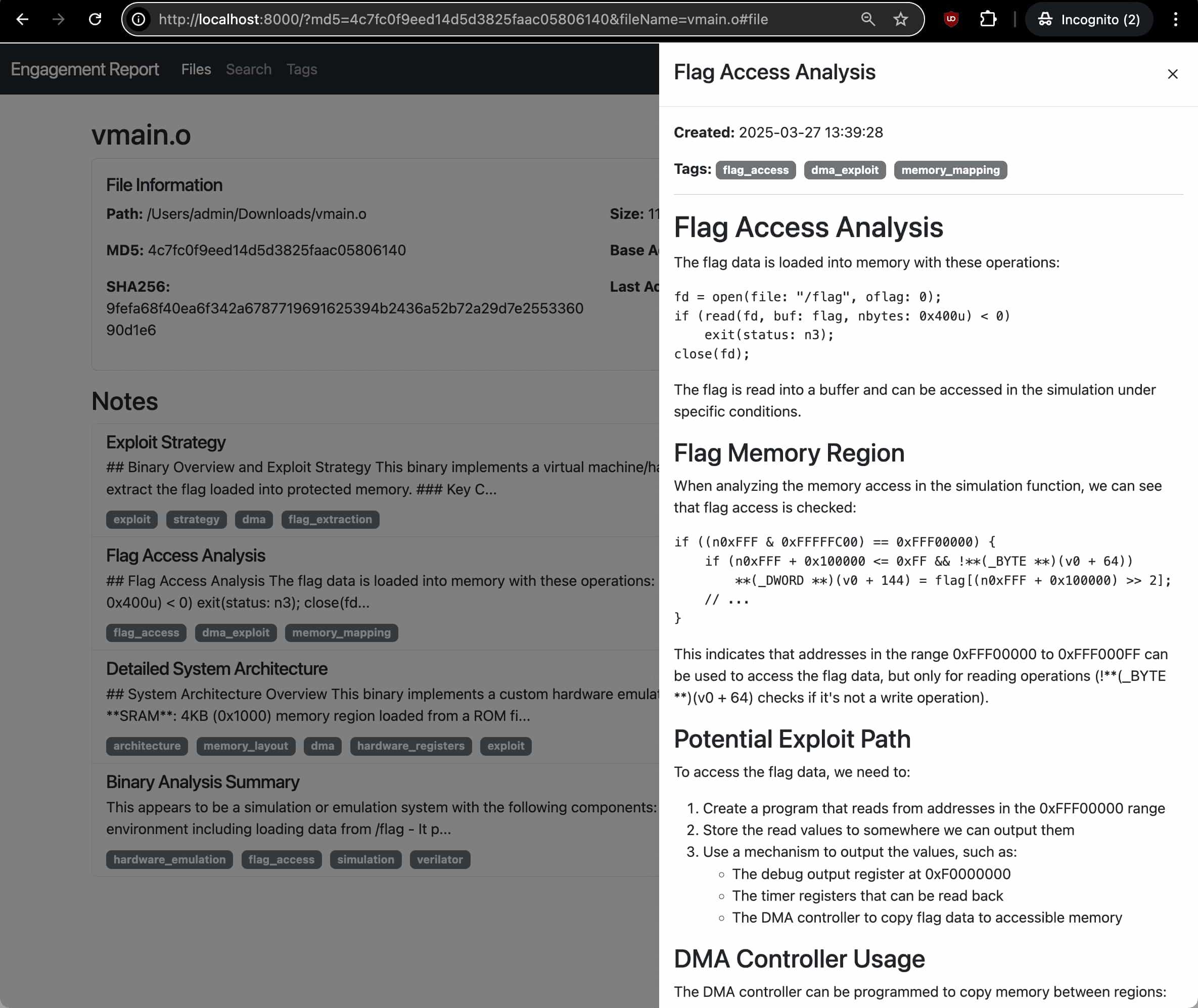
- Engagement reports
Full list of features
- `get_function_by_name(name)`: Get a function by its name.
- `get_function_by_address(address)`: Get a function by its address.
- `get_current_address()`: Get the address currently selected by the user.
- `get_current_function()`: Get the function currently selected by the user.
- `list_functions()`: List all functions in the database.
- `decompile_function(address)`: Decompile a function at the given address using Hex-Rays.
- `disassemble_function(address)`: Get assembly code (address: instruction; comment) for a function.
- `get_entrypoints()`: Get all entrypoints in the binary.
- `get_function_blocks(address)`: Get all basic blocks in a function.
- `get_function_cfg(address)`: Get control flow graph for a function.
- `get_xrefs_to(address)`: Get all cross references to the given address.
- `get_xrefs_from(address)`: Get all cross references from the given address.
- `set_decompiler_comment(address, comment)`: Set a comment for a given address in the function pseudocode.
- `set_disassembly_comment(address, comment)`: Set a comment for a given address in the function disassembly.
- `rename_local_variable(function_address, old_name, new_name)`: Rename a local variable in a function.
- `rename_function(function_address, new_name)`: Rename a function.
- `set_function_prototype(function_address, prototype)`: Set a function's prototype.
- `set_local_variable_type(function_address, variable_name, new_type)`: Set a local variable's type.
- `create_structure_type(name, members, is_union)`: Create a new structure type.
- `get_metadata()`: Get metadata about the current IDB.
- `repl_idapython(content)`: Run IDAPython code and return the results with stdout/stderr captured.
- `add_note(title, content, address, tags)`: Add a new analysis note for the current binary.
- `update_note(note_id, title, content, tags)`: Update an existing note.
- `get_notes(file_md5, address, tag)`: Get analysis notes for a binary.
- `delete_note(note_id)`: Delete an analysis note.
Installations
Prerequisites:
- Clone the repository
git clone https://github.com/rand-tech/pcm - Add
pcmto you mcp config
example{ "mcpServers": { "pcm": { "command": "uv", "args": [ "--directory", "path_to/pcm", "run", "server.py" ] } } } - Use the MCP
Related projects:
- https://github.com/mrexodia/ida-pro-mcp
- https://github.com/MxIris-Reverse-Engineering/ida-mcp-server
Attribution:
This project is based on IDA Pro MCP by Duncan Ogilvie (@mrexodia). Thank you
License:
This project is licensed under the MIT License - see the LICENSE file for details. The original code is also licensed under the MIT License.
Dev Tools Supporting MCP
The following are the main code editors that support the Model Context Protocol. Click the link to visit the official website for more information.







