
Peppa Mcp Server On Lambda
What is Peppa Mcp Server On Lambda
Peppa MCP Server on Lambda is a serverless implementation of the MCP Server that runs natively on AWS Lambda and Amazon API Gateway, utilizing the Streamable HTTP transport introduced in version 2025-03-26.
Use cases
Use cases include ordering tickets for the Peppa Pig Theme Park, retrieving available timeslots, and managing user interactions through a simple API.
How to use
To use Peppa MCP Server on Lambda, install the necessary dependencies using npm, bootstrap the server with Terraform to set up the environment variable for the MCP Server endpoint, and then run the client to interact with the server.
Key features
Key features include serverless architecture, direct integration with AWS services, and the ability to handle requests using the Streamable HTTP transport, making it efficient and easy to deploy.
Where to use
Peppa MCP Server on Lambda can be used in various fields such as event ticketing, online reservations, and any application requiring real-time data access and processing.
Clients Supporting MCP
The following are the main client software that supports the Model Context Protocol. Click the link to visit the official website for more information.





Overview
What is Peppa Mcp Server On Lambda
Peppa MCP Server on Lambda is a serverless implementation of the MCP Server that runs natively on AWS Lambda and Amazon API Gateway, utilizing the Streamable HTTP transport introduced in version 2025-03-26.
Use cases
Use cases include ordering tickets for the Peppa Pig Theme Park, retrieving available timeslots, and managing user interactions through a simple API.
How to use
To use Peppa MCP Server on Lambda, install the necessary dependencies using npm, bootstrap the server with Terraform to set up the environment variable for the MCP Server endpoint, and then run the client to interact with the server.
Key features
Key features include serverless architecture, direct integration with AWS services, and the ability to handle requests using the Streamable HTTP transport, making it efficient and easy to deploy.
Where to use
Peppa MCP Server on Lambda can be used in various fields such as event ticketing, online reservations, and any application requiring real-time data access and processing.
Clients Supporting MCP
The following are the main client software that supports the Model Context Protocol. Click the link to visit the official website for more information.
Content
Peppa MCP Server on Lambda
- Check out the Building Serverless MCP Servers and What Does Peppa Pig Have To Do With It blog for the full story.
- This repo is not being maintained. See this repo for more examples of running Serverless MCP Servers on AWS.
–
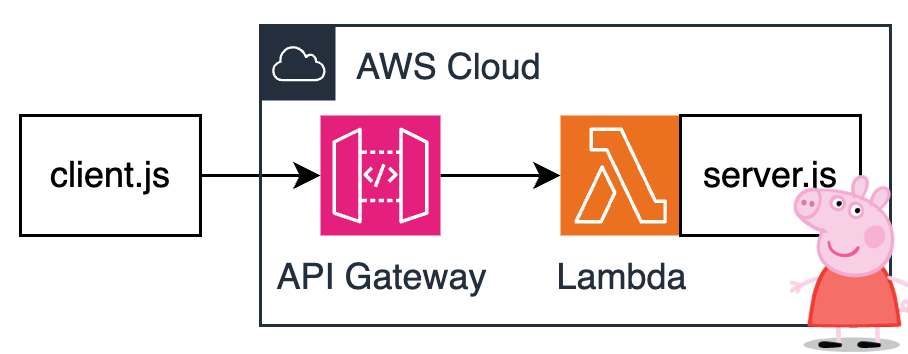
A Peppa MCP Server running natively on AWS Lambda and Amazon API Gateway without any extra bridging components or custom transports. This is now possible thanks to the Streamable HTTP transport introduced in v2025-03-26.
Architecture is as simple as it gets:
Prereqs
- AWS CLI
- Terraform
Instructions
Install dependencies:
cd src
npm install
cd ..
Bootstrap server and set env var with MCP Server endpoint:
cd terraform
terraform init
terraform plan
terraform apply
export PEPPA_MCP_SERVER_ENDPOINT=$(terraform output --raw endpoint_url)
cd ..
Note: It might take a few seconds for API Gateway endpoint to become operational.
Run client:
node src/client.js
Observe the response:
> node client.js
listResources response:  {
  resources: [
    {
      uri: 'peppa://timeslots',
      name: 'timeslots',
      description: 'Use this resource to get all open timeslots for ordering tickets     to the Peppa Pig Theme Park.',
      mimeType: 'text/plain'
    }
  ]
}
readResource response:  {
  contents: [
    {
      uri: 'peppa://timeslots',
      mimeType: 'text/plain',
      text: 'Available timeslots are: April 19th 2025, April 20th 2025, April 21st 2025'
    }
  ]
}
listTools response:  {
  tools: [
    {
      name: 'order-tickets',
      description: 'Use this tool to order tickets to the Peppa Pig Park.     The tool expects two parameters - timeslot and quantity.     The timeslot should be a stringified date.     The quantity should be a number.         Example:     order-tickets(timeslot: "April 19, 2025", quantity: 3)         The tool will return a text message with the order number.     ',
      inputSchema: [Object]
    }
  ]
}
callTool response:  {
  content: [
    {
      type: 'text',
      text: "You've ordered 3 tickets for April 19th, 2025.         Your order number is OINK-1234."
    }
  ]
}
Learn about mcp
Dev Tools Supporting MCP
The following are the main code editors that support the Model Context Protocol. Click the link to visit the official website for more information.







