
Php Neo4j Mcp Demo
What is Php Neo4j Mcp Demo
php-neo4j-mcp-demo is a demonstration project showcasing a Model Context Protocol (MCP) server that integrates AI assistants with Neo4j graph databases. It allows AI models to interact with graph data using natural language queries.
Use cases
Use cases include querying graph data for insights, performing complex analytics, and enabling AI assistants to retrieve and manipulate graph data through conversational interfaces.
How to use
To use php-neo4j-mcp-demo, ensure Docker is installed and running. Configure your MCP client (e.g., Cursor) by editing the mcp.json file to point to the Neo4j MCP server. Run the server using Docker Compose with the provided command.
Key features
Key features include Cypher query execution, secure connection management, Docker-based deployment, compatibility with any MCP client, and a robust Symfony framework foundation.
Where to use
php-neo4j-mcp-demo can be used in fields that require AI interaction with graph databases, such as data analytics, natural language processing, and AI-driven applications.
Clients Supporting MCP
The following are the main client software that supports the Model Context Protocol. Click the link to visit the official website for more information.





Overview
What is Php Neo4j Mcp Demo
php-neo4j-mcp-demo is a demonstration project showcasing a Model Context Protocol (MCP) server that integrates AI assistants with Neo4j graph databases. It allows AI models to interact with graph data using natural language queries.
Use cases
Use cases include querying graph data for insights, performing complex analytics, and enabling AI assistants to retrieve and manipulate graph data through conversational interfaces.
How to use
To use php-neo4j-mcp-demo, ensure Docker is installed and running. Configure your MCP client (e.g., Cursor) by editing the mcp.json file to point to the Neo4j MCP server. Run the server using Docker Compose with the provided command.
Key features
Key features include Cypher query execution, secure connection management, Docker-based deployment, compatibility with any MCP client, and a robust Symfony framework foundation.
Where to use
php-neo4j-mcp-demo can be used in fields that require AI interaction with graph databases, such as data analytics, natural language processing, and AI-driven applications.
Clients Supporting MCP
The following are the main client software that supports the Model Context Protocol. Click the link to visit the official website for more information.
Content
Neo4j MCP Server Demo
A demonstration of a Model Context Protocol (MCP) server that provides seamless integration between AI assistants and Neo4j graph databases. This project showcases how to build and deploy an MCP server using PHP and Symfony, enabling AI models to interact with graph data through natural language queries.
Built by Nagels
What is MCP?
The Model Context Protocol (MCP) is an open standard that enables AI assistants to securely connect to external data sources and tools. This Neo4j MCP server allows AI models to:
- Execute Cypher queries against Neo4j databases
- Retrieve graph data and relationships
- Perform complex graph analytics
- Interact with graph databases through natural language
Features
- Cypher Query Execution: Run arbitrary Cypher queries against your Neo4j database
- Secure Connection: Built-in authentication and connection management
- Docker-based: Easy deployment with Docker Compose
- MCP Compatible: Works with any MCP client (Cursor, Claude Desktop, VS Code, etc.)
- Symfony Framework: Built on the robust Symfony console framework
Prerequisites
- Docker: Ensure Docker is installed and running on your system
- MCP Client: Cursor, Claude Desktop, VS Code preview, or any other MCP-compatible client
Setup Instructions
1. Configure MCP Client (Cursor Example)
Edit your .cursor/mcp.json file to configure the Neo4j MCP server:
{
  "mcpServers": {
    "neo4j-mcp": {
      "command": "docker",
      "args": [
        "compose",
        "-f",
        "/path/to/your/project/docker-compose.yml",
        "exec",
        "php",
        "bin/console",
        "mcp:server"
      ]
    }
  }
}
Important Note: Replace /path/to/your/project/docker-compose.yml with the absolute path to your project’s docker-compose.yml file. Cursor runs MCP servers from / as the working directory, so we need to explicitly pass the path to our docker compose file. In a production MCP server, this would typically be installed as a CLI tool (like Symfony) or a composer command.
2. Start the Services
Ensure Docker is running, then build and start the containers:
docker compose up --build
This will start:
- Neo4j database on ports 7474 (browser) and 7687 (bolt)
- PHP container with the MCP server ready to run
3. Install Dependencies
In a new terminal, install the PHP dependencies:
docker compose exec php composer install
4. Configure Your MCP Client
For Cursor:
- Go to Cursor Settings → MCP
- Find the
neo4j-mcpserver in the list - Click the reload button until the status dot turns green
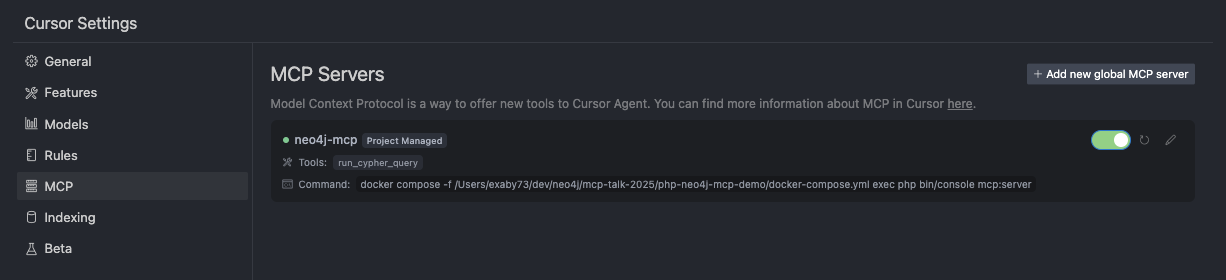
For Other MCP Clients:
- Claude Desktop: Add the server configuration to your
claude_desktop_config.json - VS Code: VS Code preview has support for MCP - add the server configuration
- Other clients: Follow the client-specific MCP server configuration instructions
Usage
Once the MCP server is running and connected to your client, you can interact with your Neo4j database through natural language. The AI assistant will be able to:
- Execute Cypher queries
- Retrieve node and relationship data
- Perform graph analytics
- Answer questions about your graph data
Example interactions:
- “Show me all nodes in the database”
- “Find relationships between users and products”
- “Execute this Cypher query: MATCH (n) RETURN count(n)”
Database Access
- Neo4j Browser: http://localhost:7474
- Username:
neo4j - Password:
password - Bolt URL:
bolt://localhost:7687
Project Structure
├── src/
│   ├── Command/
│   │   └── McpServerCommand.php    # Main MCP server implementation
│   └── ...
├── docker-compose.yml              # Docker services configuration
├── Dockerfile                      # PHP container setup
├── composer.json                   # PHP dependencies
└── .cursor/
    └── mcp.json                    # Cursor MCP configuration
Troubleshooting
MCP Server Not Connecting
- Ensure Docker containers are running:
docker compose ps - Check if dependencies are installed:
docker compose exec php composer install - Verify the path in your MCP configuration is absolute and correct
- Reload the MCP server in your client settings
Neo4j Connection Issues
- Wait for Neo4j to fully start (health check should pass)
- Check Neo4j logs:
docker compose logs neo4j - Verify Neo4j is accessible at http://localhost:7474
Docker Issues
- Ensure Docker is running
- Try rebuilding containers:
docker compose up --build --force-recreate - Check for port conflicts (7474, 7687)
Development
To modify the MCP server:
- Edit files in the
src/directory - The container automatically mounts the current directory
- Restart the MCP server in your client to pick up changes
Dev Tools Supporting MCP
The following are the main code editors that support the Model Context Protocol. Click the link to visit the official website for more information.







