
Plantuml Validator Mcp Server
What is Plantuml Validator Mcp Server
plantuml-validator-mcp-server is an MCP server designed to validate Plantuml code, ensuring that the provided Plantuml messages are syntactically correct.
Use cases
Use cases include validating Plantuml code in real-time as part of the development process, integrating with IDEs like VSCode for immediate feedback, and ensuring code quality in automated build systems.
How to use
To use plantuml-validator-mcp-server, you can run it using Docker Compose or Docker. For Docker Compose, execute ‘docker compose up -d’ to start the server. For Docker, build and publish the container, then configure the MCP settings in VSCode with the appropriate server type and URL.
Key features
Key features include the ability to validate Plantuml messages, returning ‘Ok’ for valid inputs and detailed error information for invalid ones, including error descriptions and line numbers.
Where to use
plantuml-validator-mcp-server can be used in software development environments where Plantuml diagrams are generated, such as documentation tools, IDEs, and CI/CD pipelines.
Clients Supporting MCP
The following are the main client software that supports the Model Context Protocol. Click the link to visit the official website for more information.





Overview
What is Plantuml Validator Mcp Server
plantuml-validator-mcp-server is an MCP server designed to validate Plantuml code, ensuring that the provided Plantuml messages are syntactically correct.
Use cases
Use cases include validating Plantuml code in real-time as part of the development process, integrating with IDEs like VSCode for immediate feedback, and ensuring code quality in automated build systems.
How to use
To use plantuml-validator-mcp-server, you can run it using Docker Compose or Docker. For Docker Compose, execute ‘docker compose up -d’ to start the server. For Docker, build and publish the container, then configure the MCP settings in VSCode with the appropriate server type and URL.
Key features
Key features include the ability to validate Plantuml messages, returning ‘Ok’ for valid inputs and detailed error information for invalid ones, including error descriptions and line numbers.
Where to use
plantuml-validator-mcp-server can be used in software development environments where Plantuml diagrams are generated, such as documentation tools, IDEs, and CI/CD pipelines.
Clients Supporting MCP
The following are the main client software that supports the Model Context Protocol. Click the link to visit the official website for more information.
Content
Plantuml Validation MCP Server
This project is an MCP server for validating Plantuml code.
Tools
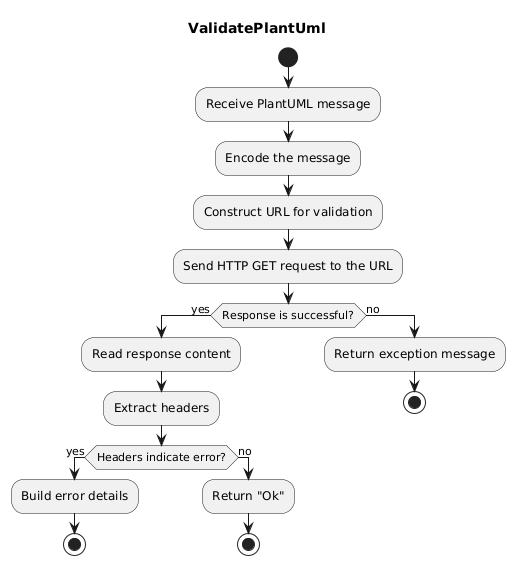
ValidatePlantuml
Validates the provided Plantuml message. If valid, it returns “Ok”. If invalid, it returns detailed error information, including the error description, the line where the error occurred, and other metadata.
Usage with SSE
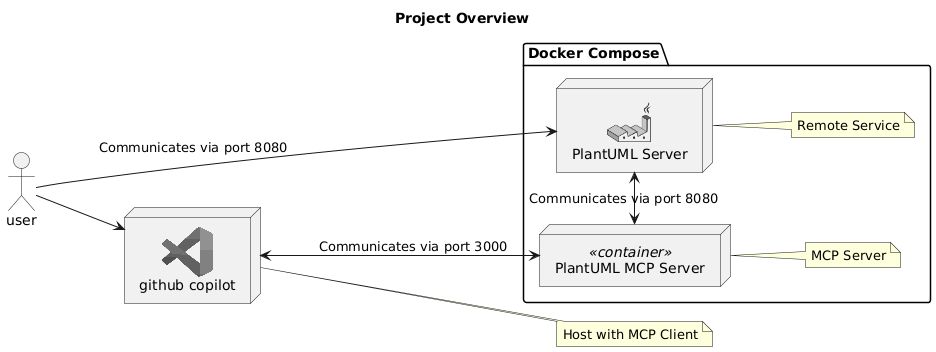
1. Run Docker Compose
Run the following command to start the server:
docker compose up -d
2. MCP Configuration in VSCode
    "mcp": {
        "servers": {
            "my-plantuml-mcp-server": {
                "type": "sse",
                "url": "http://localhost:3000/sse"
            }
        }
    }
Usage with Docker
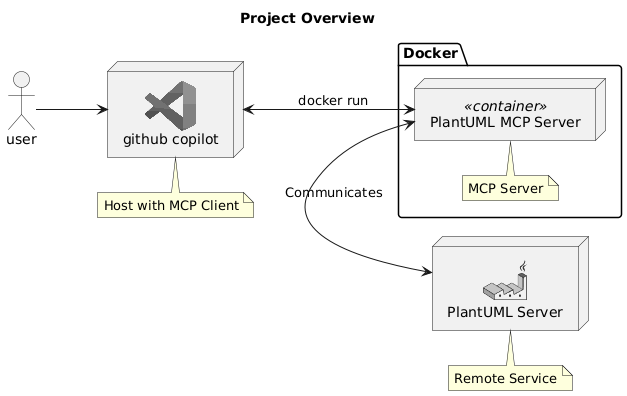
1. Build and Publish the Container
cd plantuml-mcp-server-stdio
dotnet publish /t:PublishContainer
2. MCP Configuration in VSCode
    "mcp": {
        "servers": {
            "my-plantuml-mcp-server-docker": {
                "type": "stdio",
                "command": "docker",
                "args": [
                    "run",
                    "--rm",
                    "-i",
                    "--network=host",
                    "plantuml-mcp-server-stdio",
                    "PlantumlBaseUrl=http://your_plantuml_server/"
                ],
            },
        }
    }
Dev Tools Supporting MCP
The following are the main code editors that support the Model Context Protocol. Click the link to visit the official website for more information.







